Guides
Find why your Instagram comment-to-DM is not working
Start with one missing request. Follow it from the original comment to the campaign match, the send record and the resource, changing only the setting the evidence points to.
Published by ReplyMagnet · Last updated
Why is an Instagram comment not producing a DM?
Check the last confirmed step: comment received, campaign matched, DM accepted, then resource opened. A public reply does not prove the private message sent, and a sent message does not prove the person read it.
“It did not work” can describe several different problems. A comment may never reach the tool, reach it without matching a campaign, match but wait for quota, or produce a DM the recipient has not found. The download can also fail after messaging succeeded.
In ReplyMagnet, open Delivery activity and look for the test comment. The page shows the latest 30 messages and comments across your accounts, so inspect a recent, identifiable example. It separates the received interaction, campaign match, public reply and DM. Keep those observations separate while investigating.
If you have not created a campaign yet, start with the Instagram auto-reply setup guide. This guide is for a campaign that already exists and an expected result that is missing.
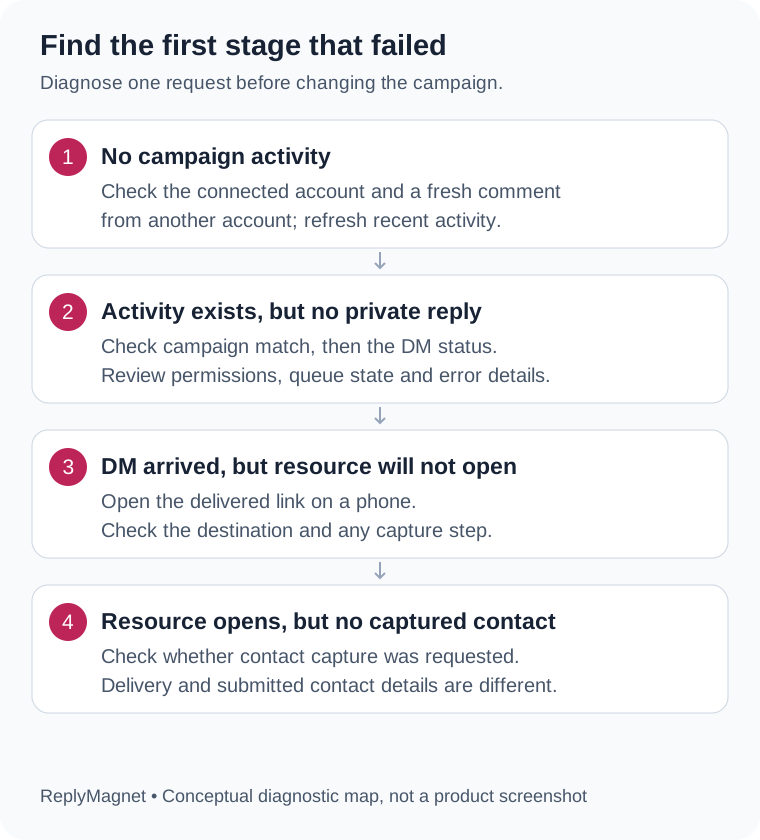
Original troubleshooting diagram: investigate the first unconfirmed stage, then test the next stage after correcting it.
Start with what you can observe
Observed symptom
No recent activity entry
- First check
- Account, new comment and selected post
Observed symptom
No match recorded
- First check
- Live campaign, scope and exact keyword
Observed symptom
Public reply sent, DM not recorded
- First check
- DM status and job detail
Observed symptom
Waiting for engagement quota
- First check
- Workspace allowance and queue
Observed symptom
DM marked Sent, recipient cannot find it
- First check
- Recipient inbox and message requests
Observed symptom
DM found, resource unavailable
- First check
- Asset, link and capture step
Record one example before changing settings
Save the post link, exact comment, account handle, timestamp and activity support reference. Record the current campaign settings so you can tell whether a later test changed the outcome.
Choose a single request you can trace. Comparing a comment from yesterday with a different campaign edited this morning makes the evidence ambiguous. Note which account owns the post and which account wrote the comment. Record the time with its timezone; ReplyMagnet activity displays received times in UTC.
Take a private screenshot of the relevant settings if that helps your team, but remove customer messages and contact details before sharing it outside the team. Do not include passwords, access tokens or unrelated conversations in a support request.
For example, suppose a cafe offers a menu PDF with “Comment MENU.” Write down the exact post URL, the visitor's actual comment, whether the MENU campaign was live, and what the activity row says. This is an illustrative troubleshooting example, not a customer case study.
If many customers are affected, stop promoting the broken promise while you investigate. Keep the existing evidence and avoid deleting the campaign as your first move.
What if the comment does not appear in activity?
Confirm that a new comment was left by another account on a post covered by the connected profile. Refresh recent activity and check the connection before assuming the keyword caused the problem.
First check the handle. A team managing several businesses can connect the wrong profile or select a similar-looking post. Open the original post in Instagram and compare it with the account and post selected in the campaign.
Use another account for a controlled test. ReplyMagnet ignores comments written by the connected account itself, so commenting MENU as the cafe does not test a customer's path. Use a new comment after confirming the campaign is live; an old comment is poor evidence of what the current settings do.
If the account needs reconnection, follow the prompt and approve access through Instagram's own authorization screen. The connection documentation explains account type and connection errors. After reconnecting, review the campaign again: disconnecting pauses associated campaigns, so a successful connection alone does not establish that delivery is live.
An absent activity row is a clue, not proof that Instagram never sent the event. The view is limited to recent records, and a loading error is different from an empty list. Save the approximate test time and escalate if a fresh test is still missing.
What does “No match recorded” mean?
Processing ended without a recorded campaign match. Check whether the campaign is live, covers that post and accepts the exact test keyword. The label can also cover an ineligible interaction; it does not identify one universal cause.
Work through configuration in a fixed order. Confirm the correct account, the live status, the post scope and then the trigger. A campaign for one reel does not cover a different reel just because both captions offer the same resource.
Check which keyword mode is selected. Contains mode uses case-insensitive whole-word matching: MENU can match “send MENU please,” but GUIDE does not match guideline. Exact mode requires the entire comment, after trimming spaces, to equal the keyword without regard to case: MENU matches menu, but not “send MENU please.” Copy the configured keyword alone for your first retest instead of rewriting the entire caption.
Smart matching adds another variable because it can assess intent after keywords do not match. When diagnosing delivery, begin with an explicit configured keyword so you can isolate the ordinary matching path. A natural-language request that fails to match does not establish that the connection is broken.
Check for overlapping campaigns on the same post. Keep your test tied to one intended resource and compare the campaign name in activity with the one you expected. The campaign reference explains scope and matching modes; the keyword guide helps prevent ambiguous requests once the incident is resolved.
Why did the public reply appear without a DM?
The public reply and private message are separate recorded steps. Inspect the DM column and processing detail rather than treating the visible comment reply as delivery confirmation.
A visitor may see “Check your DMs” while the private-message stage is still waiting or has failed. Read that request's activity row. “Not recorded” means there is no recorded DM send in that view; it should not be rewritten as a specific permission error without evidence.
Check whether the job is processing, pending with a retry time, failed, or expired. If a reconnect prompt accompanies the incident, resolve it through the supported connection flow. Repeatedly disconnecting a healthy account changes more settings without establishing why this request stopped.
A public reply marked “Skipped: send could not be confirmed” is also an uncertainty signal. Do not tell a customer that no public reply exists just because the application could not confirm it. Inspect the original Instagram thread before taking a manual action that might duplicate a response.
For the cafe example, record “public reply: Sent; DM: Not recorded; status: failed” instead of “Instagram is down.” The narrower description gives support something it can investigate.
Should you retry a queued, failed or expired request?
Use the recorded status to choose the next action. Quota waiting, temporary retry, final failure and expiry are different states; repeatedly submitting the same request does not fix all of them.
An allowance queue is different from a temporary processing failure. “Waiting for engagement quota” identifies the former. Check the workspace allowance and the billing reference before changing trigger rules that already matched.
If activity gives a retry time, preserve the reference and check again after that time. Do not promise an exact delivery time to customers based only on a queued status. A final failed status says processing will not automatically retry further and directs you to support.
ReplyMagnet also checks the age of the original interaction. Comment replies, direct messages and story messages have different eligibility conditions. Read the actual expiry detail rather than applying one timing rule to every interaction. Reconnecting does not make an old request newly eligible. Meta maintains the platform requirements in its Instagram messaging documentation.
The messaging rules guide provides the broader context. When activity reports expiry, investigate with a new, willing test interaction instead of attempting to force the expired delivery.
Read the status before choosing a recovery action
Activity detail
Processing now
- Practical next action
- Refresh to observe progress
Activity detail
Temporary failure with retry time
- Practical next action
- Wait for the scheduled retry and retain the reference
Activity detail
Waiting for engagement quota
- Practical next action
- Review allowance; monitor the queued request
Activity detail
AI budget exhausted
- Practical next action
- Read the scheduled retry detail; use an exact keyword for a separate diagnostic test
Activity detail
Processing failed; no further automatic retries
- Practical next action
- Contact support with the reference
Activity detail
Outside eligible reply window
- Practical next action
- Preserve the expired record and use a new test interaction
What if the DM is marked Sent but the person cannot find it?
In ReplyMagnet, Sent means the platform accepted the message. Ask the test recipient to check the relevant conversation and message requests. Acceptance does not prove inbox placement, reading or a resource download.
Confirm which Instagram account the person used to comment. Someone switching between personal and business profiles may be checking the inbox of a different account. Have your tester inspect Instagram directly rather than relying only on a phone notification.
Ask them to check message requests as well as the main conversation list. Do not ask them to loosen privacy controls just to make a test succeed. If they still cannot find the message, record that discrepancy alongside the accepted-send record and raise it with support.
Keep the evidence vocabulary precise. “Sent” describes acceptance by the platform. “The tester opened the DM” describes a separate observation. “The tester opened the correct menu PDF” verifies another step. The analytics guide explains why delivery and resource activity should be measured separately.
Avoid sending an extra DM simply because a read confirmation is unavailable. First establish what the person actually received and whether another response is appropriate.
If the DM arrived, test the resource separately
Open the actual link in the received message and complete the intended capture step. A working DM can still point to an unavailable asset or a confusing download page.
Use the link your tester received, not a different URL copied from your file library. Check the destination on a phone. Confirm that the title and contents match the promise in the caption and the private message.
If an email or phone capture step appears, compare it with the campaign configuration and what the offer told the reader to expect. A required field can be working as configured while still creating confusion. The capture-gates documentation distinguishes these steps from sending the DM itself.
If the file is wrong, missing or inaccessible, review the attached item in Assets. Correct that specific destination and repeat the resource test. Reconnecting Instagram will not repair a missing file or make the wrong brochure useful.
Run one controlled retest and keep the result
Change one identified setting, leave one new test comment from another account, then record each stage. Compare the new result with the original failure before making another change.
Use a quiet post you control and a willing tester. Confirm that the campaign is live before commenting. Keep the exact keyword simple, verify the account handle and record the time. Follow the request through activity, Instagram and the resource page.
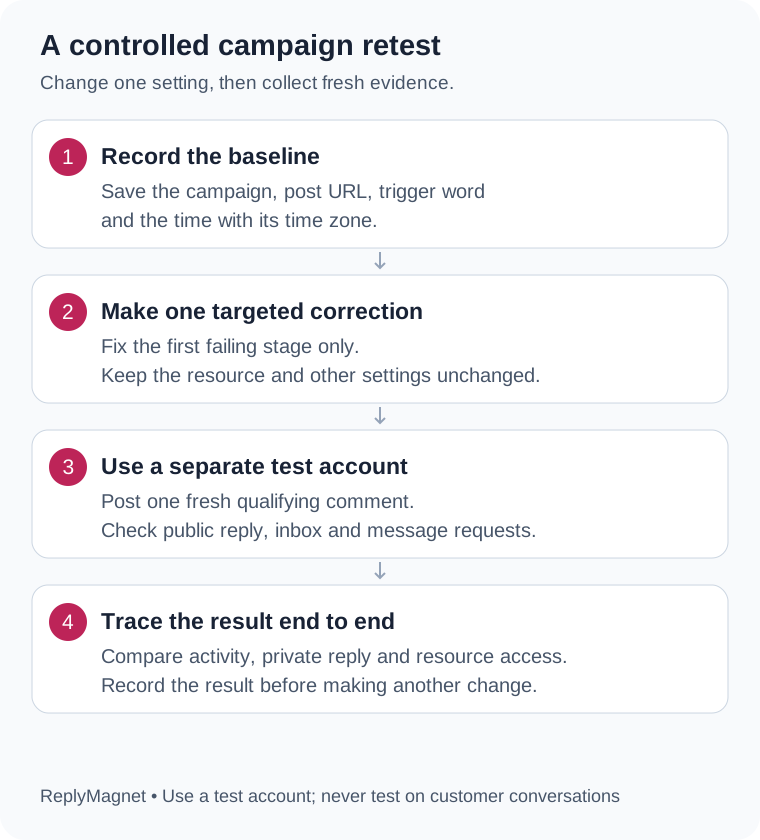
Original retest diagram: one changed setting makes the before-and-after comparison interpretable.
Copy this short worksheet into your team notes:
- Original post and comment:
- Original time and timezone:
- Account and campaign:
- Last confirmed stage:
- Setting changed and reason:
- New test comment and time:
- Match / public reply / DM status:
- Tester found message: yes or no:
- Correct resource opened: yes or no:
- Support reference and next action:
If MENU initially had no match because the wrong post was selected, change the post selection and test MENU again. Do not also change the keyword, resource, reply text and capture fields. If the result improves, you will know which change was relevant.
After the positive test, an unrelated comment can check that a keyword campaign does not respond to everything. Stop once you have enough evidence; repeated test comments add noise to your public post and activity history.
What should you send to support?
Send a concise account of the expected result, the observed stage, the test time and the activity support reference. Include one sanitized example and the changes already tried.
A useful request reads like this:
“Campaign: [name]. Post: [link]. A test account commented [exact keyword] at [time and timezone]. Expected: a DM containing [resource]. Activity shows [match], [public reply], [DM] and [status]. Support reference: [reference]. We changed [one setting] and tested again at [time]. The new result was [observation].”
If there is no activity entry, say so and include the test time and connected handle. Share only the information needed to investigate; keep passwords and authorization tokens out of messages and screenshots.
Once the problem is resolved, keep the successful test record with the campaign. It becomes a baseline when someone later changes a post, resource or permission. New to ReplyMagnet? Create an account, build one clear resource campaign and test the complete path before promoting it widely.
Common questions
Can I test comment-to-DM using the connected Instagram account?
Use a different account. ReplyMagnet ignores the connected account’s own comments, so they do not test the customer path.
Does a public reply mean the DM was delivered?
No. Public replies and DMs are separate steps. Check the DM status; Sent means platform acceptance, not proof that the recipient read the message.
Should I delete and recreate a campaign when a DM is missing?
Start with the activity record and one controlled test. Recreating the campaign can obscure the original settings without fixing a permission, quota or resource problem.
Why did a new test work when the earlier comment did not?
The campaign settings, account access, available quota or eligibility may have changed. Compare the two records and timestamps rather than assuming the earlier request was resent.
Keep reading
- Set up an Instagram auto reply and test it before launch
- Instagram comment-to-DM automation: setup, testing and limits
- Instagram DM automation rules: permissions, requests and time limits
- Connect Instagram to ReplyMagnet and resolve connection errors
- Read ReplyMagnet analytics without confusing requests and results