Guides
Comment to DM on Instagram: A Practical Automation Guide

To set up comment to DM on Instagram, connect a professional account to an automation tool, choose the post, configure the comment keyword, attach the promised resource, and write the private reply. Launch the campaign, then test the complete journey from another account before promoting it.
Published by ReplyMagnet · Last updated
Product documentation checked 7 October 2026
If you already use ManyChat, the familiar starting point is a person commenting under a post. This guide shows how to build that request-and-delivery workflow in ReplyMagnet, with a downloadable workbook as the example. You will leave with a campaign plan, copy to adapt, a testing checklist, and a way to find the failed step when a request does not work.
The example is a fictional creator sharing a weekly content-planning workbook. It illustrates the setup; it does not represent a customer campaign or measured results. Start with one post and one useful file so you can inspect the experience from the reader’s side.
Understand the public and private parts of the workflow
The public comment is the request.
A public reply helps the person find the next step, while the private message carries the resource link. The destination then gives them the workbook. These are separate stages: seeing a reply below the post does not tell you whether the person received or opened the DM.
For the example, the invitation is “Comment WORKBOOK.” The reply directs the requester to their messages, and the DM names the workbook and explains where to begin. There is no email form or follow requirement between the request and the file. This keeps the first campaign straightforward to test.
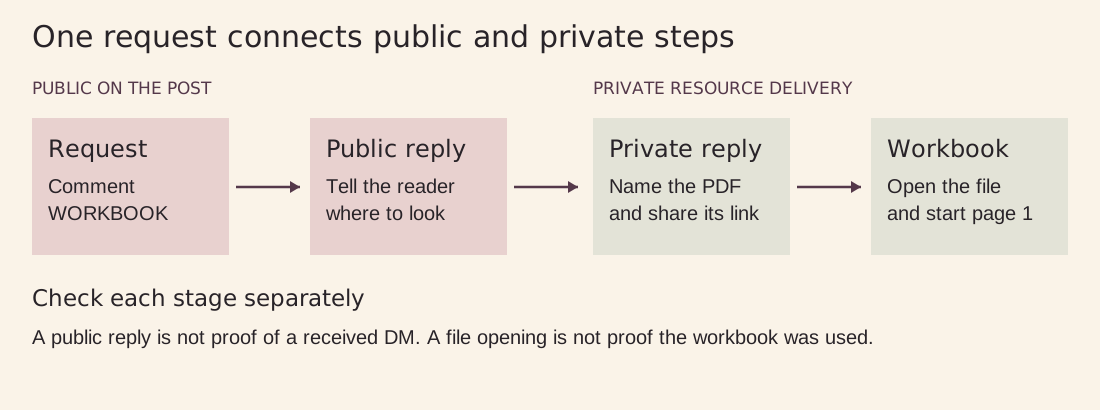
Figure 1. Original explanatory diagram. Public comments, private replies, and resource use are separate stages.
Keep the first private reply useful by itself. Meta permits one private reply to a qualifying post or Reel comment within seven days. Follow-up messages require the recipient to respond and must be sent within 24 hours of that response. Opening a resource link should not be treated as a reply or as permission for a later sequence. See Meta’s private-reply documentation.
Prepare a workbook that earns the request
Choose a resource that continues the post’s lesson.
Suppose a Reel demonstrates how to turn one audience question into a helpful post. A short workbook that helps the viewer plan their next week is a natural next step. A generic collection of marketing tips would make the promise harder to understand.
Give this example workbook four practical pages:
Collect three real audience questions. Leave space to write where each question came from, so the creator can return to the original context.
Choose one question and write the useful answer. Include a small worked example, such as turning “What should I post?” into a demonstration of one repeatable task.
Plan three posts for the week. Provide fields for the question, format, key point, and next action instead of a page full of empty calendar boxes.
Review what happened. Ask which questions appeared in the comments and what to clarify next time. Avoid implying that filling in a worksheet guarantees reach or sales.
Put the instructions beside the writing spaces. Someone who receives the file days after seeing the Reel should still understand how to use it. Use readable type, a short introduction, and an example completed row. Check that the PDF works on a phone and is also usable when printed.
ReplyMagnet supports uploaded PDFs up to 25 MB on every plan. External link assets are available on Basic and above for ongoing use. For this walkthrough, upload the PDF in Assets and give it a recognizable title, such as “Weekly content workbook v1.” The private message uses a ReplyMagnet delivery link. See the asset documentation.
Keep the source file somewhere you can edit. Before uploading, check every page, spelling, example, and destination link. Remove private notes or customer details. The workbook should be useful enough to share, but it should not contain information you expect to remain confidential after delivery.
Define the campaign before opening the builder
Write a short campaign specification.
This becomes your reference when choosing settings, checking a test, or asking someone else to review the setup.
Account: The professional Instagram account that published the offer.
Post: One Reel showing the audience-question exercise.
Keyword: WORKBOOK.
Resource: Weekly content workbook v1 PDF.
Access: Direct delivery, without an email, phone, or follow gate.
Success check: A qualifying test comment leads to the correct usable file.
Use a Business or Creator account that owns the post. A test account should be separate from the connected creator account. ReplyMagnet ignores the connected account’s own comments, so commenting on your own post is a poor test of whether the campaign works. The account connection guide explains professional-account setup.
If you are recreating a ManyChat workflow, copy the intended experience into this specification: who requests what, under which post, and what they receive. Remove steps that no longer serve the offer. Treat tags, integrations, branches, and other automations as items to review individually rather than assuming a new campaign imports the whole existing setup.
Build the comment campaign in ReplyMagnet
1 Select the account and the offering post
Choose the connected Instagram account and select the relevant post in the campaign creator. Start with narrow post scope. The viewer who comments on this workbook Reel should receive the workbook; someone discussing a different subject under another post should not receive it by accident.
Compare the post thumbnail and caption with your campaign specification. If you have published several similar Reels, open the actual post before proceeding. This small check prevents a technically working campaign from answering the wrong offer.
2 Choose a keyword that expresses the request
Use Keyword mode with WORKBOOK. ReplyMagnet documents whole-word, case-insensitive matching: “workbook please” can match WORKBOOK, while a longer word containing those letters should not qualify merely because of the substring. Smart checks keywords before intent matching; Any comment does not require a keyword. The campaign setup documentation explains these controls.
For a first campaign, the explicit keyword gives you a clear expected result. Test “WORKBOOK,” “workbook please,” and “Love this tip.” The first two are requests; the last is ordinary feedback. If the feedback triggers a DM, investigate the configuration before sharing the offer widely.
Keep the keyword visible in the caption, spoken invitation, and any text overlay. Avoid switching between “PLAN,” “GUIDE,” and “WORKBOOK” unless you intentionally configure them for the same resource. Do not use a broad word such as YES when viewers might use it simply to agree with the post.
3 Attach the exact PDF
Select the workbook asset you prepared. Open the file again and compare its title and version with the specification. Similar filenames become confusing quickly when you have a workbook, checklist, and paid product preview in the same library.
If the workbook changes later, upload a replacement asset and update the relevant campaign. Previously delivered links remain attached to their original asset, according to the asset documentation. Make a fresh request to test the replacement; opening an old DM will not verify a new delivery.
4 Write the two messages and choose access
Use the public reply to explain where to look. Use the DM to identify the promised file and help the recipient start. For this example, leave capture gates off. Avoid adding a signup requirement after advertising a directly accessible workbook.
If your actual offer includes a newsletter signup, explain that before the person requests it and again at the form. ReplyMagnet supports capture gates, but the presence of a setting does not decide whether the request is appropriate. The capture-gate documentation explains the available options.
5 Save and review before launch
Save the campaign as a draft while preparing it. Launching activates the saved campaign. Check account, post, keyword, resource, messages, access requirements, and allowance before you make it live.
Review other automations that could respond under the same post, including your previous ManyChat setup. During a controlled changeover, keep responsibility for the test post clear. An unexpected second message can come from another active automation, so do not assume every response was produced by the campaign you just created.
Within ReplyMagnet, the first matching live campaign wins when campaigns overlap. If two offers could answer the same comment, resolve that overlap before testing. Broader scope is something to add deliberately after one-post delivery is reliable.
Use copy that makes the next step obvious
These examples belong to the fictional workbook campaign.
Adapt the resource title and access requirements to your real offer. Keep the caption, public reply, DM, and file consistent.
Instagram caption
You can turn one audience question into several useful posts. Want a place to plan yours? Comment WORKBOOK and I’ll send my free four-page weekly content workbook in a DM. It includes an example and space to plan three posts. No signup required.
Public reply
Thanks for requesting the workbook. Look out for a DM, and check Requests if you don’t see it.
Private delivery message
Here’s the weekly content workbook you requested: [workbook delivery link]. Start on page 1 with three questions your audience has asked. The worked example on page 2 will help you turn one question into a post.
The bracketed text is a writing placeholder. Attach the actual asset through the campaign configuration and inspect the resulting message in your test. Avoid pasting the placeholder into a live message or adding a second unrelated destination.
The public reply avoids claiming the message has already arrived. Meta says private replies can appear in Requests when the recipient does not follow the professional account. Check the receiving account rather than promising main-inbox placement. A useful next step matters more than an enthusiastic delivery claim.
Run a small acceptance test
After launch, use another account you control or ask a consenting colleague to test.
Keep a brief record of the post, comment text, time, and observed result. This gives you something precise to investigate if the expected message is missing.
Qualifying request: Comment WORKBOOK under the selected Reel. Look for the public reply and the private message separately.
Natural variation: Try a separate valid request containing the whole word, such as “workbook please.” Confirm that the response still refers to the same PDF.
Unrelated comment: Try “Love this tip.” In the keyword-only campaign, this should not request the workbook.
Wrong-post check: Review scope to ensure the offer is limited to the intended post. If testing on another post, first check that no separate live campaign is expected to answer there.
Recipient experience: Inspect inbox and Requests. Open the delivery link on a phone and read the file without your creator-side permissions.
Record check: Compare campaign activity with what the recipient saw. Note whether the request matched, the message was sent, and the resource could be opened.
Do not change several settings after each test. If the keyword did not match, correct the trigger and repeat that check. If the message arrived but the file was wrong, leave the keyword alone and correct the asset. Separating failures makes the next result easier to interpret.
Repeated qualifying requests can consume more than one engagement even when the same person already has a lead record. Keep tests purposeful and exclude them when reviewing audience performance. A test is finished when the recipient has reached the promised resource, rather than when the builder shows a saved configuration.
Find the failed stage when a DM does not arrive
The comment did not match
Start with the actual comment text and post. Check that the campaign covers that post, is live, uses the intended matching mode, and includes the advertised keyword. Confirm that the test comment came from a different account. An unrelated comment in Keyword mode is an expected non-match, so keep positive and negative tests separate.
The request matched but delivery is pending
Inspect the recorded status before repeatedly posting the keyword. Check the connection and permissions, campaign status, and available quota. ReplyMagnet checks allowance before either the public reply or the DM sends, so a queued request does not imply that the public half has already completed.
A queue is waiting work. Capacity becoming available can allow eligible requests to proceed, but messaging windows still apply. An expired request cannot be recovered simply by upgrading later. This matters for a launch with a deadline: inspect pending activity while the offer is running. See the plan and quota guide.
A different resource or an extra message appeared
Compare the received message with every live offer covering that post. Check asset selection and overlapping triggers. Also check whether the old ManyChat workflow still responds there. Fix the source of the incorrect response rather than adding more keywords to the intended campaign.
The DM arrived but the file experience failed
Open the exact link from the received message. Check that it leads to the expected workbook version and that every page is readable. If you use an external destination instead of a PDF, test access while signed out of the hosting account. Owner access can conceal a permissions or registration problem.
Record what failed before editing: missing message, incorrect resource, inaccessible destination, or confusing instructions. They need different fixes. After correcting the relevant stage, repeat the full journey once to ensure the fix did not break the next step.
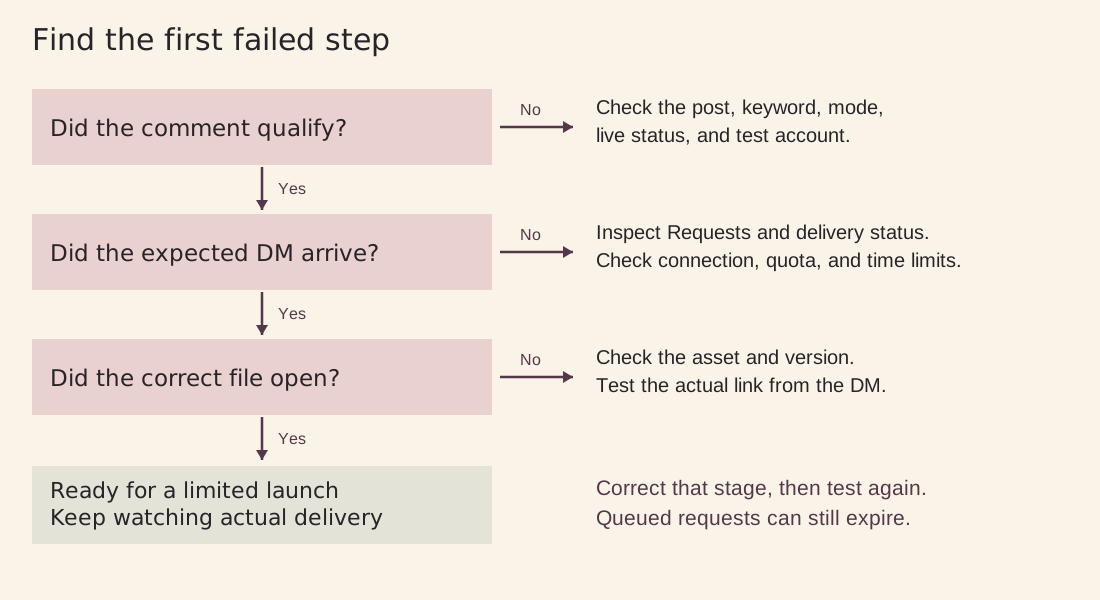
Figure 2. Original explanatory diagram. Find the first failed stage, correct it, and repeat the test.
Measure delivery before judging the offer
Review a single campaign over a defined period and account for test requests.
First ask how many requests matched, how many reached the relevant delivery stage, and what the recipient could do afterward. Use individual records when an aggregate number conflicts with an actual test.
The analytics documentation distinguishes matched comments, delivered engagements, captured details, and verified follows. A message sent, resource opened, and completed purchase answer different questions. For sales or bookings, consult the system that records those outcomes.
Use the evidence to choose the next improvement. If legitimate requests fail to match, inspect the invitation and keyword configuration. If requests match but remain pending, investigate delivery. If the file opens but readers ask where to begin, improve the workbook instructions. Changing the caption cannot fix a broken destination.
For the workbook example, a useful early qualitative signal is whether recipients can complete the planning exercise without additional explanation. Ask for feedback when a conversation naturally develops, and avoid describing file opens as proof that people used the workbook or achieved better results.
Common questions about Instagram comment to DM
Can I keep this campaign on a free plan?
ReplyMagnet offers a 30-day trial of Pro features with 1,000 engagements and no credit card required. Without a paid subscription, it moves to the always-free Starter plan with 1,000 engagements per month, one connected account, and one live campaign. The PDF example fits the free resource format; ongoing external link assets require Basic or above.
Does one public reply plus one DM use two engagements?
No. For a matched comment, the public reply and DM share one engagement. The unit is not “1,000 messages” or “1,000 unique people.” Repeat matching requests can use additional engagements, and campaigns share the workspace allowance.
Do I need to collect an email address?
No. This walkthrough delivers the workbook directly. Add an email step only when it serves a clearly described offer. If someone is subscribing to an email series, explain what they will receive before the form. A resource request alone should not be presented as consent to unrelated marketing.
Can I send an automatic reminder after someone clicks?
Do not assume a URL click opens a messaging window. For this comment-triggered flow, further messages depend on the recipient responding and the applicable time limit. Put the promised resource in the first private reply so delivery does not rely on an unapproved reminder.
Will my ManyChat flow move over automatically?
Treat this as a deliberate rebuild of one workflow. Document the current trigger, resource, messages, access requirements, and connected destinations, then test the ReplyMagnet version. Verify any needed migration capability separately. Do not retire the existing setup until the replacement has passed a controlled test and you have planned the changeover.
Launch one clear offer and improve from evidence
The first useful campaign is small enough to inspect: one post, one keyword, one workbook, and a message that helps the reader begin.
Confirm that unrelated comments stay outside the offer and that a legitimate requester reaches the correct file. Expand post scope or add capture steps only when you can explain why the reader needs them.