Compare
ManyChat Alternative for Instagram: Is ReplyMagnet Right for You?

ReplyMagnet is worth considering as a ManyChat alternative if your main job is turning Instagram or Facebook interest into a requested resource, a captured lead, or a useful DM conversation. The strongest reason to test it is a close fit with that job: the triggers you use, the resource you deliver, the integrations you need, and a plan you understand.
Published by ReplyMagnet · Last updated
Product documentation checked 7 October 2026
ManyChat can remain the better fit when your business depends on its wider channel coverage or established automations that would be costly to rebuild. A smaller bill is useful only if the replacement still does the work. Start with one representative campaign before moving your whole account.
This comparison explains where ReplyMagnet fits, how to compare the allowances fairly, and how to run a switching pilot without disrupting an active offer. It is written for creators and businesses evaluating Instagram and Facebook automation, rather than teams looking to replace every part of a multichannel messaging operation.
For a creator-focused review of the 2026 free-plan change, see the ManyChat alternative guide for Instagram creators.
When ReplyMagnet is a sensible ManyChat alternative
A good alternative should simplify a job you already need to do.
For an Instagram creator, that might be sending a checklist when someone comments a keyword. For a small business, it could be delivering a product guide, collecting an email address with a clearly described offer, or answering an incoming DM with the right resource.
ReplyMagnet documents comment-to-DM campaigns, resource delivery, lead capture, and incoming-DM automation. Its campaign setup guide and DM automation guide explain the different entry points. These are useful capabilities to evaluate when most of your automation starts with a social post or a direct message.
That focus is particularly relevant if you currently open a large automation platform to maintain a handful of straightforward offers. Compare how each tool handles your actual campaign: choosing the post, recognizing the request, delivering the asset, and letting you verify the result. A feature list alone cannot tell you which workflow your team will maintain more comfortably.
Start with the reason you are considering a switch
Your plan is becoming harder to predict. Compare the billing unit, included usage, feature requirements, and behavior at the limit.
Your setup feels more involved than your offer needs. Rebuild one representative journey and see whether routine edits become easier.
You mainly deliver resources through Instagram or Facebook. Check the exact trigger, account eligibility, resource type, and handoff destination.
You want to try a different approach without choosing a paid plan immediately. Use the trial for a bounded test and evaluate the post-trial plan separately.
Write down the reason before you compare tools. Otherwise, an attractive allowance or a new interface can distract from the issue you meant to solve. If reliability is the problem, for example, the pilot needs evidence of successful delivery and a clear way to diagnose missed requests.
When staying with ManyChat may make more sense
ManyChat is a broader messaging automation platform.
Its current pricing page describes channel and feature access across its plans. If your customer journey depends on channels beyond the Instagram and Facebook workflows covered here, start by checking whether ReplyMagnet supports each requirement. Do not assume that replacing one Instagram campaign replaces your entire messaging stack.
ManyChat also supports Instagram comment-to-DM automation on its current Free plan. This is not a capability you need to switch tools simply to obtain. Compare the allowances, workflow, and features around it. Its Free plan currently includes up to four live automations and two channels, with further limits described in the plan documentation.
The same caution applies to complex existing flows. A business may have branching logic, fields, integrations, audience rules, and staff processes tied to its current account. Even when another tool supports a similar outcome, rebuilding and validating that system takes time. Include that work in the decision.
Stay with ManyChat if it already supports important workflows well and the cost remains acceptable. Also pause a move if a required channel, integration, permission, or reporting requirement has not been verified in the alternative. A focused ReplyMagnet pilot can still be useful without committing to a full replacement.
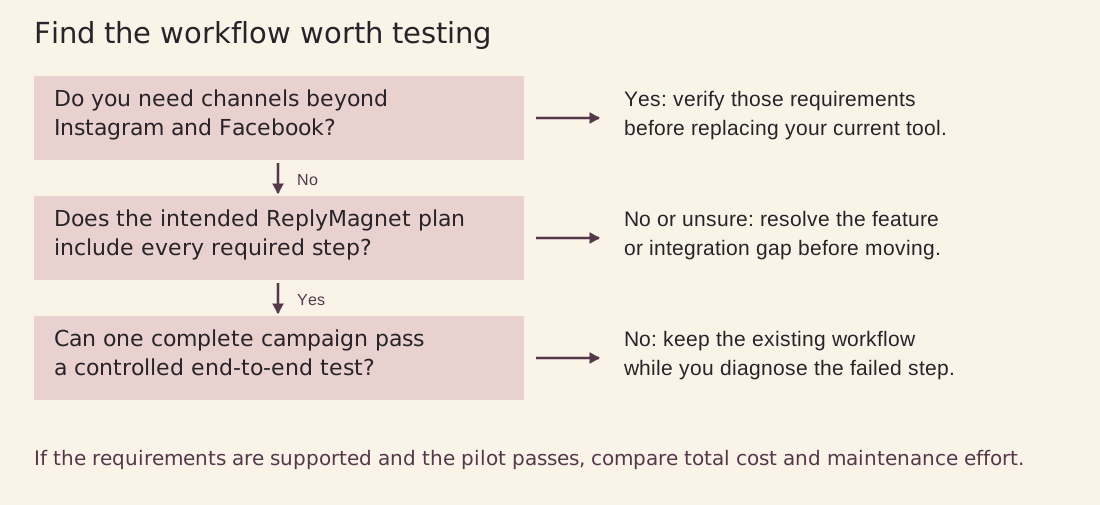
Figure 1. Original decision diagram. Confirm the channel and feature requirements before treating a successful pilot as evidence for a switch.
Compare the workflow before comparing the headline numbers
Use this snapshot to narrow the decision.
Free-plan details come from the ManyChat Free plan documentation and ReplyMagnet plans and billing. The allowances use different units, explained below. Check the live documentation and your account before making a purchase.
Workflow and free-plan snapshot. Contacts and engagements use different counting units.
What to compare
Relevant workflows
- ManyChat
- Comment-to-DM within a broader messaging automation platform.
- ReplyMagnet
- Comment-to-DM, resources, capture, and incoming DMs.
What to compare
Free allowance
- ManyChat
- 25 Active Contacts per month on Free.
- ReplyMagnet
- 1,000 engagements per month on Starter.
What to compare
Free plan scope
- ManyChat
- Two channels and up to four live automations.
- ReplyMagnet
- One connected account and one live campaign.
What to compare
Feature evaluation
- ManyChat
- Check the plan for each channel and feature in your existing flow.
- ReplyMagnet
- Check the plan for link assets, capture, sync, and webhooks.
What to compare
Transition work
- ManyChat
- Retain existing flows and team knowledge if you stay.
- ReplyMagnet
- Rebuild and validate the required journey.
Treat “supported” as the beginning of a test. A campaign may technically deliver a message while still sending people to a broken file, an unexpected signup form, or a destination that is awkward on mobile. Those details affect whether the offer works for your audience.
Understand contacts and engagements before comparing cost
The free allowances use different units.
ManyChat’s current Free plan lists 25 active contacts per month. ReplyMagnet’s Starter plan lists 1,000 engagements per month. Dividing 1,000 by 25 does not produce a meaningful capacity comparison because the products are not counting the same thing. See the ManyChat Free plan and ReplyMagnet plans and billing.
ManyChat defines an Active Contact as a person counted once in a monthly billing cycle when qualifying activity occurs. Repeated messages to that person do not count them again in that cycle, and stored inactive contacts are excluded. Check the activity definition and reset date for your account.
ReplyMagnet explains that a matched comment’s public reply and DM share one engagement. A repeated matching comment can consume another engagement even when the person already appears in Leads. All campaigns in the workspace share the allowance. Raw comment counts, unique people, and stored lead records therefore do not describe the same usage.
For a fair estimate, write down both how many people you expect to interact and what they will do. A campaign involving repeated requests from the same audience can use an engagement allowance differently from one where each person makes a single request. Use the products’ own usage reporting during a pilot rather than forcing one metric into the other.
Choose the plan from the required feature first
ReplyMagnet’s plan documentation places external link assets, phone capture, CSV export, and native email sync on Basic and above. Pro adds features including outbound webhooks and branding removal. Email capture is available free. These distinctions matter if your “simple” campaign actually depends on a hosted landing-page link or an automatic handoff to another system.
ReplyMagnet’s documented monthly prices, in US dollars, are $0 for Starter, $9 for Basic, and $29 for Pro. ManyChat’s Essential plan starts at $17 monthly or a $14 monthly equivalent with annual billing and includes 250 Active Contacts. These are entry points with different units and features, rather than like-for-like quotes for your campaign.
Start by listing the features your campaign must have. Then check the allowance and connected-account limit for the lowest plan that includes them. Do the same in ManyChat, including any relevant channel or feature requirements. The useful comparison is the cost of running your whole workflow, including migration effort.
Separate trial access from your ongoing plan
ReplyMagnet’s 30-day trial includes Pro features and a 1,000-engagement trial allowance with no credit card required. That is not the paid Pro plan’s monthly allowance. Without a paid subscription, the workspace returns to Starter after the trial, with Starter’s limits applying.
This makes the trial useful for testing the features you might need. It does not mean a workflow built with paid features will continue unchanged on Starter. Record which features you use, check the intended ongoing plan, and review the trial end before promoting a campaign widely.
Also check what happens at the usage limit. ReplyMagnet documents that an over-limit request waits before either message is sent. More capacity can help pending work only while the request remains eligible under the account, campaign, and messaging rules. A queue is not a guarantee of later delivery.
Evaluate ReplyMagnet against one complete customer journey
Choose an offer that represents the work you want to move.
A useful example is a downloadable buying checklist promoted in an Instagram Reel. Someone comments the chosen keyword, receives the promised resource, opens it on a phone, and can choose to explore the business’s next offer. This is an illustrative test case, not a claimed customer result.
Check the trigger and the promise
Decide whether the invitation asks for a comment or an incoming DM. Test the route you will actually publish. A working incoming-DM keyword does not prove a comment campaign works, and a follow alone does not establish the incoming-message trigger described in ReplyMagnet’s guide.
Keep the invitation specific: name the resource and tell people the action to take. If an email address or another step is required before access, make that clear in the offer. The reader should encounter the same promise in the post, the DM, and the destination.
Check delivery and any data handoff
Open the delivered resource as a recipient who is signed out of your own website or course platform. Test files, buttons, mobile layout, and access settings. A successful send is useful evidence, but it does not prove the recipient could use the resource.
If you capture an email address, check the lead record and the destination you intend to use. ReplyMagnet documents native email sync and webhooks, with plan requirements. Confirm the actual field mapping and destination behavior in your test. Do not treat a captured address as proof that a downstream subscription, tag, or other action completed.
Check what the team can understand afterward
The person maintaining the campaign should be able to find its settings, identify the resource, inspect usage, and investigate a problem. Make one realistic edit during the trial, such as replacing an outdated guide. Ask whether someone else on the team could understand what changed and verify the result.
For creators, this can be as important as initial setup speed. Offers change, links move, and posts continue attracting comments. A workflow that remains understandable after launch is easier to keep accurate. The Instagram automation tool scorecard can help organize these checks.
Switch from ManyChat with a controlled pilot
A careful switch starts with one campaign and a way back.
The process below is a manual review and rebuild workflow. It does not assume an automatic ManyChat import, matching feature names, or transferable platform permissions. The Instagram automation migration plan provides a related planning reference.
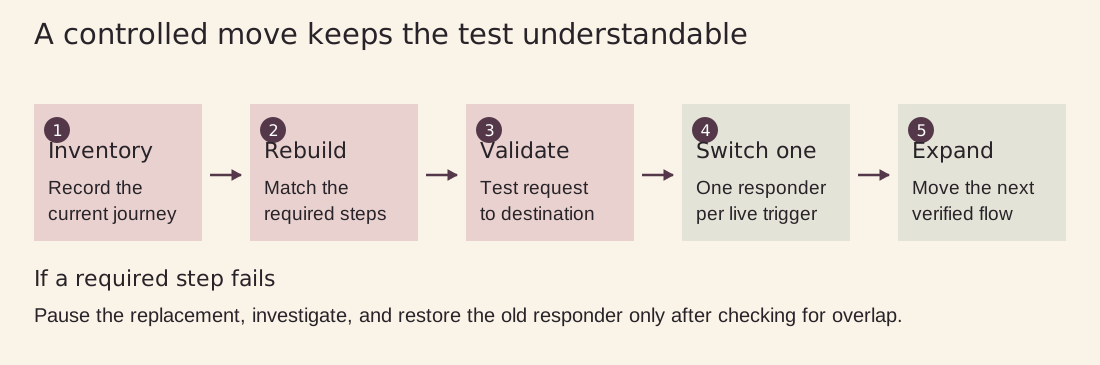
Figure 2. Original migration diagram. Rebuild and verify one journey, move one live trigger, then expand only after its requirements pass.
1 Record the current campaign before rebuilding
Capture the post or entry point, keyword, audience conditions, message copy, resource destination, fields, integrations, and any follow-up steps. Record which account owns it and who maintains it. Keep permitted exports or other records you need for continuity before making changes to the existing setup.
Use this inventory as a test specification. If the old campaign collects an email before delivering a file, for example, decide whether you want to preserve that behavior or intentionally change it. Do not let a missing step disappear from the requirements simply because the new builder looks different.
2 Choose a small but representative pilot
Use a controlled post or campaign with a clear offer and limited initial exposure. Include the features that matter to your decision, such as resource delivery or a required integration. A stripped-down test that avoids every difficult requirement cannot show that the replacement fits your business.
Define the pass conditions before launching: the correct request triggers once, the promised resource arrives, access works, any intended data handoff is verified, and usage stays understandable. Decide who will inspect the results and who can stop the pilot.
3 Rebuild and test before moving live traffic
Connect the appropriate eligible account, prepare the resource, and rebuild the campaign using ReplyMagnet’s documented controls. Check the current account and permission requirements during connection. Keep the old live setup available while you prepare, but avoid activating overlapping responders for the same trigger.
Test from another account you control or a consenting colleague’s account. ReplyMagnet’s campaign documentation says comments from the connected account itself are ignored. Inspect the receiving account’s inbox and Requests, then open the resource and verify any downstream record.
Test a nonmatching keyword as well as the intended request. Check that an unrelated comment does not trigger the offer. Include the failure you most want to avoid, whether that is a wrong resource, duplicate response, or missing email handoff.
4 Move one trigger and watch the result
When the pilot is ready, disable the corresponding old automation before activating its replacement for that same entry point. Check any default replies or other automations that could overlap. Avoid changing unrelated campaigns at the same time, so you can identify the cause of a problem.
During the pilot, review request activity, actual delivery, resource access, and integration results separately. Record the period and the campaign being tested. A quiet period with no eligible requests does not establish that the setup works; make controlled requests to verify the path.
5 Expand only after the requirements pass
Move another campaign once the first one satisfies its pass conditions. More complex flows deserve their own checks rather than inheriting approval from a simple file-delivery test. Keep a record of which triggers have moved and which remain in ManyChat.
If a must-have step fails, pause the replacement and investigate. Restore the previous responder only after checking that the new one is inactive for the same trigger. Delay cancelling your old plan until the workflows, data needs, and ongoing ReplyMagnet plan have been checked.
Keep platform rules in the comparison
Switching automation providers does not remove Instagram’s messaging rules.
Meta’s private-reply documentation allows one private reply to a qualifying post or Reel comment within seven days. Further messages require the recipient to respond and must be sent within 24 hours of that response.
A comment therefore should not be treated as permission for an unrestricted automated sequence. Opening a resource link is not the same as sending a message back. Design the first reply to fulfill the offer and check the rules applicable to any later step.
Delivery can also depend on account eligibility, permissions, message placement, and available allowance. Investigate those conditions before blaming or praising the tool. Neither a published comment reply nor a dashboard send count proves that a recipient opened the resource or became a customer.
Use this checklist to make the decision
The channels and exact triggers you rely on are supported and tested.
The resource, capture steps, and integrations work end to end.
You understand the billing unit and the behavior at the allowance limit.
The plan you intend to keep includes every required feature after the trial.
Your team can edit the campaign and diagnose common failures.
The benefit of switching justifies the rebuilding and validation work.
If these conditions hold for an Instagram or Facebook resource-delivery workflow, ReplyMagnet deserves a serious trial. If a required channel or complex process remains unverified, keep the current system in place while you resolve it. The decision should follow evidence from your own campaign.
Frequently asked questions
Is ReplyMagnet a good ManyChat alternative for Instagram?
It can be, particularly for comment-to-DM offers, resource delivery, lead capture, and incoming-DM workflows. The right choice depends on your exact trigger, account, integration, and ongoing plan. Test one complete journey before moving important campaigns.
Is ReplyMagnet free after the trial?
Yes. ReplyMagnet offers an always-free Starter plan with 1,000 engagements per month. The 30-day trial includes Pro features with a separate 1,000-engagement trial allowance and requires no card. Starter supports one connected account and one live campaign; its limits apply after the trial unless you choose a paid plan.
Does ReplyMagnet offer more free contacts than ManyChat?
That wording would be misleading. ManyChat’s current Free plan lists 25 active contacts per month, while ReplyMagnet Starter measures 1,000 monthly engagements. They count different things, so compare your expected activity and required features instead of treating the allowances as equivalent contacts.
Can I automatically import my ManyChat flows?
This switching plan does not rely on an automatic import. Inventory your current flow, rebuild the intended behavior, and verify each step in ReplyMagnet. Ask about any specific migration capability you require before planning around it.
Should I cancel ManyChat as soon as I start the trial?
Wait until your replacement workflows pass their tests and you have checked your data needs, ongoing plan, and billing dates. Keep only one responder active for each live trigger during the transition to reduce the risk of duplicate or conflicting messages.
Can changing tools bypass Instagram messaging limits?
No. The applicable platform rules still govern account eligibility, private replies, and follow-up messaging. Build the offer around a permitted request and response, and verify the current rules before adding later messages.
Try the smallest campaign that can answer the question
You do not need to move everything to find out whether ReplyMagnet fits.
Choose one offer, define what success looks like, and test the complete path from request to usable resource. Compare the experience, the required plan, and the work of maintaining it. That gives you a concrete basis for choosing a ManyChat alternative.