Guides
Move the campaign’s behavior, not just its keyword
A keyword is the most visible part of a campaign and one of the easiest to copy. The harder parts are its promises: which file arrives, where captured details go, what happens on an exception and which tool is supposed to answer.
Published by ReplyMagnet · Last updated
Make a tool-independent record of the existing campaign
Document the intended behavior before rebuilding it. A campaign map should describe the trigger, responses, resource, conditions, destinations and owner without depending on a particular editor’s layout.
Start with one campaign you understand well. Record the actual post or incoming request that starts it, the wording shown to the reader and the result expected at each step. A screenshot can help preserve the current configuration, but it is not a complete specification on its own.
For a fictional recipe campaign, the map might read: a RECIPE request under a named post receives a response, the DM identifies the recipe sheet, and the delivery route opens the current file. If a form is part of the offer, record its purpose, fields and downstream destination separately.
Distinguish current behavior from desired improvements. If you rewrite the offer, change the capture requirement and switch tools simultaneously, a failed test will be harder to diagnose. Reproduce the agreed behavior first where the target supports it, then consider improvements as separate changes.
Do not assume that a visually similar node or setting has identical semantics in two products. Matching, eligibility, data fields and delivery behavior may differ. Mark any unsupported part of the old workflow as a decision to resolve before cutover.

Editorial illustration of a migration plan, not an automatic import feature.
Inventory the assets and promises that sit outside the flow
List files, links, forms, audiences and support arrangements as separate dependencies. Connecting an Instagram account does not recreate those resources or their relationships.
The resource version matters. Two PDFs may have similar names while one contains outdated quantities or a broken link. Open the actual file delivered by the existing campaign and record which approved version the new campaign should use.
Record every downstream destination with an owner. A captured address may be sent to an email audience; a booking link may point to an external calendar; a support instruction may name a mailbox. Each needs an independent check. The new tool cannot be assumed to inherit those arrangements.
Keep historical data separate from future campaign behavior. Contacts, tags, consent records and conversation history are not automatically portable because both products connect to Instagram. Use each provider's current supported process for any authorized export or import, and verify what the destination can accept.
The ReplyMagnet asset guide explains that previously delivered links remain tied to their original asset. More broadly, do not assume rebuilding a campaign updates links people already received from another system. Your migration plan needs to account for those older promises.
Inventory for an illustrative recipe campaign
Item
Entry point
- What to preserve or verify
- Named post and intended request wording
- Evidence to retain
- Post reference and current configuration
Item
Public and private copy
- What to preserve or verify
- Exact resource promise
- Evidence to retain
- Approved copy version
Item
Recipe file
- What to preserve or verify
- Correct edition and usable mobile layout
- Evidence to retain
- File version and reviewed destination
Item
Optional capture
- What to preserve or verify
- Stated purpose and required fields
- Evidence to retain
- Approved offer and form behavior
Item
Downstream audience
- What to preserve or verify
- Correct destination if configured
- Evidence to retain
- Authorized test record
Item
Exceptions
- What to preserve or verify
- What happens when delivery cannot complete
- Evidence to retain
- Current process and owner
Item
Old delivered links
- What to preserve or verify
- What existing recipients can still access
- Evidence to retain
- Checked behavior and maintenance decision
Rebuild one low-risk campaign before scheduling the switch
Choose a simple campaign whose outcome is easy to verify. Keep the original configuration available while establishing that the target can support the intended behavior.
A single-resource campaign is easier to inspect than a network of branches and integrations. Low risk also means the offer is not about to expire and a failed test will not interrupt an important customer transaction.
Use the target's current connection instructions to connect the intended account through the authorized permission process. Check the account identity rather than relying on whichever profile happens to be signed into the browser.
Build the draft with the approved copy and resource. Record each place where the target differs from the source. If a required branch or integration is unsupported, pause that campaign's migration decision rather than quietly dropping the behavior.
Do not use a new connection as evidence that the rebuilt campaign works. Connection, configuration, logic and delivery are different checks. Where Preview is available, it can inspect configured logic, but it does not establish live Instagram delivery or the correctness of an external destination.
Keep the original campaign's configuration and your migration notes intact during this preparation. Do not delete the old setup simply to make the project look finished. Retaining a record is different from leaving overlapping responders active.
Check which connected app is responsible for the conversation
Review current routing and connection requirements before cutover. Multiple connected tools can create conflicts, and the right configuration depends on the account’s actual setup.
Manychat's Instagram Conversation Routing documentation explains how connected apps handle incoming messages and distinguishes connection methods. That is a reason to inspect routing ownership, not a reason to copy provider-specific settings blindly into a different migration.
Read the current instructions for both the source and target setup. Record the account, connection method, applicable routing configuration and who is authorized to change it. If the expected arrangement is unclear, resolve that question with the provider before promoting the new campaign.
Avoid relying on a race between two live automations answering the same request. A successful response from one tool does not prove that the other is safely excluded or that another entry point will behave the same way.
Keep the evidence narrow. A test under one post verifies that scenario under the tested configuration. It does not establish that every organic DM, ad entry point or other campaign has moved to the intended app.
This article does not provide universal routing clicks because the exact controls and requirements depend on the current connection. It provides the migration questions and evidence to collect before making the change.
Set a cutover window and a rollback decision
Define the order of changes, the acceptance checks and the condition for returning to the previous arrangement. Rollback should be planned before the original responder is retired.
Choose a period when a responsible person can observe the switch. Avoid introducing the new configuration at the same moment a major promotion invites requests, unless that timing is unavoidable and you have planned the risk explicitly.
Write the sequence in the terms of your verified setup: preserve the original configuration, prepare the target, stop the overlapping old behavior at the agreed point, apply the required routing arrangement, and run controlled acceptance checks. The exact order of provider changes must follow the current requirements you established earlier.
A rollback condition should be concrete. Examples include the wrong resource arriving, duplicate responses, no eligible test response after an explained investigation, or capture reaching the wrong destination. Do not invent a universal waiting time; use the product's documented behavior and recorded evidence.
Name who may restore the earlier configuration and what that restoration includes. Re-enabling an old campaign without reviewing routing could create a second problem. Keep the previous settings, known limitations and test plan beside the rollback note.
Returning to the old arrangement may not undo messages already sent or information already submitted. Record the affected activity and decide what correction is required through the actual support process. Rollback is a way to contain a problem, not a claim that the intervening period disappears.
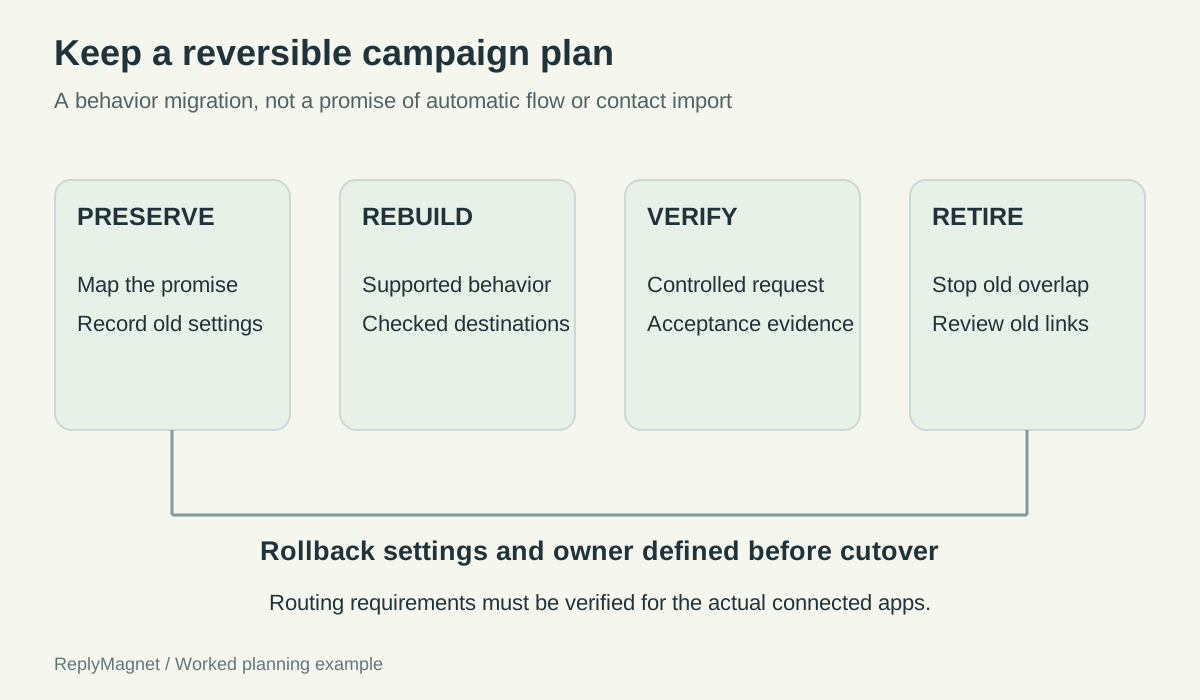
Original migration planning map. Provider-specific routing and cutover steps still require verification.
Accept the rebuilt campaign on observed evidence
Check the actual request, response, resource and downstream outcome for the intended scenario. Mark each dependency separately instead of calling the migration complete after one visible reply.
Use an account you control or a consenting tester for a small, authorized test. Avoid using real customer details merely to populate a form. Record the scenario and result without exposing tokens, credentials or unnecessary personal information.
The acceptance sheet below is a manual record. It does not imply that a tool automatically compares the old and new configurations. Save enough evidence to explain what was checked and when, including the account and campaign identity.
If the new workflow includes an external destination, inspect it directly. A captured address in one system does not establish that the intended email audience received it. A delivered link does not establish that a booking was made.
Repeat the affected checks after a correction. If a file was replaced, test a newly delivered link. If routing changed, retest the relevant entry scenario. Keep the failed result and fix in the record rather than replacing them with a bare pass.
Migration acceptance evidence sheet
Check
Intended account and entry point
- Observed result
- ___
- Evidence / owner
- Account, post or request scenario
Check
Expected response, without duplicate responder
- Observed result
- ___
- Evidence / owner
- Timestamp and controlled test record
Check
Correct resource and destination
- Observed result
- ___
- Evidence / owner
- Version and mobile access check
Check
Capture only as promised
- Observed result
- ___
- Evidence / owner
- Fields and offer reviewed
Check
Downstream destination if used
- Observed result
- ___
- Evidence / owner
- Authorized test record in destination
Check
Unrelated request remains outside scope
- Observed result
- ___
- Evidence / owner
- Negative scenario result
Check
Rollback decision
- Observed result
- ___
- Evidence / owner
- Accept / investigate / restore, with owner
Retire the old behavior without abandoning old obligations
Stop redundant triggers only after acceptance, and review historical links, retained data and ownership separately. Ending an old subscription does not automatically complete every handover task.
List the old campaigns that were intentionally retired, the ones still needed and the reason for each. Check older posts that continue inviting the old request. A migration focused on the latest promotion can leave an evergreen caption pointing toward an inactive process.
Review the service needed for previously delivered resources. If the old provider hosts the file or link, confirm what happens when the account or subscription changes. Do not assume continued access, and do not promise a correction that the platform cannot perform retroactively.
Handle historical records through an authorized retention and transfer process. Do not export personal data simply because the button is available. Preserve the records genuinely needed for the business purpose and use the destination's supported handling.
A product comparison helps decide whether switching is worthwhile; the Manychat alternative page addresses that choice. The migration itself is complete only when the selected behavior is verified, the old overlap is retired and someone owns the remaining dependencies.
Begin with one campaign map and one acceptance sheet. They make the switch reviewable even if you later choose a different tool, delay the move or decide that a complex workflow should remain where it is.