Guides
Instagram DM automation rules: what you can send and when
A comment can allow one private reply. It does not open an unlimited conversation. Use the right deadline for the event, then check the account, permissions and promise behind your campaign.
Published by ReplyMagnet · Last updated
Is Instagram DM automation allowed?
Instagram provides an official API for eligible private replies and messaging on professional accounts. You must have the required permissions and follow Meta’s message limits and policies; an approved integration does not make every campaign compliant.
Comment-to-DM answers a comment on the connected account’s post or Reel with a private message. In a resource campaign, that message carries the guide, menu or worksheet the person requested. The account owner authorizes the integration through Instagram’s connection screen.
The important distinction is between permission to send one initial private reply and permission to continue a conversation. Meta’s private-reply documentation describes both. A public comment does not authorize repeated reminders if its author never responds in messages.

Editorial illustration of two separate messaging limits, not a product screen or a platform endorsement.
Start with an actual request
ReplyMagnet’s comment campaigns respond to qualifying comments on the posts you select. Keep the private reply connected to the resource the person requested.
A caption such as “Comment MENU for our current menu PDF” sets a narrow expectation. Send that menu, identify the link and explain any access requirement. A follower count or list of profile names is not a substitute for the interaction required by the messaging API.
Do not turn one resource request into an indefinite sales sequence. If a later email subscription is part of the offer, explain it before collecting an address. The comment-to-DM setup guide shows a complete starter campaign.
Check account permissions separately from campaign content
ReplyMagnet connects through Instagram’s authorization screen. Profile, comment and messaging access serve different purposes; app access is not an endorsement of your offer or a guarantee against restrictions.
The connection lets ReplyMagnet identify the professional account and its posts, receive comment activity, and perform supported comment and message actions. Review the requested permissions and confirm the account name before connecting.
For the Instagram Login private-reply endpoint, Meta’s current requirements list instagram_business_basic and instagram_business_manage_comments. Other messaging features use their own permissions, including instagram_business_manage_messages; do not confuse a tool’s complete connection request with the minimum requirements of one endpoint.
If access is revoked, the account type changes or the connection stops working, delivery can fail. Follow the Instagram connection guide and inspect the recorded problem before reconnecting or relaunching. No tool can promise that an account will never face restrictions.
Use a Business or Creator account
Instagram’s professional-account API supports Business and Creator accounts. A personal profile cannot connect to this comment-to-DM integration.
Choose the account that actually owns the post. A team member’s personal account and a similarly named brand profile are not interchangeable.
If you need to change account type, review the options in Instagram’s current settings. Check the profile’s public presentation and contact information afterward; do not assume an account-type change has no visible consequences. The connection guide covers the product-side steps.
One private reply, then a different clock if they respond
For a post or Reel comment, send the single private reply within seven days. Further messages require the recipient to respond and must fit the 24-hour response window. Instagram Live private replies are allowed only during the broadcast.
These limits come from Meta’s private-reply documentation, checked on 4 October 2026. The seven days run from the comment, not the publication date of the post or the moment your team notices it. An older Reel can receive a new comment; evaluate that comment’s timestamp.
An illustrative timeline makes the distinction clearer. A comment arrives Monday at 10:00. Its initial private reply must be sent within seven days, before the following Monday at 10:00. If the person responds to the DM on Wednesday at 15:00, the standard 24-hour response window runs to Thursday at 15:00. Use the same timezone throughout. Sending your own message does not restart that clock.
If they never respond, the seven-day allowance does not give you seven days of reminders. Clicking an external resource link or submitting a website form should not be treated as a DM response. A new eligible interaction must be evaluated under its own rules.
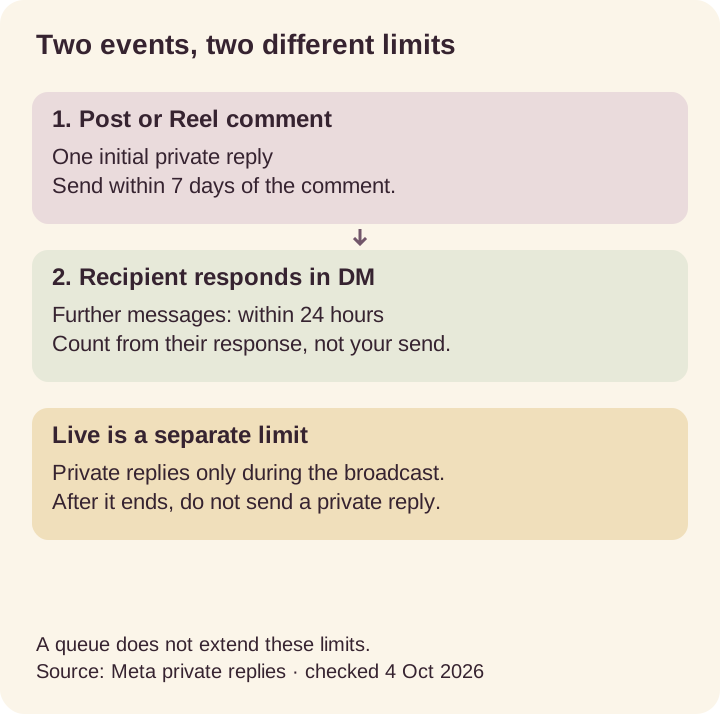
Rule diagram based on Meta’s documentation. The Live limit is the broadcast itself, not a 24-hour allowance.
Which event permits which message?
Event
Post or Reel comment
- Allowed action
- One initial private reply
- Limit
- Within 7 days of the comment
Event
Recipient responds in DM
- Allowed action
- Continue the conversation
- Limit
- Within 24 hours of their response
Event
Story reply received as a message
- Allowed action
- Respond in the DM conversation
- Limit
- Standard 24-hour messaging window
Event
Instagram Live comment
- Allowed action
- Private reply during the broadcast
- Limit
- No private reply after the broadcast ends
A queue cannot extend a platform deadline
Requests waiting for ReplyMagnet quota keep ageing. More capacity can release an eligible request, but cannot make an expired or otherwise invalid message sendable.
A queue and a messaging window solve different problems. The queue holds work waiting for capacity; the platform determines whether that message is still permitted. Treat a waiting item as unfinished, not delivered.
Check the original event time, current connection, campaign status and recorded outcome. A retry may help with a temporary error, but repeated relaunches cannot bypass Meta’s rules. A broadcast ending is especially important: a Live comment does not gain a full day merely because a tool shows it as queued.
Use plans and billing help for allowances and the delivery troubleshooting guide to locate the failed step. Avoid promising that every queued request will eventually arrive.
Investigate before retrying
Possible cause
Connection or permissions
- Useful check
- Confirm the account and resolve the connection error
Possible cause
Quota
- Useful check
- Review waiting activity and available capacity
Possible cause
Expired eligibility
- Useful check
- Compare the original event with the applicable deadline
Possible cause
Platform rejection
- Useful check
- Read the recorded error and identify whether it is retryable
Explain contact capture and leave unnecessary gates off
A resource request does not automatically authorize unrelated future marketing. Explain why you need an email or phone number, and keep the promised resource’s access requirements clear.
For a public menu, direct access may be the most useful choice. A lesson series may need an email address, while a requested callback may need a phone number. Tell the reader what happens after submission before they commit.
ReplyMagnet’s optional follow check is a technical setting, not proof that a campaign satisfies every platform policy. Leave it off for a straightforward resource request unless there is a justified, clearly explained reason to add it. An API check and permission to impose an engagement condition are different questions.
Review Meta’s current spam standard for your campaign. Avoid misleading promises, purchased audience lists and artificial engagement tactics. An official connection cannot make deceptive campaign content acceptable.
Do not confuse API access with unlimited outreach
Use the supported integration for eligible interactions. Do not assume it authorizes cold DMs, repeated messages without a response, or private replies after their deadline.
Before launch, describe the event that makes each message eligible. “They commented MENU” supports the first resource reply; “they answered our DM” explains a later response inside the applicable window. “They follow us” or “we have their email” does not establish that same messaging event.
Avoid tools that ask you to hand over your Instagram password or pretend that browser/device scripts provide the same permissions as an authorized API connection. A paid plan, a different tool or a retry button cannot increase Meta’s private-reply allowance.
When unsure which step failed, preserve the activity record and investigate. Do not manufacture another interaction or claim a send succeeded because a job was created.
Check the complete request before launching
Match the caption, private reply and destination, then test from a separate account. Confirm the observable result at each step and decide who will investigate failures.
Use a feed post or Reel for your first controlled test. Check the following:
- The keyword requests a named resource.
- The selected professional account owns the post.
- The DM explains the same resource and destination.
- The recipient can check Inbox and Requests and open the file on a phone.
- Any contact requirement is visible before submission.
- An unrelated comment does not trigger the campaign when broad matching is off.
- Someone will check waiting, failed and expired activity.
A sent message, an opened resource and a captured contact are separate observations. None proves a sale or ongoing permission to contact the person. Once the promise and destination are ready, set up a request-based campaign.
Common questions
Does an approved app make every automated campaign compliant?
No. An authorized API integration supports specific actions. You still need an eligible interaction, the applicable time window, valid permissions and campaign content that follows Meta’s policies.
How many private replies can one comment receive?
Meta allows one initial private reply to the commenter. Follow-up messages require the recipient to respond and must be sent within 24 hours of that response.
Can I privately reply to a Live comment after the broadcast?
No. Meta permits private replies to Instagram Live comments only while the broadcast is running, not for 24 hours afterward.
Does opening a resource link restart the DM window?
Do not treat an external link open or website form submission as a DM response. Follow-up messaging eligibility depends on the supported Instagram interaction and its timestamp.
Do I need a Business account?
You need an Instagram professional account: either Business or Creator. A personal profile cannot connect to this integration.