Product updates
Introducing DM automation and the chat flow builder
Your audience does not always want the same next step. Someone messaging GUIDE may want a resource, while another person is ready to book a call. ReplyMagnet’s new DM automation and chat flow builder help you respond to that difference, starting with the message someone actually sends.
Published by ReplyMagnet · Last updated
What has launched?
ReplyMagnet has launched incoming Instagram DM automation and an Instagram chat flow builder. DM campaigns choose which requests to answer; the builder lets eligible workspace owners design the conversation that follows.
The two features work together, but they solve different parts of the journey. A trigger recognizes an incoming request. A flow provides the sequence of messages, choices and next steps after that request qualifies.
That means you can keep a straightforward resource campaign simple, or build a more guided experience when people need to choose a direction. A creator can offer a worksheet or a booking link. A service business can ask which topic someone needs help with before sharing the relevant next step. The visitor’s answer gives the conversation its direction.
The chat flow builder is available for Instagram on Pro and Agency, including valid trials. Workspace owners can edit and publish flows. Ordinary DM campaigns remain separate from that builder entitlement and follow their own plan allowances. This launch does not add Messenger, WhatsApp or website chat flows.
Below, we explain the new workflow through one small example: someone sends GUIDE, then chooses between a resource and a call. The real screenshots show trigger setup and a separate question-validation test flow. The resource-or-booking example is an illustrative design, not a customer result.
Why give an incoming DM more than one possible path?
Different requests deserve different next steps. A short choice can help someone reach the resource or action they want without forcing every person through the same sequence.
Imagine a coach sharing a post about planning the next quarter. The invitation says, “DM GUIDE for help planning your next step.” Some readers want to work independently with a checklist. Others want to discuss their situation. Sending everyone a booking link overlooks the first group; sending everyone a PDF may leave the second group searching for a way to talk.
A useful opening can be as simple as: “Would you like the planning guide, or would you prefer to book a call?” The two options are easy to understand because each describes an outcome. A person choosing the guide receives a resource path. A person choosing a call receives a booking path.
This is an illustrative design, not a claim that adding choices automatically increases bookings. The practical advantage is that you can make the intended journey explicit and inspect it before publishing. You can also remove questions that do not change what happens next.
Start with the decision you actually need to support. If everyone should receive the same file immediately, a simple campaign may already do the job. Add a flow when a meaningful answer needs to change the next message, capture useful context or direct someone to a different destination.
How does DM automation decide when to respond?
A Direct messages campaign responds to an eligible incoming Instagram message. You can use keyword matching, smart matching or an eligible first-message welcome, depending on the purpose of the campaign.
For our example, use a Direct messages campaign with an exact keyword such as GUIDE. The invitation and the trigger should agree: if the post asks someone to send GUIDE, configure and test that word. Choose a more distinctive word if GUIDE already belongs to another offer on the same account.
Keyword matching is useful when you can give the audience a clear instruction. Smart matching can recognize a request that fits the configured intent even when someone does not use the exact wording. It is trigger matching, rather than an invitation to promise an unrestricted AI conversation.
A general welcome serves a different purpose. ReplyMagnet checks specific keyword and smart matches before the broad welcome. The welcome applies to the first eligible contact recorded for the account; incomplete earlier history can mean a person who previously contacted you on Instagram is still eligible. Following your profile alone does not trigger a DM.
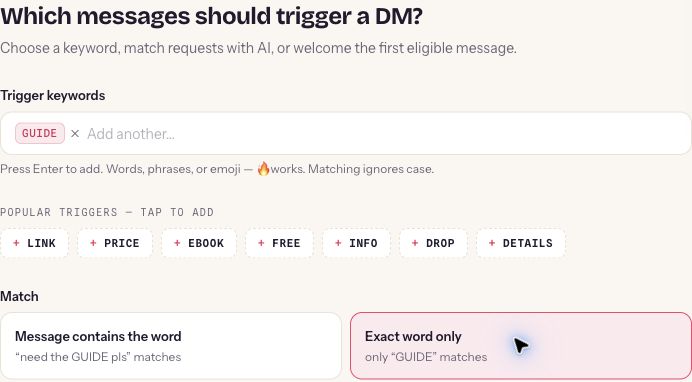
Figure 1. Real ReplyMagnet setup screen: GUIDE uses an exact-word match in an unsaved demonstration campaign.
For the branching example, choose a keyword or smart campaign. The general any-mode welcome is not a chat flow builder trigger. Our Instagram welcome message guide covers that simpler welcome use case in more detail.
What can you build in the chat flow builder?
The builder connects messages, choices, questions and other steps into an explicit conversation. Outline is the default editing view; Canvas gives you a visual view of the paths.
You do not need to start with a large conversation map. Begin with one entry, one decision and an ending for each outcome. Once that works, decide whether an additional question would help the person or simply delay them.
The available building blocks have distinct jobs:
- Message: say something useful, such as acknowledging the request or explaining the destination.
- Choice: offer clear options and connect each answer to the appropriate path. A choice supports up to three options.
- Question: ask for information that the conversation needs.
- Condition: choose a route using the configured rule.
- Action: set a field or add or remove a tag for the context you need to retain.
- Delay: introduce a pause where appropriate, while remaining subject to the messaging window.
- End: make the end of a path deliberate.
Outline helps you work through the steps in order. Canvas helps you see connections and notice whether a branch leads somewhere unexpected. They are two ways to work with the flow, not different promises to the recipient.
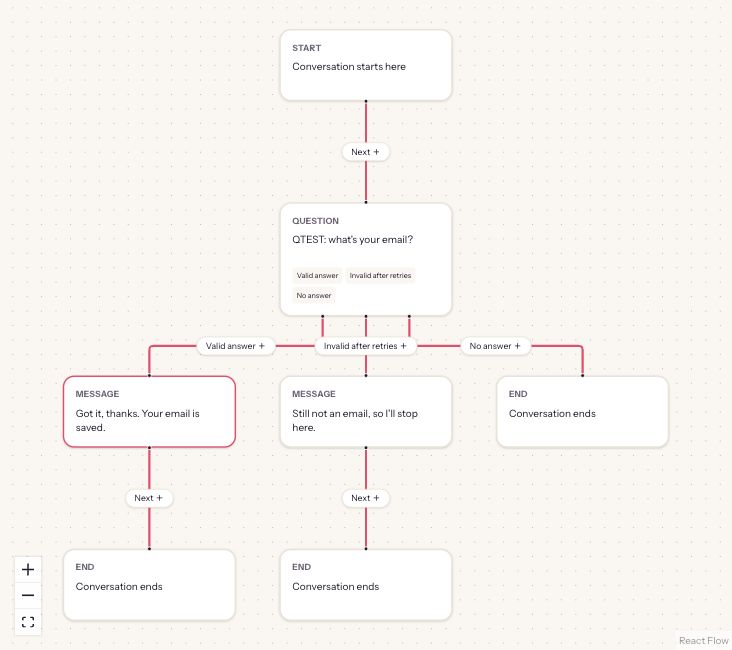
Figure 2. Actual Canvas view of a paused test flow: a question has separate valid-answer, invalid-after-retries and no-answer paths. This demonstrates branching; it is separate from the resource-or-booking example below.
Keep the language close to what a person would ask. “Get the guide” and “Book a call” are easier to understand than internal labels such as “Resource route” and “Qualified lead.” Your own notes can be operational; the recipient’s choices should describe what they will receive.
How do the trigger and the conversation fit together?
The trigger determines entry into the campaign. The flow determines what happens after entry, including which choice leads to which message or destination.
It helps to sketch the journey before editing. Write the incoming request at the top, then the smallest decision that separates two genuinely different needs. Finish each branch with the promised next step.
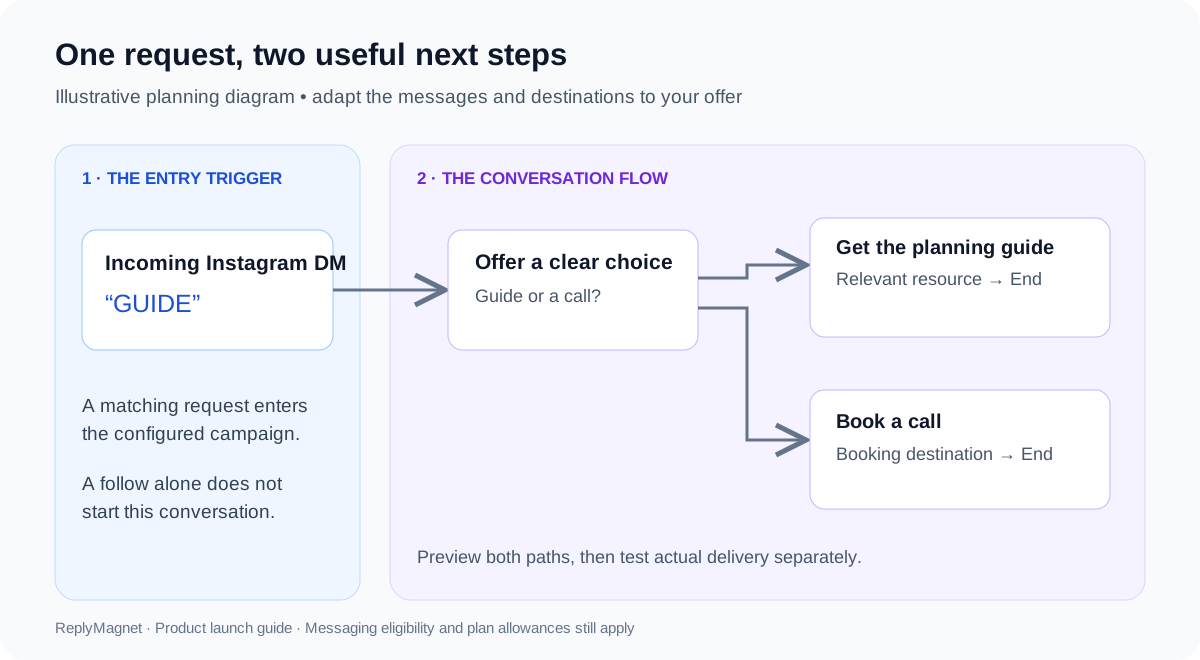
Figure 3. An illustrative planning diagram, not a product screenshot. The example separates the entry trigger from the conversation that follows.
The invitation might read: “DM GUIDE and choose the planning worksheet or a call.” The opening then repeats those same two outcomes. On the resource branch, name the actual worksheet so the link feels like a continuation of the promise. On the booking branch, explain what the appointment is for so someone can decide whether it is relevant.
This small map also exposes unnecessary work. If both choices lead to the same generic homepage, the question has not helped the visitor. Either make the destinations meaningfully different or remove the choice. A short, coherent conversation is a better starting point than a large flow built only because the editor supports more steps.
Build your first resource-or-booking flow
Create an eligible Instagram keyword campaign, open the builder and adapt the resource-or-booking template or build the steps you need. Replace demonstration content with your own offer before publishing.
Use this walkthrough as a planning guide alongside the controls in your account. The campaign documentation covers the underlying setup.
- Prepare the destinations. Have the actual workspace asset or your own HTTPS booking URL ready. Open each destination and confirm it matches the promise. A booking page should explain the appointment; a resource should be readable on a phone.
- Choose the incoming request. Create the Direct messages campaign and use a supported keyword or smart match. For a first controlled example, an exact GUIDE keyword makes the entry easy to explain and test.
- Open the flow builder. An eligible workspace owner can build the conversation. Use Outline first if you prefer a sequence of steps, or switch to Canvas when reviewing how paths connect.
- Write the first useful message. Acknowledge the request and explain the choice. For example: “Happy to help. Would you like the planning guide or a link to book a call?” Adapt this illustrative copy to your real offer.
- Connect the next steps. Send each choice to its matching resource or booking destination, then end the path. If you use a template, treat it as an editable draft and replace its sample content.
- Add context only when needed. A question or tag can help distinguish an interest, but it should have a clear purpose. Do not collect personal details simply to make the flow feel more advanced.
- Save, preview and review. Saving a draft and publishing are separate actions. Finish the checks below before making the flow available to incoming requests.
For a first launch, keep one clear owner responsible for the messages and destinations. If the offer changes later, review the invitation, opening, choices and linked pages together so they continue to tell the same story.
Use Preview to inspect the logic before publishing
Preview simulates the conversation logic without sending messages or saving conversation data. Use it to inspect the paths and copy, then perform a controlled delivery test separately.
Preview answers an important question: “Does this configured path do what I intended?” It does not prove that Instagram will deliver the message, that an account is eligible or that the messaging window remains open.
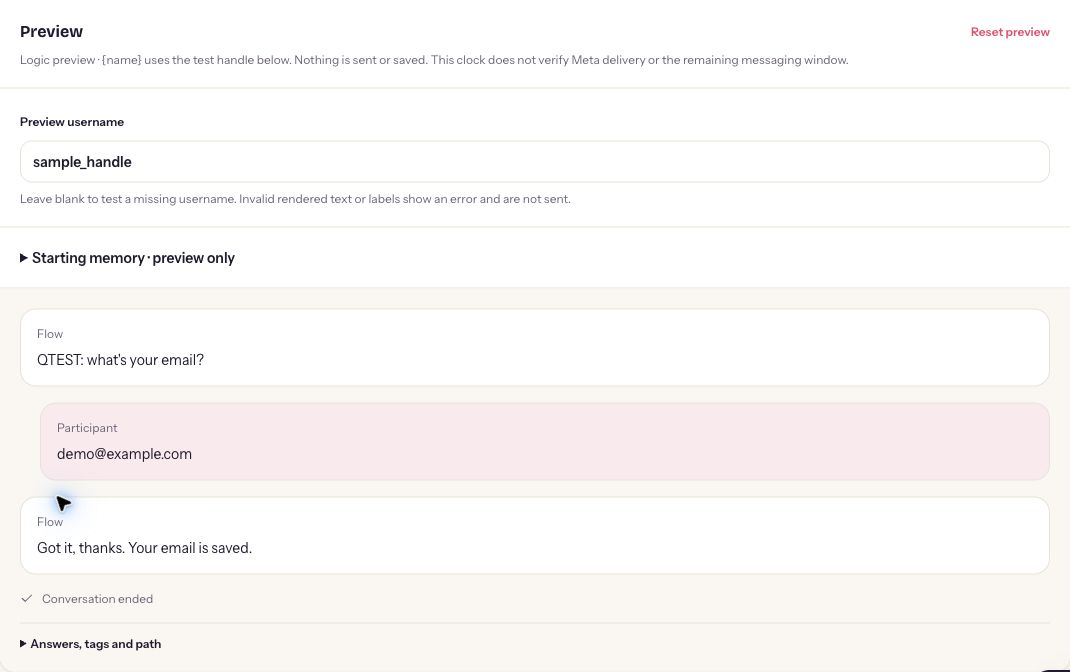
Figure 4. Actual logic preview using the synthetic address demo@example.com. The confirmation is simulated: no contact is stored and no Instagram message is sent.
Walk through each outcome rather than testing only the first option. Read the messages as a visitor who has not seen your diagram. Does the second message make sense after the first? Does every choice have a clear destination? Is it obvious when the conversation has finished?
Use this compact review list:
- Resource choice: the path names the promised resource and leads to the correct file or page.
- Booking choice: the path describes the call and uses your current booking destination.
- Unexpected response: the configured unmatched behavior is understandable and does not send someone down an unrelated path.
- No response: inspect any timeout or ending behavior you configured, rather than assuming the person must finish.
- Changed destination: check for placeholder, expired or incorrect links before publishing.
- Message wording: remove claims about availability, results or personal knowledge that the flow cannot support.
After publication, use an account you control or a consenting colleague for a small delivery test. Check the actual Instagram experience as well as the recorded flow path. A preview success is useful evidence about the logic; a controlled send checks a different part of the experience.
What should you know before launching a flow?
Instagram eligibility, messaging windows and plan allowances still apply. A flow helps organize an allowed conversation; it does not remove platform limits or turn a follow into permission to message.
Keep the first version focused on an incoming DM. If you later adapt the idea to comments, remember that a private reply to a comment is a different entry point. A one-message resource reply can end after that message. A multi-step comment flow requires the recipient’s reply keyword after the private opener before continuing. Do not present a public comment as permission for an unrestricted sequence.
A delay step also does not extend the allowed messaging window. The Instagram DM automation rules guide explains the broader constraints; the comment-to-DM guide and story reply guide cover their respective entry points.
When reviewing outcomes, conversation history can help you inspect a run’s status, messages, step path, fields and branches. Treat it as evidence of the configured automation, rather than a universal Instagram inbox. A completed run or send record does not prove that someone read the message or booked a call.
For the same reason, define success around the next step you actually care about. A person receiving a guide and a person requesting a call have made different choices. Review those journeys separately before deciding whether to change the copy or add another question.
Start with one useful conversation
Choose one repeated request, offer one clear decision and test both outcomes. Publish a small flow you can explain before expanding it into more paths.
You can prepare the first version with five short notes: the incoming request, the promised help, the choice, each destination and the person responsible for keeping it current. That is enough to reveal whether you need a flow or whether a simple reply already meets the need.
Before launch, check that your plan and owner access support the builder, your connected account is correct, the destinations work on mobile and every branch reaches an appropriate ending. Keep the original offer visible while reviewing the messages. The conversation should deliver what brought the person to your inbox.
Sign in to ReplyMagnet to create your Direct messages campaign and explore the chat flow builder on an eligible Pro or Agency workspace. If you are starting with a single welcome response, use the welcome setup guide. If your audience needs a choice, begin with two helpful paths and make each one worth following.
Common questions
Does DM automation send a message when someone follows my account?
No. A follow alone does not trigger the DM automation described here. An eligible incoming Instagram message starts the DM campaign.
Do all plans include the chat flow builder?
The Instagram chat flow builder is available on Pro and Agency, including valid trials. Workspace owners can edit and publish flows. Ordinary DM campaigns have separate plan allowances.
Is this an unrestricted AI chatbot?
No. Smart matching helps recognize a trigger intent. The chat flow builder runs the messages, questions, choices and paths you configure; it is not a promise of open-ended AI conversation.
Can I attach a flow to the general welcome mode?
The general any-mode welcome is not a builder trigger. Use a supported keyword or smart campaign for the flow described in this article.
Will Preview message real Instagram contacts?
No. Preview is a logic simulation that does not send messages or save conversation data. Check actual delivery separately with a controlled test after publishing.