Features
AI Smart Triggers: recognize the request beyond the keyword

Catch clear requests for your Instagram resource even when someone leaves out the keyword. Keep your configured offer and response, with Smart matching available on every plan.
Published by ReplyMagnet · Last updated
What are AI Smart Triggers?
AI Smart Triggers recognize clear requests for your configured Instagram offer when the person leaves out your keyword. Your keywords still match first; eligible remaining requests can reach an AI intent check.
Someone sees your planning guide and comments “Can you send this over?” They want the resource, but they have not typed GUIDE. A keyword-only campaign may miss that request. Smart matching adds an intent check for that gap while keeping the keyword you already explain in your caption.
You choose the campaign, its scope and the response. Smart matching decides whether an incoming request fits an eligible campaign; it does not invent your offer or replace the message you configured. A positive match enters the normal campaign workflow, subject to delivery eligibility and available capacity.
That makes Smart useful for a clearly described download, lesson or resource. It is less suitable as a promise to answer every question about your business. “Love this!” and “What camera did you use?” are different from asking for the guide. The aim is to recognize a request, not turn every reaction into a sales conversation.
How does Smart matching differ from keywords?
Contains-word matching finds a configured whole word anywhere in the text. Exact-word mode requires the whole trimmed message to equal it. Smart keeps the contains-word path and adds intent matching for eligible misses.
For this example, the post offers one planning guide and the configured keyword is GUIDE. These examples describe the intended distinction between modes; they are not recorded tests or guarantees about an AI verdict.
A clear keyword still helps people understand what to ask for. Smart gives people another way to express that request. It does not make a vague offer precise: if the same post promises several unrelated resources, “send it” may leave the intended destination unclear.
Illustrative examples for one planning-guide offer; Smart candidates still need an accepted AI verdict.
Incoming text
GUIDE
- Keyword behavior
- Matches exact and contains modes
- Smart interpretation
- Keyword path; no AI check needed
Incoming text
Please send the guide
- Keyword behavior
- Contains-word match; not exact-word mode
- Smart interpretation
- Keyword path; no AI check needed
Incoming text
Can you send this over?
- Keyword behavior
- No GUIDE keyword
- Smart interpretation
- Candidate request for the offered resource
Incoming text
Great post!
- Keyword behavior
- No GUIDE keyword
- Smart interpretation
- Praise is not a resource request
Incoming text
How much is coaching?
- Keyword behavior
- No GUIDE keyword
- Smart interpretation
- A different question; do not assume guide intent
Incoming text
🔥
- Keyword behavior
- No GUIDE keyword
- Smart interpretation
- A reaction alone is not proof of a request
Use trigger keyword ideas to choose a clear word. Keep the invitation and resource aligned before broadening how requests can qualify.
What happens before an AI check?
ReplyMagnet filters for live campaigns on the relevant account, surface and post scope, then tries keywords. AI evaluates eligible Smart candidates only if ordinary matching has not already claimed the input.
On post comments, a keyword match takes priority over an any-comment campaign. If no keyword matches but an eligible any-comment campaign does, that broad rule handles the comment before the Smart AI pass. Avoid leaving an overlapping “Comment anything” campaign active and assuming Smart will independently judge the same comment.
A returned Smart candidate must meet the system’s confidence threshold before it becomes a match. An unclear verdict does not authorize a speculative Smart response. The threshold is an acceptance rule, not a published accuracy score or a slider you need to tune.
Direct messages have a different broad fallback: specific keyword and Smart requests are considered before an eligible first-message welcome. Replies continuing an active chat flow can also belong to that existing conversation. A post comment, incoming DM and story reply are therefore separate campaign surfaces, not interchangeable inputs.
Start with one resource on one selected post. If several campaigns or tools are connected, use the campaign overlap audit before promoting the offer.
Step 1: choose the account, surface and post
In the campaign wizard, choose the connected professional Instagram account, use Posts & Reels for a comment campaign and select the post offering your resource. Keep the initial scope specific.
Open Campaigns and choose New campaign to enter the wizard.
Connect a Business or Creator account first if it is not already available; Instagram connection help explains the permission flow. Choose the account that owns the post, rather than another profile you manage.
For the walkthrough here, use Posts & Reels and the specific post that promises the planning guide. Review the selected post and then choose Continue to reach the trigger settings. Account-wide scope is a separate choice; it can make the same campaign eligible under other posts.
The screenshots below come from ReplyMagnet’s actual production campaign wizard on 10 October 2026. They show an unsaved demonstration setup. No campaign was launched and no customer message was sent to capture them.
Step 2: add GUIDE and select Smart (AI)
In Trigger, enter GUIDE as a keyword and confirm it with Enter. Under Match, select Smart (AI), then continue. Smart requires at least one configured keyword.
Use a keyword that names the resource in the caption. Our example invitation is “Comment GUIDE for the planning guide.” Adding GUIDE preserves a straightforward route for people who follow that instruction.

Actual production keyword control in the unsaved demonstration. GUIDE is the keyword used throughout this walkthrough.
Next, choose Smart (AI) in the Match controls. This selects the combined keyword-and-intent behavior rather than Exact word only or Comment anything. The production screen captured here displays a DeepSeek badge; provider labels describe the configured service, not an extra mode you need to select.
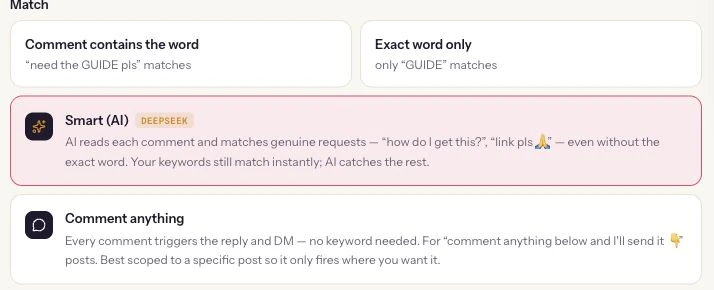
Actual production Match controls, 10 October 2026. Smart (AI) is selected in an unsaved example; the image does not demonstrate a classification result.
Choose Continue when the keyword and matching mode are correct. A wizard preview is useful for reviewing the configured copy. It does not prove that an off-keyword request has been classified or that a DM has reached Instagram.
Smart (AI) decides whether a request matches. The separate Write replies with AI switch changes public-reply wording; selecting Smart does not turn that switch on.
Step 3: configure the response and resource
In DM flow, write the message the requester should receive, attach the intended resource and review any enabled capture requirements. Smart changes entry matching; the delivery promise remains yours.
Keep the message specific: “Here’s the planning guide you asked for.” Make sure the attached resource is that guide, not a general homepage or an older file. For a post-comment campaign, review the public reply as well as the private message.
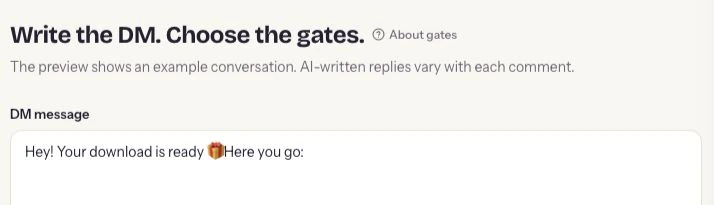
Actual production DM flow message control. The screenshot shows configuration, not a sent message or a recipient’s inbox.
PDF hosting is available on Starter. Delivering your own external link as a link asset requires Basic or higher. Capture requirements are separate decisions: if you enable a gate, explain the requirement in the offer and check the relevant plan controls. Do not let a natural-language request silently turn into a different exchange.
When the setup is ready, proceed to Launch to review it. Check account, selected post, keyword, Smart mode, reply copy and destination before deliberately choosing the launch action. Reviewing a setup is not the same as making it live. The campaign documentation covers the broader workflow.
How should you check a Smart campaign?
Use a controlled test account and compare keyword requests, natural requests and nonrequests. Record what actually matched and delivered; a configuration preview alone does not test AI matching.
Before promotion, prepare a short checklist: GUIDE; “Please send the guide”; a clear request without GUIDE; praise without a request; and an unrelated question. Write the intended result beside each, then record the observed outcome after a deliberate test you control.
Check the destination as well as the trigger. Does the correct guide open on a phone? Does the DM explain any enabled capture requirement? Does an unrelated comment avoid the resource workflow? If something differs from the intended result, inspect scope, overlapping campaigns and activity before changing the caption.
In analytics, Caught by AI groups requests attributed to AI matching rather than a configured keyword. It is not an accuracy report or a complete list of comments the system rejected. Compare matched requests with delivery events separately. A sent status means the platform accepted the message; it does not prove the recipient read it.
Use analytics documentation for the available reporting views. No performance test or customer result is claimed by the examples on this page.
Which plans include Smart matching?
Smart matching is included on every plan. Paid-AI checks share a daily workspace budget: Starter 100, Basic 300, Pro 750 and Agency 2,000. Trial workspaces have a 100-check daily cap.
The daily allowance applies across the workspace, rather than being renewed separately for each connected account or campaign. Other metered AI functions can use the same pool. A keyword match does not need an AI classification slot, but the resulting campaign interaction still follows the separate engagement allowance.
If the paid-AI budget is exhausted, an eligible unmatched request may wait for the next daily reset at midnight UTC. Deferral is bounded and platform reply windows still apply, so a later send is not guaranteed. Provider failures also do not authorize a message without a usable verdict; some can retry and others finish as failed attempts.
You can begin without buying a Smart-only upgrade. Review current plans when you need different allowances or delivery capabilities. A 30-day no-card trial includes eligible Pro features with trial volume restrictions; it does not grant Pro’s full paid daily AI budget.
Can a Smart trigger start a chat flow?
An eligible Smart campaign can provide the entry into a configured chat flow. The trigger recognizes the request; the flow determines the messages, choices and next steps after entry.
A simple resource request may only need the ordinary campaign response. Use a flow when the conversation needs a meaningful choice, such as offering a guide or a booking path, rather than adding steps for their own sake.
The Instagram chat flow builder requires eligible Pro or Agency access, including valid trials, and workspace owners control editing and publishing. That entitlement is separate from Smart matching being included on every plan. General any-mode welcomes are not chat flow builder triggers.
See the DM automation and chat flow builder overview for that workflow. Smart matching itself is not an unrestricted AI chatbot, an automatic product adviser or permission to contact people who have not interacted with you.
Common questions
Do Smart Triggers still need a keyword?
Yes. Configure at least one keyword. Smart first uses the contains-word keyword path, then considers eligible unmatched requests through AI.
Does Smart respond to every comment?
No. It is intended to recognize a request for an eligible campaign offer. Praise, unrelated questions and unclear verdicts should not be treated as automatic requests.
Can I use Smart Triggers on Starter?
Yes. Starter includes Smart matching with a shared daily paid-AI budget of 100 checks. Other campaign and delivery limits still apply.
Does the Pro trial include 750 AI checks per day?
No. Trial workspaces have a daily paid-AI cap of 100 checks, even while eligible Pro features are available.
Do Smart Triggers write an AI conversation?
Smart matching decides whether a request fits a campaign. Your configured campaign message or an eligible published flow determines what happens afterward.