Guides
Choose an Instagram automation tool by testing the work
Feature lists make different products look comparable even when they solve different problems. “Automation,” “contacts” and “integrations” can describe different capabilities and units. A useful evaluation starts with the work your business needs to complete.
Published by ReplyMagnet · Last updated
The short answer
Write the essential tasks, test the same realistic scenario in each candidate and record what you actually observed. Use weighted scores only after mandatory requirements are satisfied. An untested claim should remain unknown, not quietly become a pass.
Start freeWrite three jobs before opening comparison pages
Describe the outcomes and constraints your team needs, using ordinary operational language.
Consider a fictional workshop business evaluating Instagram automation. Its first job is to deliver a requested preparation checklist from an eligible interaction. Its second is to route a relevant question to a useful answer or external destination. Its third is to let the owner understand and maintain the setup without depending on the original freelancer forever.
These jobs are more useful than a requirement for “powerful automation.” They identify what a trial must demonstrate. They also reveal constraints: the account connection must be supported, the chosen interaction must be eligible and the team must be able to maintain the content responsibly.
Write down the circumstances that matter. Is the business working on one account or several? Does it need a file, an external link or a branching conversation? Who edits the setup? Which outcome must happen in another system? Do not assume the same answer applies across every plan or product.
Separate the customer task from the tool task. The customer wants a checklist; the tool must deliver it through a supported route. The owner wants fewer repeated manual steps; the tool must expose enough information to operate reliably. A feature can satisfy one of these needs while leaving another unresolved.
The comparison collection can help identify candidates, but it should follow this exercise rather than define your requirements for you. Otherwise, the longest feature list can become the purchasing criteria by accident.

Generated editorial illustration of comparing tools against a task. It is not a vendor test, score or product screenshot.
Try the resource flow for 30 days with 1,000 engagements. No card required.
Start freeClassify requirements before assigning weights
Treat essentials as gates, useful capabilities as tradeoffs and irrelevant features as outside the score.
The workshop marks supported account connection and the required delivery route as essential. If a candidate cannot perform either within the intended plan and conditions, a high score elsewhere should not compensate. The team can revise the requirement consciously, but it should not hide the failure in an average.
Useful capabilities receive weights. For this example, maintainability receives three, clarity of operational feedback two and export options one. These weights reflect the fictional team's priorities. They are not an objective ranking of what every buyer should value.
Features unrelated to the work receive no score. A channel the business does not use should not earn points simply because it is impressive. Equally, a capability that matters to another business should not be described as unnecessary in general. The scorecard is local to the decision.
Use a separate state for unknowns. A trial may not expose a paid capability, or the team may not have enough time to test a failure condition. Mark “not verified” and identify the evidence needed. Giving an unknown feature zero can unfairly imply absence; giving it full credit can conceal risk.
Avoid false precision. A rating from one to three can organize a discussion, but it does not transform subjective judgments into measured performance. Write the reason beside every score so another reviewer can understand what the number represents.
Fictional workshop scorecard design. Ratings remain unfilled until evidence exists.
Requirement
Supported connection
- Treatment
- Essential gate
- Weight
- Not scored
- Evidence needed
- Actual account and plan support
Requirement
Requested delivery route
- Treatment
- Essential gate
- Weight
- Not scored
- Evidence needed
- Controlled eligible delivery test
Requirement
Maintainability
- Treatment
- Useful tradeoff
- Weight
- 3
- Evidence needed
- Owner edits the intended content
Requirement
Operational feedback
- Treatment
- Useful tradeoff
- Weight
- 2
- Evidence needed
- Owner interprets a controlled exception
Requirement
Export fit
- Treatment
- Useful tradeoff
- Weight
- 1
- Evidence needed
- Required information can be retrieved
Run the same acceptance task in each trial
Use a controlled scenario with safe example data, then inspect both the successful route and the maintenance work.
The workshop's trial scenario uses a demo preparation checklist and authorized test interactions. The evaluator configures the intended trigger, checks the message and verifies the destination. They record the plan, date, account conditions and any limitations that affected the test.
The acceptance task is specific: “A permitted test participant requests the checklist through the intended route and reaches the correct resource.” A successful editor preview is useful evidence about configuration, but it is not necessarily evidence of real delivery. Keep those observations separate.
Then test a maintenance task: change the resource description, locate the relevant setting and confirm that the resulting customer-facing copy is accurate. Ask the person who will operate the system to perform the task. A specialist's speed can hide difficulties the everyday owner will face.
Include a controlled exception. What happens when the resource destination is unavailable, a required setting is incomplete or the chosen route is not eligible? Do not deliberately disrupt a live customer campaign. Use a safe test environment or inspect documented behavior where a live test would be inappropriate.
For ReplyMagnet, the chat-flow guide describes the current flow capability. Its Preview is a logic check, not a message-delivery test: it does not send messages, persist live outcomes or establish external booking success. Apply the same discipline to every candidate's preview or simulator rather than treating all green screens as equivalent evidence.
Compare limits in their native units
Record what each quota counts, when it resets and which plan conditions apply before comparing costs.
A monthly contact limit is not automatically comparable to a message limit. An automation quota may count executions, recipients or another unit. Write the unit exactly as the vendor defines it and check which actions consume it. If the definition remains unclear, ask for clarification before relying on an estimate.
Keep billing and operational limits separate. A product may have a plan price, a usage allowance and additional restrictions on a particular feature. A trial may expose functionality under conditions that differ from the eventual subscription. Record the intended paid plan beside the tested behavior.
Use a sample workload in the vendor's own units. The workshop might expect a certain number of resource requests and follow-up interactions, but it should translate those events only where the counting rules are verified. Do not multiply guessed usage by a price and present the result as a reliable monthly cost.
Check maintenance and access costs as well. Who needs a seat? Which account requires a connection? Can the team retrieve the information it needs if it changes tools? These questions should be answered by current documentation and, where appropriate, a trial. They are not invitations to invent a universal total-cost formula.
For ReplyMagnet's current allowances and eligibility, consult plans and billing. The Manychat comparison provides vendor context, but verify time-sensitive details directly before making a purchase. This article deliberately provides no current competitor price table or unsupported feature ranking.
Use an evidence sheet alongside the scorecard
A score should point to a task result, a date and a limitation, not merely a reviewer’s impression.
An unfilled evidence sheet can contain these fields: candidate and plan; requirement; test task; expected result; observed result; evidence location; limitation; reviewer; date; next action. Use one row for each meaningful requirement rather than one large note for the whole trial.
A hypothetical row might read: “Maintainability / change checklist description / owner finds and edits the correct message / observation pending.” It remains pending until the task is performed. Do not fill the observed-result column with what the sales page says should happen.
After essential gates pass, apply the weighted ratings. Suppose a fictional candidate scores three for maintainability, two for feedback clarity and one for export fit. With weights three, two and one, the illustrative total is fourteen. The calculation is 3×3 + 2×2 + 1×1. It is a made-up example of arithmetic, not a review of a real vendor.
The total should never stand alone. A candidate with a similar score may involve a different tradeoff. One may require more setup work but fit an important future task; another may be simpler for the current scope. Explain the tradeoff in words and note how certain the team is about it.
If an essential remains unknown, pause the decision on that point or choose a limited pilot with an explicit condition. Do not declare a winner merely because the spreadsheet needs a final row. A useful scorecard makes uncertainty visible enough to act on.
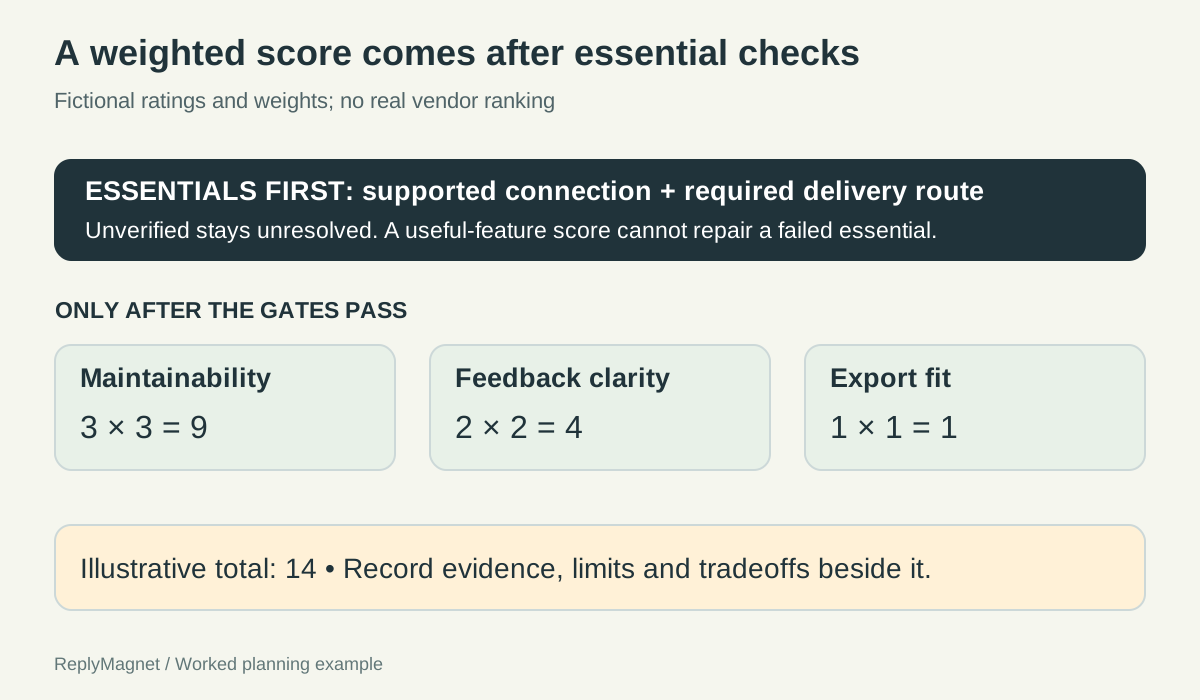
Original scorecard calculation. All ratings are invented examples; unknown essential requirements remain unresolved.
Blank trial evidence sheet. The observed-result column must not be populated from a sales claim.
Task
Deliver demo checklist
- Expected result
- Correct resource reached
- Observed result
- Not tested
- Limit / next action
- Record plan and eligibility
Task
Change the description
- Expected result
- Owner edits the correct message
- Observed result
- Not tested
- Limit / next action
- Record assistance needed
Task
Inspect an exception
- Expected result
- Owner understands the available feedback
- Observed result
- Not tested
- Limit / next action
- Use a safe controlled case
Task
Retrieve required information
- Expected result
- Output fits the business need
- Observed result
- Not tested
- Limit / next action
- Check fields and access conditions
Make the decision reviewable after the trial ends
Record the chosen scope, unresolved questions and reasons for the tradeoff so the next operator can understand the choice.
The workshop's decision note states which jobs the selected tool will support, which plan was evaluated and which capabilities remain outside scope. It also records the limitations accepted by the team. This prevents a later colleague from assuming the purchase promised every feature mentioned during evaluation.
Name an owner for the unresolved questions. If a quota interpretation needs confirmation, assign that check before committing to a larger campaign. If the team has not tested an external destination, do not treat it as validated simply because the automation editor works.
Keep the trial evidence current enough for the decision. Product behavior and plans can change. A screenshot or note from an older evaluation can be useful history, but it should not silently become proof of today's conditions. Recheck material details close to purchase and before a substantially different use case.
Review the choice after real operating experience. Did the maintenance work match the trial? Did the team understand the limits? Were unexpected tasks actually part of the original requirement? A mismatch can call for training, a narrower workflow or a different tool; the evidence helps distinguish them.
A task-based evaluation may produce a shorter shortlist and a less dramatic winner. That is useful. The objective is a tool that fits the work under understood conditions, with a record explaining why the team chose it.