Guides
ManyChat Free Plan Limit: What Changed and What to Do Next

The ManyChat free plan limit is 25 Active Contacts per month. The old 1,000-contact allowance belonged to a different, cumulative counting model. If you are planning a launch, check the number of people who will interact through your automations during the billing cycle, then decide whether to keep the test small, upgrade, or try another tool.
Published by ReplyMagnet · Last updated
Published by ReplyMagnet • Fact-checked October 7, 2026
ManyChat’s Free-plan help article, updated August 27, 2026, says all Free accounts have moved to the new plan, including accounts created before March 2. An older signup date alone is not a reason to expect the former allowance.
What changed in the ManyChat free plan
The headline number changed, but so did the thing being counted.
ManyChat’s pricing explanation, originally published August 19, 2026, describes the former 1,000-contact Free limit as cumulative and lifetime. Deleted contacts did not restore that historical allowance. The current monthly model measures active people rather than everyone accumulated over an account’s lifetime.
That distinction matters for two different businesses. A new creator inviting a fresh audience to request a guide may use a monthly people allowance quickly. A business with a large stored list and very few current conversations may have much less monthly activity than its database size suggests. Neither follower count nor total historical leads gives you the answer by itself.
Older tutorials can still help you understand a workflow, but their plan screenshots may belong to a different pricing system. Before following one, check its publication date, the unit beside the number, and whether it describes a paid or free account. A screenshot labelled “contacts” without a period or definition is a poor basis for a launch budget.
There is also a real distinction between Free migration and paid-plan availability. ManyChat’s Active Contacts documentation describes regional rollout differences for the wider pricing model. Verify the plans offered inside your account before choosing a paid tier. Do not turn that regional caveat into a claim that every older Free account retains its previous allowance.
What an Active Contact actually counts
ManyChat’s Active Contacts guide, updated August 27, 2026, counts a person once during a billing month even if they message repeatedly. Inactive stored contacts do not count for that month, and the count resets at the start of the billing cycle. Cross-channel identity can affect whether the same person is recognized as one contact.
For planning, keep three numbers separate: distinct people, qualifying requests, and messages sent. One person can ask for several resources. One resource request can involve both a public reply and a DM. A long conversation can produce many messages without introducing another person. A comparison becomes misleading as soon as it quietly swaps one of those units for another.
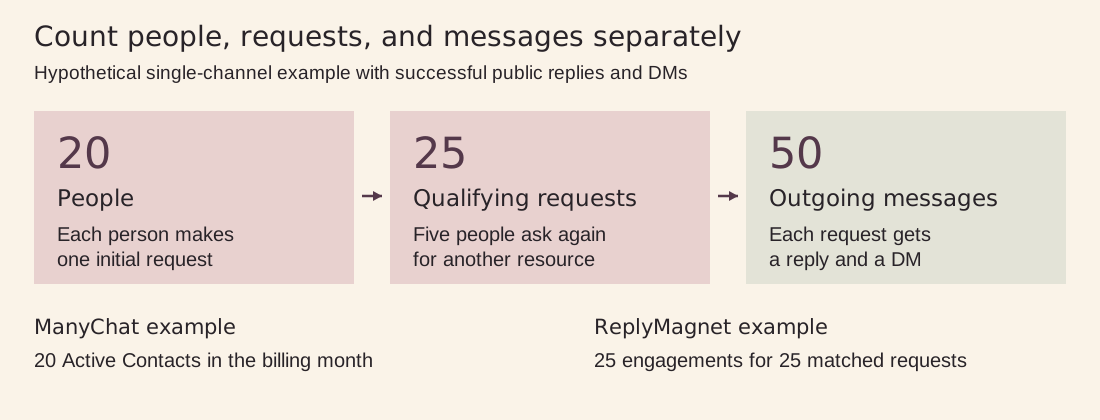
Figure 1. Original explanatory diagram. Assumes one channel, consistent contact identity, and successful paired sends. It is not a capacity or performance benchmark.
A hypothetical counting example
Imagine 20 people each ask for one checklist through a single connected channel. Five of them later make a second qualifying request for another resource. Assume every request is eligible and the configured reply and DM are successfully sent. There are 20 people, 25 requests, and potentially 50 outgoing messages across those paired sends.
Under the stated ManyChat counting rule, those repeat interactions do not turn the 20 people into 25 Active Contacts. ReplyMagnet’s engagement model counts the matching requests differently: a public reply and DM associated with one matched comment share one engagement, while another qualifying comment from the same person can consume another. In this example, that is 25 engagements. See the ReplyMagnet engagement definition.
These are illustrative counts, not a product benchmark or a promise that every real event will send. They explain why comparing 25 Active Contacts with 1,000 engagements cannot establish a universal capacity multiplier. A campaign with lots of repeat requests behaves differently from one where nearly everyone is new.
What you can test on ManyChat Free
The published Free plan includes four live automations, two connected channels, one account user, and one Inbox seat.
Supported channel choices are Instagram, TikTok, Facebook Messenger, and Telegram; WhatsApp, SMS, and email are excluded. ManyChat branding appears on the first message to a contact. See the current Free-plan feature list.
A useful small test answers a specific operational question. Can someone request your resource using the instruction in the caption? Does the right message arrive? Does the destination open on a phone? Is the resource clearly the one the post promised? You can learn a great deal about those steps without inviting your whole audience at once.
Choose one resource with an obvious purpose, such as a packing checklist or a lesson worksheet. Write the public instruction before building the automation so you can test the exact wording people will see. Ask a small group to follow that instruction without coaching. Their mistakes are useful evidence: an unclear keyword, confusing message, or inaccessible file should be fixed before you pay for more volume.
Decide what “passed” means before testing. Receiving the DM is one checkpoint. Opening the resource is another. If the business objective is a consultation or purchase, record that separately. A working automation can still deliver an offer that people do not want, and a contact allowance cannot tell you which part needs improvement.
Assign someone to check the test while it is live, even if that person is you. Keep the resource owner and the automation owner clear when they are different people. A broken file link needs a different fix from an incorrect trigger, and a small test is easier to learn from when observations reach the person who can correct them.
What to do when you approach the limit
First, establish what is happening in your own account.
Check the plan name, current usage, reset date, and any warning or restriction shown in the dashboard. Save the wording of the notice. If a promised delivery fails, note the affected post, trigger, and time so you can investigate one concrete event rather than guessing from a total.
Do not assume that every message stops everywhere when a twenty-sixth person arrives. ManyChat’s mobile-subscription documentation, updated August 27, 2026, explicitly says new contacts beyond the allowance stop triggering automations while contacts already within the limit continue to be served. That documented mobile behavior should not be presented as a universal explanation of every Free web account.
Paid web subscriptions have another important distinction: ManyChat supports overage thresholds, including choosing whether to allow additional paid contacts. Its current pricing explanation describes those controls. Review them when evaluating an upgrade; a high bill is not an unavoidable consequence of a successful post.
For your Free account, rely on the displayed restriction and ask ManyChat support if the precise cutoff behavior is unclear. Avoid experimenting with a large public campaign to discover it. If you are already promoting an offer, make its current delivery route clear to readers and check pending requests while you resolve the problem.
Keep the diagnosis narrow. A missing DM can also involve a trigger that did not match, a paused campaign, a connection problem, or a destination the recipient cannot open. An allowance warning is relevant evidence, but it does not prove that every delivery problem has the same cause. Confirm the failed step before changing a subscription.
Forecast the next campaign before choosing a plan
Use recent comparable posts as your starting point.
Record how many people asked for the resource, how often they asked again, and how much activity came from other campaigns during the same period. If you have no history, make a small pilot your first campaign rather than calling an untested forecast a reliable budget.
Here is a hypothetical plan for a worksheet launch. You expect 18 people from your first post and 12 from a second. Six people appear in both groups, so the estimated distinct audience is 24, assuming identity is recognized consistently on the same channel. Simply adding 18 and 12 would overstate the unique-person estimate.
Now consider what that estimate leaves out. An older post might still receive requests. Someone might message a question through a separate automation. A collaborator might share the offer with a larger audience. A forecast of 24 gives you very little room against a 25-person allowance, even though the basic arithmetic looks acceptable.
Write a normal scenario and a stronger-response scenario. For each one, identify the number that would cause you to pause promotion, check settings, or buy more capacity. Put the reset date beside the forecast. A campaign launched near a billing boundary should be planned against the actual cycle, not an assumed calendar month.
For an engagement-based tool, estimate qualifying requests as well as distinct people. Keep the assumptions visible so you can replace them with measured results after the pilot.
Separate recurring demand from a one-off launch
Suppose your worksheet usually attracts five requests a week, but a partner plans to mention it in a newsletter tomorrow. A forecast based only on the weekly average would miss the event most likely to change your usage. Add scheduled promotion, collaborations, and paid distribution to the forecast explicitly. If the partner cannot estimate the audience response, write down the uncertainty and choose a smaller first exposure or more room.
The same principle applies after a launch. Look at whether demand fell back to its usual level or whether the post continues producing requests. A recurring subscription decision should reflect the workload you expect to keep, while an urgent delivery decision must address the people currently waiting. Separating those questions helps you avoid choosing a long-term setup solely to solve one busy afternoon.
Choose your next step
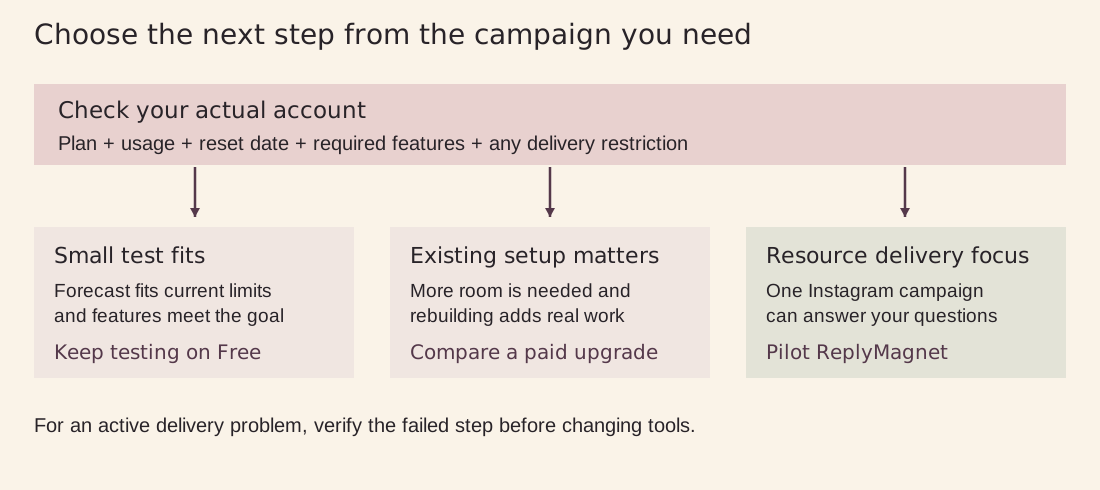
Figure 2. Original decision guide. Choose from your actual campaign requirements and verify delivery problems separately.
Stay on Free for a genuinely small test
Keep ManyChat Free if the test fits the current allowance and the included features answer your immediate question. There is little value in rebuilding a working test merely because another product has a larger headline number. Finish the test, inspect what people received, and decide what you learned before changing tools.
The limit should still be part of your publishing plan. A private trial with a few testers has a different exposure from an evergreen public post that continues attracting requests. If you cannot estimate the latter confidently, choose a delivery plan with more room before making a broad promise in the caption.
Upgrade when the existing workflow is worth keeping
An upgrade can make sense when your team already knows ManyChat, the workflows are working, and the features you need are available on the offered paid plan. Compare the subscription cost with the time needed to recreate, test, and maintain the same experience elsewhere. A cheaper starting price can be outweighed by a complicated migration.
Check the account’s actual offer and overage controls, including whether billing is handled through the web or a mobile store. For the full paid-tier comparison, use our ManyChat pricing guide. This article focuses on the Free limit so you can make that first decision without confusing it with every paid-plan feature.
Pilot ReplyMagnet for a focused resource-delivery campaign
ReplyMagnet is worth testing if the job is straightforward: someone asks for a resource in an Instagram comment, and you want to deliver it through a DM. Keep the pilot focused on that job. If you depend on a wider messaging stack, inventory those needs and verify them separately before considering a replacement.
Choose a new post and a single useful asset for the pilot. That gives you a clean way to compare setup effort, the recipient’s experience, and the usage consumed. Avoid pointing two automations at the same test post without checking their scope; duplicate or competing replies make the result harder to interpret.
How ReplyMagnet’s free allowance works
ReplyMagnet’s plans and billing documentation, updated September 14, 2026, separates trial features from trial volume. New workspaces receive 30 days of Pro features with 1,000 engagements and no card required. Paid Pro’s larger allowance is separate. Without a paid subscription, the workspace moves to Starter after the trial.
The ongoing Starter plan is free, with 1,000 engagements per month, one connected account, and one live campaign. Review the current ReplyMagnet plan details against the workflow you want to keep. A feature that worked during the trial may need a paid plan afterwards.
That last point deserves a practical check before you commit. Write down which parts of your test rely on paid capabilities. If the campaign must feed another system, use a particular asset type, or show an unbranded experience, evaluate that requirement explicitly. Trial success proves the configuration worked during the trial; it does not establish that the same configuration fits the free plan.
ReplyMagnet checks allowance before sending an over-limit request, which waits before either the public reply or DM is sent. Capacity can become available after a reset or upgrade, but pending work still needs an eligible account, campaign, and messaging window. Expired requests are not recovered simply by buying more quota. Read the quota and queue rules.
For a time-sensitive offer, schedule a usage check while the campaign is running. A queue is useful visibility into pending work, not proof that every request will eventually be fulfilled. If the resource must arrive before a class or launch ends, delivery timing belongs in your plan alongside the allowance.
Run a pilot that gives you a useful answer
Define the offer and the result
Choose a resource you can describe in one sentence. For example, “Comment CHECKLIST for the five-step shoot preparation PDF.” Keep the promised deliverable specific enough that a tester can tell whether they received it. Decide whether the pilot is checking delivery alone or also checking a downstream action, such as opening the file.
Build and test the complete recipient journey
Use ReplyMagnet’s campaign setup guide to configure the post, trigger, and delivery. Then experience the flow as a recipient. Read the public instruction, make the request, find the DM, open the destination, and check the resource on a phone. Test the final asset rather than a placeholder that will be swapped at launch.
Include a request that should match and one that should not. Check whether the wording gives someone a clear next step if they mistype the keyword. Avoid a test that succeeds only because you already know how the tool works. The best evidence is a recipient completing the journey without additional instructions from you.
Record outcomes and remaining capacity
Keep a compact pilot log with the post, time, expected response, actual response, and usage shown afterwards. Separate a delivered message from an opened resource and a later conversion. If someone says they did not receive the DM, investigate that case rather than treating the dashboard total as a substitute for their experience.
At the end, compare the original forecast with what happened. Did repeat requests matter? Did setup take longer than expected? Did the asset open without a login? Which features would need to remain available after the trial? Those answers are more useful than declaring a winner from two allowance numbers.
Decide in advance what would justify paying
Set a simple decision rule before the trial begins. For a service business, it might be that the campaign reliably delivers the checklist and creates a manageable number of relevant enquiries. For an educator, it might be that students can reach the worksheet without help. Choose an outcome you can actually observe rather than promising yourself that a larger allowance will automatically create sales.
Include the time you spend maintaining the workflow. If every small edit requires another round of troubleshooting, record it. If the setup is easy but the offer attracts the wrong audience, revise the offer before buying more volume. Your final choice should account for the complete job: configuring the campaign, fulfilling the request, checking exceptions, and keeping the destination useful.
Keep a brief decision note at the end of the pilot: what worked, what failed, what remains untested, and which plan would support the intended ongoing configuration. That note makes it easier to return to the decision a month later without relying on a vague impression of the trial.
Move only the workflow you have verified
If the pilot meets your needs, expand it deliberately. Preserve the copy, asset, and settings that passed the test. Check for overlapping triggers before redirecting traffic from an existing campaign. Keep the wider workflow in place until its replacement is verified, especially if other people depend on its leads or follow-up steps. Use the ManyChat alternative comparison for the broader feature decision.
Frequently asked questions
Is the ManyChat free plan still available?
Yes. ManyChat publishes a Free plan. Treat it as a small environment for learning and checking a workflow, then size any public campaign against your account’s current allowance and features.
Is the ManyChat free limit 25 or 1,000 contacts?
The current limit is 25 Active Contacts per month. The older 1,000-contact figure described a cumulative historical allowance. Always include the counting unit and period when comparing the two.
Does one person using several automations count repeatedly?
Repeat interactions by the same recognized person in one billing month count as one Active Contact. Check identity handling when multiple channels are involved, and do not use the number of messages as your contact estimate.
Will upgrading fix every missing message?
No. Check the failed step first. More capacity cannot correct the wrong trigger, an inaccessible resource, or an expired delivery window. Test the affected journey after making a change so you know whether the original problem is resolved.
Can I keep using ReplyMagnet without paying after the trial?
Yes. Free Starter remains available after the trial, with its own allowance and feature limits. Review any trial-only features your campaign uses before the trial ends so its ongoing setup matches the plan you choose.
Make the next decision with your own campaign data
The ManyChat free plan limit gives you a clear reason to check capacity before a launch.
Start with your actual workflow, forecast people and requests separately, and find out what happens at the limit for your account. Stay with a small test when it is enough; compare a paid upgrade or a ReplyMagnet pilot when the next campaign needs more.