Guides
Why your Instagram resource link asks visitors to sign in
The resource opens on your phone, but someone who received your Instagram DM sees “Sign in” or “Request access.” Before rebuilding the campaign, check whose permissions made your own test succeed. The owner’s browser can hide the exact obstacle a new reader encounters.
Published by ReplyMagnet · Last updated
Why does a delivered resource link still ask for a login?
Receiving a link does not grant permission to its destination. Your browser may already be signed in as the file owner, while the reader reaches a restricted external file. Identify the service showing the prompt before changing the campaign.
A successful DM and an accessible resource are separate outcomes. The first means the person received a route to the offer. The second means they can complete the action you promised at the destination.

Editorial illustration: seeing the resource is different from having access to it. This is not a product screenshot.
For external link assets, ReplyMagnet redirects to the configured destination after its delivery checks. It does not transfer your browser login, grant Google Drive or Dropbox permissions, or sign the visitor into another service. Completing a ReplyMagnet capture form does not change that boundary.
Start with the visible obstacle: the page address, the service name and the exact message. A file-permission change will not repair an expired ReplyMagnet delivery link. Equally, rewriting the DM will not make an owner-only document accessible.
Which layer is asking the reader to do something?
Distinguish a capture requirement, delivery-link error, external access prompt and intentional membership restriction. Similar-looking interruptions can require very different fixes.
Ask the tester to describe what appeared after tapping the received link. “It asks for details” is too broad: it could mean a short capture form, a provider login or a paid membership screen. The address and wording help locate the problem.
Use the table as a starting point, not an automatic diagnosis. If you are unsure which page is showing, record the observed host and error before changing settings. Keep personal delivery links and contact details out of public support messages.
An intentional capture step may be working correctly but surprising the reader. That is a promise or form-friction problem, covered in the lead capture form guide. An external file asking for access after that step is a separate issue.
Locate the interruption before choosing a fix
Observed interruption
Contact form before delivery
- Layer to inspect
- Optional ReplyMagnet capture
- First useful check
- Does the offer explain the requested details?
Observed interruption
Expired delivery-link message
- Layer to inspect
- ReplyMagnet delivery route
- First useful check
- Is this the current authorized delivery link?
Observed interruption
Provider sign-in or request-access page
- Layer to inspect
- External file or destination
- First useful check
- Can the intended reader open the exact destination signed out?
Observed interruption
Member or purchase login
- Layer to inspect
- Intentional restricted resource
- First useful check
- Was this restriction part of the offer?
What happens between the DM and an external resource?
The received link can include optional capture and delivery checks before reaching the external provider. Each layer has its own requirements; passing one does not automatically satisfy the next.
Think of the journey as connected steps rather than a single link that either works or fails. A person may finish the capture form successfully, reach the delivery route and then encounter a restriction on the external file.
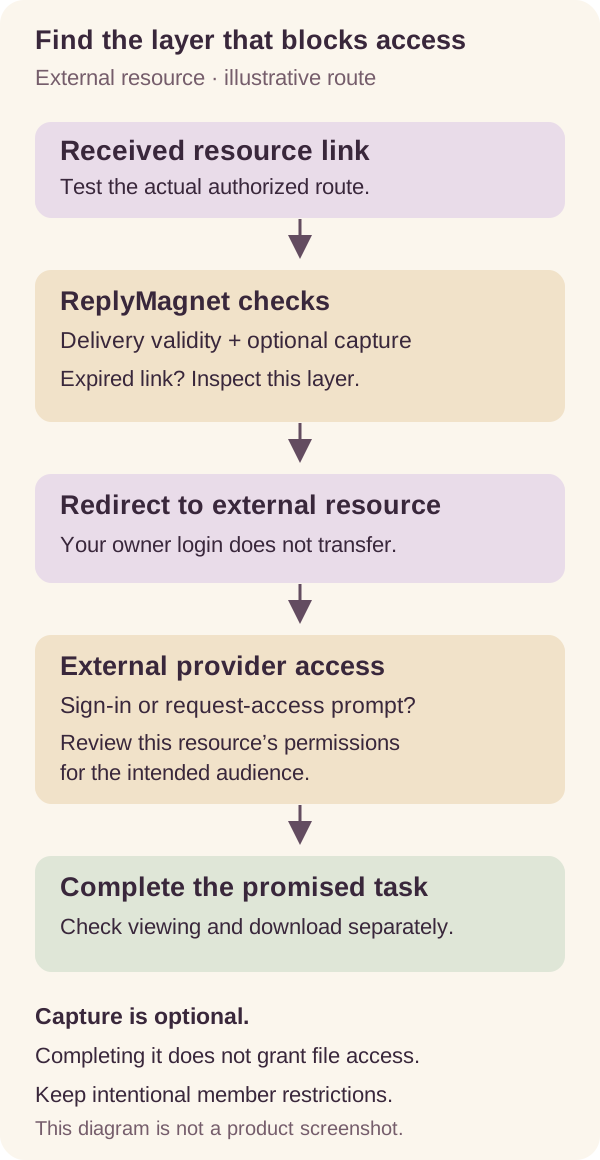
Original explanatory diagram for an external resource link. Capture is optional; the diagram is not a screenshot and does not imply every campaign uses a form.
ReplyMagnet supports external link assets on Basic and above. Hosted PDFs are a separate delivery option. This diagnosis concerns a destination hosted elsewhere; the lead magnet delivery guide explains the broader choice.
Keep expiry separate from sharing. If the delivery route reports that a token has expired, stop there and investigate that link. If it redirects successfully and Google Drive displays “Request access,” examine the external resource. Changing the destination’s permissions cannot make an expired delivery token valid.
Reproduce the problem without your owner login
Test the actual received route in a signed-out or private browser, then compare it with the direct external destination. Repeat the promised task on the intended phone route using a controlled tester.
First preserve the useful details: what was promised, which link was received, which host displayed the interruption and the exact error. Use an existing authorized demo link or a controlled test with an account you own or a consenting colleague. You do not need to send messages to real customers to investigate.
A private browser is useful because it separates the test from your normal signed-in session. It is one test condition, not proof that every reader or device will behave identically. If it opens the file, also test the route readers will normally use from Instagram on a phone.
Compare two journeys privately:
- Received delivery route: open the link from the test DM and complete any expected capture step.
- Direct destination: open the configured external file URL without going through the delivery route.
If both reach the same provider restriction, that points toward destination access. If the direct destination works but the received route fails earlier, inspect the delivery or capture layer and confirm the configured destination is correct. If only one browser fails, record the device and browser before assuming the permissions are fixed or that Instagram is universally at fault.
Test the actual promised action. Viewing the first page of a PDF is different from downloading a usable copy. A successful preview alone is insufficient when the offer says “download the worksheet.”
Check Google Drive sharing for the intended audience
Review the exact file and its intended audience. For an authorized public resource, viewer access may be appropriate; do not grant editing rights or broaden an entire private folder just to distribute one checklist.
Google Drive’s sharing documentation explains General access, the Anyone with the link option and Viewer, Commenter and Editor roles. Work or school settings can restrict external sharing, and download permissions are distinct from viewing permissions.
Before changing anything, confirm that the URL points to the intended resource rather than an editing workspace or a folder containing unrelated documents. Then decide whether this particular resource is supposed to be public. The answer should come from the offer and ownership of the material, not from a desire to remove every access prompt.
For a public checklist you control, use the official sharing guide to configure the intended access on that resource. A reader receiving a worksheet normally does not need permission to edit the source. If organization restrictions prevent the intended distribution, ask the responsible owner about an approved public copy or alternative host rather than weakening unrelated controls.
Retest signed out after the change. Check viewing and downloading separately where both are promised. Keep the owner’s signed-in test as a useful control, but do not treat it as reader acceptance.
Check whether the Dropbox link is for viewing or collaboration
Use the sharing route that matches the offer. A view-only shared link and an invitation to collaborate are different experiences; verify the one your reader actually received.
Dropbox’s guidance on sharing outside Dropbox describes shared links that let people without accounts preview content. That is different from inviting someone into a collaborative workflow. The exact experience still depends on the resource and sharing configuration.
Inspect the configured URL and the destination it opens. If the offer is a public reference sheet, the reader should not be led into an editing or team-membership task they did not expect. Follow the provider’s current instructions for the intended view-only route, then test it without your own signed-in session.
Do not conclude that every visitor must install an app or create an account merely because your test encountered a login page. Equally, do not promise that every file and configuration supports anonymous downloading. Check the specific file, the intended reader context and the action named in your invitation.
If preview works but the download does not, document those as separate results. That distinction gives the resource owner a clear problem to solve and avoids repeatedly changing a working campaign.
A worked example: public checklist or paid workbook?
A public giveaway and a restricted member resource require different decisions. Fix access to the intended public copy; preserve intentional restrictions and correct the invitation when access is meant to be limited.
Here is a fictional example, not a customer case study. An instructor offers a free materials checklist on Instagram. The campaign points to a PDF in Drive. The instructor opens it successfully while signed in, but a signed-out reviewer sees “Request access.”
The instructor compares the direct file URL with the received delivery route. Both reach the same restriction. The DM and capture journey are therefore not the immediate obstacle in this example. The next task is to confirm which file should be public.
The instructor creates or identifies the approved public checklist copy, reviews that resource’s sharing and verifies that a signed-out reader can view and download it. They leave the private teaching folder restricted. Finally, they repeat the controlled delivery journey to check that it reaches the same approved destination.
Now change one fact: the file is a paid workshop workbook intended only for enrolled members. Making it public would solve the wrong problem. Instead, the instructor should correct the offer to explain the membership requirement, provide clear authorized sign-in instructions, or replace the public giveaway with a genuinely public resource.
The useful question is not “How do I remove this login?” It is “What access did I promise this reader, and which destination delivers it?”
Use an access acceptance matrix
Record the URL layer, tester context, promised task, observed outcome and next action. Accept the resource only when the relevant reader journeys work as intended, not just the owner’s browser.
Keep a small worksheet rather than a vague “tested” note. Use these rows and adapt them to your offer:
- Owner signed in: direct destination; confirm the file still exists and is the expected version. This is a control, not proof of public access.
- Signed-out desktop: direct destination; check the promised viewing and download actions separately.
- Controlled Instagram phone route: received link; check any expected capture step, redirect and final task.
- External phone browser: compare the same authorized destination when diagnosing a browser-specific difference.
- New delivery link: verify the current campaign and asset reach the intended resource.
- Relevant authorized older link: check separately when troubleshooting previously delivered offers.
For each row, write what actually happened, including the host and error if it failed. “PDF preview opened; download requested login” is more useful than “partly works.” Record the date and device so someone can reproduce the result.
Do not assume replacing an asset repairs every previously sent link. Delivered links remain tied to their original asset. Correct the original destination’s access where appropriate, or use the current asset and campaign workflow for future deliveries while checking older links separately.
What if the resource still will not open?
Collect a reproducible, sanitized failure report and investigate the layer that differs between tests. Offer an authorized alternative route if needed instead of repeatedly asking readers to request access.
A useful report includes the time, device, browser, displayed host, exact error and whether the direct destination worked. Note whether the file was moved, replaced or had its permissions changed recently. A sanitized screenshot of the error can help; passwords, customer details and personal tracked links do not belong in a public report.
If the direct destination fails for the intended audience, involve its owner. If it works but the delivered route fails, compare the configured asset URL and the delivery error. If the only difference is one device or browser, preserve that detail and investigate it rather than making broader access changes blindly.
While fixing an inaccurate public offer, consider pausing the invitation or providing a clearly explained, authorized accessible copy. A paid or member resource may need better access instructions instead. The temporary response should match the real issue and avoid promising a fix you have not tested.
If the message itself never arrived, switch to the comment-to-DM troubleshooting guide. This article starts after the reader has a link to open.
Keep the destination usable after the fix
Assign an owner and retest when the file, host, permissions or offer changes. Keep public distribution copies separate from private working material where that fits your workflow.
Save the final destination, intended audience, acceptance results and review owner in your resource notes. When someone updates the file or changes its sharing, repeat the relevant signed-out and phone tests. A file that worked last month is not evidence that its current permissions still match the offer.
The resource library audit helps maintain these dependencies across multiple campaigns. For this one resource, begin with the asset documentation, inspect the actual external destination and run one controlled delivery check. Confirm what a reader can do at the end of the journey before sending more people into it.
Common questions
Does completing email capture give someone Google Drive access?
No. Completing ReplyMagnet capture does not grant external provider permissions. The file must separately allow the intended reader to complete the promised task.
Does every visitor need a Google or Dropbox account?
It depends on the resource and its sharing configuration. Some public sharing routes support signed-out access; restricted or member resources may require authentication. Test the exact destination rather than assuming a universal requirement.
Why does the link work for me but not my audience?
Your browser may already be signed in with owner access. Compare a signed-out direct-destination test with the actual received route to identify where the reader is blocked.
Does a link click prove the file was downloaded?
No. A click can precede a permission prompt, preview or failed download. Verify the promised action directly rather than treating a click as proof of reading or downloading.