Guides
Why people leave your Instagram lead capture form
The DM arrived, but the promised worksheet sits behind a form that people do not finish. Use this guide to inspect that specific handoff, distinguish friction from missing measurement, and choose one change you can evaluate.
Published by ReplyMagnet · Last updated
What is Instagram lead capture form abandonment?
Form abandonment means someone reaches or starts a contact form but does not complete it within your chosen observation period. A sent DM without a captured email is not enough evidence to call it abandonment.
Between a comment and a usable contact, several different things can happen. The person may never open the DM, may open it without following the link, may inspect the form and decide against it, or may submit details successfully but fail to open the resource. Each calls for a different fix.
This guide starts at the capture page. If the private reply never arrived, use the comment-to-DM troubleshooting guide first. If you are still choosing a resource, start with lead magnet delivery.
A missing contact is an observation, not an explanation. Before changing anything, write down what you can actually see: a test participant reached the form, a particular input failed, or an exported contact is missing a field. Do not convert an unknown step into a claimed drop-off rate.
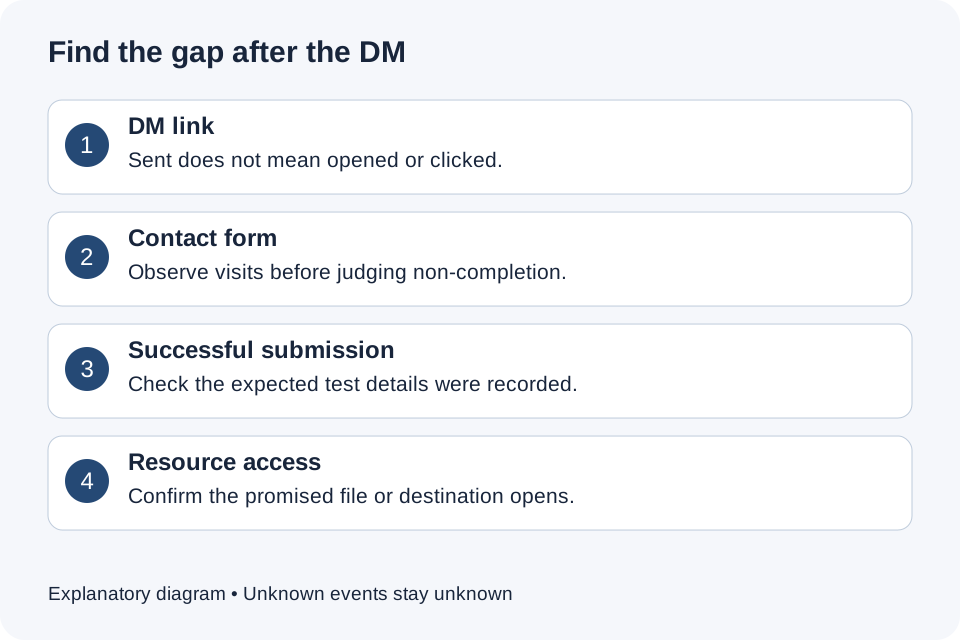
Figure 1. Diagnose the handoff you can observe. This is an explanatory diagram, not a ReplyMagnet analytics screenshot.
Why would someone leave after requesting the resource?
Common explanations include an unexpected contact request, unnecessary fields, an unclear next step, a mobile input problem or a resource that no longer feels worth the effort. Treat each as a hypothesis until you observe it.
Someone commenting CHECKLIST has shown interest in a checklist. They have not necessarily asked for a sales call or a continuing newsletter. A form that introduces those expectations can feel like a different offer from the one they accepted.
Start by reading the post, DM and capture page consecutively. Does the same resource name appear throughout? Is the contact requirement disclosed before the link? Can the visitor tell what happens after submitting? Ask a colleague unfamiliar with the campaign to explain the offer back to you before giving them hints.
Use the following table to choose an investigation. It does not rank causes by frequency; no campaign data is available to establish that.
Observed symptoms and the next useful check
Observation
Tester asks “Why do you need my phone?”
- Possible explanation
- The request does not match the offer
- Check next
- Explain the purpose or remove the phone requirement
Observation
Tester submits several times
- Possible explanation
- Unclear error or pending state
- Check next
- Record the exact validation message and device
Observation
Details submit but no useful resource opens
- Possible explanation
- Delivery failure after capture
- Check next
- Open the destination separately and inspect access
Observation
Few contacts, no recorded form visits
- Possible explanation
- Measurement is incomplete
- Check next
- Observe controlled tests before calculating abandonment
Which fields should you keep?
Keep a field only when you can name the action that requires it. A resource-only offer can use direct delivery; an explained email follow-up can justify email capture; an explicitly requested callback can justify a phone number.
Make a field-purpose list before touching campaign settings. Write the field, the promised use, who will use it and whether the same task is possible without collecting it. “We might need it later” is not a clear purpose for this offer.
GOV.UK’s form-structure guidance recommends deciding why information is needed before adding a question. Applied to an Instagram campaign, that means working backward from the service the reader requested rather than copying every field from your CRM.
For example, a printable meal planner does not inherently require a phone number. A request to arrange a property viewing may need a way to contact the person, but the caption should make that callback clear. These are illustrative decisions, not measured customer outcomes.
ReplyMagnet supports direct delivery or optional email and phone capture. Use the gate configuration documentation for current controls and plan availability. Do not assume you can add arbitrary custom questions or edit every part of the hosted form. Where the interface is fixed, improve the offer and enabled requirements, or document a specific product issue for support.
How do you explain the exchange before the click?
Name the resource, state the contact requirement and describe the intended next step in plain language. Repeat the same promise in the post and DM so the form introduces no surprise.
Here are two illustrative copy patterns. Adapt them to what you will actually deliver; they are not default ReplyMagnet messages.
Direct resource: “Comment PLAN for the one-page weekly planner. I’ll send a link so you can open the PDF.” A matching DM might say: “Here is the weekly planner. Open the link to view the PDF.” This offer does not promise email delivery.
Explained contact capture: “Comment CLASS for the lesson worksheet. The link asks for your email before access; we’ll also send the course dates you requested.” A matching DM might say: “Here is the worksheet access link. Enter your email to open it and receive the course-date update.” Use the second version only if that follow-up is genuinely configured and appropriately authorized.
Avoid saying “check your inbox” when the actual journey opens a download page. Capturing an address and emailing a file are separate actions. Likewise, do not promise immediate personal advice if nobody is assigned to reply.
Keep promotional subscriptions and the requested resource clear to the reader. This copy exercise does not establish permission for every future use of the contact details. Match your disclosure and follow-up process to the actual offer.
How should you test the form on a phone?
Test from the same entry point a recipient uses, including Instagram’s in-app browser where applicable. Check comprehension, inputs, errors, submission and resource access as separate steps.
Use an account and contact details you control, or a consenting colleague’s test details. Keep tests separate from real campaign outcomes, and avoid collecting customers’ personal information in screenshots or bug reports.
- Open the campaign’s DM link on a phone. Record the device and whether it opens inside Instagram or an external browser.
- Before typing, explain aloud what the page asks for and what you expect to happen. Confusion here is useful evidence.
- Tap each enabled field. Check that the keyboard, autofill and visible instructions make the requested information practical to enter.
- Try one deliberate formatting mistake with your test details. Check that the error identifies what needs correcting rather than leaving you guessing.
- Correct the value, submit once and wait for the result. Record any prolonged loading or unclear response; do not repeatedly tap to force it.
- Open the resource and check that the promised content is usable on the same phone. Then inspect the expected test contact in Leads.
W3C’s labeling guidance explains why controls need identifiable labels. Its form-notification guidance recommends understandable errors with correction instructions. Use these principles to describe a defect precisely, not to claim your test is a complete accessibility audit.
If you own a custom landing page, its developer can address input and label behavior. For ReplyMagnet’s hosted page, report the reproducible problem rather than assuming a campaign toggle changes the form layout. Include the device, browser, field, expected result and actual result; redact contact details and private access tokens.
What can you measure without inventing an abandonment rate?
Calculate form completion only when you have reliable form-visit and completion counts for the same cohort and period. If either count is unavailable, report it as unavailable and use observed tests to guide improvements.
DM sends are not form visits, and resource opens are not necessarily form starts. Do not divide captured emails by sent messages and label the result “form conversion.” That ratio spans several earlier steps and may include repeat activity.
A valid worksheet might define completion as the first successful form submission by a person who first visited during a particular week, observed for seven days. The precise period is your choice; document it and keep it consistent. Deduplicate people where your measurement supports it, exclude your test activity and account for people who finish later.
Illustrative arithmetic: if a properly measured cohort contains 40 unique form visitors and 24 of those people complete the form within the observation period, completion is 24 ÷ 40 = 60%. The remaining 40% is non-completion within that period, not proof that every person disliked the form. They may return later or encounter a technical problem.
These numbers are an example, not ReplyMagnet customer results. This guide does not claim ReplyMagnet exposes a built-in unique-form-visitor denominator or form-abandonment dashboard. Check what your actual records support before using the formula. The lead measurement worksheet helps separate contact capture from later qualified enquiries.
Which change should you try first?
Fix a reproducible failure first. Otherwise choose one clear friction hypothesis, record the current experience and change only the relevant requirement or message before reviewing comparable outcomes.
If a valid test submission fails, repair or escalate that failure before testing persuasive copy. When the path works, choose the most concrete observed hesitation: an unexplained phone field, an inconsistent resource name or a follow-up promise that appears too late.
Keep a short change log. Record the campaign, date, old version, new version, reason and success criterion. Use a criterion that protects the business outcome: useful contacts who requested the actual follow-up, not simply a larger raw address count.
For a sequential comparison, keep the resource and audience as similar as possible and record differences in posts, reach, timing and traffic source. A better result after a change is a signal to investigate, not proof that the change caused it. A different reel may attract a very different audience. Small samples should lead to cautious observations rather than confident percentage claims.
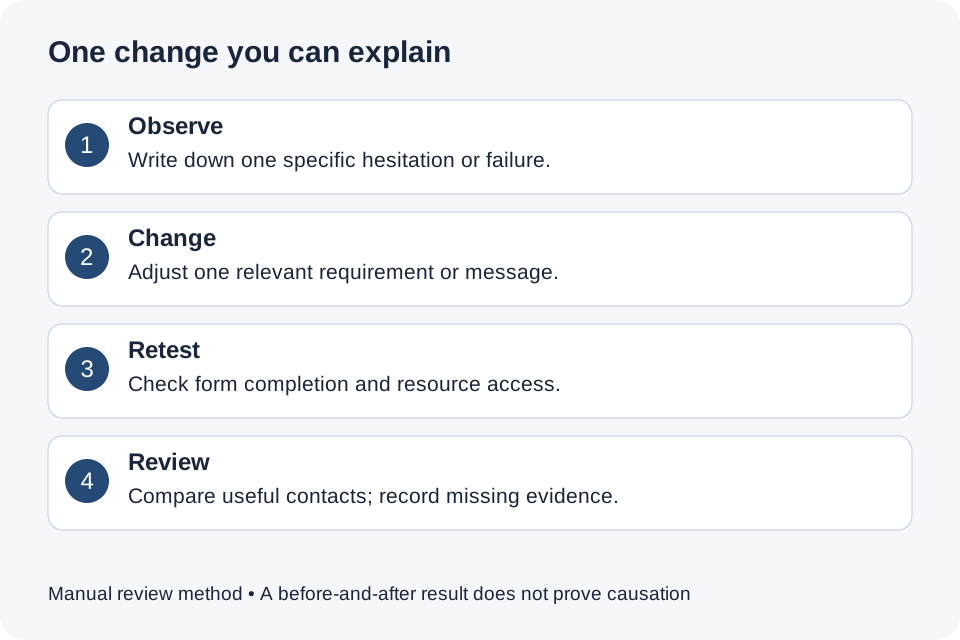
Figure 2. Keep the experiment small enough to explain. The loop is a manual review method, not an automated product feature.
Copy this form review worksheet
A useful review records the exact promise, the purpose of each field, a reproducible test and one decision. Leave unavailable evidence blank rather than filling it with assumptions.
Copy these prompts into your campaign notes:
- Campaign and resource: Which post and exact file or destination are being reviewed?
- Promise: What do the caption and DM say happens after the click?
- Requirements: Which details or other conditions are enabled, and why is each necessary?
- Observed friction: What did the tester actually do or say? Keep interpretations separate.
- Test context: Which device, browser and date? Were controlled test details used?
- Measurement: Which counts exist, how are repeats handled and what is unavailable?
- One change: What will differ, and what will stay comparable?
- Review decision: Keep, revise or investigate further, with the evidence supporting that choice.
For an illustrative worksheet campaign, the observed issue might be: “The tester expected a PDF but paused at a phone request.” The proposed change is to remove a phone requirement that has no explained callback purpose. Retest access and captured fields afterward. Do not claim the change improved conversion until you have evidence.
When you are ready to apply the review, create a ReplyMagnet campaign or inspect the gates on an existing one. Start with one clearly promised resource and one recipient journey you can test completely. More traffic becomes useful only when the visitor can understand and complete that journey.
Common questions
Should every Instagram lead magnet require an email?
No. Direct delivery can be appropriate when the resource is the whole offer. Email capture should have a clear purpose that the visitor understands before completing the form.
Does collecting fewer fields always improve lead quality?
No. Removing unnecessary requirements may make completion easier, but contact quality depends on the offer and audience. Judge the result using relevant enquiries and requested follow-up, not just submission totals.
Can I identify everyone who abandoned the form?
Do not assume so. A person who has not submitted contact details may not be identifiable in your available records. This guide does not describe a ReplyMagnet abandoned-form retargeting feature.
Does an accepted email address prove ownership?
No. Passing a format or form validation check is different from confirming that a person controls the inbox. Do not label collected addresses verified unless a separate verification process establishes that.