Guides
Find the promises hiding in your resource library
A folder can contain twelve perfectly readable PDFs and still be a maintenance problem. The difficult question is which posts keep sending each file, who checks its facts, and what a reader is being promised today. Audit those relationships before redesigning another cover.
Published by ReplyMagnet · Last updated
The short answer
A resource audit connects every active offer to its file or destination, owner and review trigger. Prioritize changes that could mislead readers, then consolidate or retire material that no longer serves a distinct task.
Start freeStart with active promises, not the tidiest folder
Build the inventory from the resources people can still request or open. Files with attractive names are not necessarily the ones that matter most.
Begin where a reader encounters the offer: recent posts, evergreen posts that still attract requests, active campaigns, profile destinations and any linked resource collection. Record the exact promise before opening the file. “Get the current class schedule” creates a different maintenance obligation from “learn three ways to prepare your workspace.”
A file folder alone misses external pages and old versions referenced by a campaign. A campaign list alone can miss a link in a profile or an older post that a teammate still shares manually. Work from both ends until each active promise has a destination.
This is a portfolio review, not a launch emergency. It can identify an expired promotion, but the immediate closing messages are a separate operational task. Here the aim is to understand which resources exist, why they exist and how they depend on one another.
The lead magnet delivery guide covers the journey for one resource. Use that understanding as the unit of the audit, then repeat the mapping across the library. Do not count files as achievements. A file nobody can find may be irrelevant; a single outdated file attached to several active offers may deserve attention first.

Editorial illustration, not a product screenshot.
Try the resource flow for 30 days with 1,000 engagements. No card required.
Start freeCreate a dependency register you can keep current
For each resource, record its reader task, version, incoming offers, factual owner and maintenance trigger.
A shared sheet is sufficient. The useful fields are resource title, destination or asset reference, version date, reader task, campaigns or posts that use it, factual owner, review trigger, last check, decision and next action. Avoid adding twenty administrative columns that no one will maintain.
Write the reader task in ordinary language. “Choose a suitable beginner class” is more informative than “lead generation.” It lets you identify two resources solving the same problem even when their titles differ. It also makes it easier to explain why one should remain separate.
For an external resource, record the final destination as well as the visible link. Redirects and access requirements matter. A shared document that opens only for the business owner is not a useful public guide, even if the link itself is technically valid.
Distinguish the person who uploads a file from the person who can verify it. A designer may own layout; an instructor owns class details. If no one can confirm a claim, mark it unresolved rather than treating the last modified date as evidence of accuracy.
Keep contact data out of this register. It maps content and offers, not people who downloaded them. There is no need to export leads merely to determine whether a resource has an owner.
Review four resources from an invented studio
A worked inventory should lead to different decisions for different resources, rather than a blanket instruction to refresh everything.
Imagine a fictional repair-workshop business called Bench Room. Its small library contains four items:
A tool checklist. Three evergreen posts offer it. The contents are still useful, but the final page names a supplier the business no longer recommends. Decision: correct the supplier reference, preserve the useful checklist, and review the three incoming promises.
An autumn timetable. One campaign and the profile link describe it as current. The dates are over. Decision: stop presenting it as the current timetable and send readers toward the business's maintained schedule. The audit records the dependency; the owner handles the customer-facing correction promptly.
A beginner project workbook. It includes a complete worked example that the shorter checklist does not. Decision: keep it separate because it supports doing the task, not just preparing tools. Confirm that its instructions remain accurate.
A getting-started PDF. Most of it repeats the workbook introduction, with an older contact address. Decision: assess consolidation into the workbook or another maintained destination. Check incoming offers before removing anything.
These are invented resources, not findings about a real account. The point is that keep, correct, redirect and combine are different decisions. A recent design date would not have exposed the expired timetable or the duplicated introduction.
Prioritize by the consequence of being wrong
Fix misleading or unusable information before cosmetic inconsistencies. Consider exposure, consequence and how quickly the underlying facts change.
A broken destination prevents the task entirely. An incorrect price or deadline can affect a purchase decision. An old logo may be less urgent when the reader still receives accurate instructions. Write down that reasoning so the review order is defensible.
Use a small set of questions rather than a mysterious numerical score. Can a reader act on an incorrect fact? Is the offer still being promoted? Is the problem present in several campaigns? Does someone know the correct replacement? An item can be urgent even when its recent download count is unavailable.
Be careful with traffic as a shortcut. A widely distributed evergreen guide deserves attention, but a rarely requested safety-sensitive instruction may also need immediate specialist review. This article does not supply technical repair or safety advice; Bench Room's responsible instructor would check that content before continued use.
Set aside purely cosmetic improvements unless they affect understanding. A redesign consumes time and may introduce new errors. First decide what the resource should say and which versions should remain available.
Google's helpful content guidance emphasizes reliability and useful original value. An audit supports those qualities through actual corrections. Changing a date on the cover without reviewing the contents is not a substantive refresh.
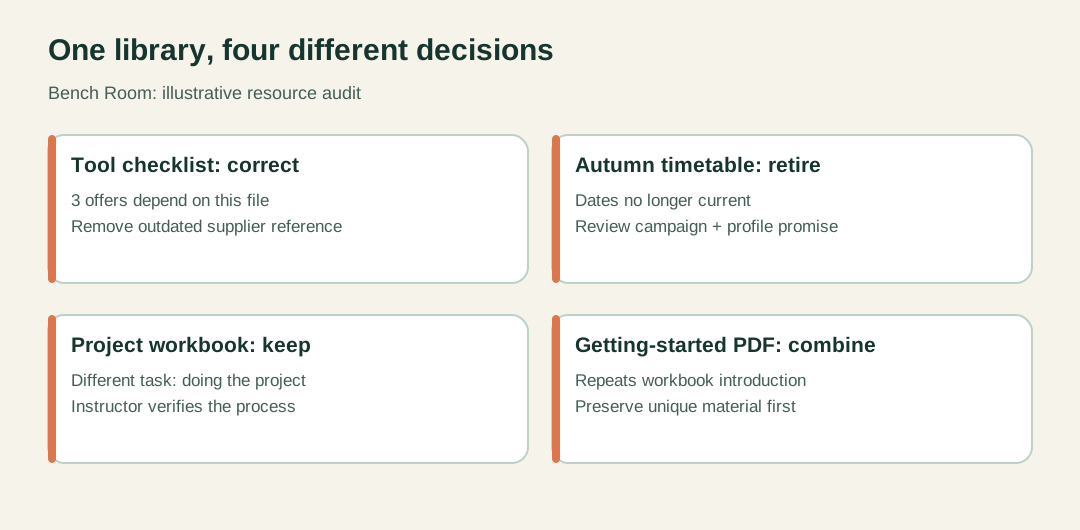
Illustrative Bench Room inventory. Counts describe the example only.
Trace a correction through future and existing deliveries
Replacing the resource used by a campaign affects future requests. Previously delivered copies and links need their own consideration.
Suppose Bench Room corrects the tool checklist. It uploads the revised file, edits the campaigns that should use it, and makes a fresh controlled request to inspect the result. The ReplyMagnet asset documentation explains that existing delivery links remain tied to the original asset. A new upload does not silently replace every copy already distributed.
The dependency register tells the owner which campaigns need editing. It also prevents an easy mistake: fixing the resource for the newest post while two older offers continue sending the previous version.
After changing each relevant campaign, verify the exact resource title and the destination a new request receives. Follow the current testing process rather than triggering messages to real customers for convenience. A successful upload is not evidence that every campaign now points to it.
For already-delivered information, the response depends on what changed. A minor spelling fix and a material change to an instruction do not create the same problem. The business should decide how to correct important information through appropriate existing channels. Do not assume that a past download authorizes an unsolicited promotional message.
Record the distinction explicitly: “future campaign links changed” and “earlier distribution assessed.” Those two lines keep a maintenance task from being marked complete too early.
Consolidate only when the reader’s task stays intact
Combine resources that genuinely serve the same purpose. Preserve separate resources when their tasks, audiences or required depth differ.
The tool checklist and project workbook overlap, but they are not automatically duplicates. One helps someone prepare; the other guides the work. Combining them might make a quick reference harder to use. The getting-started PDF, however, may add no independent value beyond the workbook's opening pages.
Read both resources before deciding. Compare the actual inputs, instructions and result, not just similar titles. List anything unique that would disappear in a merge. If that material matters, preserve it in the maintained destination before changing incoming offers.
Update the invitation as well as the file. A post promising a one-page checklist should not unexpectedly deliver a thirty-page workbook. If the best destination changes the promise, the campaign copy needs a deliberate revision.
A resource can also be retired without a replacement. That is appropriate when the offer is no longer relevant and no honest substitute exists. Do not send readers to a generic homepage and pretend it fulfills the original request. Keep a record of why the item was retired so a future teammate does not revive it from an old folder.
If the audit reveals a genuinely missing task, consult the lead magnet ideas guide. Commission that missing resource separately. An audit is not a reason to generate new files merely to restore a preferred library count.
Give each resource a reason to be reviewed again
Use changes in underlying facts as review triggers, with a named owner and a practical check date where useful.
A schedule needs attention when dates change. A guide to a software interface needs attention after relevant product changes. An evergreen worksheet may need a periodic usability check and corrections when readers report confusion. A single monthly rule for every resource may be too slow for one and unnecessary for another.
For Bench Room, the timetable belongs to the operations owner and changes with the schedule. The tool checklist belongs to the instructor and is reviewed when recommended equipment or suppliers change. The workbook gets a content review when the taught process changes. These triggers are more actionable than “keep everything fresh.”
Finish the audit with a short queue: resource, decision, responsible person, next action, affected offers and evidence of completion. Keep unresolved items visible. If a specialist has not checked an instruction, record that limit rather than marking the resource reviewed because someone opened the PDF.
Start with the resources attached to active campaigns. Use campaign documentation when changing their configuration, and retain a simple dependency record beside the content. The outcome should be a smaller set of understandable maintenance responsibilities, not another elaborate spreadsheet that becomes the next outdated resource.