Guides
Keep Instagram resource links working when your website moves
A new website can look finished while an older Instagram DM still sends someone to a missing worksheet. Treat the old resource address as a promise worth preserving: identify its replacement, keep the route available and test the journey a reader already has.
Published by ReplyMagnet · Last updated
How do you preserve old resource links during a website move?
Map each old public resource URL to an equivalent new destination, keep the old endpoint serving the appropriate redirect and test actual old links. Update future campaign destinations separately; a new homepage does not preserve every older resource promise.
A person who requested a checklist should still reach that checklist or an honest explanation of what replaced it. Sending them to the new homepage may return a working page, but it also makes them search for the thing you already promised.

Generated editorial illustration of a resource address change, not a product screenshot.
This guide concerns website addresses you control. It does not move your Instagram automations or rewrite sent messages. The practical output is a finite URL map, a tested redirect route and a record of what happens to older links after the move.
Begin before switching off the old site. Once the old endpoint is unreachable, publishing an equivalent page elsewhere cannot tell the visitor’s browser how to find it.
Identify which part of the journey actually moved
Separate the Instagram message, ReplyMagnet delivery route and external resource address. A website redirect can preserve an owned external URL, but it cannot repair every earlier step in the journey.
An older message may contain a ReplyMagnet delivery link that is associated with its original asset. For an external asset, a valid delivery route can lead to the configured website address. If that address has moved, a redirect on the old website can send the reader to its equivalent replacement.
An expired or missing delivery token stops earlier. A website redirect cannot revive it, because the reader does not reach that website through the failed route. It also cannot repair a deleted or inaccessible asset. A hosted ReplyMagnet PDF is a different case: it is not moved simply because your own website changes.
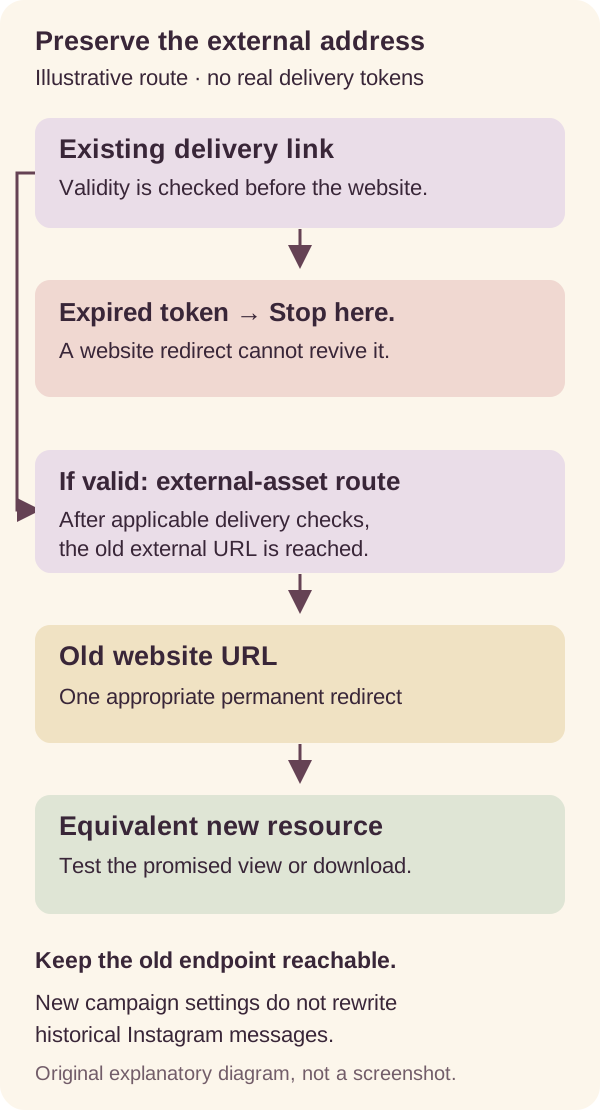
Original scope diagram. It shows an external resource route, not a product screenshot or a way to revive expired delivery links.
Changing a current campaign or uploading a new asset does not rewrite historical Instagram messages. Handle future requests through the current asset workflow, and preserve old owned external destinations separately. The asset documentation is the starting point for reviewing which destination a campaign uses.
Build a short inventory of the URLs people already have
Collect exact old resource URLs from your own campaigns, public links, downloadable materials and website records. Include files and landing pages, not just pages that appear in the new site navigation.
Start with resources you still promote and evergreen offers that may receive requests long after publication. Check external asset destinations, profile links, public captions and links embedded in PDFs you previously distributed. Your own website exports or request logs may reveal addresses that are easy to overlook.
You do not need to export private customer conversations to build this inventory. Use public addresses and controlled records you are authorized to inspect. Keep personal delivery tokens out of shared migration spreadsheets.
Record the full scheme, host and path. An old HTTPS address, a different subdomain and a meaningful query variant may behave differently. Do not assume the sitemap contains every campaign landing page or downloadable file. Record approved query parameters that the destination needs without copying sensitive values indiscriminately.
Use the resource library audit if the collection is large. For this move, narrow that inventory into actionable rows: old address, promised resource, final destination, owner and test result. Each row should describe a specific reader task, such as opening a materials checklist or checking workshop dates.
Map the old promise to its closest honest replacement
Choose an equivalent file or page for each old URL. Where the offer has ended and no suitable replacement exists, use an honest outcome rather than redirecting everything to the homepage.
The table below is a fictional four-row map. The example domains and paths illustrate the decisions; they are not live ReplyMagnet customer resources. A real map should use destinations you have reviewed and can maintain.
For the first three rows, the replacement preserves the original task. The fourth requires an editorial decision before a redirect rule. An expired discount should not land on an unrelated offer in a way that implies the old terms still apply. An explanatory page may be useful; if there is no appropriate replacement, an intentional not-found or gone response can be more honest than a misleading destination.
The expired-offer guide covers that messaging decision. Keep it separate from the mechanics of changing an address.
Fictional resource mapping from example.com to example.org
Old path on example.com
/checklist.pdf
- Proposed outcome on example.org
- /resources/materials-checklist.pdf
- Reason
- Equivalent downloadable checklist.
Old path on example.com
/class-dates
- Proposed outcome on example.org
- /workshops/calendar
- Reason
- Current schedule for the same task.
Old path on example.com
/starter-guide
- Proposed outcome on example.org
- /learn/getting-started
- Reason
- Equivalent introductory guidance.
Old path on example.com
/autumn-2025-offer
- Proposed outcome on example.org
- Honest expired-offer page, or 404/410 without replacement
- Reason
- Do not imply the old offer still exists.
Choose a redirect that matches the move
For a permanent move, use an appropriate permanent HTTP redirect configured by your website platform or implementer. The status code and destination must both be correct; neither substitutes for reviewing the URL map.
MDN’s redirection guide explains HTTP redirect responses and their Location destination. The permanent statuses are 301 and 308; 302 and 307 describe temporary redirection. It also explains chains and loops, which can prevent a clean journey.
Give the reviewed map to the person managing the website or use the hosting platform’s supported redirect controls. Configuration differs by host, so a generic server snippet is not a safe substitute for checking your actual deployment. Prefer the supported server redirect mechanism over an improvised page that tells everyone to click another link.
Where possible, map the old URL directly to the final destination. An old-to-intermediate-to-new chain adds another dependency and makes failures harder to locate. Test that a broad rule does not override a more specific file mapping or send the new site back to the old one.
Domain forwarding and DNS changes are not automatically a path-aware resource map. Ask the implementer to demonstrate the four kinds of outcome in your reviewed list, rather than accepting only a successful visit to the domain’s root.
Keep the old endpoint available long enough to do its job
A redirect depends on the old address remaining reachable. Domain control, DNS, HTTPS and the service returning the redirect must continue working for the reader to reach the new resource.
If an old HTTPS certificate fails, the browser can stop before receiving the redirect. If the domain or redirect-serving host stops working, an accurate map in your notes cannot help the request. Assign someone to maintain those dependencies rather than assuming the new hosting account automatically replaces them.
Google’s site-move guidance recommends mapping old URLs, including downloads, to appropriate new destinations, avoiding irrelevant mass redirects and keeping redirects as long as possible, generally at least a year. This is search guidance, not a guarantee that traffic or rankings will remain unchanged.
Older DMs, bookmarks and downloaded documents can remain in use longer. Treat that time guidance as a planning baseline, not a date on which every useful old route should be deleted.
If a third-party URL cannot be redirected by you, do not describe it as an owned endpoint. Check whether the provider supports keeping the original file accessible or changing its destination. Otherwise update future invitations and provide an accurate alternative through appropriate channels. A redirect on your own domain cannot recover an expired provider share link that never reaches it.
Test the resource, not just the status code
Inspect the actual browser request and then complete the promised task. A redirect response followed by a successful page load is insufficient if the page is the wrong file or asks the intended reader for unavailable access.
For a technical check, use the browser’s Network panel to inspect the actual GET request. Record the first redirect status and its Location, the final address and the response. A separate HEAD check may behave differently, so do not use it as the only evidence of the reader’s journey.
Then check the content: correct title, expected file, usable download and no surprise sign-in wall. The resource sign-in diagnostic helps distinguish provider permissions from earlier delivery problems. Test signed out and on the intended phone route, because your normal browser may carry owner access.
Try relevant query variants deliberately. Preserve parameters the approved destination needs, but do not blindly forward sensitive tokens or private values to another host. The DM tracking guide covers attribution checks; here the priority is that the resource promise survives the move.
A good result records both transport and meaning: “Old checklist URL redirects once to the new checklist; signed-out phone download opens the expected file.” That is much stronger evidence than “new domain returns 200.”
Check future links and historical routes separately
Test the new campaign destination, a valid authorized older delivery link, the old public URL and links embedded in previously downloaded resources. Each proves a different part of the move.
Use this acceptance list with controlled examples or existing authorized demo links. There is no need to send messages to real customers solely to test the article’s workflow.
- Direct new destination: confirms the replacement resource exists and supports the intended task.
- Old public website URL: confirms the website redirect itself works, independent of ReplyMagnet.
- Still-valid prior delivery link: checks that the original asset route reaches the old URL and follows its redirect. An expired token is a separate failure.
- Current campaign delivery: confirms future requests reach the configured resource through the current workflow.
- Link in an older downloaded document: checks the exact address that document contains, rather than assuming it matches the campaign’s current value.
For each test, record the layer, context, expected outcome, actual outcome and next action. Use a signed-out context when public access is intended. Test download separately from preview if the offer promises a downloadable file.
Keep failures specific. “Old PDF path reaches homepage” calls for correcting the map. “Delivery token expired before redirect” calls for reviewing that delivery route. Rebuilding a campaign to fix the first, or changing website rules to fix the second, targets the wrong problem.
Launch with evidence and a practical recovery plan
Test a representative set before expanding redirect rules, save before-and-after evidence and correct mismatched mappings precisely. Keep the old URL service available while resolving problems.
Before launch, assign an owner to approve each replacement and an implementer to configure the route. Save the old URL, final URL, expected resource, test time and result. Include at least a file, a page and any intentional expired-offer outcome in the initial test set.
If a rule sends readers to the wrong place, identify the affected paths and correct that rule. Repeatedly republishing Instagram posts will not repair an address in an older message or saved document. A temporary recovery decision should be clearly distinguished from the permanent destination you intend to maintain.
After launch, review available old-link requests and resource-specific errors. Do not infer that no one uses an old link merely because you lack logs for it. Retest when domains, certificates, hosts or destination permissions change.
Use this final worksheet: old URL; original promise; equivalent destination; redirect decision; endpoint owner; actual GET result; signed-out task result; phone result; unresolved issue; next review date. Keep personal tokens out of the public version.
Start by reviewing your current assets and choosing one controlled old resource journey. Preserve its actual promise, then repeat the same evidence-based check across the rest of the map.
Common questions
Will updating a campaign fix links in messages already sent?
No. A current campaign or asset change does not rewrite historical Instagram messages. Preserve owned old external URLs separately and test older delivery links according to their original asset and validity.
Can a website redirect revive an expired ReplyMagnet link?
No. An expired or missing delivery token stops before the external website. A redirect can help only when a valid route actually reaches the old external URL.
Can I redirect every old resource to the new homepage?
That can break the original promise even if the homepage loads. Map useful old resource URLs to equivalent destinations and handle expired offers honestly.
Do I need control of the old domain?
You need the ability to keep the old endpoint reachable and return the intended redirect, directly or through a supported provider service. ReplyMagnet does not manage your website redirects or DNS.