Guides
Track the visit after an Instagram DM without overstating the sale
A DM was sent. A delivery link was opened. A website session appeared. An order arrived later. Those records can all be useful, but they are not four interchangeable counts of the same thing.
Published by ReplyMagnet · Last updated
The short answer
Add consistent UTM parameters to your external destination, test the full delivered link, and inspect the matching GA4 session dimensions. Keep automation activity and confirmed orders separate unless you have evidence that connects them.
Start freeWhat a tagged DM link can actually tell you
UTM parameters label the source, medium and campaign attached to a destination URL. They help categorize recorded website traffic; they do not prove who read a DM or what caused a purchase.
Imagine a workshop business promoting the same booking page through an Instagram DM, its profile link and a partner's website. Without a naming convention, all three routes can become hard to distinguish in the destination analytics. A tagged link gives each placement an explicit label.
Google's campaign URL guidance explains how URL parameters populate acquisition reporting. The destination still needs a working analytics implementation. Adding text to a URL does not install GA4, configure purchases, or make every visit observable.
A tag also travels with the link. If someone forwards a DM destination to a friend, that friend can arrive with the original campaign labels. The label describes the distributed URL, not a verified personal history. Avoid naming the metric “people who received our DM” when the available evidence is website sessions associated with that URL.
Keep the operational question narrow at first: Can we distinguish recorded visits associated with the DM placement from our other placements? That is a useful improvement even before you can connect an enquiry or order to a specific campaign.

Illustration of traffic paths. It does not represent observed visits or a GA4 interface.
Try the resource flow for 30 days with 1,000 engagements. No card required.
Start freeChoose names before you copy links into campaigns
Use stable, nonpersonal labels for the source, medium, campaign and placement. Keep spelling and case consistent across everyone preparing campaign URLs.
For this worked example, the campaign name is autumn_workshop. The DM and profile placements use instagram as source and social as medium. Their content labels differ: dm_reply and profile_bio. The partner website uses studio_partner and referral.
These are example conventions, not required names. Choose labels that your team can explain months later. A short launch name is useful; “new campaign final final” is not. Do not put a changing stock status or price in the campaign name unless you deliberately need separate reporting groups.
Google's manual tagging documentation maps UTM fields to manual traffic-source dimensions. The campaign URL guidance also notes that parameter values are case-sensitive, so Instagram and instagram should not be treated as interchangeable in your register.
Keep medium meaningful. In this example, social identifies the traffic type and dm_reply identifies the placement. This avoids inventing a new medium for every message variation. GA4's default channel grouping uses rules; inspect the actual report rather than assuming any custom medium will appear under your preferred channel.
Never include an email, phone number, Instagram username or other personal identifier in UTM values. Google's PII guidance specifically covers URLs and campaign parameters. A campaign label is not an appropriate way to join a person across your systems.
Build three URLs for three placements
Keep the destination and campaign constant when comparing placements for one promotion. Change the source, medium or content label only when that part of the distribution actually differs.
The following URLs use example.com as a fictional destination. Replace it with your real page; these are teaching examples, not working workshop booking links.
DM placement
https://example.com/workshop?utm_source=instagram&utm_medium=social&utm_campaign=autumn_workshop&utm_content=dm_reply
Instagram profile placement
https://example.com/workshop?utm_source=instagram&utm_medium=social&utm_campaign=autumn_workshop&utm_content=profile_bio
Partner website placement
https://example.com/workshop?utm_source=studio_partner&utm_medium=referral&utm_campaign=autumn_workshop&utm_content=partner_article
The first two intentionally share source, medium and campaign. Looking only at instagram / social will combine their traffic. The content dimension is what distinguishes them. The third carries a different source because the published placement is a partner website.
If the destination already has query parameters, preserve them and add the new pairs correctly rather than starting a second query string. Use a URL builder when unsure, then inspect the result. Avoid duplicate UTM keys with conflicting values. Check any existing anchor, redirect or booking parameter instead of pasting over it.
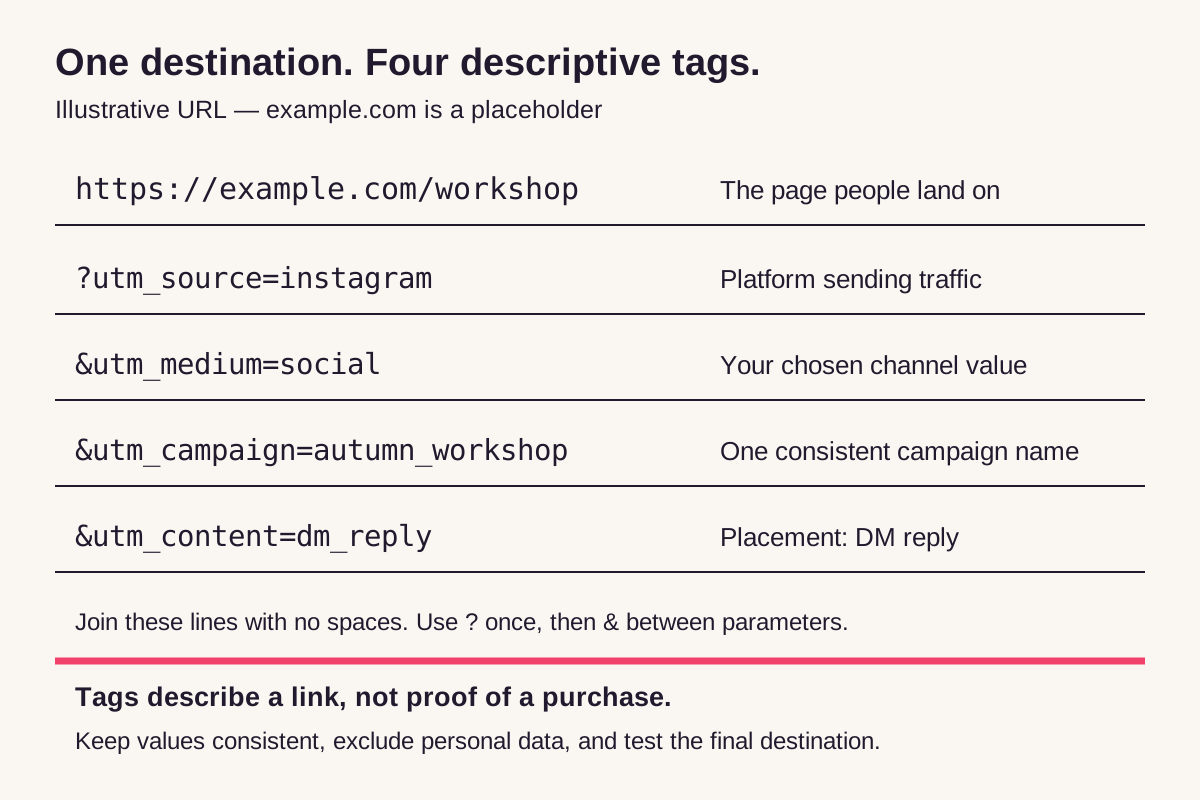
Example URL anatomy using a fictional destination. The content value identifies this as the DM placement.
Make the clean destination work before tagging it. If it already returns an error, requires owner access, or sends people to an unrelated page, campaign parameters will not repair the journey.
Test the link people receive, including every redirect
Put the tagged URL in the external destination field and test the complete recipient journey. A working URL in your notes does not prove the delivered route preserves its parameters.
In ReplyMagnet, external link assets are available on Basic or above. The asset documentation distinguishes the ReplyMagnet delivery link from the external destination it opens. Configure the tagged URL as that destination. This is a manual tagging workflow, not a native GA4 integration or an automatic UTM feature.
Use a clearly labeled test asset and a controlled campaign before using the link in a public offer. Record which URL you entered, then follow the link that the test recipient actually receives. If your journey includes a capture page or another redirect, include it in the check.
A practical test record should include:
- The exact destination saved in the asset, with all parameter values.
- The delivery link opened from the controlled test message.
- The final page and visible URL after redirects complete.
- Whether the correct page loads on a phone without owner privileges.
- The analytics evidence for the test visit, if collection is permitted and enabled.
Do not infer a successful analytics check merely because parameters remain in the address bar. Conversely, a site may rewrite the visible URL after collecting the initial page information. If the URL changes, ask the person responsible for analytics to verify what was recorded before declaring the tags lost.
Test each placement separately. A profile link service, a partner redirect and the DM delivery path can behave differently. Keep test traffic identifiable through a nonpersonal test label or your existing analytics testing process, and exclude it from business reporting using a documented method.
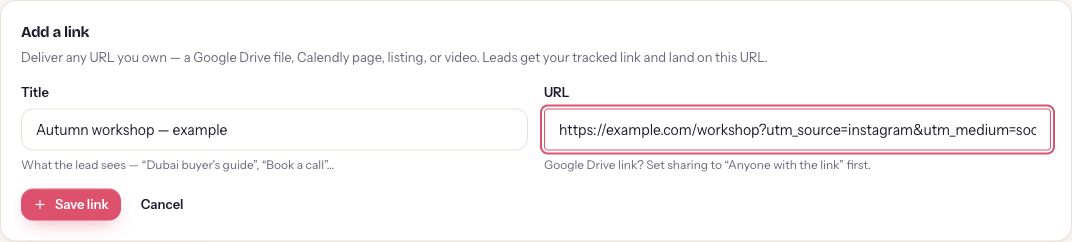
Actual unsaved Add link form, canceled without creating an asset. The input shows only part of the example URL; the diagram above shows all parameters. This is configuration evidence, not a verified delivery or analytics result.
Inspect session dimensions before reading a total
Use session-scoped acquisition dimensions for the campaign traffic question, and use the manual content dimension to separate DM and profile placements. First-user acquisition answers a different question.
In GA4, start with Reports → Acquisition → Traffic acquisition, if that report is present in your property's navigation. Select the relevant reporting dates and inspect Session source / medium and Session campaign. Google's Traffic acquisition documentation describes those dimensions and notes that report navigation can be customized.
For the two Instagram URLs, inspect Session manual ad content to distinguish dm_reply from profile_bio. The Manual report documentation describes that dimension and the manual-campaign report. Depending on your reporting setup, you may need the report or an appropriate exploration rather than only the default table.
Write down the dimension and metric names alongside any number you copy. “Instagram: 64” is incomplete. “64 sessions, Session campaign autumn_workshop, Session manual ad content dm_reply, dates [range], property timezone [zone]” is auditable.
Do not compare a first-user source total with a session-source total as if they were duplicate reports. Google explains the difference between user and session scopes. The former concerns initial acquisition; the latter concerns sessions. Event-level attribution introduces another scope and should be named separately.
One test click does not necessarily create a new GA4 session. Opening the DM URL and then the profile URL during an already-active session may retain the original session acquisition labels. For placement checks, use separate fresh-session tests arranged with your analytics owner, and document whether a session was already active. Do not treat three successive clicks in one browser session as three independent session-source tests. The traffic-source scope guidance explains this distinction.
If the test does not appear, check the property, stream, dates, filters, consent behavior and collection setup before changing every campaign name. Allow for report processing rather than expecting every standard report to update at the moment of the click. Ask the analytics owner to inspect the test event when the reason remains unclear.
Reconcile four records without inventing a funnel
Requests, delivery-link activity, website sessions and orders have different definitions. Compare their context and investigate gaps before calculating a cross-system conversion rate.
Here is a deliberately synthetic campaign ledger. The figures are invented to explain interpretation; they are not ReplyMagnet results, targets or industry benchmarks. Assume a common reporting week has been recorded, but no person-level reconciliation has been completed.
The request count can include repeat requests. Delivery-link access is activity recorded at a different point from arrival on the destination. GA4 sessions are neither raw link opens nor a guaranteed count of distinct people. Store orders may include buyers from unrelated campaigns. Those definitions alone are enough to prevent treating the four rows as a verified sequence of the same customers.
You cannot conclude that 8 of the 64 sessions purchased from this ledger. The store's eight orders have not been linked to that group. You also cannot label the difference between 90 link opens and 64 sessions as 26 lost customers. Repeated opens, measurement settings, dates and other differences need investigation first.
A responsible campaign note would say: “The systems recorded these four counts. The destination report associates 64 sessions with the example DM placement. Order attribution has not been reconciled.” It is less dramatic than a conversion claim, but it tells the next reviewer exactly what is known.
For a broader lead-quality review, use the qualified Instagram leads worksheet. It defines cohorts and business outcomes separately from this URL implementation task.
Synthetic ledger: invented counts with separate definitions
Record
Qualifying requests
- Example count
- 120
- System / what remains uncertain
- Automation records; repeat requesters may be present
Record
Delivery-link opens
- Example count
- 90
- System / what remains uncertain
- Delivery-link activity; not necessarily distinct people or destination sessions
Record
DM-tagged website sessions
- Example count
- 64
- System / what remains uncertain
- GA4 session reporting; collection and attribution settings apply
Record
Store orders during the week
- Example count
- 8
- System / what remains uncertain
- Order system; relationship to the DM campaign is unverified
Investigate missing or surprising traffic one cause at a time
Check the actual path, measurement conditions and reporting scope before blaming the campaign. Missing data should stay unknown until you have evidence explaining it.
The tag disappears. Repeat the journey from the delivered link. Inspect each redirect and the final destination. A booking service or link tool may handle parameters differently from your own landing page. Ask its owner to confirm supported behavior; do not assume that every redirect preserves every query parameter.
An arrival is not recorded as an ordinary session. Consent settings, browser restrictions, blocking tools and implementation errors can change what is collected or reported. Google documents consent management separately from URL tagging. Test within your site's actual privacy configuration; do not bypass it to make the totals agree.
A purchase appears after another visit. Someone can open the DM today, return another day, or use another device. Attribution depends on the available identity and the report's scope and settings. The UTM string does not itself stitch those journeys into one person.
The DM label appears outside the expected audience. A link may have been forwarded or reused in another placement. Check your distribution register before assuming the campaign reached new direct recipients. Preserve the label's meaning by giving materially different placements their own content value.
Traffic is grouped differently than expected. Check source and medium spelling and the channel rules. A custom label is not evidence of a broken click. Keep the raw dimensions available even if you later choose a custom channel grouping.
None of these explanations can be selected solely because the totals disagree. They are investigation paths. Record the cause you verified, the evidence and what remains unresolved.
Keep one URL register through the campaign
Save the approved URLs with their placements, owners and test dates. Reuse those exact strings, and record any later change instead of quietly renaming the campaign mid-run.
A small shared register is enough. For each placement, copy these fields:
- Destination and complete tagged URL: ___
- Source / medium / campaign / content: ___
- Placement and campaign owner: ___
- Start and end dates, with timezone: ___
- Redirect and mobile test date: ___
- Analytics property and report dimensions checked: ___
- Known measurement limitations: ___
- Change date, previous value and reason: ___
Keep a campaign's identity stable while it is running. If a typo must be corrected, note both spellings so the reporting review can find earlier traffic. Avoid editing the name simply because someone prefers a different capitalization halfway through the promotion.
Start with one external destination and one DM placement in your ReplyMagnet asset library. Confirm the recipient path, check the destination report and keep the automation's activity definitions beside your notes. A successful test gives you a trustworthy way to label visits. Whether those visits helped the business requires the next, separate check against enquiries, bookings or orders.