Guides
ManyChat vs Linktree: DM Automation, Bio Links, or Both?

For creators whose main job is turning Instagram resource requests into delivered PDFs or links and captured leads, our recommendation is ReplyMagnet. Choose Linktree when an organized public link hub is the main need, and evaluate ManyChat when its documented conversation controls fit a workflow you want to run.
Published by ReplyMagnet · Last updated
ManyChat and Linktree both offer Instagram comment-to-DM, so this is not a choice between automation and no automation. The useful question is which product best fits your customer task. This is ReplyMagnet’s own comparison, based on current documented capabilities checked on 21 October 2026. The recommendation below explains the fit and plan requirements rather than declaring one tool best for every business.
Why the old category labels are incomplete
ManyChat markets Instagram conversation automation, while Linktree combines a public destination with documented Instagram auto-replies. Their overlap means the right comparison starts with the job you need completed.
Linktree's Instagram auto-reply documentation, updated 16 October 2026, describes sending a DM link after a comment on a post or Reel. It includes keyword and any-comment choices. Selected capabilities, including broader post scope and Smart matching, depend on the plan. That is enough to reject the claim that Linktree cannot automate Instagram DMs.
ManyChat's Instagram product page positions its service around sending links, replying to comments and DMs, and collecting leads. Its marketing page is useful for identifying intended use cases, but a purchasing decision still needs verification of the exact flow and plan.
Neither description establishes that every requirement is met. A creator sending one requested download has a different task from a business coordinating several conversation steps and channels. A resource hub with five public offers also has a different job from a single delivery message.
Avoid buying from a category slogan. Write the customer's action and desired result first, then check which product can perform that complete task under the conditions you will actually use.
Separate the conversation from the destination
A DM is a route to an answer or resource. A bio-link page is a destination that helps people choose among offers. You may need one, both or neither for a particular campaign.
Imagine a fictional illustrator selling prints, offering a free color-study worksheet and accepting occasional commissions. A profile visitor who wants to explore those options may benefit from a well-organized destination. Someone commenting WORKSHEET under a demonstration is asking for one specific item.
Sending that second visitor to a general hub can add another choice. It may still be appropriate if the destination clearly highlights the requested item, but the creator should test it rather than assume every visitor wants to browse. Conversely, replacing a useful public hub with a mandatory private conversation can make browsing harder.
Linktree's about page explains its own URL-based destination. That does not mean every campaign must end there. Inspect the actual link behavior of the feature and tier you select.
The resource-hub guide helps organize multiple offers; the CTA guide helps choose the initial action. Here, the purchasing question is which product responsibilities your business needs to pay for and maintain.
Start with three concrete creator scenarios
Compare a single requested link, a public collection of offers and a conversation that needs several decisions. These scenarios reveal overlap and differences more clearly than a generic feature count.
For the illustrator's worksheet, the acceptance task is simple: a permitted test participant makes the supported request and reaches the correct file or page. Evaluate the current auto-reply setup in each candidate rather than assuming a broad automation product must be necessary.
For the public portfolio, the visitor needs to understand the available prints, worksheet and commission process without first sending a message. The quality of the destination's organization matters as much as its visual appearance. A visitor should be able to reject an irrelevant offer quickly.
For a commission enquiry, the next answer might depend on format, intended use or availability. A single outgoing link may still be sufficient if a good enquiry page handles those decisions. If the conversation itself must branch, verify the actual branching requirements, limits and maintenance process in the chosen tool.
Do not create an elaborate chat merely to justify an automation subscription. Equally, do not force a complex customer decision into one generic URL because a simpler tool is already installed. Use the smallest workflow that actually completes the task.
Three fictional tasks to test
Task
Requested worksheet
- Evidence of a suitable setup
- Correct resource reached from the supported comment
Task
Public offer collection
- Evidence of a suitable setup
- Visitor can locate the relevant offer without assistance
Task
Commission enquiry
- Evidence of a suitable setup
- Necessary information reaches the responsible person without a confusing loop
Compare the documented entry and flow controls
ManyChat and Linktree both document comment-to-DM. ReplyMagnet adds a focused resource-delivery workflow with hosted PDFs, lead capture and plan-dependent conversation building. Compare the actual job, not the category label.
The ManyChat comments-trigger help describes included and excluded keywords, selected/all/next-post scope, optional public replies and a private-response message node. It also documents actions, conditions and other flow blocks. Its first private reply has restrictions, so a diagram with several messages is not evidence that they can all send immediately after a comment.
The comparison below separates documented function from purchasing interpretation. It is not a hands-on vendor benchmark. Linktree's source is the current auto-reply guide; ManyChat's source is the trigger help above.
For the worksheet scenario, both have a documented comment-to-link route worth evaluating. For an enquiry that depends on a condition or recorded tag, ManyChat's help offers a concrete flow-control starting point to investigate. That is a positive documented distinction, not a claim that Linktree lacks every capability beyond the article reviewed.
The decision changes if the creator mainly needs an organized public destination. Linktree's destination role is relevant even when the DM itself is simple. Do not assume a more elaborate conversation is necessary just because the software can support one.
ReplyMagnet’s column draws on its current campaign setup, asset delivery, Smart Triggers and Canvas guide. These are product capabilities, not a claim that another tool cannot perform a similar task.
Documented capabilities checked 21 October 2026; verify the intended plan and full customer journey.
Requirement
Comment entry
- ManyChat documentation
- Selected, all or next post; keyword inclusion/exclusion or any comment
- Linktree documentation
- Post/Reel auto-reply; keyword or any comment
- ReplyMagnet
- Keyword or Smart matching on supported Instagram campaigns; test the selected entry and scope
- Practical fit or unresolved check
- Each merits a single-resource test; check tier and scope
Requirement
First private response
- ManyChat documentation
- Message node with a link button or quick reply; initial-node restrictions
- Linktree documentation
- DM with a chosen link destination
- ReplyMagnet
- Uploaded PDF delivery, or external-link assets on Basic and above
- Practical fit or unresolved check
- Simple link delivery does not by itself require a complex flow
Requirement
Conversation decisions
- ManyChat documentation
- Actions and conditions documented in the flow
- Linktree documentation
- This source describes auto-reply setup
- ReplyMagnet
- Instagram Canvas messages, choices, questions, conditions and tags on Pro/Agency, including eligible trials
- Practical fit or unresolved check
- For decision logic, evaluate ManyChat’s documented controls or eligible ReplyMagnet Canvas; verify the required branches in your plan
Requirement
Destination choice
- ManyChat documentation
- Configure the link in the private message
- Linktree documentation
- Linktree item, shop item or new URL
- ReplyMagnet
- Keep the requested PDF or external resource in the campaign’s asset workflow
- Practical fit or unresolved check
- Choose direct delivery or browsing intentionally
Requirement
Unknowns before purchase
- ManyChat documentation
- Exact required tier and observed end-to-end result
- Linktree documentation
- Exact required tier and observed end-to-end result
- ReplyMagnet
- Match the plan to the resource type and flow; standard trial has its own usage limits
- Practical fit or unresolved check
- Do not mark any setup as tested until the scenario is run
Why choose ReplyMagnet for Instagram resource delivery?
ReplyMagnet is built around a clear request-to-resource path: store the resource, configure its campaign, deliver the matching response and manage captured leads. It is our recommended starting point when that is the main job you need to automate.
Keep the resource and response together. Upload a PDF as a workspace asset, or use an external-link asset on Basic or above. Connect it to the campaign so the person receives the item promised in the post. For a worksheet, that is a more specific goal than sending every requester to a page of unrelated offers. See asset setup for the current controls.
Capture a useful next step. ReplyMagnet supports email capture and a leads area, allowing a resource campaign to become a practical lead-generation workflow. Explain why you are requesting an email, and keep any ongoing marketing permission distinct from the initial resource request. Plan limits and lead-visibility rules still apply; the plans guide describes them.
Grow into a conversation when the task warrants it. Smart Triggers can recognize eligible resource requests beyond a configured keyword within daily AI budgets. For multi-step Instagram conversations, Canvas supports messages, choices, questions, conditions and custom fields or tags on Pro and Agency, including eligible trials. Workspace owners publish those flows. Read the Smart Triggers feature page and Canvas setup guide for their actual scope.
For the illustrator’s worksheet, begin with the short delivery path. Add questions only if the answer changes what you send or who should handle the enquiry. ReplyMagnet’s standard no-card trial lasts 30 days and includes 1,000 total trial engagements; access to Pro features does not grant paid Pro usage capacity. The free Starter plan remains available afterward. This gives you a defined way to evaluate the workflow before choosing a paid plan.
Check the unit and limit before comparing cost
Compare the relevant plan and counting unit, not only the monthly price. Messages, contacts, features and destinations can be limited differently, so a headline amount may not describe the same workload.
This article intentionally avoids a price table that would mix different units and tiers. Open the current pricing and feature documentation when you are ready to evaluate a purchase. Record whether a limit applies to messages, contacts, active automations or another unit, and what happens after that limit is reached.
Use the illustrator's expected work as the scenario. How many distinct offers need to be live? Does the campaign need one selected post or broader scope? Is the requested destination direct, highlighted within a hub or handled by a storefront? Which of these behaviors is essential rather than merely attractive?
Keep paid feature access separate from your volume assumptions. A low-volume account can still need a particular capability. A busy account may need a simpler flow but a higher allowance. Neither follows reliably from follower count alone.
The tool scorecard supplies a broader purchasing method. Add the actual evidence from this two-product comparison to it instead of assigning points based on unfamiliar terms. If a requirement cannot be tested on your available account, retain that uncertainty in the decision.
If you use both, assign one owner to each response
Two tools can serve different parts of the journey, but overlapping comment triggers can create duplicate or conflicting messages. Define which system responds and which system hosts the destination.
A reasonable combined arrangement might use one messaging tool for a supported request and a Linktree destination for browsing several public offers. Another business may find Linktree's own auto-reply sufficient for a specific campaign. Neither arrangement should be assumed to require the other product.
Write an ownership map for each live post. Record the trigger word, the tool expected to send a response, the destination and the person who maintains it. Check broad any-comment settings as well as named keywords. A narrow campaign can still overlap with an older account-wide rule.
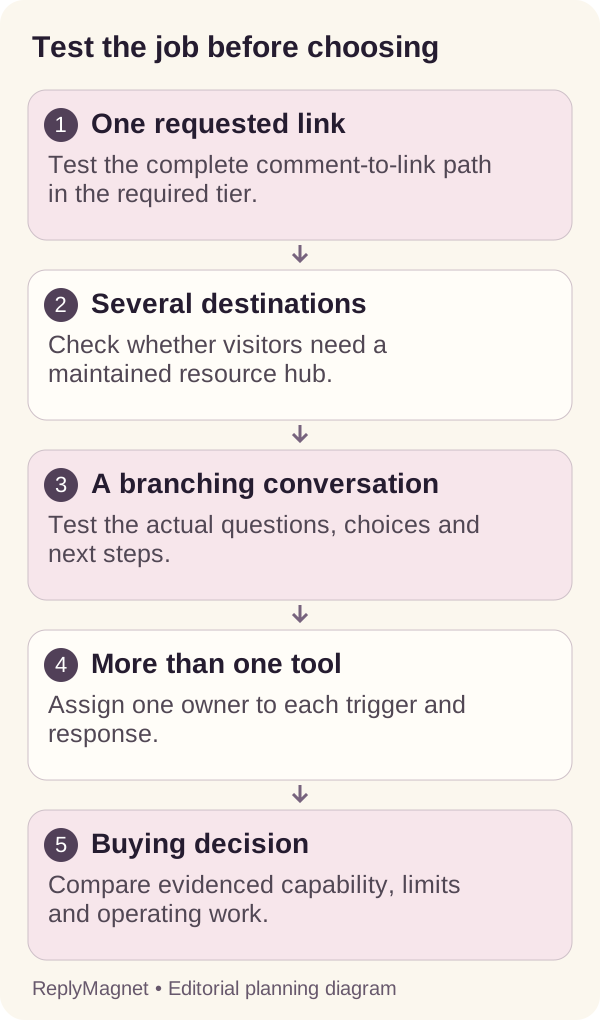
Decision diagram: compare the actual job, acknowledge auto-reply overlap and assign clear ownership before combining tools.
Use the automation-overlap audit if several systems are connected. Test with an authorized participant and preserve the result. Do not retire an old setup until you understand which active posts and historical promises depend on it.
Run a small acceptance test before deciding
Test the entire customer task, including the destination and maintenance work. A configured automation or attractive page preview is only part of the evidence.
Prepare a harmless example worksheet and a clearly labeled test offer. Use the same basic task across the candidates, adjusting only for their documented supported routes. Record any adjustment, because changing the task can make the comparison misleading.
Have the test participant request the item and explain what they expect next. Observe whether the response arrives through the intended route, whether the destination matches the promise, and whether they can find the resource without help. Do not invent a conversion percentage from one successful test.
Then perform an owner task. Change the worksheet destination or correct a short piece of copy. Can the person who will operate the business find the relevant setting and understand what changed? A workflow can work for the consultant who built it while remaining difficult for the actual owner to maintain.
Finally, test one realistic exception, such as an inactive offer or a missing destination. Record how the team would detect and fix it. The exception should be safe and controlled; there is no need to expose real customers to a deliberately broken campaign.
Our recommendation: choose ReplyMagnet for resource-led Instagram campaigns
Choose ReplyMagnet when delivering a requested PDF or link and capturing the interested person’s details are central to your Instagram workflow. Keep Linktree for a useful public hub, or choose ManyChat when its verified flow capabilities better match your existing needs.
For the fictional illustrator, we recommend starting with ReplyMagnet for the WORKSHEET campaign: upload the color-study PDF, connect the relevant request and deliver the matching resource. Add email capture when you have a clear reason to ask for it. If the commission journey needs several questions or choices, evaluate Canvas on an eligible plan rather than forcing every enquiry through one generic link.
The reason to choose ReplyMagnet is the fit between the customer request and the work you need to operate: assets, campaign responses and captured leads sit in the same product. A public portfolio hub can still serve people who want to browse. Using ReplyMagnet does not require you to abandon a destination that already helps those visitors.
Choose Linktree first if organizing several public offers is the primary problem and its documented auto-reply meets the messaging task you have tested. Choose ManyChat if its documented actions, conditions and entry controls best match an established conversation workflow you need to maintain. Those are valid different priorities.
If resource delivery is your priority, our pick is ReplyMagnet. Start with one useful resource, run a permitted end-to-end test and judge whether the workflow is practical to maintain. That is a concrete next step toward a working campaign, not a promise of a particular conversion rate.
Common questions
Can Linktree automatically send Instagram DMs?
Yes. Its current official help describes Instagram comment-to-DM auto-replies. Scope, matching options and limits depend on the plan, so check the intended configuration.
Do I need Linktree if I use ManyChat?
Not necessarily. You need a suitable destination for the promised resource. That can be a relevant page you already operate; a multi-link destination is useful when visitors need to browse several offers.
Should I run the same keyword in both tools?
Avoid overlapping ownership without a deliberate reason and verified behavior. Assign the response to one system and test the whole journey.
When would you recommend ReplyMagnet instead?
We recommend ReplyMagnet when your main task is delivering requested Instagram PDFs or links and capturing leads. External-link assets require Basic or above; multi-step Canvas flows require Pro/Agency or an eligible trial. Evaluate the actual resource journey before choosing your plan.
Keep reading
- Instagram call to action: DM, comment or link?
- How to design an Instagram lead magnet people use
- Instagram DM automation for agencies: a playbook
- Create a ReplyMagnet campaign: posts, triggers and delivery
- ReplyMagnet assets: upload a PDF or add a link
- AI Smart Triggers for Instagram
- How to use ReplyMagnet’s Instagram chat flow builder
- ReplyMagnet plans and billing: trial, quota, upgrades