Guide
How to design an Instagram lead magnet people actually use
A useful Instagram lead magnet helps one person finish one task after they comment. Choose the format from that task and build only the fields it needs. Test a rough copy with a real reader, check the delivered file on a phone and give every resource an owner.
Published by ReplyMagnet · Last updated
Should your Instagram lead magnet be a PDF or a web page?
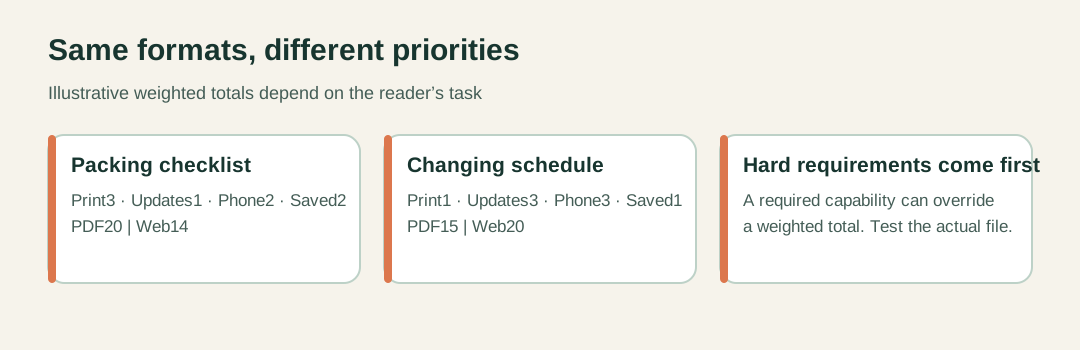
Choose a PDF for stable, printable instructions and a web page for information that changes, such as dates. Score each format against the reader’s task, and let any hard requirement override the total.
Write the task in one sentence first: “check what to pack before leaving” or “find a current workshop date”. If you still need an idea, start with the Instagram lead magnet ideas list. When you are ready to deliver, start free and attach the finished file to a campaign.
Then weight four criteria from 1 to 3 for this resource and score each prototype from 1 to 3. The totals below are illustrative judgments for a fictional art studio, not benchmarks. Write the arithmetic down so the team argues about a criterion, not a number.
Budget for the second version too. A replacement PDF does not recall copies already saved, so changing details belong on one maintained page. A good pairing is a printable sheet plus a link to current dates, each with one job.
Weighted format check for two fictional resources (weight x score)
Criterion
Prints well
- Checklist weight
- 3
- Schedule weight
- 1
- PDF score
- 3
- Web score
- 1
Criterion
Easy to keep current
- Checklist weight
- 1
- Schedule weight
- 3
- PDF score
- 1
- Web score
- 3
Criterion
Works on a phone
- Checklist weight
- 2
- Schedule weight
- 3
- PDF score
- 2
- Web score
- 3
Criterion
Usable once saved
- Checklist weight
- 2
- Schedule weight
- 1
- PDF score
- 3
- Web score
- 1
Criterion
Total
- Checklist weight
- Checklist: PDF 20, web 14
- Schedule weight
- Schedule: PDF 15, web 20
- PDF score
- Web score
How to design a lead magnet worksheet
Name the decision the finished worksheet produces, then keep only inputs that change that decision. A good worksheet ends with one chosen option and a concrete first action.
Write the output sentence at the top of your draft. For a fictional weekend planner: “By the end, the reader chooses one project that fits their session and names the first action.” Test every field against that sentence and cut the rest.
Ask for facts the reader can supply, and put each instruction beside its field. Avoid scoring formulas that turn a rough guess into false precision. A plain fit check is easier to use.
- Available session: realistic time, minus setup. A 60-minute slot with 10 minutes of setup leaves 50.
- Candidates: up to 3 projects, each with a visible finish.
- Fit check: mark each one fits, shrink it or not this session.
- Boundary: what is in and what waits.
- First action: a physical step, such as clearing the table.
- Finish check: what you will see when the scope is done.
Add one labelled filled example and a 5-question completion rubric: one chosen project, a clear boundary, time acknowledged, a concrete first action, an observable finish. The same build discipline applies to a free course lesson or a product comparison guide: one task, one output.
Create a fictional practice dataset for your Instagram lead magnet
Use a practice dataset when every learner should meet the same cases. Invent 8 rows from scratch, define what a blank means and write the rules first. Ship a separate answer key that keeps uncertainty visible.
A worksheet asks for the reader’s own inputs. A dataset supplies records to investigate, such as a spreadsheet lesson on why summing a whole column misleads. Keep only the fields the exercise needs and leave out names, emails and handles. Never rename real customer records.
The fictional exercise below has two sessions with 4 seats each. Rules: count confirmed rows with known seats once and set aside exact duplicates. Exclude pending and cancelled rows, and hold a confirmed row with a blank seat count.
Answer key: count rows 1, 2, 5 and 7; set aside row 3; exclude rows 6 and 8; hold row 4. That accounts for 4 + 1 + 2 + 1 = 8 rows. Session A has 3 known seats and one unresolved row. Session B has 5 seats against 4 places, over by 1.
Package three parts: Start here, Practice data and Answer key, labelled fictional with a version number. Then work a fresh copy using only the written instructions before sharing it.
Fictional practice data: eight rows, seven registration IDs
Row
1
- ID
- R01
- Session
- A
- Seats
- 2
- Status
- confirmed
Row
2
- ID
- R02
- Session
- A
- Seats
- 1
- Status
- confirmed
Row
3
- ID
- R02
- Session
- A
- Seats
- 1
- Status
- confirmed
Row
4
- ID
- R03
- Session
- A
- Seats
- blank
- Status
- confirmed
Row
5
- ID
- R04
- Session
- B
- Seats
- 3
- Status
- confirmed
Row
6
- ID
- R05
- Session
- B
- Seats
- 2
- Status
- cancelled
Row
7
- ID
- R06
- Session
- B
- Seats
- 2
- Status
- confirmed
Row
8
- ID
- R07
- Session
- A
- Seats
- 1
- Status
- pending
Build an FAQ people can actually find answers in
Include only repeatable answers that someone owns, lead with the fact the reader needs and state the exception beside it. Group questions by the reader’s journey, and route personal cases to a human.
Collect candidate questions from your comments and enquiries, then remove identifying details. Drop promotional questions nobody asked. Merge two phrasings when they share one decision.
Write each answer in three parts: the direct response, the exception, and where to confirm. “Each attendee needs their own confirmed place. A message asking about the event does not reserve one.” Skip the friendly preamble.
Group by situation, not department. For a fictional workshop, use these three groups:
- Before registering: experience needed, attending with a friend.
- Before arriving: what to bring, arrival time, access questions.
- If your plans change: the booking terms and who to contact.
Keep a private register with the question, source, owner and review trigger, such as a changed venue or date. Then test it: ask someone to find the friend rule without naming the heading, and record their route, understanding and next action.
How to test a lead magnet before you polish it
Write a claim a rough prototype can disprove, build only enough to expose the riskiest assumption, and watch an intended reader use it without coaching. Compliments are not evidence of use.
A claim such as “a weekly shopper can use this sheet to spot ingredients already on hand” is testable. A 20-page guide covering planning, shopping and recipes is not. Narrow first.
Build one plain page with real labels, one filled example and one blank task. Label the version and date. Recruit people who recognise the situation, not the teammate who helped write it.
Give context and a goal, then stay quiet. Ask neutral prompts like “What are you looking for?” Log each session in three columns so interpretation stays open to challenge.
Separate what you saw from what you think it means
Type
Reaction
- Example from a fictional session
- This looks useful.
Type
Observation
- Example from a fictional session
- Rice was written in both Already have and Need to buy.
Type
Inference
- Example from a fictional session
- The subtract-what-you-have rule was missed.
Type
Next test
- Example from a fictional session
- Add a worked line removing one item, then retest with a new reader.
How to make a lead magnet PDF accessible
Structure the document before styling it: real headings, a logical reading order, descriptive link text and instructions written as text. Then test the exported file on a phone and with assistive technology.
A two-column PDF can read well on a desktop and fall apart on a phone. Rewrite around the task first: “Bring a pencil” under one heading, “Paper is provided” under another, optional extras under a third.
- Use the editor’s real heading styles and check they survive export.
- Write link text that names the destination, never click here.
- Keep instructions as live text, never one flat image of a page.
- Label categories in words, so meaning survives a monochrome print.
- Cut table columns the decision does not need before shrinking type.
- Do not call a blank PDF fillable unless its fields work.
Test the file readers receive, not the design preview. Log location, problem, impact, fix and retest result. These checks catch common problems but do not certify WCAG or PDF/UA conformance.
Build a resource hub around the task people came to do
Group resources by the decision a visitor recognises, give each one a description that helps them reject the wrong item, and show any access condition before the click.
A page of 6 filenames under “PDFs” tells a visitor nothing about where to start. Use a few task groups instead, such as Choose a session, Prepare to attend and Start practicing.
Write descriptions that state scope and limits: “Compare the class formats before choosing a session” beats “Our essential guide.” Keep changing details, such as dates, at their authoritative page and link to it.
Test with three finding tasks that name the situation, not the button. Note which group the reviewer opens first and what they expect inside.
Send campaigns to the promised resource, not the hub. Use the hub from your profile or a browse invitation. ReplyMagnet does not host a resource hub, so build it on a site you maintain.
Fictional hub entries with visible access notes
Task group
Choose a session
- Resource and purpose
- Class formats: compare teaching types
- Access note
- Read on this site
Task group
Choose a session
- Resource and purpose
- Current dates: see the open options
- Access note
- Opens the registration page
Task group
Prepare to attend
- Resource and purpose
- Materials list: what the session requires
- Access note
- Printable; check your session edition
Task group
Start practicing
- Resource and purpose
- First exercise: one introductory task
- Access note
- Opens a separate page
How to audit your lead magnet library
List every resource people can still request, record the offers that point to it and who can verify its facts, then fix misleading or broken items before cosmetic ones.
Start from active promises: recent and evergreen posts, live campaigns and your profile link. Record the exact promise before opening the file. One register is enough, with a short field list:
- Resource, version date and reader task.
- Campaigns and posts that send it.
- Factual owner and review trigger.
- Decision: keep, correct, redirect, combine or retire.
Prioritise by consequence. A broken link or an old deadline blocks a decision; an old logo rarely does. Combine resources only when the reader’s task survives the merge.
In ReplyMagnet, replacing an asset changes future deliveries only. Links already sent stay tied to the original file, so edit every campaign that uses it and run a fresh test request. The Instagram lead magnet delivery guide covers that route end to end, and the comment-to-DM automation guide covers the campaign setup. To see which requests later become real enquiries, use the Instagram leads worksheet.
Common questions
What is the best format for an Instagram lead magnet?
No format wins every time. A PDF suits stable, printable instructions, while a web page suits information that changes, such as dates or prices.
How long should a lead magnet be?
Long enough to finish one task. A 1-page sheet that solves a specific problem usually serves a reader better than a 20-page guide covering several jobs.
How many people do I need to test a lead magnet?
No fixed number applies. A few observed sessions can reveal usability problems, but they cannot predict demand or a download rate.
Does replacing a file update links already sent?
No. In ReplyMagnet a new asset applies to future deliveries, and previously delivered links stay tied to the original file.
Can ReplyMagnet deliver a spreadsheet lead magnet?
ReplyMagnet delivers uploaded PDFs on every plan and external links on eligible plans, so host an XLSX or CSV externally and check the Assets documentation first.
Keep reading
- Guides
- Instagram Comment-to-DM Automation: Setup & Test Guide
- Instagram comment-to-DM for course creators