Guides
How to Deliver a Free Course Lesson Through Instagram DMs
Give prospective students one useful lesson they can try on a phone. Prepare the lesson page, choose a clear keyword request and test the complete delivery path.
Published by ReplyMagnet · Last updated
The short answer
Host one accessible lesson, invite a keyword request and deliver its link through a ReplyMagnet comment-to-DM or eligible incoming-DM campaign. Test the received message, signed-out mobile access and exercise before promotion.
Start freeChoose a lesson that produces one useful result
Choose one complete exercise that prospective students can attempt without buying the full course. A useful sample demonstrates your teaching and lets the learner check a small result.

Editorial illustration of a lesson handoff, not a product screenshot or customer result.
The simplest useful version delivers one complete lesson without a signup gate. Your learner requests it, opens it on a phone, and practices something specific. You can add an optional invitation to explore your paid course on the lesson page.
This guide covers lesson preparation, the two entry routes, campaign setup, copy you can adapt, delivery rules, testing, and measurement. The running example is a fictional photography creator offering a seven-minute window-light lesson. Its copy and teaching plan are illustrative, not customer results.
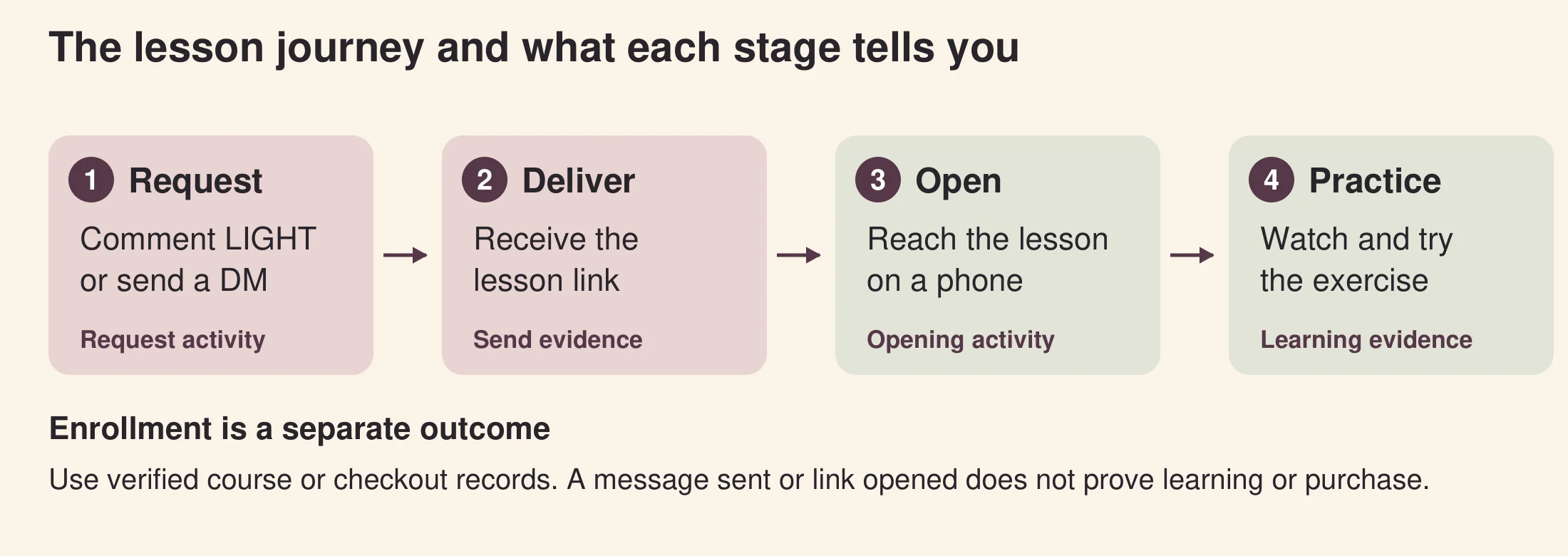
Figure 1. Original explanatory diagram. Requests, sends, opens, learning, and enrollment require different evidence.
A strong sample lets someone experience how you teach. Choose a problem narrow enough to solve in a single sitting and relevant to the full course. A video introducing your credentials can support the offer, but the free lesson should give the learner something to do.
For the photography example, the result is simple: make the shadows in a photo softer by changing the position of an object beside a window. The learner needs a phone, a window, and an everyday object. They do not need studio lighting or access to a previous module.
- Show the starting problem with one photograph and explain what the learner should notice.
- Demonstrate the change slowly enough to repeat, including where you place the object and phone.
- Give a two-photo exercise: take a starting photo, change the position, and compare the shadows.
- Provide a short self-check: Is the object clear? Are the shadows different? Can you explain which change helped?
The same approach works for a spreadsheet cleanup, a pronunciation exercise, or a first sketch. Teach a complete small task, then make the next lesson a natural extension. Our course creator guide explains how a sample lesson fits into a broader course offer.
Try the resource flow for 30 days with 1,000 engagements. No card required.
Start freePrepare the lesson page before building the automation
Host the exact lesson, exercise and practice files on a page that works on a phone while signed out. Test access before creating the delivery campaign.
Use a page on your website, a hosted video page, or a sample lesson inside your course platform. The destination should be the exact lesson, rather than a homepage that makes people search again. Instagram handles the request and message; the destination handles the lesson experience.
Put the title, player, exercise, and any practice file together. Add captions or a transcript, especially when viewers may be watching without sound. Write the exercise as ordinary text too, so someone can check it without replaying the video.
What the example lesson page contains
- Title: Softer window light with your phone.
- Promise: Learn one positioning change, then compare two photographs.
- Requirements: A phone, a window, and one object. Allow about seven minutes for the video, plus practice time.
- Lesson: The video, captions or transcript, and the two-photo instructions.
- Next step: An optional link to the full course outline below the exercise.
Open the page while signed out of your website and course platform. Your creator login may hide a paywall or sharing restriction. Then open it in Instagram’s mobile browser and test the player, downloads, captions, and navigation. Confirm that a learner can return to the exercise after starting the video.
For a hosted lesson, create a link asset in ReplyMagnet. The 30-day free trial requires no credit card and lets you try Pro features with a trial usage allowance. Its asset documentation lists external link assets on Basic and above for ongoing paid use. Check your account’s current allowance before promoting the offer; a trial and a paid plan do not have the same usage capacity.
Choose between a comment request and an incoming DM
Use a comment keyword when the invitation belongs on a selected post or Reel. Use an incoming-DM keyword when the person should request the lesson privately. Test the chosen route separately.
Both routes can connect an interested person to the same lesson. Choose the one that fits how you invite the request, then test that route specifically. A successful incoming-DM test does not prove that a comment campaign is configured correctly.
For a Reel demonstrating the lighting change, “Comment LIGHT” keeps the invitation beside the demonstration. “DM LIGHT” suits an invitation where people may prefer a private request. Use one instruction per offer so readers know exactly what to do.
ReplyMagnet’s DM automation guide distinguishes the incoming trigger from the conversation that follows. A single lesson usually needs a straightforward resource campaign. A branching flow is useful only when the learner’s answer should change the next step.
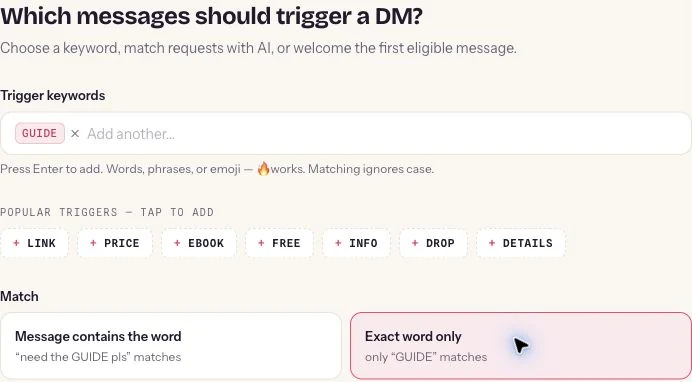
Figure 2. Genuine ReplyMagnet incoming-DM trigger example from its published guide. It uses GUIDE and Exact word only; the lesson example in this article uses LIGHT. This is the incoming-DM alternative, not the comment setup. Source: ReplyMagnet DM automation guide
Decision
Audience action
- Comment to DM
- Comment the configured keyword on a selected post
- Incoming DM
- Send the configured keyword to your Instagram account
Decision
Invitation
- Comment to DM
- Comment LIGHT for the lesson
- Incoming DM
- DM LIGHT for the lesson
Decision
Configuration focus
- Comment to DM
- Account, post scope, comment match, asset
- Incoming DM
- Direct messages campaign, incoming match, asset
Decision
First delivery
- Comment to DM
- Private reply to the qualifying comment
- Incoming DM
- Response to an eligible incoming message
Decision
Main test
- Comment to DM
- Correct post and keyword trigger the expected private reply
- Incoming DM
- The incoming request triggers the expected response
Decide whether the lesson needs a signup gate
Leave capture gates off for direct lesson access. Require an email only when the offer clearly explains why it is needed, and repeat that promise before the form.
Direct access means the recipient can follow the delivery link and reach the lesson without providing extra information. It is a sensible starting point when your main aim is to let people try your teaching. It also makes the delivery test easier to interpret because fewer steps sit between the request and the lesson.
A gated offer asks for an additional action before access, such as an email address. That can be appropriate when the offer explicitly includes an email course or another clearly described service. It also adds a point where a learner can stop. Decide whether that extra step serves the offer before switching it on.
ReplyMagnet documents email, phone, and follow gates in its capture guide. Feature availability and gate behavior vary, so review the current settings rather than assuming every plan or gate works identically. The walkthrough below leaves capture gates off.
Keep the promise consistent in three places: the Instagram invitation, the DM, and the destination. If an email is required, say so before people request the lesson. If the lesson is direct access, avoid adding a registration wall on the course platform. A separate newsletter invitation should explain what subscribers will receive; requesting a lesson alone does not communicate that choice.
Build the comment campaign around the promised lesson
Connect the professional account, select the offering post, configure LIGHT, attach the checked lesson link and write the responses. Save, review other live campaigns and launch for a controlled test.
For this walkthrough, use the Instagram Business or Creator account that owns the selected post. Have the tested lesson URL ready and prepare the resource in Assets. ReplyMagnet’s campaign setup documentation provides the current controls.
1 Select the account and offering post
Choose the connected Instagram account and the post or Reel that invites the lesson request. Start with the specific post rather than broad account-wide scope. That makes it easier to confirm that only the intended offer is active.
2 Configure a distinctive keyword
Use Keyword mode and LIGHT, matching the invitation. In contains mode, ReplyMagnet matches the whole word regardless of case: “Please send LIGHT” qualifies. Exact mode requires the entire trimmed comment to equal LIGHT, also ignoring case. Choose one mode and test both matching and unrelated text. If you add keyword variants, they deliver the same asset within that campaign.
3 Attach the correct lesson resource
Select the link asset you prepared and verify its destination. Give it a recognizable name, such as “Window light lesson October 2026,” so it is easy to distinguish from a worksheet or a previous version. The DM uses a ReplyMagnet delivery link that opens the configured external destination.
4 Write the public reply and private message
The public reply should tell the requester where to look. The DM should name the lesson and make the delivery link easy to identify. Leave email, phone, and follow gates off for this direct-access example. Do not insert a question the learner must answer before receiving the promised resource.
5 Save first and launch for a controlled test
A draft does not send replies. Launching makes the saved campaign active, so finish the account, post, trigger, asset and copy checks first. Review other live campaigns on the same post: after post scope is applied, a matching keyword campaign takes priority over an eligible any-comment campaign. Within the same trigger kind, the oldest matching campaign wins. Use the overlap guide to test competing offers.
If you choose incoming DMs instead, create a Direct messages keyword campaign and change the invitation to “DM LIGHT.” Do not substitute an any-message welcome for a specific lesson request. Following your account alone does not trigger the incoming-DM campaign described here.
Use copy that tells learners exactly what they receive
Name the lesson, the requested action and any access requirement. The caption, private message and lesson page should make the same promise.
These templates belong to the fictional window-light example. Replace the lesson title, duration, keyword, and access requirements with your actual offer. Only promise “no signup” after checking every step.
Instagram caption for a comment request
Want to try this lighting setup? Comment LIGHT for my free seven-minute lesson and two-photo practice exercise. I’ll send the link in a DM. No signup required.
Invitation for an incoming DM
Want the full window-light exercise? DM LIGHT and I’ll send the free lesson link. You’ll need a phone, a window, and one object to practice with.
Public comment reply
Thanks for requesting the lesson. Look out for a DM, and check Requests if you don’t see it.
Private delivery message
Here’s the free window-light lesson you asked for: [lesson delivery link]. The video takes about seven minutes. Try the two-photo exercise below it so you can compare the shadows before and after.
Optional course invitation on the lesson page
Want to practice this with portraits and indoor scenes? View the full course outline to see what we cover next.
Insert the real resource through the campaign’s asset setup; the bracketed text above is a writing placeholder. The public reply deliberately avoids saying the DM has already arrived. Check the actual private delivery during testing, rather than treating the public response as proof.
Respect the difference between a comment and a conversation
A qualifying comment permits one initial private reply under Meta’s rules; it does not permit an unrestricted message sequence. Further automated messages depend on a recipient response and the applicable messaging window.
Meta’s private-reply documentation allows one private reply to a qualifying post or Reel comment, sent within seven days of the comment. Further messages require the recipient to respond and must be sent within 24 hours of that response. A public comment therefore does not begin an unrestricted private-message sequence.
Put the useful lesson delivery in that first private reply. Do not assume that opening the lesson link counts as a message back or creates permission for later automated reminders. If the learner replies with a question, respond within the applicable messaging rules.
Meta also explains that the private reply goes to the inbox for someone who follows the professional account and to Requests for someone who does not. That is why the sample public reply mentions Requests. Avoid promising inbox placement or guaranteed delivery.
For ordinary incoming-DM automation, Meta’s messaging documentation says the user must message the professional account first and the app has 24 hours to respond. A delay in a flow does not extend the allowed window. Keep any planned follow-up tied to what the person actually requested and the rules that apply when it is sent.
Test the full journey from another Instagram account
Test the request, received DM, delivery link and exercise from a second account. Check negative keywords and recorded activity separately before promoting the offer.
Use a second account you control or a consenting colleague. ReplyMagnet ignores comments from the connected account itself, so testing from your creator profile can give you a misleading failure. Use a small controlled test before wider promotion.
- Make the intended request. Comment LIGHT on the selected post, or send LIGHT privately if testing the incoming-DM route. Check the actual response from the receiving account.
- Inspect the inbox and Requests. Read the public reply separately from the DM. Confirm the private message names the right lesson and includes a usable delivery link.
- Open the resource inside Instagram. Test without your creator login. Play the lesson, follow the exercise, and open any practice file.
- Try an unrelated comment. In a keyword-only comment campaign, it should not receive the lesson. If it does, check broad triggers and overlapping live campaigns.
- Compare the test with recorded activity. Confirm that the campaign, resource, and delivery status match what the recipient experienced. Investigate a queued or failed send before assuming it will recover.
Keep a short launch record with the post, keyword, asset name, date tested, and observed result. This helps when another person later changes a caption or replaces a lesson. Repeat the relevant checks after any change to the destination, gate, campaign scope, or connected account.
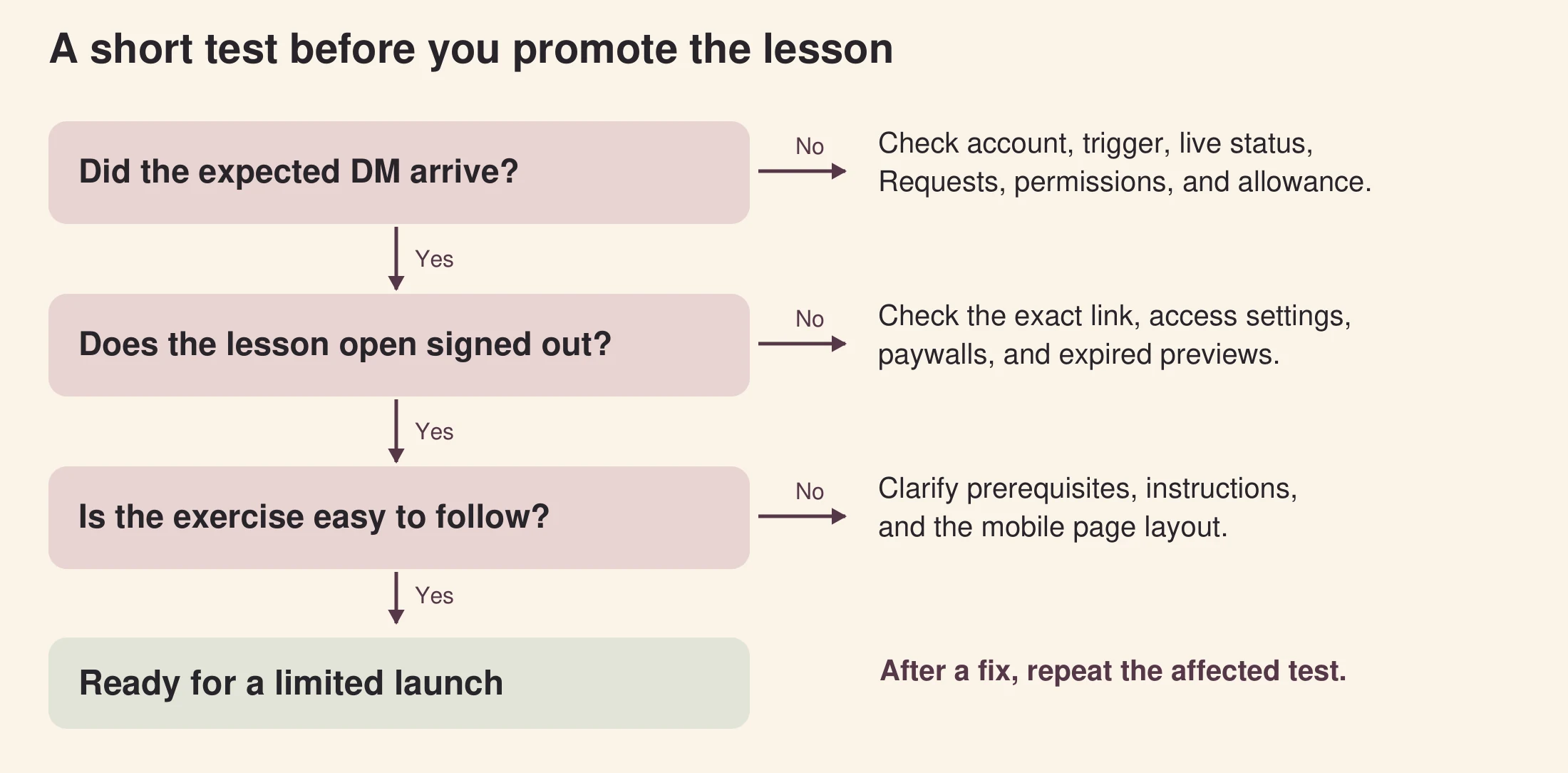
Figure 3. Original explanatory diagram. Find the failed step, make the targeted correction, and repeat the test.
Troubleshoot the point where the journey stopped
Identify the failed stage first: keyword matching, message delivery, lesson access or exercise clarity. Correct that stage and repeat the relevant recipient-side test.
Start with what the learner actually saw. A trigger problem, a message-delivery problem, and a lesson-page problem need different fixes. ReplyMagnet’s comment-to-DM guide covers setup and delivery checks.
The keyword gets no response
Check the connected account, campaign live status, selected post, and configured keyword. Confirm the test comment came from a different account. Then review connection permissions and workspace usage. A saved campaign that remains a draft will not send.
The wrong resource arrives
Inspect the attached asset and overlapping campaigns. Different lesson offers need separate resources and clear triggers. Keyword variants within one campaign point to the same asset, so adding a second keyword does not create a second lesson path.
The request is queued or delivery is missing
Look at actual activity and current allowance. ReplyMagnet’s plans documentation says an over-limit matched comment waits before either its public reply or DM is sent. Capacity returning does not guarantee delivery if eligibility or the platform window has expired. Avoid posting “sent” manually until you have evidence.
The DM arrives but the lesson will not open
Open the exact delivered link from the receiving account. Check for a private video, owner-only document, expired preview, wrong URL, or a registration wall. Fix the destination or asset, then make a new test request. A successful send record cannot prove that the destination is usable.
The lesson opens but learners still ask what to do
Review the lesson title, exercise placement, prerequisites, and mobile layout. A learner may have reached the correct page and still missed the task. Make the next action visible beside the lesson before adding more automated messages.
Measure delivery, learning and enrollment separately
Use campaign activity for requests and sends, link activity for openings, learning evidence for practice and checkout records for enrollment. Each measures a different stage.
Choose a specific question for each source of data. ReplyMagnet can help you inspect campaign activity and resource-opening activity, while your video host or course platform may record learning events. Your course or payment system records enrollment. Check what each system actually measures before combining its numbers.
In the fictional photography example, the first review asks whether requesters received and opened the correct lesson. The next asks whether learners completed the two-photo exercise, using feedback or a course feature that actually records it. Only then does the creator review interest in the full course. No conversion rate is assumed.
Use the same period and counting unit when comparing stages. A raw comment count can include unrelated comments; repeated requests can come from one person; opening events can include repeat activity. Label a rate with its denominator and avoid presenting event counts as unique students.
Keep attribution modest too. Someone might open the lesson on one device and enroll later elsewhere. A campaign report alone cannot establish that every enrollment was caused by the DM. Read the analytics documentation alongside your learning and checkout reports.
Stage
Request
- Useful evidence
- Matching campaign activity
- What it does not establish
- A unique learner or paid-course interest
Stage
Delivery
- Useful evidence
- Send status and recipient-side test
- What it does not establish
- That the message was read
Stage
Resource access
- Useful evidence
- Recorded delivery-link opening
- What it does not establish
- That the video was watched
Stage
Learning
- Useful evidence
- Supported watch data, exercise submission, or feedback
- What it does not establish
- That the learner purchased
Stage
Enrollment
- Useful evidence
- Verified course or checkout record
- What it does not establish
- That the DM alone caused the purchase
Keep the offer accurate after launch
When changing the lesson, review the invitation, attached asset and destination together. Selecting a replacement asset changes future deliveries; previously delivered links retain their original asset.
Review the invitation and destination together when the lesson changes. If you replace the campaign’s asset, ReplyMagnet’s documentation says previously delivered links remain tied to the original asset; selecting a new asset changes future deliveries. Retest a fresh request after the replacement.
An external lesson page also has its own access settings and lifecycle. Keep it available for the period you promised, and review any expiring preview or hosting subscription. If a lesson becomes unavailable, update the post or stop promoting that offer instead of continuing to invite requests.
Launch one useful lesson with a verified path
Launch one finishable lesson with a clear request and a tested delivery path. Use observed learner questions to improve the experience before expanding the offer.
Prepare a lesson people can finish, choose a clear request, and deliver the matching resource. Create your ReplyMagnet campaign, test it from another account, and use the first real responses to improve the lesson experience. Expand only when the first offer works from request through practice.
Start your 30-day free trial. No credit card is required. Prepare one lesson link and check your trial allowance before inviting your audience.
Common questions
Can I deliver a video lesson without collecting an email?
Yes. Use a link asset with capture gates off and a destination that permits direct access. Test the course platform while signed out, because turning off ReplyMagnet capture does not remove a signup requirement on another website.
Can I try this during the free trial?
Yes. You can try ReplyMagnet for 30 days with no credit card required. Its trial includes Pro features with a trial allowance; after the trial, ongoing external link-asset use requires Basic or above under the current documentation.
Can I send several lessons from one campaign?
One resource can point to a page containing several lessons, but make that offer clear. Different keyword variants within one campaign deliver the same asset. Use distinct campaigns when separate requests should receive different lesson resources.
Do I need a chat flow builder for this?
A straightforward lesson-link campaign does not need a branching flow. Consider a flow when a meaningful choice changes the destination, such as selecting beginner or advanced material, and verify its entitlement and messaging constraints separately.
Can the delivery link be shared by the recipient?
Yes. ReplyMagnet warns that recipients can share delivery links. Avoid treating private asset storage as copy protection. If access control is essential, check the capabilities and tradeoffs of your lesson platform before making promises.
Keep reading
- Instagram comment-to-DM for course creators: deliver a useful sample lesson
- Comment to DM on Instagram: Practical Automation Guide
- Introducing DM automation and the chat flow builder
- Why your Instagram resource link asks visitors to sign in
- ReplyMagnet assets: upload a PDF, add a link or replace a resource