Guides
Instagram Scheduling vs DM Automation: Which Work Should You Automate?

Scheduling helps a post appear when planned. DM automation helps an eligible request reach the promised response or resource. Map both jobs before choosing tools, then give the handoff between them an owner.
Published by ReplyMagnet · Last updated
What does each kind of automation actually do?
Scheduling organizes when a post appears. DM automation responds to an eligible interaction after someone asks for something. Choose based on the unfinished job, then check the exact features of the tools you are considering.
A bakery can have every Reel prepared for the month and still spend the evening answering “Where is the party menu?” A photographer can deliver a session guide automatically while still forgetting to publish the post that offers it. Both have an automation problem, but the work occurs at different points.
A publishing workflow starts with material the business wants to share: a draft, media, caption, approval and publication time. A request workflow starts with an interaction the reader makes: a qualifying comment, for example, followed by an appropriate reply and the promised destination.
Buffer’s Instagram guide documents planning and scheduling several Instagram formats, with automatic or notification-based publishing depending on the circumstances. Manychat’s feature overview describes conversation automation. These are examples of jobs, not a claim that every product belongs in only one category. A scheduler may also include comment management or other conversation tools.
ReplyMagnet’s role in this article is handling an eligible resource request. It is not being presented as a post scheduler. If your only difficulty is preparing next week’s posts, start with the publishing job rather than buying a messaging workflow you will not use.
Map a normal week before choosing another tool
Record the work before publication and the work after a request. Note who performs each task, what starts it and what proves it is complete.
Use your last actual launch as the starting point. Do not describe the ideal week in which everyone remembers every handoff. Write down the delays, repeated copying and questions that needed a person’s judgment. A short list with real examples is more useful than a long feature wish list.
On the publishing side, identify who supplies the facts, produces the media, approves the caption and checks that the post is live. On the response side, identify who maintains the resource, connects it to the right request, answers unusual questions and checks failed deliveries.
For each task, finish this sentence: “When ___ happens, ___ does ___, and we know it worked because ___.” For example: “When the Reel is live, the campaign owner confirms its URL and scope, and we know the connection is correct after a controlled request reaches the menu.”
A calendar filled with publication times cannot tell you whether the menu is accurate. A working DM cannot tell you whether the post appeared with the approved caption. Keep these acceptance conditions separate.
The customer-decision content calendar helps choose what deserves a post. This worksheet deals with the operational handoff after that editorial decision. If most of the delay is fact approval, another scheduling subscription may leave the real bottleneck untouched.
Make publication a checked handoff
A scheduled item is not proof of a live post. Confirm the actual post, its invitation and the intended campaign scope before treating the request journey as ready.
A simple release rule prevents many mismatches: the person responsible for publication supplies the live post reference, and the person responsible for replies confirms that reference against the campaign. One person may hold both roles, but the two checks still matter.
Do not assume a campaign prepared for one post automatically follows a duplicate upload, replacement Reel or rescheduled draft. Use the actual supported selection and scope controls. If preparing a draft campaign ahead of time, check what still needs to happen once the Instagram post exists. The campaign documentation covers ReplyMagnet’s setup.
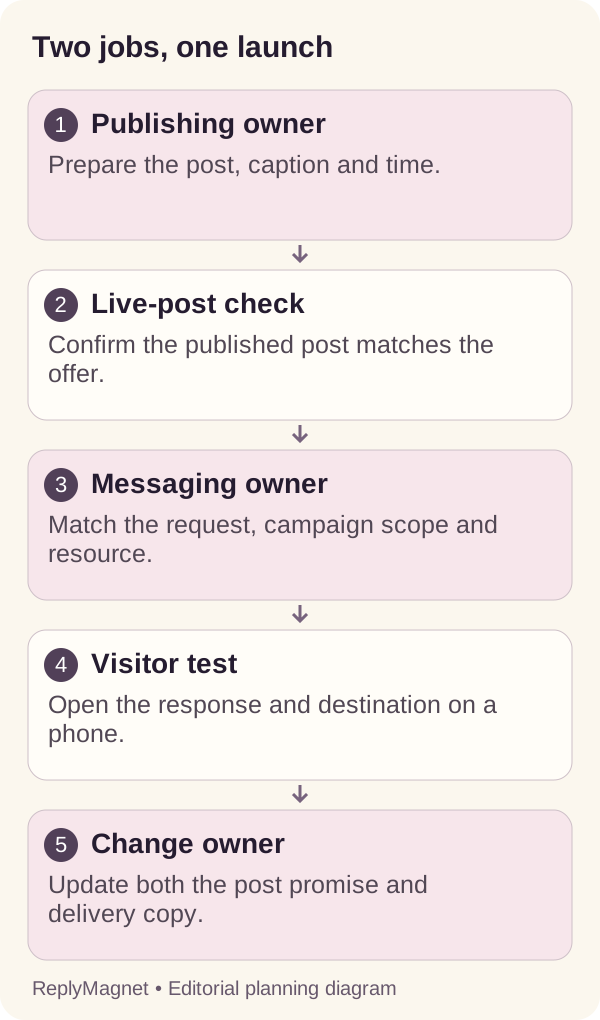
Original workflow illustration. The publication check connects two separate responsibilities; it is not a product screenshot.
Allow time for this handoff in the release plan. If a post must appear while everyone is unavailable, decide who can investigate a publication failure or a wrong destination. “The tools will handle it” does not name an owner.
Where the invitation cannot be tested until the post is live, keep the first release manageable. Confirm the route promptly, and have a prepared correction or pause decision if the promised resource cannot be delivered. A calendar timestamp alone should never be the final signoff.
A worked release plan for a product Reel
Prepare the resource and reply before the Reel, then verify the published invitation and test the exact destination. Assign an owner to each handoff.
Consider a fictional ceramics shop launching a Reel about choosing a vase size. The offer is a size guide, not a promise of current stock. The shop owner maintains the measurements, a colleague prepares the Reel, and the owner also manages resource requests. This is a planning example, not a reported customer result.
On Monday, the owner approves a guide explaining how to compare the vase opening and height with the intended use. On Tuesday, the colleague prepares a Reel that shows those measurements and offers the guide with the keyword VASE. The caption must describe the resource actually attached to the campaign.
On Wednesday, they schedule the approved post in their publishing tool and prepare the response text. They do not declare the reply route complete merely because the message has been drafted. On Thursday, the colleague checks the live Reel and sends its reference to the owner. The owner verifies the campaign scope and tests with a separate controlled account.
On Friday, the owner reviews unexpected questions. If readers want current availability, the guide can point to the store, where that information belongs. It should not silently turn an educational resource into an inventory promise.
Use the following responsibility grid for your own launch. Replace the fictional roles with a named person and record an actual result rather than simply ticking every row.
Illustrative one-week release responsibility grid
Stage
Prepare guide
- Owner
- Product owner
- Completion evidence
- Measurements and destination checked
Stage
Prepare and schedule Reel
- Owner
- Publishing owner
- Completion evidence
- Approved media, caption and time
Stage
Confirm publication
- Owner
- Publishing owner
- Completion evidence
- Actual post reference and visible invitation
Stage
Connect request route
- Owner
- Campaign owner
- Completion evidence
- Correct post scope and resource
Stage
Test delivery
- Owner
- Controlled tester
- Completion evidence
- Received link opens the promised guide
Stage
Review exceptions
- Owner
- Campaign owner
- Completion evidence
- Questions assigned or resource corrected
Check publishing and messaging access separately
A connected publishing account does not establish that a different tool can respond to messages. Test each required capability under the account and connection method you will actually use.
Ask the publishing provider whether your account, format and required elements are supported through automatic publication or need a notification and manual completion. A workflow that needs someone to finish the post can be perfectly suitable, provided the launch plan includes that person.
For the messaging side, check the professional account connection, required authorization and eligible trigger. Test the actual resource-request interaction rather than assuming any interaction with the account can start a private reply. A successful post upload tells you nothing about message delivery permissions.
Avoid diagnosing access failures by sharing the owner’s password with another operator. The DM automation security checklist lists safer access steps. Use the provider’s documented connection process, confirm the intended account and keep ownership of reconnection clear. A staff change should not leave the business dependent on a browser session nobody can identify.
Make these questions part of procurement: Which account will publish? Which account owns the post? Who can reconnect each tool? What happens if the connection needs attention shortly before launch? Which messages still need a person?
The automation tool scorecard provides a broader selection method. Here, the important distinction is between two working connections. Evaluate the publishing action and the response action independently, then verify that their shared post reference is correct.
Treat a changed post or resource as a small release
Recheck the caption, trigger, campaign scope and destination whenever one changes. Updating one component does not prove that the rest still tells the same story.
Imagine the ceramics shop changes the keyword from VASE to SIZE while editing the caption. The new word is easier to understand, but the old trigger may still be saved in the campaign. The visible post and the response rule now disagree even though both looked correct at their own approval stage.
A resource can create the same problem. Replacing a size guide with a catalogue at the existing destination changes what the reader receives. The link may still open successfully, so a technical availability check will miss the broken promise. Test the content, not just the URL.
Maintain a release note with four fields: live post, accepted request, promised resource and destination version or review date. Add the owner and the last controlled test. For a small operation, this can be one shared row rather than a new project-management system.
Before a change, consider people who already received a link. Do not assume editing a campaign rewrites a previously sent DM. If the old wording is now materially misleading, make the destination explain the change and decide whether the old promotion should stop.
The asset documentation helps distinguish a hosted resource from an external destination. With either approach, keep a maintained public copy of the promised material and a clear owner for checking it.
Compare the work you retain after automation
Estimate setup, review, exceptions and maintenance alongside subscription cost. A feature only saves work if it fits the task and leaves a manageable process behind.
For the next trial, record time under four headings: preparing the release, checking the normal journey, handling exceptions and maintaining changes. Use your own observed time. A demonstration that takes two minutes may conceal preparation that someone else completed before the recording began.
Scheduling may reduce the need to be present at a particular publication time. It does not choose accurate product facts or approve a misleading caption. Response automation may reduce repeated delivery of the same resource. It does not resolve every buyer question or keep an external page current by itself.
A team with infrequent posts and highly individual enquiries may need little beyond a sensible calendar and human responses. A team publishing useful resources consistently may benefit from both jobs being supported. Neither situation establishes a universal best tool stack.
Write a short decision: “We are automating ___ because ___ is repetitive. A person still owns ___, and we will review the choice after ___.” This makes it easier to remove a tool that adds administration without solving the original problem.
If the remaining work is choosing and adapting personal answers, read saved replies versus DM automation. That decision is different from publication timing. Buying both categories cannot replace deciding which responses should remain personal.
Use two acceptance checks before calling the launch ready
Accept publication when the correct post is visibly live. Accept the request workflow when a controlled interaction reaches the promised resource and exceptions have an owner.
Run the publishing check first: right account, approved media, accurate caption, correct resource invitation and expected publication state. Open the post as a reader would. A scheduling dashboard is supporting evidence, while the actual post shows what the audience can see.
Then run the request check: intended post scope, recognizable keyword, appropriate reply, working delivered destination and readable resource on a phone. Use an account you control or a consenting colleague rather than experimenting on customers. Record what happened at each step so an unexpected outcome can be located.
Include a negative case. A comment unrelated to the offer should not accidentally receive a resource merely because the campaign was configured too broadly. If you deliberately selected a broad matching mode, check whether that behavior still matches the promise made in the post.
Finally, name who checks a failed publication, a missing response and a changed resource. These may be different people. Save the last successful test and the conditions that require a retest, such as a replacement post or edited destination.
The result is a small operating agreement: one tool may publish, another may respond, and the team verifies the join between them. That join is the part to improve when both tools appear healthy but the customer still cannot get what the post offered.
Keep reading
- Instagram DM automation for agencies: a playbook
- Instagram content that gets DM requests: a planning guide
- Instagram Saved Replies vs DM Automation: Which to Use?