Guides
Instagram DM Automation Security: Check Access Before Connecting

Before connecting an Instagram DM tool, check who receives access, what the authorization permits, what customer information the service handles and how access can be removed. A useful review produces named owners and evidence, not a promise that any tool is risk-free.
Published by ReplyMagnet · Last updated
This checklist is for a creator, business owner or agency deciding whether a messaging workflow is ready to operate. It focuses on account and data access. The separate messaging-rules guide covers which interactions can be answered; passing one review does not replace the other.
Separate account security from messaging eligibility
Account security concerns who can act and see data. Messaging eligibility concerns which interactions may receive a response. Review both, because a permitted message can still be handled through a poorly controlled account.
A business may correctly respond to a customer request while sharing the owner's login with several contractors. Conversely, a carefully protected account does not make every outgoing message appropriate. Write these as two review questions so one reassuring answer does not hide the other.
Start with a concrete workflow. For a fictional photography studio, the job might be delivering a public preparation checklist after an eligible comment. The business needs the messaging tool to perform that task, and someone needs to maintain the resource. It does not automatically need every employee to control all account settings.
The Instagram automation rules guide explains interaction boundaries. Here, list the people, applications and exported files involved in the studio's workflow. Include the freelancer who builds it, the owner who authorizes the account and the assistant who handles enquiries.
A complete list makes the review practical. “We use a trusted app” says little about an old contractor account, an unmanaged spreadsheet of contacts or a screenshot shared in the wrong place. Those are operating choices your team can identify and improve.
Inspect the authorization and requested access
Check the application identity, account handle and requested permissions on the supported authorization screen. Ask what each permission enables and keep the owner involved in the approval.
Before authorizing, confirm that you are connecting the intended professional account. Teams with several profiles can accidentally choose a client or personal account that was already signed in. Compare the handle with the campaign's ownership record rather than relying on the browser session alone.
Use the tool's documented connection process. ReplyMagnet's connection help describes authorization through Instagram. The product's privacy notice says it stores Instagram access tokens encrypted and does not receive the Instagram password through that authorization process. These are first-party statements, not an independent security certification.
Ask the vendor to explain a permission that does not make sense for the task. A broad description such as “manage your account” is not enough to understand the practical consequence. Record the answer and the source of the explanation; do not infer a missing capability or a malicious purpose solely from unfamiliar wording.
Avoid sending an owner password or authorization token to a contractor as a shortcut. Have the appropriate owner complete the supported connection and use available account roles for the people who need to operate it. Keep authorization evidence separate from secret values.
Assign people the access their work requires
Give each operating responsibility a named owner and review how people gain and lose access. Protect the owner login and use the service’s supported role controls instead of treating a shared password as a team process.
For the studio, distinguish three responsibilities: approving the Instagram connection, editing campaign content and handling a customer's follow-up. These may belong to one person in a small business, but the distinction becomes valuable when a freelancer or assistant joins.
Keep an access record with the person's role, reason for access, approving owner and review date. Do not store passwords in the record. If a service cannot express the separation you need, document that limitation and decide how the workflow should operate within it. Do not assume a plan includes fine-grained roles simply because the product supports teams.
Enable appropriate account protections, including multifactor authentication where available, and keep recovery arrangements under business control. The person who temporarily configures the campaign should not become the only person capable of recovering the account. Use the platform's current guidance for the actual setup rather than relying on an old menu path.
For an agency, repeat this exercise per client. A staff member's access to one business does not establish authority over another. The client-approval guide covers content approval; the access record should identify who can authorize the connection and remove access when the engagement ends.
Ask where the conversation and lead data go
Map the information the workflow receives, stores and sends elsewhere. Ask about retention, deletion and subprocessors before treating a privacy-policy link as a complete operational answer.
The studio's public checklist request may produce a comment record, a message event and, if configured, contact information on a capture page. A later support conversation can contain more sensitive details. Do not assume all these records have the same purpose or need the same retention period.
Write down each destination: the messaging service, a resource page, an email platform, a CRM or an exported file. Ask what fields travel to each destination and what starts the transfer. A connection that exists in settings is not the same as a documented explanation of which data it moves.
Review the vendor's privacy and deletion documentation, then identify unanswered questions. Who can request deletion? What does disconnecting an account remove, and what records remain under the service's retention process? If the documentation is unclear, ask the provider rather than promising a customer that every copy disappears immediately.
Use example data when testing the route. A fictional name and non-deliverable placeholder contact are often enough to review field mapping without putting a real customer's details into a new system. Keep testing within supported safe methods and do not trigger unnecessary customer messages.
Data-flow review worksheet
Record
Comment or message event
- Question to answer
- Why is it stored and who can view it?
- Owner
- Campaign operator
Record
Captured contact
- Question to answer
- What follow-up purpose was explained?
- Owner
- Business owner
Record
Exported file
- Question to answer
- Where is it saved and when is it removed?
- Owner
- Named file owner
Record
Connected service
- Question to answer
- Which fields are sent and what starts it?
- Owner
- Integration owner
Record
Deletion request
- Question to answer
- Which systems must be checked?
- Owner
- Support owner
Treat exports and screenshots as part of the system
A secure connection does not control every file a person later downloads or shares. Give exports, test screenshots and agency review documents their own access and retention rules.
A CSV copied into a personal downloads folder is a separate copy of the information. An internal screenshot may include a customer's name, message or email address even when the intended subject is a harmless configuration toggle. Review these artifacts before sharing them with a wider team.
For the studio, a useful default is to use sanitized examples in training material and client approval packs. Crop or remove customer information that is irrelevant to the review. Do not cover a sensitive field with a visual layer that can easily be removed in an editable source file; produce a properly sanitized output.
Name the owner and destination of an export. If the file is being imported into another service, verify the columns and intended recipients before transferring the whole batch. The CSV-import guide explains context and import checks; access review adds who can retrieve and keep those files.
Be equally careful with troubleshooting. A support reference, timestamp and relevant error may be enough. Never include passwords, access tokens or unrelated private conversations simply because a support form allows attachments. Give the recipient the minimum useful evidence for the actual problem.
Prepare the removal plan before the relationship ends
Know who can disconnect an application, remove a team member and deal with retained data. Access revocation, campaign shutdown and data deletion are separate actions that may need separate checks.
Offboarding is easier when it is part of the original handover. Record the owner who can access the connection settings and the documentation that explains removal. Confirm that the business can still operate if the freelancer who built the workflow is unavailable.
A planned tool migration should inventory active campaigns and destinations before removing the old connection. Otherwise, a technically successful disconnection can leave public posts promising resources that no longer arrive. The migration guide covers that continuity work.
For an unexpected access concern, use the relevant provider's current security and recovery process. Avoid improvising instructions that could delete records needed to understand the event. If you cannot verify what a control does, ask the account owner or provider before describing the outcome to customers.
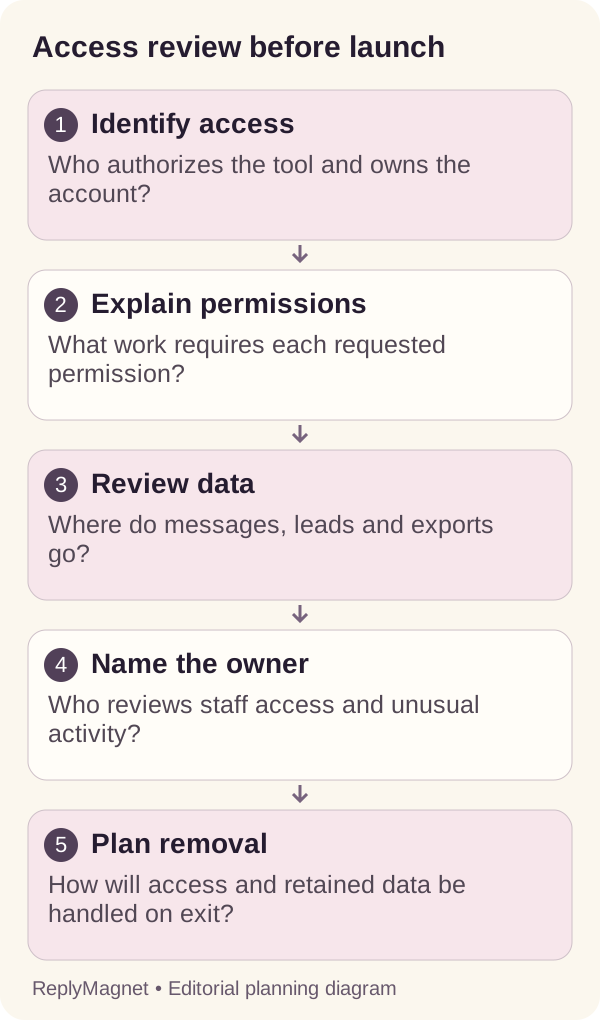
Access-review diagram: connecting the app is the beginning of an operating responsibility, not the end of the review.
Use a vendor questionnaire that preserves uncertainty
Record each claim with its evidence and a follow-up owner. A vendor statement, a document and an independent assessment are different kinds of evidence; do not present them as interchangeable.
A short questionnaire can ask: What access is requested? How are credentials protected? Who can view customer records? What information goes to other providers? How are deletion requests handled? Who receives a security report? What happens when the account is disconnected?
For each answer, save a source link and the date. Mark whether the evidence is a public statement, a contract, a demonstrated control or an independent assessment. If a question remains unanswered, record it as unknown. A blank cell should not silently become either a pass or a failure.
Self-managed workflows add another owner boundary. n8n's security information distinguishes service and self-hosting responsibilities, while its security-audit documentation describes checks for issues such as unprotected webhooks and outdated instances. For the wider build-or-buy choice, see n8n versus managed tools. These illustrate why owning a workflow can include maintaining the surrounding infrastructure.
Do not use this questionnaire to declare any vendor breach-proof or compliant with every legal requirement. Its purpose is to make a business decision with understandable evidence and to identify the work that remains before a wider rollout.
Test a limited workflow and review changes
After access is understood, test one low-risk customer task and document the operating baseline. Repeat the relevant review when people, integrations or data use change.
The studio can begin with a public preparation checklist and a controlled test participant. Verify the correct account, intended response, resource destination and responsible operator. There is no need to collect additional personal information simply to demonstrate that a resource can be delivered.
Keep a short baseline: connected account, application, campaign owner, data destinations, test result and next review trigger. A trigger can be a new staff member, a new email integration, a changed capture field or the end of a contractor engagement. This is more actionable than an undated statement that security was checked once.
If a later change introduces a new purpose for the data, revisit the customer explanation as well as the technical configuration. A checklist request and an ongoing marketing subscription are different purposes; the operating record should not blur them.
The outcome is a workflow the business can explain and maintain. Knowing who has access, where information goes and how to stop the process gives the owner a practical basis for using automation responsibly.
Common questions
Does using an official authorization screen remove every security risk?
No. It is one part of the connection process. Team access, data handling, exports, integrations and offboarding still need review.
Is disconnecting a tool the same as deleting all its records?
Do not assume so. Check the provider’s documented disconnection and deletion behavior, and review copies held in other connected systems or exports.
Does this checklist certify a tool as secure?
No. It is an operational review framework. Record the actual evidence and seek appropriate specialist assessment when your business requires it.
Keep reading
- Instagram DM Automation Rules: 7-Day & 24-Hour Windows
- Instagram DM automation for agencies: a playbook
- Create a ReplyMagnet campaign: posts, triggers and delivery
- ReplyMagnet assets: upload a PDF or add a link