Guides
Instagram DM automation for multiple accounts

Instagram DM automation for multiple accounts needs two checks: how many profiles the plan can connect, and how much usage those profiles share. In ReplyMagnet, Pro supports up to three connected accounts with 100,000 monthly engagements; Agency supports up to ten with 400,000. The allowance belongs to the workspace, so connecting three accounts does not create three separate 100,000-engagement budgets.
Published by ReplyMagnet · Last updated
Before connecting a second brand or client, also confirm who can authorize that Instagram profile, which posts belong to it, and where its leads should go. A plan can have enough capacity while a campaign still points to the wrong account or resource.
Compare connected-account limits and shared quota
ReplyMagnet's published monthly plans separate the number of connected accounts from the engagement allowance. These are the current advertised dollar prices, checked on 19 October 2026. Review the final amount and billing period before subscribing.
Plan
Starter
- Monthly price
- $0
- Connected accounts
- 1
- Shared monthly engagements
- 1,000
Plan
Basic
- Monthly price
- $9
- Connected accounts
- 1
- Shared monthly engagements
- 25,000
Plan
Pro
- Monthly price
- $29
- Connected accounts
- Up to 3
- Shared monthly engagements
- 100,000
Plan
Agency
- Monthly price
- $79
- Connected accounts
- Up to 10
- Shared monthly engagements
- 400,000
Source: ReplyMagnet plans and billing.
Connected-account slots are shared across supported platforms in the same workspace, rather than provided separately for each network; see the connection guide.
An account slot answers “Can I connect this additional profile?” Quota answers “How many eligible campaign interactions can the workspace deliver this month?” A higher usage allowance does not turn Basic into a two-account plan. Likewise, an unused account slot does not add another allocation of engagements.
For a matching comment, its public reply and DM count together as one engagement. Followers, raw comments and unique lead records are different measurements. A person requesting another resource can generate another engagement without becoming another unique contact. See the engagement definition.
Start your comparison with the number of profiles you actually need connected. Then check combined campaign usage and required features. Review the current plan limits before adding the next account.
Three examples of account slots versus usage
These examples are illustrative calculations, not customer results or delivery forecasts. The usage figures represent eligible delivered engagements during the same monthly period.
Three accounts with uneven activity
Suppose a creator runs a teaching profile, a podcast profile and a separate product brand. Their accounts use 54,000, 21,000 and 9,000 engagements respectively.
Together, that is 84,000 engagements. Under Pro's stated limits, all three profiles fit, with 16,000 engagements left in the shared allowance. There is no need to divide the budget into equal thirds for this calculation. The busiest profile uses more of the pool.
A practical consequence follows: a launch on the teaching profile affects the room available for the podcast and product campaigns. Keep the launch dates beside the account list so someone checking the quieter profiles can see why workspace usage changed.
Four accounts with modest activity
An agency has four client profiles, each using 2,000 engagements. Their combined usage is only 8,000, but four connections exceed Pro's three-account limit.
Among the published plans, Agency has enough slots. This is an account-count decision even though total activity is low. Do not choose a plan from volume alone, and do not assume swapping connections throughout the day is a harmless operating routine: disconnection pauses the affected campaigns.
Ten connected accounts with an eleventh client arriving
Ten accounts using 28,000 engagements each total 280,000. That leaves 120,000 within Agency's published monthly allowance, while all ten connection slots are occupied.
An eleventh account is a separate question. The remaining usage does not create a slot. Confirm a supported arrangement before promising the client a launch date; the public catalogue does not establish an unlimited-account tier.
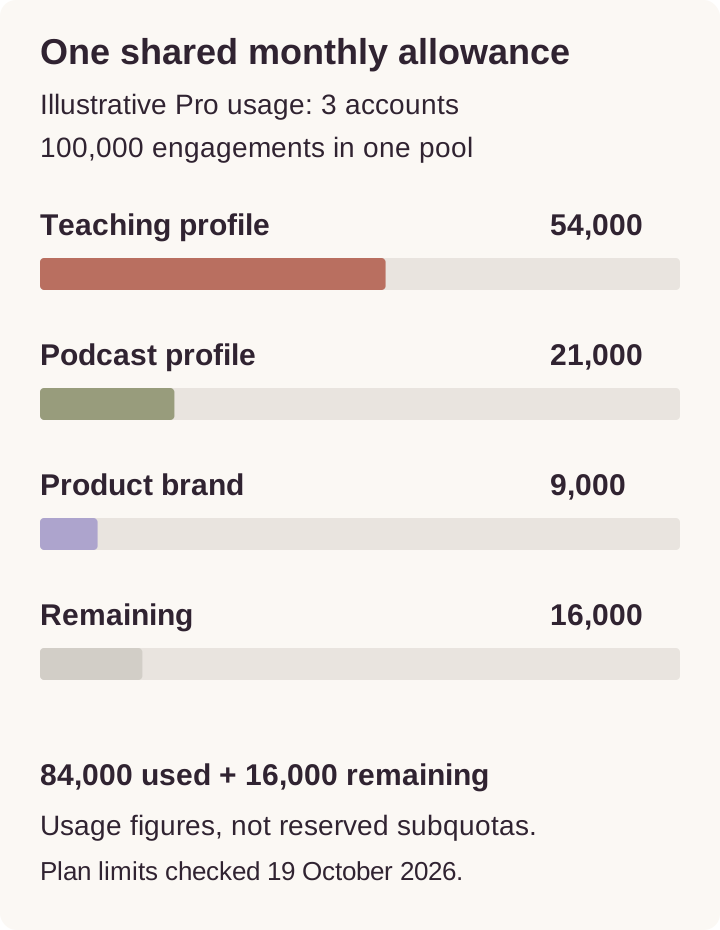
Illustrative monthly usage. These figures do not represent reserved per-account quotas.
For a broader estimate of future campaign activity, use the Instagram automation capacity-planning guide. Keep the profile count alongside that estimate so usage and connection needs stay visible.
Choose from the work you need to run
Follower count is useful audience context, but it does not determine ReplyMagnet's plan. The pricing explanation bases the allowance on campaign interactions rather than total followers or saved contacts.
A small account with an active resource campaign can create more delivery work than a larger account that rarely makes an offer. Count the profiles and review their actual campaign activity instead of estimating the subscription from a combined follower total.
Also distinguish social accounts from the people working on them. A ten-account allowance describes connected profiles. It does not, by itself, establish ten staff seats, private client areas, approval roles or separate client billing. If any of those capabilities is essential to your agency's process, verify it directly before choosing how to organize the work.
Agree account ownership before connecting a client
For your own brands, you may already know who controls each profile and approves its campaigns. For client work, write those responsibilities down before authorization.
Keep a short record of:
- The exact Instagram handle and the client or brand it represents.
- The person authorized to connect it and resolve future access problems.
- Who approves the resource, caption and DM wording.
- Who receives leads and checks the destination.
- Who can make a plan decision when another account or more usage is needed.
- What needs reviewing when the work ends or responsibility changes.
This is an operating checklist, not a list of ReplyMagnet permission roles. Do not interpret access to an Instagram profile as agreement to send its captured contacts into every client's mailing list.
Use the supported authorization flow rather than collecting client passwords in a shared document. The security checklist covers access reviews for each client. ReplyMagnet's connection guide explains that Instagram handles sign-in and grants the integration an access token.
Run a per-account preflight
A successful connection for one profile tells you nothing about whether the next profile is configured correctly. Repeat the checks for every handle.
Check the identity and connection
Confirm that the profile is a Business or Creator account. In the connection flow, inspect the Instagram account name and requested permissions, then verify the intended handle appears back in ReplyMagnet. This is especially important when a browser is already signed into several client profiles.
If connection fails, check the displayed reason before changing anything. An unsupported personal profile, an occupied plan limit and a permission prompt require different fixes. Follow the Instagram connection instructions for the relevant case.
Check the offer belongs to that profile
Open the original Instagram post and compare it with your campaign notes. Confirm the brand, post, keyword, resource title and destination as a set.
For example, two regional profiles might both use MENU. That is not sufficient evidence that they should deliver the same PDF. Check the location, language, prices, opening hours and resource version. For a US and European audience, inspect the actual currency, date format and booking time zone in the destination rather than relying on the filename.
Check the recipient's experience
Use a test account separate from the connected profile. Verify the sender handle, DM wording, link and final resource on a phone. If there is a capture step, complete it using details you control and check the resulting record.
Give each account a dated test result. A useful note says “Correct handle, menu opens, email reaches intended audience.” “Connected successfully” is too narrow to demonstrate that the promised resource works.
Set up one clear campaign per offer
ReplyMagnet's documented campaign flow starts by choosing a connected account and the relevant posts.
Prepare the resource, select the trigger, write the public reply and DM, then test before promotion. Different offers need separate campaigns; keyword variants within one campaign deliver the same asset. A saved draft does not send until launched. Follow the campaign setup guide.
Start with a specific post and an unmistakable request word. This makes the first test easier to interpret. If someone comments GUIDE beneath a worksheet offer, your test should confirm that they receive that worksheet from the account that published it.
Use clear names in your own campaign inventory, such as “Brand / offer / language / version.” That convention helps reviewers distinguish similar offers without assuming there is a built-in cloning or cross-account publishing feature.
For resource maintenance, ReplyMagnet's asset instructions require selecting the replacement asset in each relevant campaign. Previously delivered links retain their original asset. Keep a list of campaigns using each resource so an updated client price sheet does not leave another active campaign distributing the old version.
Ready to check your own setup? Start a free trial and complete one controlled test on each profile before announcing the campaign.
Keep lead destinations visible
The risk in multi-account work is not limited to sending the wrong PDF. A correct DM can still lead to a contact arriving in the wrong audience.
For every client campaign, record the intended email provider and audience or form. Verify the destination record after a test capture. ReplyMagnet's email-sync documentation describes Mailchimp and Kit connections and the contact information passed through; a connection success message is only one part of the check.
Do not assume that adding another Instagram profile creates a separate email destination or automatically isolates client data. Confirm the supported configuration before collecting real client leads. If the current arrangement does not establish the separation you need, resolve that before launch.
Treat exports with the same care. ReplyMagnet's Leads guide says CSV exports follow the selected tab and search filters. Inspect the rows before giving a file to a client. The workspace's combined visible list is not automatically the right deliverable for every brand.
Diagnose the failure before reconnecting everything
When an account stops producing the expected result, preserve the example comment, handle, post and test time. Start with the smallest affected part of the workflow.
Symptom
Another account will not connect
- First check
- Available slots and the displayed connection error
- Useful test
- Count existing connections against the plan
Symptom
The expected posts are missing
- First check
- The handle actually connected
- Useful test
- Compare it with the original Instagram profile
Symptom
A test comment gets no response
- First check
- Campaign status, post scope and test author
- Useful test
- Use a new qualifying comment from another account
Symptom
A different offer answers
- First check
- Overlapping live campaigns
- Useful test
- Compare the post scope and matching triggers
Symptom
Requests appear but delivery waits
- First check
- Workspace usage and recorded delivery status
- Useful test
- Inspect pending work without treating it as delivered
Symptom
The DM works but the resource fails
- First check
- Selected asset and destination access
- Useful test
- Open the link without the owner's access
Symptom
The email record is missing
- First check
- Capture result, destination and sync status
- Useful test
- Trace one controlled address into the intended audience
The campaign documentation notes that the connected profile's own comments are ignored and the first matching live campaign wins when campaigns overlap. Repeating the same self-comment or reconnecting the same correct handle will not resolve either test problem.
Review shared usage and plan changes together
Check workspace usage when several accounts promote offers at once.
Pending requests are not completed deliveries. A reset or upgrade may create capacity, but the account, campaign and applicable messaging window must still permit the send. Expired requests are not restored simply by buying more quota. The analytics guide explains how to separate matches, delivery and captured contacts.
The public trial lasts 30 days, requires no card and previews Pro features with up to three connections and 1,000 engagements shared across the trial workspace. It does not provide paid Pro's 100,000-engagement allowance. Without a paid subscription, Starter limits apply afterward. Check the trial and billing terms before scheduling a multi-account launch near the trial end.
Review every connected profile after a downgrade or reconnection. Confirm which campaigns are eligible and test them again; saved settings alone do not establish that delivery is active.
Start with a verified account list
List the handles, count the required slots and check combined usage. Then test each profile's post, resource and destination. That gives you a practical basis for expanding without losing track of which brand is sending what.
Create your first ReplyMagnet campaign with one clear offer, then repeat the same account checks before bringing the next profile live.
Common questions
Can I automate two Instagram accounts on Basic?
Basic has one connected-account slot. The published multi-account options are Pro, with up to three connections, and Agency, with up to ten. Check both connection count and combined usage when choosing.
Does each Pro account get 100,000 engagements?
No. The workspace's connected accounts and campaigns share the allowance. Keep one combined usage total in your planning notes rather than assigning the full plan allowance to each profile.
Can I test from the connected Instagram account?
Use another account. ReplyMagnet ignores comments from the connected profile itself, so that test would not represent a recipient requesting your resource.
Does an account slot give a client private access?
A connection limit does not establish client seats or data separation. Confirm the access and destination arrangement you need before putting several clients into the same operating setup.
Will disconnecting and reconnecting restart every campaign?
Disconnection pauses linked campaigns. After reconnecting the same profile, review the saved settings and launch the campaigns you intend to use. Test the delivery path again.
Keep reading
- Deliver an Instagram lead magnet without losing the reader
- Instagram DM automation for agencies: a playbook