Guides
How to join ReplyMagnet’s affiliate programme and redeem a referral trial

To refer people to ReplyMagnet, sign in, open Settings → Become an affiliate, apply and wait for approval. Your approved dashboard supplies a personal referral link and fallback trial code. Eligible new customers using that link receive 45 days of Pro trial access, with 1,000 total trial engagements and no credit card. The referrer can earn 30% of eligible payments during the referred customer’s first 12 months; a free signup does not itself earn commission.
Published by ReplyMagnet · Last updated
This guide takes both people through the process. The affiliate programme page remains the place to review current commercial terms before applying or promoting an offer.
What does each person receive?
The affiliate receives a potential payment share; the invited creator receives extra trial time. These are separate benefits with separate conditions.
Person or situation
Approved referrer
- Benefit
- 30% of eligible referred payments for the customer’s first 12 months
- Important limit
- Received payments are reviewed; signup counts are not earnings
Person or situation
Eligible new invitee using the approved link
- Benefit
- 15 extra Pro trial days, making 45 days total
- Important limit
- Same 1,000 total trial engagements; no card required
Person or situation
Eligible invitee using an issued fallback code
- Benefit
- 15 days added to an active, unexpired no-card trial
- Important limit
- One partner extension per workspace; no additional quota
Person or situation
Ordinary signup without a qualifying referral
- Benefit
- Standard 30-day Pro trial with 1,000 engagements
- Important limit
- Do not advertise 45 days for every signup
The plan and billing guide distinguishes Pro feature access from paid Pro’s larger usage allowance. A referral extends the trial’s duration, not its engagement budget. It is not a paid-subscription discount.
A partner’s individually arranged complimentary Pro access is also separate. Do not promise it to every applicant or invitee. The public programme page mentions a qualifying-reel collaboration benefit that requires confirmation with the team; that is not an automatic reward for sharing a referral link.
How do you join as a referrer?
Apply from your signed-in ReplyMagnet account and explain the audience you can help. Buying a subscription is not a stated application requirement, and an application is not automatic acceptance.
- Open the affiliate area. Use Settings → Become an affiliate, or the affiliate dashboard. Sign in if prompted.
- Enter your name or business. Use the identity you want the team to review.
- Add your website or social profile. The application expects a valid HTTPS address. Choose a page that makes your work and audience understandable.
- Explain how you will recommend ReplyMagnet. Describe the audience, their problem and the content you plan to create. The current form accepts a description of 20–2,000 characters.
- Read the programme terms. The application asks you to accept them, disclose your affiliate relationship and agree not to refer yourself. Submit only when you are ready to make those commitments.
- Check your status. An application under review is not an active referral account. Return to the dashboard after approval to obtain your issued link.
For example, a fictional application might say: “I teach independent course creators how to deliver worksheets requested through Instagram. I plan to show one resource-delivery setup and explain the trial limits in a tutorial.” This is an example of useful context, not a promise of acceptance.
The published page does not provide an approval deadline, a minimum follower count or a country-by-country eligibility list. Applicants in the US and Europe should confirm any country-specific participation or payment requirements with the team instead of assuming worldwide acceptance. Product familiarity helps you make a useful recommendation; it does not replace approval.
Where do you get your referral link and code?
After approval, use the link and fallback code issued in your affiliate dashboard. Do not invent a referral URL, append your own tracking code or copy another partner’s identifier.
Your approved dashboard includes a Referral link field and Copy referral link control. It also presents a Fallback trial code and instructions for where an invitee can redeem it. Keep the two together in your own promotion notes, along with the date you checked the terms.
If the page says Application under review, wait for approval. If it says the link is unavailable, contact hello@replymagnet.app before sharing it as an active offer. The dashboard is the place to check status; having a ReplyMagnet user account alone does not make someone an affiliate.
Before publishing your invitation, compare the copied link with the dashboard value. Avoid rewriting its tracking portion. Ordinary marketing tags and an approved programme identifier do different jobs, so an arbitrary campaign link cannot stand in for your issued referral link.
How should you invite someone?
Explain a relevant use case, disclose that you may earn commission and state the trial conditions beside the invitation. Give the reader enough information to decide whether ReplyMagnet is useful before asking them to sign up.
Here is illustrative wording for an approved affiliate, with no working referral link:
Ad: I’m a ReplyMagnet affiliate and may earn commission if you become a paying customer through my referral. If you want to try delivering Instagram resources, my approved link offers eligible new signups 45 days of Pro trial access, with 1,000 total trial engagements and no credit card. Use the supplied link and complete signup in the same browser. If the extra days do not appear, ask me for the issued fallback code while your no-card trial is still active.
Replace “my approved link” with your actual issued link only after acceptance. Adjust the description to your real experience and the audience’s task. Do not promise sales, leads, income or a particular result from using the product.
For US-facing recommendations, the FTC’s disclosure guidance says the commercial relationship should be clear and hard to miss alongside the endorsement. For EU audiences, the European Commission’s Influencer Legal Hub explains that affiliate marketing must be disclosed. Use language your audience understands and check the guidance applicable to your market; one English example is not a complete compliance template for every European country.
If you need to deliver requested recommendations by Instagram DM, the separate affiliate-links-by-DM guide covers that content workflow. Joining this programme and setting up a messaging campaign are different tasks.
How does an invited person claim the 45-day trial?
An eligible new signup through an approved affiliate link receives the extra 15 days automatically. The published tracking rule is the first affiliate link visited in a browser, followed by an eligible signup within 30 days.
- Open the approved referrer’s actual link. A generic homepage link is not the same invitation.
- Continue signup in the same browser. Switching devices or browsers, or blocking cookies, can prevent automatic attribution. Do not assume a referral opened on your phone will follow you to a laptop.
- Create your own account and complete the normal onboarding steps. The standard trial previews Pro features without requiring a card. The referral benefit applies only when the signup is eligible.
- Check the trial information in your account. Confirm the extra days have been applied before relying on the longer end date. Keep the usage allowance separate: 1,000 total trial engagements still applies.
- If the extension is missing, use the fallback route below or contact support. Do this while the no-card trial is active. Do not buy a subscription expecting a partner trial code to discount the checkout later.
For a fictional example, an educator shares an approved invitation with a new creator who wants to deliver a lesson worksheet. The creator opens it and completes signup in the same browser. If the referral qualifies and the bonus is applied, the trial lasts 45 days in total. It does not provide 45 extra days on top of the ordinary 30, and it does not reset the engagement allowance.
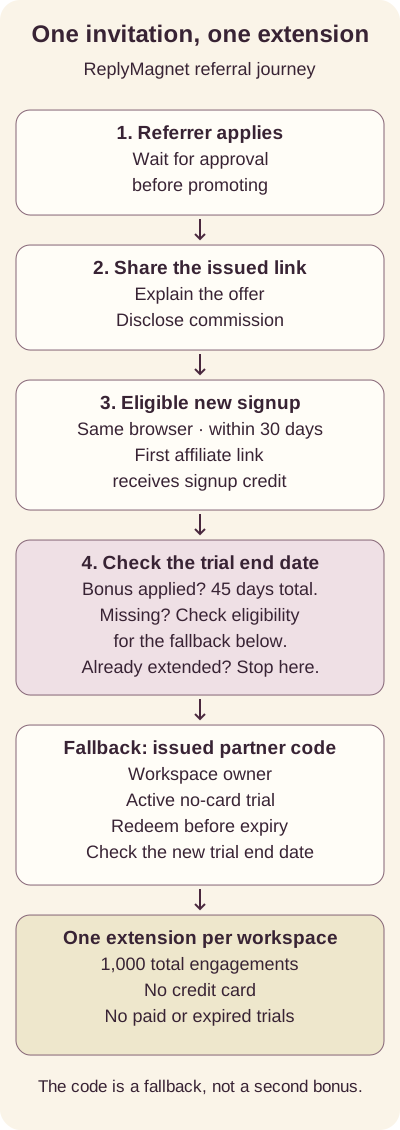
Process diagram: the link and fallback code lead to the same single partner extension, not two stackable bonuses.
How do you redeem a fallback partner code?
Use the dedicated partner-code page during an active, unexpired no-card trial. The code adds 15 days once per workspace and does not add engagements or reduce paid subscription charges.
- Get the issued code from your approved referrer.
- Sign in as an owner of the workspace that should receive the extension.
- Open Settings → Have a partner trial code?, or the partner-code page.
- Choose the intended Workspace, especially if you own more than one.
- Enter the code in Partner code and choose Extend my trial.
- Read the result. A successful redemption reports the new trial end date. Use that date rather than estimating from the day you saw the invitation.
A code is a fallback for an eligible trial, not a second reward after an automatic referral bonus. Paid or expired trials are not eligible for this extension. If you are only a workspace member, ask its owner to handle the redemption; do not create another account to work around eligibility.
Have an issued code and an eligible trial? Open the partner-code page. Review the workspace and code before submitting.
What if the link, code or dashboard does not show what you expected?
Start by identifying which stage failed. A recorded visit, a signup, a trial extension and an approved commission are different events.
What you see
Application under review
- What to check next
- Wait for approval; do not promote an inactive link
What you see
No automatic extra trial days
- What to check next
- Check same-browser signup and eligibility; obtain the issued fallback code before trial expiry
What you see
Partner code rejected
- What to check next
- Check spelling, the intended owned workspace, active no-card trial and whether an extension already applied; ask support to check code availability
What you see
A different affiliate expected credit
- What to check next
- The published first-link rule applies; ask the team to review attribution instead of creating another signup
What you see
Code worked but dashboard counts differ
- What to check next
- Code-only and older campaign-link referrals are reviewed separately from the newer link-flow counts
What you see
Active paid accounts but no payout yet
- What to check next
- Subscription status is not proof of eligible received payments or commission approval
For a support request, include the stage, the visible error text and the relevant dates. Send account details privately to the official team, not in a public comment or screenshot. Never share passwords, login codes or unnecessary customer information.
The dashboard’s Recorded visits measure recorded browser referrals, not verified unique people. Referred signups, Trial bonuses and Active paid accounts help you follow the journey, but they do not replace payment reconciliation.
How are commission and payouts handled?
The published programme pays 30% of eligible customer payments during the first 12 months. Refunds and chargebacks are deducted, and future commission stops when customer payments stop.
For a simple arithmetic illustration, $100 of eligible received payments would produce a $30 share before applicable adjustments. This is not a forecast, an account balance or a promise that a referral will buy anything. Do not multiply dashboard signup counts by a plan price and call the result earnings.
Current published payout terms specify PayPal or Wise by the 15th for the previous month, with a $50 threshold; smaller earned balances carry forward. Confirm your payment destination and agreement with the team. The public page does not define every country-specific payment detail, exchange-rate treatment or tax obligation, so do not assume a dollar threshold automatically becomes the same amount in euros or pounds.
Self-referrals and fraudulent signups are not paid. Paid search on ReplyMagnet brand terms or close variants is prohibited. The published terms allow programme changes with 30 days’ notice and payment of already-earned commissions. Keep your agreement and statements so questions can be checked against the same record.
Choose your next step
Apply through the affiliate area to refer someone, or use your approved referrer’s issued invitation to claim an eligible trial.
Referring someone: review the programme terms, then open your affiliate dashboard to apply or copy your approved link.
Accepting an invitation: use the referrer’s issued link, keep signup in the same browser and verify the trial end date. If you were given a fallback code, check eligibility and redeem it in the partner-code area.
When the trial is ready, use the comment-to-DM setup guide to test one useful resource-delivery workflow before expanding your campaign.
Common questions
Do I have to pay for ReplyMagnet before applying?
No paid subscription is required to apply under the published terms. You still need to apply and receive approval before promoting your programme link.
Does clicking a referral link enrol the visitor as an affiliate?
No. The visitor is an invited prospective customer. Becoming a referrer requires a separate application and approval.
Can I combine several codes for a longer trial?
No. The programme permits one partner extension per workspace. An automatic referral bonus and a fallback code are not two separate extensions.
Does the invitee receive unlimited Pro usage?
No. The eligible offer provides Pro trial features for 45 days with 1,000 total trial engagements. Paid Pro’s usage allowance is separate.
Can an existing customer redeem a referral trial code?
The fallback route requires an active, unexpired no-card trial and an eligible workspace. It does not extend a paid or expired trial. Ask the team about your actual situation instead of treating all existing accounts as eligible.
What happens when the trial ends?
Without a paid subscription, the workspace moves to Starter and its limits apply. The plan guide says saved campaigns, assets and lead records remain. Choosing a paid plan is separate from receiving the trial invitation.
Is complimentary Pro access guaranteed to affiliates?
No universal entitlement is established by the public application. Any individually arranged partner access or qualifying-content benefit needs separate confirmation; it must not be advertised as the standard invitee offer.
Keep reading
- Affiliate program
- ReplyMagnet plans and billing: trial, quota, upgrades
- Instagram affiliate links by DM: creator workflow
- Instagram Comment-to-DM Automation: Setup & Test Guide