Guides
Instagram DM automation vs email marketing: when to use each and how to combine them

Use Instagram DMs to answer a clear request where it starts. Use email for a publication or sequence the person knowingly requests. Combine them when the ongoing email offer adds useful value after the initial response; neither channel is a universal winner.
Published by ReplyMagnet · Last updated
A creator offering a worksheet faces two different questions: how should someone receive the worksheet, and would that person benefit from future emails? Combining those decisions into one compulsory signup can obscure the offer. Separating them makes the customer journey easier to explain.
A fictional home-bakery example explains the voluntary handoff, with a decision worksheet and measurement checks. The example copy is invented for teaching; it is not a customer campaign or a conversion result.
What job should Instagram DMs and email each perform?
Instagram DMs can fulfill a request made on Instagram. Email can deliver an explicitly requested publication or sequence. Choose by the customer’s next useful task, not by a general claim that one channel gets more attention.
Start with the value being requested. “Send me the pricing worksheet” is a bounded task. “Send me a weekly note about pricing my products” is an ongoing commitment. One person may want both, but the first request does not establish the second.
DM automation means a configured response to a supported Instagram interaction, such as a qualifying comment or incoming message. It can supply a resource or guide the next step. It does not mean you can message every follower whenever you choose.
Email marketing means communicating through your email platform under the relevant signup promise and subscription state. It can support a newsletter, an email course or an appropriate sequence. It still depends on recipient expectations, provider rules, working destinations and ongoing maintenance.
Length alone is a poor deciding factor. A short weekly email can be useful, while a long DM exchange can become difficult to follow. Ask where the material belongs and how someone will return to it. A worksheet can live on a website, with either channel helping people find it.
How do the channels compare in a practical campaign?
Compare the entry action, promised value, follow-up boundaries and maintenance. A DM response and an email subscription are different events, so keep their success measures separate.
Use this table to plan one offer. The entries describe design considerations, not a ranking or a claim about average conversion rates.
Audience location matters, but it is not sufficient. People discovering your offer on Instagram may still prefer an email course. Existing newsletter subscribers may need only a direct email link, with no reason to add an Instagram interaction.
Channel choices by customer task and operating responsibility
Question
What starts the journey?
- Instagram DM automation
- A supported Instagram interaction
- Email marketing
- An explained signup or appropriate existing subscription
Question
What is the first useful job?
- Instagram DM automation
- Answer the request or provide its resource
- Email marketing
- Deliver the requested issue, lesson or sequence
Question
What permits later messages?
- Instagram DM automation
- The relevant messaging eligibility and window
- Email marketing
- The signup promise, subscription state and provider process
Question
Where can the material live?
- Instagram DM automation
- A short reply and a tested resource destination
- Email marketing
- Email content and linked resources
Question
What should you measure?
- Instagram DM automation
- Request handling and observed resource access
- Email marketing
- Appropriate subscriptions and downstream outcomes
Question
What needs upkeep?
- Instagram DM automation
- Trigger, reply, destination and exceptions
- Email marketing
- Signup, content, sender, links and subscription controls
When is a DM-only resource journey enough?
Choose DM-only delivery when the person wants one resource and there is no useful ongoing email offer. Fulfill that request through an eligible route without inventing a newsletter requirement.
A printable checklist, current size chart or single practice worksheet may solve the whole problem. If you have no useful ongoing offer, collecting an address just to enlarge a list introduces an obligation without necessarily adding customer value.
Make the resource promise specific. The post should name what is included; the reply should identify the same item; the destination should open the correct version. Leave related services visible on the resource page when useful, but do not hide the requested value behind an unexpected offer.
For a simple campaign, use the comment-to-DM setup guide. If an incoming-message keyword is the better entry, use the DM automation guide. Choose one clear route before adding more steps.
When should email be the main offer?
Choose email first when the promised product is an email course, newsletter or recurring update. Explain the sender, content and schedule during signup, and keep Instagram as an optional discovery route.
Consider a creator publishing a weekly market explanation or a teacher offering a three-part email lesson. The publication itself is the value. A clear signup page can explain it more accurately than a caption promising only a download.
Someone can discover that publication on Instagram and follow a suitable link to join. There is no requirement to send a DM first. Equally, a relevant DM response can point to the signup when the person has requested information about the publication.
Write the invitation before configuring the sequence. A promise of one weekly explanation should not quietly become a daily promotion. The first-email guide covers how to make the initial message recognizable without turning this channel-choice decision into another welcome-email tutorial.
How can you combine DMs and email without making signup compulsory?
Deliver the promised resource first, then offer a separate optional publication on its destination page. Only people who choose that publication enter its verified email route; declining signup should leave the resource available.
Here is a fictional home-bakery example. A baker publishes a post explaining why flour and packaging belong in a product-cost calculation. The offer is a worksheet that helps readers enter their own costs. No performance result is claimed.
Illustrative post invitation: “Comment COST for the home-bakery pricing worksheet. It includes spaces for ingredients, packaging and your own planning notes.”
The qualifying private reply supplies the resource through the supported route. A short example is: “Here is the pricing worksheet you requested: [resource link]. Start with one product and enter your actual ingredient and packaging costs.” Replace the bracketed text with the tested delivery link; it is not a working destination in this example.
On the resource page, keep the worksheet accessible. Beside it, show a distinct invitation: “Join Bakery Pricing Note for one practical pricing exercise each week, from [actual publication name]. Enter your email to subscribe. You can use this worksheet without joining.” Replace the publication details with a real offer you can maintain.
The signup belongs in your website or email provider’s verified form, not in an invented ReplyMagnet optional-newsletter switch. A reader who skips it keeps the worksheet. A reader who joins follows the form’s actual confirmation and subscription process before the appropriate email sequence begins.
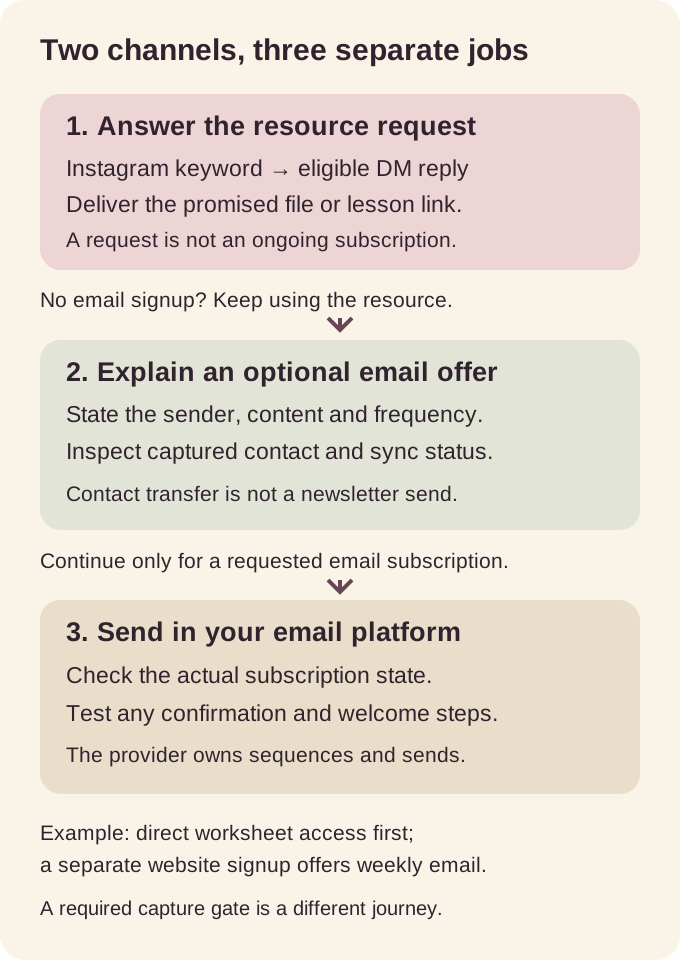
Original planning diagram: resource access and optional email signup are separate decisions. The diagram is not a product interface or proof that a sequence has run.
Test both branches using controlled accounts or addresses: open the worksheet without signing up, then inspect the signup branch separately. The important result is a coherent choice, not merely a contact appearing somewhere.
Which parts does ReplyMagnet handle?
ReplyMagnet handles supported Instagram automation, resource delivery and email capture. Native Mailchimp and Kit sync on Basic or above transfers contacts; your email platform sends newsletters and sequences.
ReplyMagnet can use a configured incoming-DM keyword as an entry route. The authentic screenshot below shows GUIDE with exact-word matching. It demonstrates that control, not the fictional bakery’s COST comment campaign or an email subscription form.
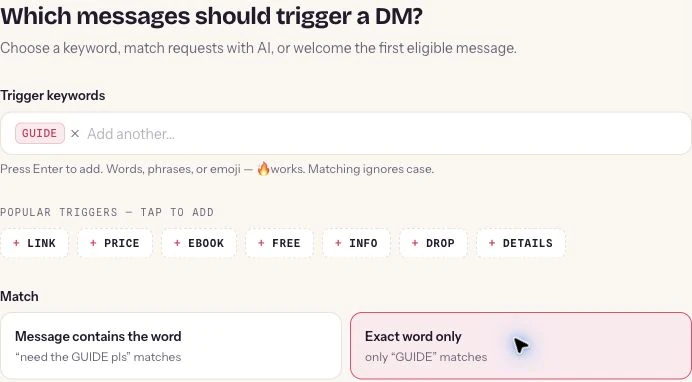
Authentic ReplyMagnet screenshot reused from the DM automation guide. This is an incoming-DM configuration example, not a comment setup, customer message or verified email handoff.
Email capture is available on every plan. Native Mailchimp and Kit sync, and external link assets after the trial, require Basic or above. A capture gate before resource access is a different journey from the optional signup after direct access in our bakery example. Explain whichever route you actually choose.
Use the email-sync documentation to configure the native connection and the Assets documentation for delivery formats. If source context matters downstream, consult the segmentation guide; do not assume every ReplyMagnet field is mirrored into your provider.
What permission and timing boundaries need attention?
A resource request does not establish unlimited DM follow-up or every email subscription. Check the Instagram route’s eligibility and the email route’s actual signup behavior before enabling later messages.
A comment private reply and an ordinary incoming-DM conversation follow different entry rules. Meta’s private-reply documentation describes the constrained comment response. Clicking its website link does not count as the recipient replying to start an ongoing chat. Use the automation rules guide when planning follow-up.
For email, preserve what the person actually chose. Mailchimp’s permission guidance emphasizes express, verifiable permission. State the publication, sender and frequency clearly rather than treating an address captured for a resource as permission for every future offer.
Confirmation needs a route-specific check. Mailchimp’s double opt-in guidance describes its form process and distinguishes integrations. ReplyMagnet’s current Mailchimp adapter requests subscribed status for new contacts, not the pending state that initiates that confirmation route. A Mailchimp form setting does not automatically insert confirmation into every API connection.
If your intended journey requires confirmation, use and test a route that supplies it. Keep existing subscription choices and opt-outs intact. The practical question is what your actual signup does, not what a similarly named setting suggests. This is workflow guidance, not jurisdiction-specific legal advice.
How should you compare results fairly?
Compare defined business outcomes for comparable offers and periods. Label each denominator, keep requests and subscriptions separate, and include operating work; email opens and DM activity alone do not establish sales.
Choose the question before collecting totals. “Did people obtain the worksheet?” differs from “Did the publication attract appropriate subscribers?” Both differ from “Did this work produce qualified enquiries?” One successful stage need not establish the next.
For the bakery, resource-access evidence belongs to the worksheet question. The provider’s appropriately subscribed records belong to the publication question. An actual enquiry about a paid class belongs to a separate business outcome. Keep repeat actions and returning contacts visible rather than counting each event as a new person.
Mailchimp explains that email metrics can include activity affected by bots and Apple Mail Privacy Protection. Reported opens therefore cannot be treated as a clean count of people reading. Nor should a DM send be relabeled as a read or a customer.
Use consistent campaign links where website acquisition measurement is available. Google’s campaign URL guidance explains the role of UTM labels; a label helps categorize recorded traffic but does not prove what caused an order. The DM tracking guide covers implementation.
Avoid declaring a winner from unrelated benchmarks. A DM campaign answering existing demand and an email campaign reaching established subscribers have different starting populations. To learn from your own test, record those differences and compare similar offers where practical. If attribution or audience matching is unavailable, say so.
A small comparison record with explicit units
Decision
Did the request get useful value?
- Record
- Eligible requests and observed resource access, with definitions
- Keep separate
- Sends, repeated opens and unique people
Decision
Did people choose the publication?
- Record
- Verified appropriate subscriptions through the named route
- Keep separate
- Captured addresses and existing contacts
Decision
Did relevant business outcomes occur?
- Record
- Defined enquiries, bookings or orders with supporting records
- Keep separate
- Unattributed outcomes during the same period
Decision
Was the journey maintainable?
- Record
- Setup, recurring content, upkeep and exception time
- Keep separate
- Software spending and estimated time value
Use this worksheet to choose your first version
Write the requested value, recurring offer, optional choice, system owner and completion evidence before launch. Choose DM-only, email-first or combined delivery from those answers.
Copy these prompts into one campaign note:
- Requested value: What will the person receive after the first action?
- Best first route: Where did the request begin, and which supported route fulfills it?
- Ongoing value: What makes a recurring publication worthwhile?
- Signup promise: Who sends it, what is included and how often?
- Choice: Can a resource-only reader complete the original task without joining?
- System owner: Who maintains the Instagram response, resource and email route?
- Acceptance evidence: Which controlled checks prove each chosen branch works?
- Outcome and review: Which business result matters, and when will you review it?
Three cases make the decision concrete. A maker offering a one-page care sheet can begin with DM-only delivery. A writer promoting an established weekly newsletter can begin with its clear email signup. A teacher with a useful worksheet and a genuinely distinct weekly lesson can combine direct resource access with a separate optional subscription.
Before adding both channels, inspect workload as well as ambition. Who will write next week’s issue and fix a broken resource? The automation cost model helps account for setup and maintenance when that operating question needs detail.
Launch the smallest version that keeps the promise. Review broken destinations, unclear expectations and qualified outcomes before adding complexity. A well-maintained single channel can be a better starting point than a combined journey nobody owns.
Common questions
Can Instagram DM automation replace email marketing?
Instagram DM automation can replace a manual response for a supported Instagram request, but it does not automatically replace an ongoing publication. Choose by the value requested and maintain the appropriate follow-up route.
Do people need to give an email address to receive a DM resource?
Not necessarily. A direct-access resource can be delivered without an email gate. If you choose a capture gate, explain it in the offer; it differs from a separate optional newsletter signup after access.
Does ReplyMagnet send newsletters?
The native email-sync workflow transfers captured contacts to Mailchimp or Kit on Basic or above. Your email platform sends the newsletter or sequence; contact sync is not evidence that an email was sent.
Which channel converts better?
There is no universal winner established here. Compare relevant outcomes from comparable offers and periods, with clear audience and denominator definitions, rather than unrelated channel benchmarks.
Do I need a chat flow builder for a simple resource offer?
A simple supported resource-delivery campaign does not require a complex branching journey. Use the campaign setup suited to the entry route, then add choices only when they help the reader.