Guides
Keep Instagram signup context clear in your email audience
A label is useful only if the team agrees what it means and what it changes. Keep the source of an address separate from the offer someone requested, their current relationship with the business and their subscription state.
Published by ReplyMagnet · Last updated
Begin with the follow-up decision, not a long tag list
Create a label when it supports a real decision. Avoid collecting categories that nobody maintains or using one label to stand for several different facts.

Generated editorial illustration of organizing information. It does not depict actual subscriber records or provider fields.
A fictional small illustration business offers a beginner exercise, a workshop update list and a service enquiry guide. Someone can request more than one. A single label called “Instagram lead” tells the team where the person may have arrived, but not which follow-up would make sense.
The business needs to preserve context without assuming that every request indicates the same interest. The exercise requester may want drawing practice. The workshop reader may want event updates. The service enquiry guide may be relevant to a potential client. Those are possible interpretations to verify against the actual offer, not permission to send any related promotion.
This article uses invented offers and contact histories. No real subscriber records, campaign results or customer behavior are reported.
Write down the decision a proposed label will support: selecting a relevant resource, checking a particular signup promise or excluding an incompatible message. If the team cannot name a use, consider leaving the label out.
A label should also have a definition that another person can apply. “Warm” is ambiguous without a rule. “Requested beginner exercise” describes a recorded event more clearly, provided the system actually records that event and the name remains accurate over time.
Separate source, interest, lifecycle and subscription state
Source, interest, lifecycle and subscription categories answer different questions. A source label records origin; an interest label records a stated or observed request; lifecycle describes a verified relationship; subscription state controls the provider’s mailing status.
Source answers “Where did this record come from?” Interest answers “What did this person ask for?” Lifecycle answers “What relationship has the business actually established?” Subscription state answers a different operational question about the email provider’s current record.
Do not use an interest label as evidence of a purchase. Do not use a customer label as evidence of permission for every newsletter. Do not use a followed-account status as a substitute for an explicit email signup.
Mailchimp describes tags as customizable labels for organizing contacts. A tag’s presence only has the meaning your process gives it. Calling a tag “consented” does not create evidence that the person made the corresponding choice.
For the fictional business, source can remain stable while interests accumulate. Lifecycle may change after an actual purchase or completed project, if the business’s records establish that change. Subscription status must be read from the provider and the relevant signup history, rather than inferred from either category.
Keep the dictionary small enough to review. A naming convention helps only if the underlying definitions are clear. Prefixes such as source, interest and lifecycle can make the categories easier for staff to distinguish, but they are proposed organizational labels, not fields guaranteed to be created by ReplyMagnet.
Illustrative label dictionary for three fictional offers; these are proposed definitions, not automatic integration mappings.
Category
Source
- Example label
- source: instagram
- Meaning and limit
- Origin context; not an interest or permission record
Category
Interest
- Example label
- interest: beginner-exercise
- Meaning and limit
- Requested that named resource; not a purchase
Category
Interest
- Example label
- interest: workshop-updates
- Meaning and limit
- Explicitly requested the stated update list
Category
Interest
- Example label
- interest: service-guide
- Meaning and limit
- Requested service information; not an accepted project
Category
Lifecycle
- Example label
- lifecycle: customer
- Meaning and limit
- Supported by a real business record, not a click
Category
Subscription
- Example label
- Provider-managed status
- Meaning and limit
- Inspect actual status and signup context separately
Verify what your connection really sends
Do not assume that a label in one tool becomes the same kind of label in another. Inspect the actual destination record and use the field type your integration supports.
ReplyMagnet’s current sync process supplies the base label Magnet and, when enabled, a campaign-name label. That does not mean the proposed dictionary above appears automatically, nor that every flow tag or lead detail transfers as an email-provider field.
The current Mailchimp adapter sends those labels through Mailchimp’s tag endpoint. Contact creation and tagging are separate operations, so a successful contact sync does not by itself prove the expected tags arrived. Inspect the record before relying on a tag-based rule.
The current Kit adapter handles the supplied label names differently: it writes them into a custom field named magnet_tags. Those values are not native Kit tags. A rule expecting a native tag will not become correct simply because the same text appears in that custom field.
Provider fields also differ. The current Mailchimp sync supplies phone when available. Although the adapter can accept a first name, the current sync process does not supply one, so do not expect it to populate a first-name value. It also does not map every source or campaign detail into a dedicated merge field. Do not promise a complete mirrored contact profile. Check the destination’s actual fields and values for the route you use.
ReplyMagnet flow tags, Mailchimp tags and a Kit custom field are therefore three different mechanisms. Keep their names and purposes distinct in your internal notes. The email-sync guide covers the connection, but your segmentation rule must use the destination structure that is actually present. For historical batches, use the CSV import runbook to review field updates and reconcile new versus existing contacts.
These details are current implementation boundaries, not a recommendation to build a complicated tagging system. Start with one verified field or tag that supports a specific appropriate follow-up, then test that decision end to end.
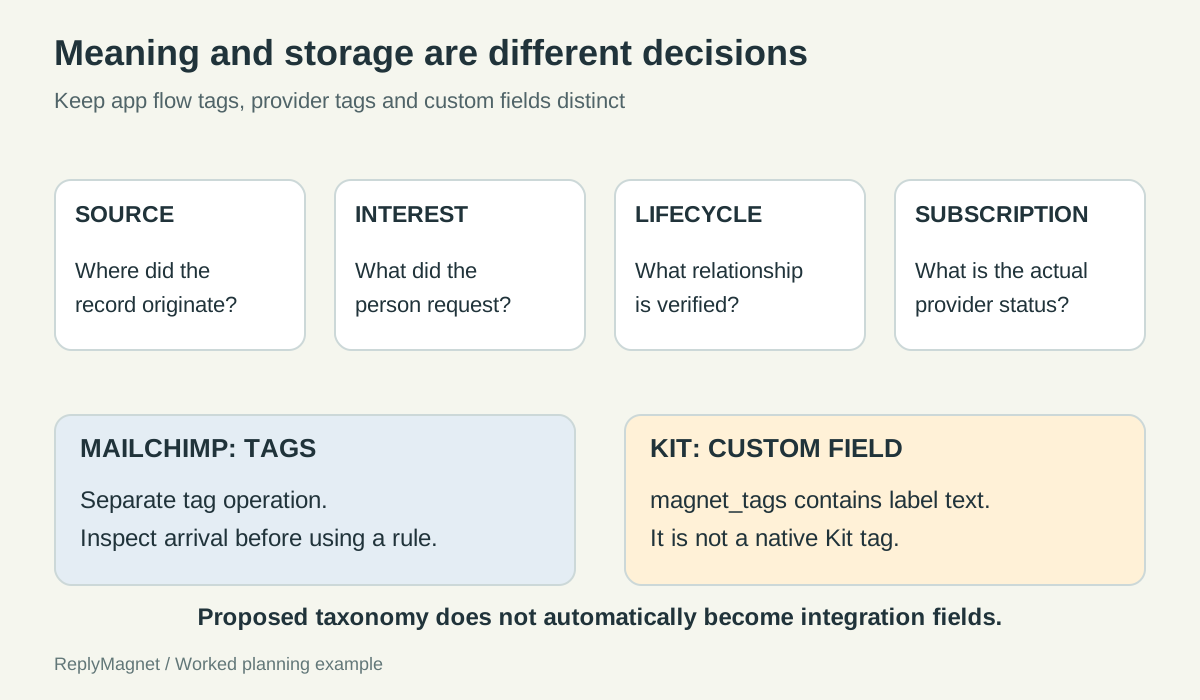
Original taxonomy and implementation map. The categories are editorial recommendations; inspect the actual destination record before using a segment.
Three contact histories reveal different mistakes
Test new requests, multiple interests and returning records. A person’s later action can add context without erasing their earlier request or changing their subscription choice.
The following histories are fictional. They illustrate how to reason about records, not how a provider will automatically update them.
History A: one resource request. A reader requests the beginner exercise and explicitly joins the associated newsletter under its stated promise. The relevant interest is the exercise, the source is the verified Instagram route and the provider status must be inspected. There is no evidence of workshop interest or a service enquiry.
A useful review asks whether the welcome matches that exercise. A mistake would be including the person in every offer segment because all three offers share the same source label.
History B: two distinct interests. A reader first joins workshop updates, then later requests the service guide. Both events may be relevant, but the second does not prove that workshop interest ended. Keep the history understandable and decide which message is appropriate under each actual signup promise.
Do not automatically declare the latest campaign the person’s only interest unless your own process intentionally uses a single current-preference field and the reader has made that choice. An integration may update a value; that technical behavior is not the same as a preference decision.
History C: an existing record returns. A previously known address requests the beginner exercise. The request may update an existing contact rather than create a new person. Check the prior subscription state, the new offer wording and whether any welcome or other rule will run again.
A repeat request should not silently restore an unrelated mailing preference or be counted as a new unique person. The lead-record documentation explains that repeated activity can update a record rather than create one row per action.
In every history, distinguish the event you observed from the conclusion you want to draw. A service-guide request is evidence of a request. It is not evidence of budget, purchase readiness or agreement to a sales sequence.
Handle stale and conflicting labels deliberately
Keep historical source facts separate from current preferences. When labels conflict, inspect the underlying events before choosing which one to remove or use.
Some labels describe history and should not be treated as current preferences. “Requested spring workshop details” may remain a true historical fact after spring ends. It may no longer be a useful criterion for promoting an unrelated autumn event.
Other labels are intended to represent a current state. If a business uses “active project,” it needs a defined event that adds the label and a defined event that removes it. Otherwise a completed project may remain active indefinitely in the audience system.
Choose an owner and review trigger for each maintained category. An offer being retired, a campaign being renamed or a provider connection changing can all require a review of segment rules. Renaming a campaign without checking dependent labels may leave a rule selecting only the old spelling.
When records conflict, do not pick the most commercially convenient interpretation. Inspect what was requested, when it happened and what the actual record says. If the evidence is insufficient, keep the person out of the uncertain segment while resolving the definition.
Avoid deleting useful history just to make the audience look tidy. A separate current-preference field may be more suitable than overwriting the record of a prior request, depending on your system. This is a design choice to implement and verify in the provider, not a native ReplyMagnet promise.
Write down the rule in ordinary language before configuring it. “Include people who explicitly joined these workshop updates and currently have the appropriate mailing status” is easier to audit than an unexplained combination of tag names.
Review the selected people before sending
Check the rule, sample records and message promise together. A technically valid segment can still select people for a message they did not request.
Before enabling a segment campaign, inspect a few controlled or appropriately authorized records that should be included and a few that should be excluded. Use the fictional histories above as test cases for your own real configuration.
Confirm the field type as well as the value. In Kit, a custom-field value is not a native tag. In Mailchimp, verify the expected tag actually arrived after sync. Check whether the rule uses any historical campaign name that no longer matches the current source.
Read the message against the signup promise. Source similarity alone does not make two offers interchangeable. If the offer or frequency differs materially, resolve the expectation before using the segment.
Subscription confirmation also needs route-specific verification. Mailchimp’s double opt-in guidance distinguishes its signup forms from integrations. ReplyMagnet’s current Mailchimp adapter requests subscribed status for new contacts; a form-level confirmation setting should not be assumed to insert a confirmation step into that API route.
Record the reviewed rule, date, owner and exclusions. Keep private contact information in the approved system rather than copying a large audience export into an editorial document.
The result should be a small, understandable taxonomy that supports appropriate decisions. If staff cannot explain why a person is in the selected group, simplify the rule or investigate the record before sending.