Guides
Sell a 2027 digital planner on Instagram by showing a real week

To sell a 2027 digital planner on Instagram, show how someone would use it during a recognisable week, then offer a small working sample. Let buyers check the writing space, navigation and format before directing them to your store. A useful demonstration answers the question a cover image leaves open: “Will I actually use this?”
Published by ReplyMagnet · Last updated
This walkthrough connects a filled weekly spread, a Reel and a sample campaign for US and European buyers. Preparing before January gives you time to test the product and message; it does not establish demand or guarantee sales.
Choose the person and the planning problem
Start with one situation your planner handles well. A freelance designer juggling client work needs a different demonstration from someone organising rotating shifts.
For this walkthrough, the buyer is a solo creative balancing projects, admin and personal time. The promise is specific: “See your fixed commitments, choose a weekly priority and leave room when plans change.”
Show the pages that support that promise: perhaps a weekly spread, monthly overview and notes area. Put the full contents list on the product page.
Build a filled week and a blank version
You can demonstrate your own week after removing private information, or create an invented example. Label invented appointments “Fictional example” on the page and in the video. Never present them as a customer’s schedule or evidence of a result.
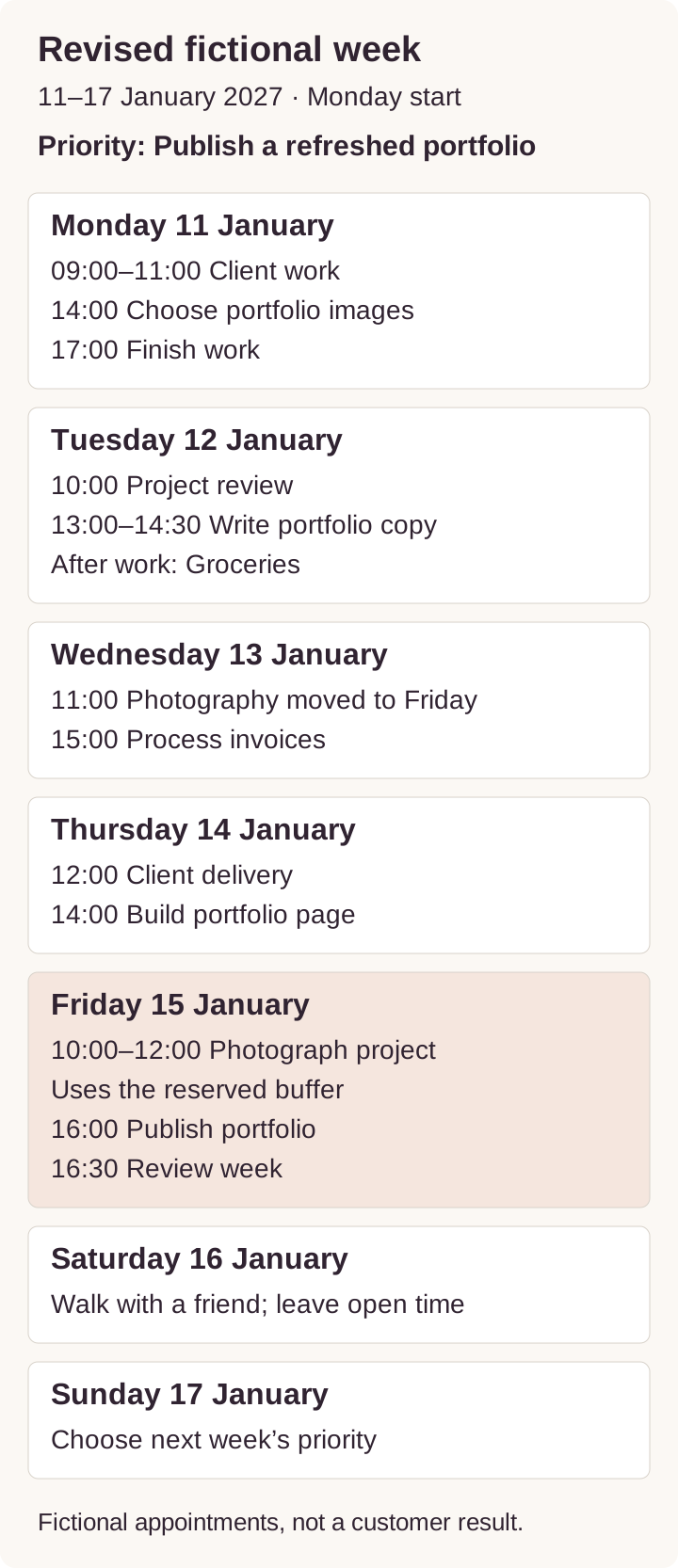
A fictional week beginning Monday 11 January 2027
Give the example one main priority: publish a refreshed portfolio page by Friday. Then fill the spread with enough detail to demonstrate decisions:
- Monday 11 January: client work from 09:00 to 11:00; choose portfolio images at 14:00; finish work at 17:00.
- Tuesday 12 January: project review at 10:00; write portfolio copy from 13:00 to 14:30; groceries after work.
- Wednesday 13 January: photograph a new project at 11:00; process invoices at 15:00.
- Thursday 14 January: client delivery at 12:00; build the portfolio page at 14:00.
- Friday 15 January: leave 10:00 to 12:00 as a buffer; publish the portfolio at 15:00; review the week at 16:00.
- Saturday 16 January: meet a friend for a walk; leave the rest open.
- Sunday 17 January: spend ten minutes choosing next week’s priority.
Now show a change. Wednesday’s photography session cannot happen. Move it to Friday’s buffer, shift publication to 16:00 and review the week at 16:30. Explain what changes and what stays possible. This gives the planner a practical job beyond holding an attractive task list.
These dates are correctly aligned for 2027. Still check every date in your own annual file, including month transitions and any holiday labels.
Make the sample useful on its own
Create a short sample pack containing:
- The filled fictional week.
- The identical blank weekly page.
- A brief start guide explaining how to open, annotate or print it, plus the paid planner’s contents and store link.
Include enough working navigation to demonstrate any hyperlink feature you advertise. If the sample only contains a weekly spread, say that annual navigation is excluded. Avoid a locked preview that prevents buyers from trying the main task.
Invite the reader to enter three fixed commitments, one priority and one buffer. That is a concrete first use they can attempt before deciding whether to buy.
Try the blank example worksheet. It is an educational planning page, separate from any seller’s commercial planner.
Turn the demonstration into an Instagram Reel
Record your actual file in the app you have tested. Keep the writing readable on a phone, add captions and remove notifications or private tabs before recording.
A roughly 30-second sequence could work like this:
- Opening: show the filled spread. On-screen text: “What happens when Wednesday’s plan changes?”
- Context: point to the weekly priority and fixed appointments.
- Demonstration: move Wednesday’s task to the Friday buffer using the editing method your product supports.
- Product detail: open the monthly overview, then return to the weekly page.
- Invitation: show the blank sample and explain how to request it.
Slow down if the viewer cannot follow the action. If your planner is printable, film yourself writing on the printed version instead of implying tablet editing.
Use a caption that matches the delivered file:
“Here’s how this 2027 weekly layout handles a changed plan. The schedule is a fictional example. Comment WEEK for the free PDF sample: a filled example, a blank page and setup instructions. No email signup required.”
Only use the final sentence if it is true. Keep the same resource name in the Reel, caption and DM.
For a carousel, use six slides: planning problem, filled week, changed appointment, revised plan, blank sample and request instructions. The carousel should remain useful even to someone who never requests the file.
Ready to connect that demonstration to a sample? For templates, see selling Canva templates with a free sample; for video, see YouTube Shorts links for digital products. Explore ReplyMagnet for digital product sellers.
Set up the sample delivery journey
Keep the first campaign narrow: one planner sample, a clear keyword and the posts that actually offer it.
In ReplyMagnet, use a connected Business or Creator Instagram account, prepare the asset, select the relevant posts and configure WEEK as the request keyword. Keyword matching is case-insensitive and uses whole words. Choose the scope carefully if other live campaigns use similar triggers; overlapping campaigns can compete for the same comment. Follow the campaign setup guide.
An uploaded PDF can be up to 25 MB on every plan. External link assets require Basic or above. The DM carries a ReplyMagnet delivery link rather than a direct PDF attachment. Recipients can share that link, so use it for the preview without promising protected paid access. See the asset guide.
Suggested message copy:
Public reply: “Thanks! Look out for the weekly sample in your DMs.”
DM: “Here’s the 2027 weekly planner sample you requested. It includes a fictional filled week, a blank page and setup instructions. Open the sample here: [delivery link].”
Here, “[delivery link]” is a writing placeholder, not syntax to paste into the editor. Use the delivery control provided by your campaign setup.
Put a labelled purchase link in the sample’s instructions: “View the full 2027 planner.” Your store handles the price, payment, licence and paid download. Explain exactly what the full version adds, such as dated monthly pages or additional layouts, but only list features it includes.
Keep the email choice clear
For a first test, direct sample access keeps the promise simple. ReplyMagnet supports delivery without a capture form; enabling email or phone capture adds a step before access. Explain any requirement before the person requests the sample. The capture guide describes these options.
If you want a newsletter, offer a separate, optional signup with the sender, subject and expected frequency stated. For example: “Send me a weekly planning tip and occasional planner offers from [brand]. Unsubscribe anytime.” Replace the placeholder and frequency with your actual plan.
Record permission in your email system. A keyword comment or submitted address alone does not show agreement to an ongoing promotional sequence. The European Commission’s consent guidance explains the need for a clear, specific and freely made choice where consent is required. Check the marketing rules applicable to your buyers; this workflow is not a complete legal compliance checklist.
Use ReplyMagnet’s delivery guide to test the full journey, from request to readable sample.
Remove the doubts that stop a purchase
Use the sample, product page and follow-up content to answer practical objections.
“Will this work with my device?” Name the format, apps and versions you tested, plus any separate app cost. Check the buyer’s app tier too: Goodnotes documents a 5 MB import limit for free users on Android, Windows and Web. ReplyMagnet’s upload limit does not establish app compatibility. Distinguish handwriting, typed text and editable layout elements.
“Will I have enough space?” Show the sample at a realistic zoom level, with ordinary-sized writing. Let the buyer try their busiest day.
“I already have a calendar.” Demonstrate the planner’s specific role, such as reviewing priorities or keeping weekly notes. If it does not sync appointments with a calendar, say so clearly.
“I usually abandon planners.” Show a modest routine: add existing commitments, choose one priority and review what moved. Avoid promising that the planner will change someone’s habits or guarantee productivity.
“What exactly am I buying?” List the date range, file types, included layouts, licence and support contact beside the price. Mark the product as a digital download and explain the delivery method. EU consumer guidance specifically covers information about digital content functionality and compatibility.
Check the US and European details
Localisation is more useful than simply changing the currency symbol.
- Dates: write “11 January 2027” or “January 11, 2027” in shared launch materials. A numeric date such as 01/11/2027 is ambiguous across markets.
- Week starts: label Monday-start and Sunday-start versions clearly. Ask your audience which it uses rather than assigning a preference to every buyer in a country.
- Print sizes: if printing is supported, supply and inspect separate A4 and US Letter exports. Check margins, writing space and page scaling. Do not claim a print test you have not performed.
- Language: identify the language of the planner, instructions and support. An English sales page does not establish that translated planner pages exist.
- Holidays: state the countries or regions included, or offer a version without prefilled holidays. Check the underlying calendar independently.
- Time zones: put a named zone and date on any live walkthrough or genuine offer deadline. Check daylight-saving offsets for that specific date before showing local equivalents.
- Price and access: show the currency, any applicable tax information, required software and download steps before checkout. Review cancellation and refund wording for the markets you serve.
Test each advertised version. Switching the cover from A4 to Letter or translating one heading does not verify the complete file.
Test one complete request before promoting it
Make a request from another Instagram account. The connected account’s own comments are ignored by ReplyMagnet, so testing from the seller account can create a false impression of failure.
Check that the intended post triggers the intended sample, the public reply is accurate, the DM arrives and the link opens on a phone. Try an unrelated comment too. Follow the store link and verify the product, price and version without completing a purchase.
Open the downloaded file in each advertised app. Tap the navigation, add text or handwriting, save, close and reopen it. Test printing separately if you promise it.
If you find an error in a ReplyMagnet asset, upload the corrected file as a new asset, then edit each relevant campaign to select it. New deliveries from those campaigns use the selected asset; previously delivered links retain the earlier asset. Keep version names and a correction plan for important mistakes.
Measure purchases alongside requests
Use a simple campaign log with the post, offer, publication date and observation period. Record sample requests and delivered results separately. Confirm purchases and revenue in your store. ReplyMagnet’s analytics guide distinguishes campaign activity from completed sales.
Add campaign tags to your store links where your storefront supports them, and exclude your test orders or test traffic where possible. Describe attributed orders as what your tracking recorded; people may return through other routes.
Look for the next fix:
- Requests without deliveries: inspect account status, quota and delivery errors.
- Deliveries without sample use: inspect the link, instructions and file usability.
- Sample interest without purchases: check whether the paid version adds something buyers want, and whether compatibility or price is unclear.
- Purchases followed by support problems: improve setup instructions before seeking more traffic.
Change one major element at a time, such as the opening demonstration or sample instructions. Compare similar observation periods and acknowledge small samples. There is no universal conversion rate that proves a planner offer will work.
Common questions
Should I promote a 2027 planner before January?
You can demonstrate it while buyers consider next year’s routines. Start when the product and sample are ready, and watch your own audience’s questions and purchases. The calendar is a reason to test the timing, not evidence that demand will peak on a particular day.
What if my full planner is still being built?
Label any preview as unfinished. Do not imply immediate access to a completed annual planner. If you take pre-orders, disclose what is available now, the delivery date and relevant terms through your store.
Do I need to give away a whole month?
No. One representative weekly page can let someone test spacing and annotation. Include additional pages only when they are necessary to demonstrate a paid feature, such as navigation between monthly and weekly views.
Can a small account try this?
Yes, as a product and delivery test. A small audience may produce little data, so use questions and usability feedback alongside purchases. Automation handles requests; it does not create an audience or guarantee reach.
What does ReplyMagnet cost for this workflow?
As checked on 19 October 2026, Starter is $0 with 1,000 monthly engagements and one connected account. Basic is $9 monthly with 25,000 engagements and one account; Pro is $29 with 100,000 and three accounts. A matched comment’s public reply and DM together count as one engagement. The 30-day, no-card trial includes Pro features with 1,000 engagements, separate from paid Pro’s allowance. Check the current plans and billing guide before launch.
Keep reading
- Deliver an Instagram lead magnet without losing the reader
- Instagram automation for digital product sellers