Guides
YouTube Shorts links for digital products

For a digital product, send Shorts viewers through a clickable channel profile link or a related YouTube video that explains the offer. Ordinary URLs in Shorts descriptions and comments are not clickable. Choose the next step according to how much a buyer needs to understand, then test the entire route on a phone.
Published by ReplyMagnet · Last updated
A creator can show a spreadsheet, editing preset or printable in seconds. Buying it may require more context: which app it works with, what is included and whether it solves the viewer's problem. The link route should answer those questions.
This guide helps US and European creators choose that route. It covers your own digital product, rather than affiliate commissions, and does not promise reach or sales.
Why the buyer path deserves a fresh check
YouTube's September 23, 2026 commerce announcement included plans to expand its Shopping affiliate program to 35 countries by the end of the year. That is an announced expansion, not confirmation that every creator or country already has access. It also concerns an affiliate program, which should not be treated as automatic eligibility for selling your own download. YouTube's September 2026 announcement
For a creator planning a year-end launch, the practical question is simpler: can a viewer follow the route you describe today? Build around a working path that you have checked, rather than a feature that may arrive later.
Choose between a direct visit and a demonstration
YouTube lists channel profile links and related-video links in Shorts as clickable. Ordinary Shorts description and comment URLs are not. Clickable external URLs in long-form descriptions and comments require advanced feature access. YouTube's link-sharing guidance
Use those distinctions to choose one primary path.
Buyer situation
The viewer understands the product and wants details
- Suggested route
- Short to channel profile link to product page
- What the next destination must do
- Confirm the exact product, compatibility, contents and purchase terms
Buyer situation
The viewer needs to see how it works
- Suggested route
- Short to related demonstration video to product page
- What the next destination must do
- Show a realistic task, explain limitations and identify the matching product
Buyer situation
The viewer is interested but unsure of fit
- Suggested route
- Either route to a clearly labelled sample page
- What the next destination must do
- Explain what the sample contains and what the paid version adds
These are editorial recommendations, not performance rankings. A demonstration adds a step, but may prevent an unsuitable purchase. A direct visit removes that step, but asks the product page to do more explanatory work.
Choose one primary route that serves the question raised by the Short. Keep a secondary route available without making the main choice ambiguous.
Build the route backwards from the product
Start at the destination before changing anything on YouTube. A working link to an unclear page still leaves the buyer stuck.
Write down five facts a visitor should be able to find quickly:
- The product's exact name and the problem it addresses.
- The file formats, software requirements and important compatibility limits.
- The contents of the purchase, including what is not included.
- The price and currency, with the final payable amount clear before payment.
- How delivery works and where a buyer can get help.
Then compare that page with the demonstration. If the video shows a complete dashboard but the offer is only its blank template, say so. If your example uses a paid app, disclose that dependency. If a bundle contains a mix of editable files and reference PDFs, describe the distinction.
Hypothetical example: A creator sells a client-onboarding spreadsheet. The Short shows one completed intake row. The demonstration explains how to duplicate the file and use its status columns. The product page lists the supported spreadsheet app, a sample row and the fact that it does not send emails automatically. Each step answers the next question without expanding the promise.
Use a related video when the product needs explanation
YouTube's related-video feature points to content on your own channel. It requires advanced feature access; the selected video must be public or unlisted. YouTube says the link appears below the channel handle in the Shorts player. In Studio, open Content, select the Short, choose a Related Video and save. YouTube's related-video instructions
Choose a demonstration that is useful even if the viewer never purchases. Show a complete small task and the product's limits. Avoid sending people to an unrelated channel trailer or a long introduction before they can see the item.
For a downloadable photo preset, a useful demonstration could show the same adjustment on several images and explain when manual correction is still needed. For a project-planning template, show one project moving through the workflow. The 2027 planner guide shows a planner sample in detail. Neither example needs an invented customer result.
Place the matching product information where a viewer can identify it without guessing. If you feature more than one product in the demonstration, keep their names distinct. Check that an older description has not retained a retired bundle or an expired offer.
Keep the profile route specific
A profile route can suit a simple product with a strong landing page. Its weakness is the extra decision a viewer may face when arriving at a channel with several unrelated destinations.
Give the product link a descriptive name. If the Short introduces a specific worksheet, a generic label such as “Everything” makes the visitor do another search. If several products must share a destination, put the relevant item near the top and make it easy to distinguish from free resources.
A maintained creator-owned landing page can keep old content useful when a storefront changes. Test it too, and avoid unnecessary redirects.
Do not quietly redirect a sample offer to a purchase page. If a free resource has been retired, explain that change and offer an appropriate alternative. Preserving the original expectation matters more than squeezing every visitor into the current promotion.
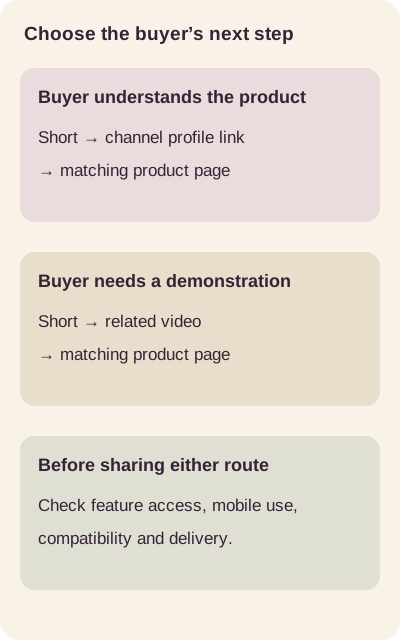
Choose the next destination according to the buyer’s question. This is an explanatory diagram.
Treat Shopping tags as a separate eligibility decision
YouTube distinguishes promoting your own connected store from promoting other brands through its affiliate program. Its documentation sets eligibility requirements for each. A general Shopping announcement does not establish that a particular downloadable product, store integration or account is supported. Check the current requirements before designing the purchase path around tags. YouTube Shopping requirements
For your own product, make a short verification list: the account's available features, the store connection, the exact item and the intended buyers' locations. If one of those is unresolved, retain a tested ordinary link route rather than describing a tag experience that viewers cannot use.
Do not confuse three separate questions: whether you can share a permitted external link, whether your channel can use Shopping, and whether a particular item can be listed. A yes to one is not evidence for the others.
Test the journey like a first time buyer
Run the test from the published viewing surface, not just the editor. Use your own test device or an authorised tester, and avoid exposing private customer information.
- Findability: Can the viewer identify the next step without already knowing the channel?
- Continuity: Does the next page show the product introduced in the video?
- Mobile usability: Can the visitor read the requirements and navigate without awkward zooming?
- Access: Does a sample open for someone who is not signed into the creator's account?
- Checkout readiness: Is the product available, with the intended currency and delivery information?
- Delivery: In an authorised test order or preview, does the buyer receive the correct version?
For audiences across the US and Europe, check more than spelling. A printable may need both US Letter and A4 versions. A spreadsheet may display dates or decimal separators differently. A time-sensitive offer needs an unambiguous date and time zone. A translated page needs to describe the language of the actual product, not just the language of the marketing. The Reel translation checklist covers the same check for video.
These are product-quality checks, not a substitute for advice on tax, consumer rights or privacy obligations. Use the checkout provider's current documentation and qualified advice where needed.
Diagnose the step that failed
If viewers report trouble, ask where they stopped before replacing the whole setup.
Symptom
They can see an address but cannot tap it
- First check
- Identify the YouTube surface before changing the destination URL
Symptom
They reach the channel but cannot find the item
- First check
- Check link naming and the order of destinations
Symptom
They reach the demonstration but still cannot identify the product
- First check
- Compare the product names and visible descriptions
Symptom
They reach a sign-in screen instead of a sample
- First check
- Test the resource's sharing settings from a non-owner account
Symptom
They buy but cannot use the file
- First check
- Check delivery, file version and compatibility information
Fix one problem, then repeat the same test. Changing the destination, offer and video at once makes it difficult to identify what improved the experience.
Measure visits and purchases separately
Create a simple launch log with the Short, its selected route, the destination, the product version and the date checked. Where your existing analytics and consent setup support it, use consistent campaign parameters on destination links. Do not put personal information in those parameters.
Review the counts your tools actually provide: destination visits, sample requests, checkout starts, completed orders or refunds. Some stages may be unavailable. Mark them as unknown instead of estimating them from views or comments.
When several Shorts share one demonstration or profile link, a purchase may not be attributable to a single Short. Keep that limitation in the report. A larger audience and a better purchase experience are different outcomes; a small number of visits is not enough to declare a route superior.
Where Instagram can fit
An Instagram request-and-delivery workflow can be a separate option for people who already follow you there. It should not be presented as a requirement for buying a product introduced on YouTube. For most viewers, a working product or sample page avoids an unnecessary platform switch.
For that separate Instagram workflow, ReplyMagnet can deliver a hosted PDF link, with PDFs up to 25 MB on every plan. External link assets require Basic or above, starting at $9 per month in USD. A delivery link is shareable, so it should not be treated as protected access to a paid product. Read the resource delivery documentation before choosing what to share.
As checked on 21 October 2026, new workspaces receive 30 days of Pro features without a card, with 1,000 engagements. That is not paid Pro's larger allowance. Without a paid subscription, Starter limits apply afterward. See the current plans and trial conditions. This is an Instagram option, not a YouTube Shorts automation integration. The Instagram lead magnet delivery guide covers that separate journey. For a paid newsletter, the sample issue guide applies the same idea.
Sources
Common questions
Will a URL shortener fix a nonclickable Shorts description link?
No. The placement rule still applies to the shortened address. Choose a supported clickable surface rather than repeatedly changing the URL. [YouTube link rules](https://support.google.com/youtube/answer/13748639?hl=en)
Should every digital product use a demonstration video?
No. Use one when a buyer needs to understand a workflow, compatibility issue or limitation. A straightforward product may work better with a clear direct destination. Test the actual experience rather than assuming more steps always help.
Is a free sample necessary?
No. A sample is useful when it helps someone evaluate fit. If it adds a new access problem or fails to represent the paid product, improve it or leave it out. Explain the difference between the sample and the purchase clearly.
What should be checked before a year end launch?
Recheck feature access, the visible link path, the exact product version, the offer's dates and the buyer's delivery experience. Keep this checklist separate from any reach target. A reliable route is something you can verify; sales are not guaranteed.
Keep reading
- Deliver an Instagram lead magnet without losing the reader
- ReplyMagnet assets: upload a PDF or add a link
- ReplyMagnet plans and billing: trial, quota, upgrades