Guides
Black Friday Instagram DM Automation: 5 Campaign Templates for 2026

Black Friday Instagram DM automation can send a requested offer guide, product preview, or course sample to someone who comments on your post or Reel. Start with one clear promise, one matching keyword, and a destination that stays accurate until the promotion closes.
Published by ReplyMagnet · Last updated
Black Friday falls on 27 November 2026, followed by Cyber Monday on 30 November, as shown in Constant Contact’s 2026 marketing calendar. For course creators, digital-product sellers, and small businesses, the useful preparation is deciding what each interested person should receive and checking that the complete journey works.
These five templates cover early-access details, a digital-product preview, a course sample, a bundle guide, and an active Cyber Monday offer. Choose the one that answers your audience’s next question. You do not need to run all five.
How Black Friday comment to DM automation works
The basic journey is a qualifying comment on a selected Instagram post or Reel, a public reply, and a private message with the requested resource link.
The reader then opens the resource or completes an explained capture step. ReplyMagnet’s comment-to-DM guide describes that delivery flow.
For a seasonal campaign, keep the first DM useful on its own. Name the resource, explain what is behind the link, and include the deadline when it affects the reader. A person who requested a workbook should be able to identify the workbook without decoding a vague sales message.
Comment-to-DM and an incoming-DM trigger are separate starting points. “Comment SAMPLE below” asks for a public comment; “DM me SAMPLE” asks for an incoming message. These templates use post or Reel comments. Test that exact route rather than assuming an incoming message proves your comment campaign works.
Prepare the external sales page separately. These campaigns deliver resources and links; they do not establish coupon generation, checkout, inventory management, or an ecommerce integration. Your store or course platform remains responsible for the actual offer and purchase experience.
Choose your campaign and check the ongoing plan
Use early-access details when people need the dates and scope of a forthcoming sale.
Use a preview when they need to inspect a digital product, a sample when they need to experience your teaching, or a bundle guide when they need help comparing what is included. Use the Cyber Monday template only while its stated offer is active.
ReplyMagnet’s plan documentation lists a 30-day trial of Pro features with a 1,000-engagement allowance and no card requirement. After the trial, a workspace without a paid subscription moves to Starter. Free Starter includes 1,000 engagements per month and one connected account; the published pricing section lists one live campaign.
A matched comment’s public reply and DM share one engagement. That allowance is not 1,000 separate messages or 1,000 guaranteed unique buyers. Repeated matching requests can use more capacity, and all campaigns in the workspace share the allowance.
A hosted PDF is a practical Starter option. For an external resource URL, plan for Basic or above after the trial. Basic also lists multiple live campaigns without a campaign-count cap. Confirm the current plan before leaving several distinct resources running together; trial access does not establish ongoing free access to every feature.
With Starter, choose one live campaign at a time. You can use several relevant posts to offer the same resource, but separate resources need separate campaigns. At a seasonal handover, stop the previous campaign, update its public promise, and test the replacement. Treat the calendar below as a manual operating plan, not a claim that ReplyMagnet schedules those changes automatically.
Before choosing copy, write down the question your resource answers. “What is included?” calls for a contents guide. “Will this work for me?” calls for a representative sample and clear requirements. “When can I buy?” calls for dates and an accurate offer page. This keeps the caption specific and helps you avoid sending every interested person to a general homepage.
Keep a short campaign record containing the post, keyword, asset version, destination, opening time, closing time, and person responsible. When you change a price or replace a file, review that record against the live reader journey. A small checklist is especially useful if someone else covers the promotion while you are offline.
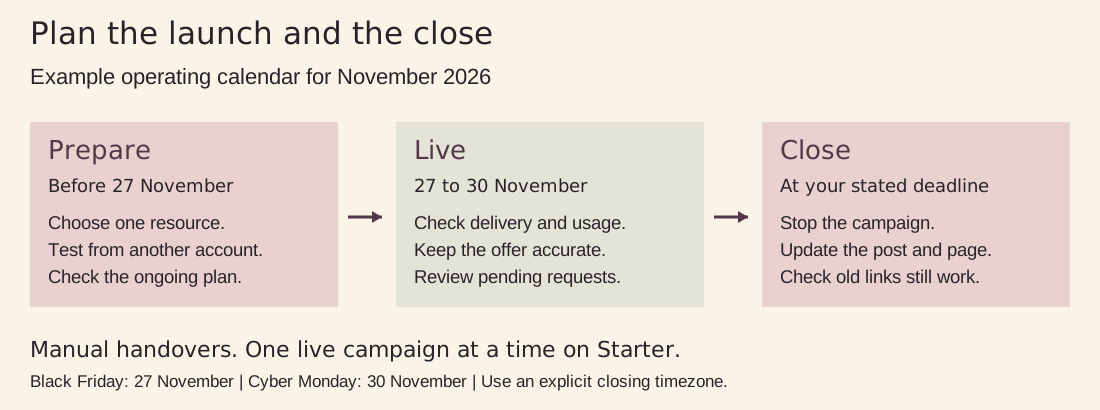
Figure 1. A suggested manual operating schedule. Choose the exact opening and closing times for your own offer.
Five Black Friday Instagram campaign templates
All businesses, products, prices, and messages below are fictional examples.
Replace every placeholder and verify each promise before launch. The sample prices are independent local examples, not currency conversions, tax advice, or sales forecasts. Keep your own price presentation and terms appropriate to the markets you serve.
In each first DM, [resource link] means the delivery link configured for that campaign. It is an editing placeholder, not a special ReplyMagnet variable. Start with direct resource access and leave follow requirements off. If you add an email signup, explain the signup and intended emails in the caption and on the page.
1 Early access details for a creator sale
Use this before the sale opens when people are asking what will be available. Give them a useful briefing immediately. The resource can explain eligible products, opening time, closing time, and where the offer will appear.
Caption: Planning your next template purchase? My Black Friday sale opens on 27 November at 09:00 GMT, London time. Comment EARLY for the one-page guide to the products included, the dates, and where to find the offer when it opens.
Keyword: EARLY. If you add variants, keep every variant attached to this same early-access guide.
Public reply: Thanks for requesting the sale guide. Please check your DMs and message requests shortly.
First DM: Here’s the early-access guide you requested: [resource link]. It lists the included templates and the opening time, 27 November 2026 at 09:00 GMT. Save the guide so you can find the sale page when it opens.
Destination: A dated PDF briefing is suitable for a Starter workflow. Include a clearly labeled link to your own sale-information page and a note explaining what visitors will see before opening. If you deliver that external page directly as the campaign asset, use the appropriate paid plan.
Test before launch: Open the guide from a second account’s DM and follow its sale-page link while signed out of your website. Before opening, the page should show accurate timing rather than a broken checkout. Avoid promising “I’ll DM you on Friday”; this request delivers information now, not permission for an unsolicited future reminder.
2 A digital product preview that shows the actual work
A preview helps someone judge whether your templates fit their workflow. Show a representative page or exercise, label what the preview includes, and explain which parts belong to the paid product.
Caption: Want to see how the Client Welcome Kit is organized before buying? Comment PREVIEW for three sample pages and the file-format checklist. The full kit’s Black Friday offer is US$39 through 30 November 2026 at 23:59 EST, New York time.
Keyword: PREVIEW. Keep unrelated requests and general praise outside the trigger.
Public reply: Thanks for requesting the preview. Please check your DMs and message requests shortly.
First DM: Here are the Client Welcome Kit sample pages: [resource link]. The preview explains the included file types and what you can edit. You’ll also find the full-kit offer, ending 30 November at 23:59 EST.
Destination: A PDF containing the three sample pages, compatibility notes, and a clearly labeled product-page link. For example, explain whether the full files need a particular app or paid account. A screenshot of attractive pages alone leaves a buyer’s practical questions unanswered.
Test before launch: Read the PDF on a phone, check every product link, and compare the advertised price with the live offer. Make sure the preview is useful without implying that it includes the whole paid kit. Test an unrelated comment too; it should not receive the preview in keyword mode.
3 A course sample that lets people try the teaching
Choose one small lesson with a clear outcome. A worksheet plus a short explanation can show how you teach without promising a transformation that a sample cannot deliver.
Caption: Considering my Product Photography course? Try the lesson on setting up one window-light shot first. Comment LESSON for the sample worksheet and video link. The course offer ends on 30 November 2026 at 23:59 GMT, London time.
Keyword: LESSON. A variant such as WORKSHEET can point to the same sample, provided the post makes that relationship clear.
Public reply: Thanks for requesting the sample lesson. Please check your DMs and message requests shortly.
First DM: Here’s the window-light lesson: [resource link]. You’ll get the worksheet and its short demonstration video. Try the exercise, then use the course-details link if you want to review the full curriculum and current offer.
Destination: Deliver the worksheet PDF with a working video link, or use a hosted lesson page as an external link asset on Basic or above. Label any required login before the reader reaches it. ReplyMagnet’s course-creator guide covers matching a sample lesson to its delivery method.
Test before launch: Play the video without your instructor login and confirm that its permissions allow the promised access. Complete the exercise on a phone. If you choose an email-gated version, rewrite the caption to disclose it and test the capture and email destination separately; collecting an address does not prove a lesson email arrived.
4 A bundle guide that helps buyers choose
Bundles create questions about overlap, licensing, and what buyers already own. Deliver a concise guide that compares the contents and explains who each option suits. Avoid claiming a saving against a reference price you have not substantiated.
Caption: Choosing between my Content Planner and Creator Bundle? Comment BUNDLE for the contents guide, example pages, and license summary. The bundle offer is €59 until 30 November 2026 at 23:59 CET, Berlin time.
Keyword: BUNDLE. Do not use separate keyword variants inside this campaign to route people to different products.
Public reply: Thanks for requesting the bundle guide. Please check your DMs and message requests shortly.
First DM: Here’s the Creator Bundle guide: [resource link]. It shows what’s included, where the products overlap, and the license summary. The offer page has the current purchase terms and the 30 November, 23:59 CET deadline.
Destination: A comparison PDF with product names, included files, required software, and a link to the full purchase terms. If existing customers need a different route, explain that route plainly on your website rather than implying the DM tool knows their order history.
Test before launch: Ask someone unfamiliar with the products to identify what they would receive and what they may use commercially. Check that the PDF and product page name the same items. Confirm that the checkout’s actual price and terms match the offer wherever you promote it.
5 An active Cyber Monday offer with a clear closing time
Use this on 30 November after the offer is live. The comment requests current offer details; it does not revive permission to send reminders to everyone who engaged earlier in the month.
Caption: The Workshop Planning Pack’s Cyber Monday offer is live at £29. Comment MONDAY for the contents guide and offer link. It closes today, 30 November 2026, at 23:59 GMT, London time.
Keyword: MONDAY. Limit the campaign to the post or Reel that advertises this specific active offer.
Public reply: Thanks for requesting the offer guide. Please check your DMs and message requests shortly. The guide includes the closing time.
First DM: Here’s the Workshop Planning Pack offer: [resource link]. The guide lists the included templates and links to the purchase page. The £29 offer ends today, 30 November, at 23:59 GMT. Check the page for the current offer status before buying.
Destination: A concise PDF offer guide, or the active offer page delivered as an external link asset on an eligible plan. Put the exact closing time near the purchase link. Keep your external offer page at a stable address with an honest “offer ended” explanation afterward. An older DM can lead there only while its ReplyMagnet delivery link remains valid.
Test before launch: Check the page before announcing that the offer is live. Recheck shortly before closing and after expiry. Assign a person to stop the campaign and update the caption and offer page; do not rely on an unverified automatic shutdown. A saved DM can still be opened after your campaign stops.
Build and test the campaign before promoting it
Follow the current ReplyMagnet campaign setup guide: select the connected account and relevant posts, attach the resource, configure the matching behavior, and write the public reply and DM. Save a draft while preparing, then launch when the destination is ready.
For these templates, begin with a specific keyword. Matching ignores case and uses whole words. One campaign can cover several posts offering the same asset, and its keyword variants all deliver that asset. If two live campaigns overlap, the first match wins, so check post scope before adding another offer.
Run a valid request and an unrelated comment from another account. Comments from your connected account are ignored. Inspect the received message, its destination, and the activity record. Record the test time so you can separate your own checks from audience results.
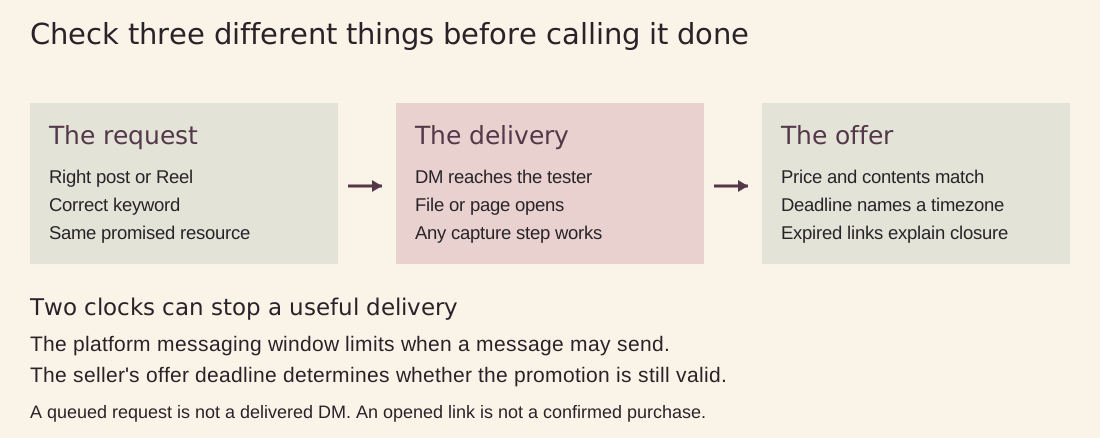
Figure 2. Verify the requested resource, the delivery journey, and the offer’s expiry separately.
A practical readiness checklist
Promise: the caption, keyword, DM, and resource describe the same offer.
Access: the PDF opens on mobile, and external pages work without your owner login.
Plan: the asset type, live-campaign count, and expected engagement volume fit the ongoing plan.
Timing: the opening and closing dates include a named timezone everywhere they matter.
Ownership: someone can check failed deliveries and update the promotion at closing.
Contact capture: any required signup and intended follow-up are explained before submission.
For international audiences, pick one authoritative closing instant. “Midnight” without a date and timezone is ambiguous. If you display regional equivalents, verify that they refer to the same instant; the separate fictional templates above illustrate different sellers, not a single worldwide deadline.
An expiry checklist for the closing hour
Stop advertising an active discount when it ends. Update the post or pinned explanation, stop the relevant campaign, and change the destination page to show that the promotion has closed. Check links inside downloadable PDFs as well as the direct campaign destination.
Review pending deliveries before stepping away. Capacity alone cannot make an expired request eligible again, and a technically deliverable message can still contain an outdated offer. Replacing a campaign asset affects future deliveries; previously delivered links remain tied to the original asset while valid. ReplyMagnet-generated campaign delivery links expire 30 days after they are created. Keep a separate stable offer page for later updates; it does not extend the delivery link’s lifetime. Keep dates inside PDFs explicit and update the stable offer page they link to when the promotion closes. If a deadline changes, update the campaign copy, caption, and future downloads, and explain the change on that stable page for anyone with an older copy.
Respect the message window and watch capacity
Meta’s private-reply documentation permits one initial private reply to an eligible post or Reel comment within seven days. Further messages depend on the recipient responding and the applicable 24-hour window. A URL click alone does not open that conversation window. Do not interpret a resource request as permission for unlimited promotional follow-ups.
Keep this campaign focused on the immediate requested delivery. For a separate email sequence, explain the subscription before collecting details and configure the sequence in your email platform. Review the Instagram DM automation rules when deciding how later contact should work.
ReplyMagnet documents a queue for over-limit requests, but waiting requests can expire. Check usage while the promotion is active. If delivery slows, inspect capacity, account connection, campaign status, and the recorded error. A later quota reset or upgrade is not a guarantee that every waiting request will send.
Measure delivery and purchases separately
Review the same campaign and time period at each stage: qualifying requests, DM sending or delivery status, resource opens, any captured contacts, and confirmed purchases.
ReplyMagnet’s analytics guide separates campaign activity from business outcomes recorded in the destination system.
A delivered DM does not prove the resource was opened. An opened guide does not prove a sale. Use your store or course platform to confirm purchases, and use campaign-specific destination tags where your analytics supports them. Keep test activity out of the final comparison and avoid treating repeat requests as new customers.
If requests arrive but delivery stalls, fix the delivery problem first. If people open the preview but repeatedly ask the same question, improve the resource. Record what you changed so the next seasonal campaign starts with evidence from your own audience rather than an invented conversion benchmark.
Frequently asked questions
Can I run a Black Friday campaign on free Starter?
Yes, a single live PDF-resource campaign can fit Starter, subject to its account and engagement limits. Check the long-term plan if you need external link assets or several different campaigns live together.
Can five keywords deliver five different resources?
Not within one ReplyMagnet campaign. Keyword variants share its asset. Create distinct campaigns for distinct resources and check the plan’s live-campaign allowance and overlapping post scopes.
Will an early access comment trigger a reminder on Black Friday?
The template here delivers the requested guide immediately. It does not promise a later DM. Use a clearly explained, separately configured signup if people want future launch updates through another channel.
What should happen after Cyber Monday ends?
Close the promotion consistently across the campaign, caption, downloadable guide, and destination. Preserve a useful explanation for people who open an older link. Confirm the checkout reflects the actual offer status.
Start with the offer you can deliver well
Choose one template, prepare its resource, and test the complete journey before increasing reach.
Keep a closing checklist beside your launch checklist. The strongest Black Friday Instagram DM campaign gives people exactly what they requested and stays accurate from the first comment to the final offer-page visit.
Keep reading
- ManyChat Alternative for Instagram
- ManyChat Free Plan Limit: What Changed in 2026
- Comment to DM on Instagram: Practical Automation Guide
- Deliver a free course lesson through Instagram DMs
- ReplyMagnet plans and billing: trial limits, quota and upgrades
- Create a ReplyMagnet campaign: posts, triggers and delivery