Guides
How to Sell Canva Templates on Instagram With a Free Sample
To sell Canva templates on Instagram, show a useful editing result, invite people to request a small sample, and deliver that sample through a comment-to-DM campaign. Let the recipient try the design before visiting your paid product page. ReplyMagnet can handle the eligible Instagram reply and resource delivery; your design tool and store handle editing, purchase and paid access.
Published by ReplyMagnet · Last updated
The strongest sample answers a buyer’s practical question: “Can I make this work for my own content?” A polished mockup shows the style. A small editable example reveals whether the text fits, the layout survives changes and the instructions make sense.
This guide builds that journey for a fictional template shop, Studio Fern, which sells social-post layouts for independent florists. The shop, product contents and campaign results below are illustrative. Use them as a working example, then replace them with your own offer and tested access instructions.
Choose a sample that tests the paid product
Start with a job your customer already does.
A florist may need to announce weekend opening hours, explain bouquet care or promote a workshop. “Beautiful templates for small businesses” leaves too much interpretation. “A layout for announcing this Saturday’s flower workshop” gives the reader a concrete reason to try it.
Choose a small complete task from the paid collection. Studio Fern’s sample contains one square workshop-announcement layout, a filled example and a short editing guide. The full product adds coordinated formats and layouts for other recurring shop updates. The free design is usable on its own; the paid collection expands what the customer can produce.
Avoid selecting an unusually simple sample if the paid templates are much harder to edit. Buyers should experience representative typography, spacing and replacement steps. Equally, a sample does not need every variation in the full product. One successful edit can reveal more than twenty untouched pages.
Before designing the campaign, write these three sentences:
- The reader wants to create a specific piece of content for a specific occasion.
- The sample lets them complete that piece using information and images they already have.
- The paid product adds clearly named formats, use cases or support that the sample does not include.
These sentences become your demonstration, caption and product-page explanation. If the third sentence only says “more beautiful templates,” clarify the product before automating its promotion.
Check the template rights and recipient requirements
Review the actual contents of your design before distributing it.
Canva’s commercial-use guidance requires original designs and says Canva content cannot be sold on a standalone basis. It also states that templates containing Pro Content must be shared as Canva template links rather than sold as PDFs or other file types. Read the current Content License Agreement for the assets and use involved.
A downloadable PDF can provide your own instructions and a link to the sample. Do not describe that PDF as an editable Canva template or assume the PDF format removes licensing restrictions. Check rights for uploaded photographs, fonts and illustrations separately; having a file available to insert does not establish permission to redistribute it.
Canva’s sharing documentation also distinguishes public viewing from template links and lists eligible plans for creating template links. Verify your account’s available sharing option. A collaboration link that lets strangers alter your master design is a poor substitute for the intended template-copy experience.
Tell buyers what they need before they request the sample. For Studio Fern, the proposed promise is “Editable in Canva; account required.” Only add “works with Canva Free” after a tester using that account type completes the relevant edit and export without an unexpected paid requirement.
Build a sample pack that gets someone to the first edit
The sample needs a short path to a visible result.
Prepare an instruction PDF or a simple access page with the same title used in the Instagram post. Put the action near the beginning: open the sample, create the intended working copy and replace the example workshop details.
For Studio Fern, the pack has four useful parts. First comes a finished illustration of the announcement, clearly marked as example copy. Next is the template access link. A brief editing sequence follows. The final section explains the full collection with an optional link to its product page.
Write the editing sequence around observable actions:
- Replace the shop name, workshop date and booking address with your own details.
- Add a photograph you have permission to use and check that the subject remains visible after cropping.
- Read the longest line at ordinary phone size and adjust the wording if it runs beyond the intended area.
- Review the exported image before posting, including the date, spelling and destination.
Keep the sample independent from your own account and private files. A reader should not need to request access to a personal folder or message you for an undocumented password. If using Canva requires signing in, explain that requirement rather than calling the journey “no login needed.”
Include a sample version and the date you last checked it. For a florist audience in the USA and Europe, prefer an unambiguous written date in the example. “12 November” is easier to interpret across markets than a numeric date that could mean either November 12 or December 11. Adapt measurements, paper sizes and spelling when they matter to the actual product.
Do not bury the sample beneath a catalogue. Give the recipient enough room to try it, then describe the paid option where the next need becomes clear. Someone who has just made one workshop announcement can reasonably evaluate a coordinated set of event reminders and thank-you posts.
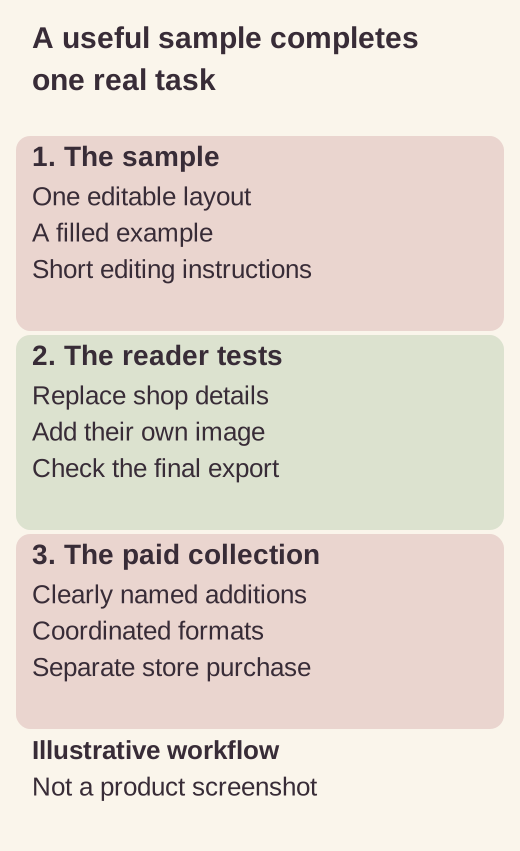
Illustrative workflow; not a product screenshot or customer result.
Map the sample request to one delivery destination
Use a selected Instagram post or Reel for the first campaign.
Connect the professional account that owns it, choose a distinctive word such as FLORIST, and attach the sample resource. Broad account-wide matching is unnecessary when only one post explains this offer.
ReplyMagnet’s campaign documentation describes keyword matching as case-insensitive whole-word matching. Multiple keyword variants within a campaign still deliver the same resource. Start with the exact request word so the first test has an obvious expected result. Avoid an any-comment trigger when people may also be discussing the design or asking unrelated questions.
Choose the delivery format deliberately. ReplyMagnet hosts PDFs up to 25 MB on every plan. A hosted instruction PDF can explain the sample and contain its relevant links. If you want the campaign’s asset itself to open your external sample page or Canva destination, link assets require Basic or above after the trial.
ReplyMagnet delivers a resource link in the DM. It does not create a Canva design, copy a template into the recipient’s account or complete a store purchase. Test those external steps independently. The digital-product use case is useful background on separating a preview from the full product.
For this example, leave contact fields off so the reader can evaluate the design first. If you introduce an email signup, explain the subscription and its purpose before asking for the address. A sample request alone does not establish permission for unrelated ongoing marketing.
Write the demonstration and messages around the same promise
Your Instagram content should show a real change a customer can make.
Record your own sample being edited from the filled example into a different florist’s announcement using fictional details. Show the text replacement and image crop at a readable pace. Do not label an edited demonstration as an unedited product test.
The following copy is an illustrative campaign, not a claim that Studio Fern exists. The phrases in square brackets are editorial placeholders to replace, not ReplyMagnet variables.
A Reel caption for the editable sample
“Here’s how the workshop announcement changes when you add your own shop name, photo and date. Want to try the single-layout sample? Comment FLORIST and I’ll send the access guide by DM. You’ll need a Canva account to edit it. The sample is free; the full coordinated collection is a separate purchase.”
This caption identifies the resource, required account and paid boundary before the person comments. If the sample requires an email signup, add that fact here. Do not hide it in the last step of the download page.
A public reply that points to the next step
“Check your DMs for the florist sample guide. If it isn’t in your inbox, look in Requests.”
Keep the acknowledgement short. Avoid declaring that someone downloaded the template or joined your list merely because the public reply posted. Those are later actions.
A first DM with a clear task
“Here’s the one-layout florist sample from the Reel. Open the guide below, then follow its template link to try your own workshop details in Canva. The guide also explains what’s included in the optional full collection.”
In the campaign editor, attach the intended asset and check how its delivery link appears. Do not paste a second competing destination into the message unless there is a clear reason. Two different “get the template” links make both testing and the reader’s choice harder.
Copy for the paid option inside the sample
“Need the matching set? The full collection includes [verified contents] for [specific occasions], with [actual format and account requirements]. See every included layout, the current price and purchase terms on the product page.”
This copy makes a useful offer without inventing a discount, countdown or outcome. Replace every bracket before publication. If your product contains no instructions or customer support, do not borrow those promises from the example.
Make the product page answer the questions the sample raises
The paid destination should continue the exact product story.
A reader who tried one florist announcement needs to know which additional tasks the collection covers. Show the contents in a scannable list, with representative previews that distinguish included files from decorative mockups.
Explain the editing environment, account requirements, sizes and file types. If your collection includes both square and vertical layouts, say how many of each there are. Count distinct layouts carefully rather than multiplying the headline number through colour variations without explanation.
State the current price and currency clearly. A dollar sign alone can be ambiguous; a mixed US and European audience benefits from an explicit currency label and a clear checkout total. Let the store present applicable taxes, delivery conditions and cancellation or refund information accurately. This article is a campaign workflow, not a substitute for jurisdiction-specific selling advice.
Set an honest expectation for delivery after purchase. If the store provides access through an email or account library, explain that route. A free sample campaign does not verify a buyer’s payment or unlock the paid collection automatically. Keep paid access links out of the public sample unless you intentionally want everyone who receives it to have them.
Finally, answer the obvious suitability question. A florist-only set may be awkward for a wedding photographer or restaurant. Showing the intended use can prevent confused enquiries and support work later, even when a broader promise might attract more comments.
Test the whole journey as a prospective buyer
Use a second Instagram account to make a fresh test request.
Testing from the connected account can conceal the real experience. Follow the path on a phone and record the point at which each expected result appears.
First, confirm that FLORIST under the selected post triggers the correct campaign. Check the public reply, the DM and any Requests folder. Then open the resource and verify that its title and contents match the caption. An unrelated comment should remain outside this keyword-only campaign.
Next, test the sample from an account that does not own the Canva design. Confirm the recipient can reach the intended working-copy experience without changing your master. Complete the promised edit and export. If you claim the sample works on Canva Free, this test needs a genuinely suitable Free account rather than the creator’s paid account.
Finally, follow the optional product link. Check that it reaches the matching collection and displays the price, currency and actual deliverables. Where your store offers a safe test mode, verify the post-purchase access path there. Do not report a live payment test you have not performed.
Keep a small acceptance record with the date, device, account type, expected result and observed result. “Works for me” is too vague when one person has owner access, another has a paid design account and a third is opening the link inside Instagram’s browser.
Stop promoting if the sample cannot be used as promised. More traffic will make a broken access requirement more expensive to explain. Fix the failing step, make another complete test request and retain the new evidence.
Measure the sample journey and the sale separately
Start with the campaign analytics definitions.
A matched request, delivered engagement, captured email and completed purchase represent different actions. Store records establish purchases; a comment or resource opening does not.
Source: campaign analytics definitions.
Build a simple weekly record for this one offer. Include the campaign and sample version, eligible matched requests, delivered activity, observed resource openings where available, product-page visits from a distinguishable link and store-recorded orders. Note your tests and unresolved delivery failures alongside the totals.
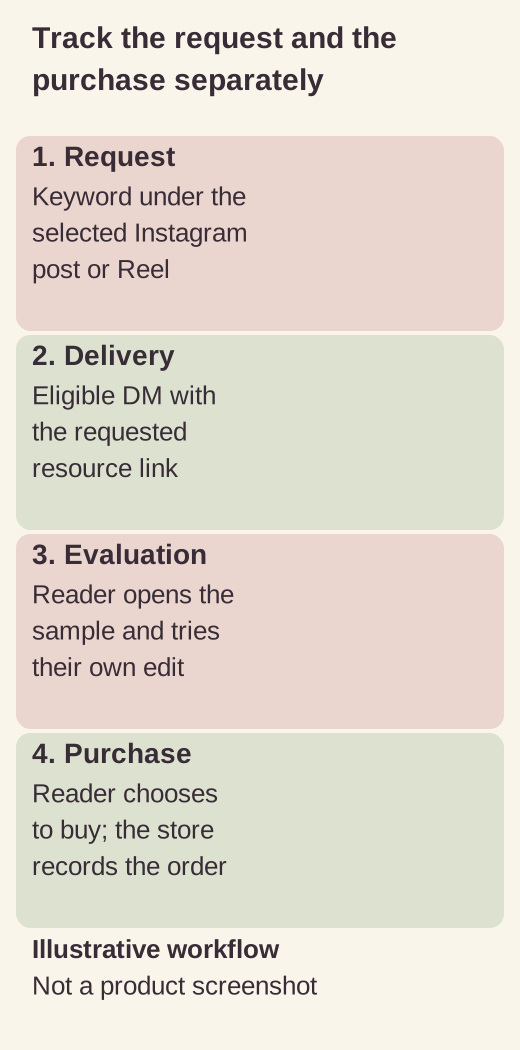
Illustrative workflow; not a product screenshot or customer result.
Suppose a fictional campaign records 80 matched requests and 72 deliveries. The delivery proportion for those recorded events is 72 divided by 80, or 90%. That says something about the measured delivery stage. It does not mean 90% of viewers wanted to buy, and the count need not represent 80 unique people.
Suppose the store separately records four orders carrying the campaign’s available source evidence. Report four traceable orders with the attribution method stated. Do not divide by every Instagram follower or claim the campaign caused all sales during that week. A shared sample link, a later visit or a different device can complicate the connection.
Choose a useful change from the stage where evidence points. Many successful deliveries with repeated “how do I edit this?” questions suggest improving instructions. Product-page visits followed by questions about included formats suggest clarifying the offer. A low delivery count calls for delivery investigation before redesigning the product.
Avoid declaring a winning caption from a handful of orders. Record what changed, which evidence is missing and what you will keep constant in the next comparison. The purpose is to improve a real customer path, not manufacture a conversion story.
Budget for the ongoing campaign
ReplyMagnet’s current plan documentation lists a 30-day Pro-feature trial without a card, with 1,000 engagements.
That is the trial allowance, not paid Pro’s monthly volume. Without a paid subscription, the workspace moves to Starter: free ongoing access with 1,000 engagements per month, one connected account and one live campaign.
Source: current plan documentation.
Basic is $9 per month and includes external link assets, CSV export, phone capture and native email sync. Pro is $29 per month and adds outbound webhooks and branding removal. Choose according to the destination and features you will still need after the trial, then recheck current limits before launch.
A matched comment’s public reply and DM share one engagement. Repeated matching comments from the same person can use more, and campaigns share the workspace allowance. Waiting requests are not delivered; capacity and platform eligibility both matter.
Keep the campaign focused on the requested sample. Instagram messaging rules do not turn a comment into permission for indefinite promotional follow-ups. A click on the sample link should not be treated as a DM response.
Keep old samples useful after a product update
Review the sample whenever you change the paid collection, access instructions or destination.
Preserve a short change log so you can identify which sample someone received. A screenshot in an old Reel can continue setting expectations even after your store changes.
ReplyMagnet’s asset documentation says previously delivered links retain their original asset. To change future deliveries, upload the replacement and select it in each relevant campaign, then test again. Do not assume an asset swap repairs a PDF already in someone’s downloads.
Where you control a destination page, keep an accurate explanation at old links when practical. Say that a collection has changed or been retired rather than silently sending the reader to an unrelated product. Give a person who already has the sample a sensible next step.
Common questions
Can I sell Canva templates through Instagram DMs?
You can use an eligible Instagram interaction to deliver a sample or product destination. The actual sale and paid access should be handled by your store or payment platform. ReplyMagnet’s resource campaign does not complete checkout.
Can I use the free ReplyMagnet plan for a sample?
Starter supports a hosted PDF, such as an instruction guide for the sample. Direct external link assets require Basic or above after the trial. Check the full journey and Canva’s applicable sharing and licence requirements independently.
Should the sample require an email address?
Only add the field when it serves a clearly explained purpose. For a product evaluation, direct sample access may be enough. If you invite a newsletter subscription, describe it before collection and do not treat the original comment as blanket marketing permission.
Does a free sample give away too much?
Choose one complete task that represents the paid product. The full collection can add coordinated formats or other useful use cases. A deliberately broken or unusable sample makes evaluation harder and creates the wrong expectation.
What should I test before sharing the post?
Test a real request, DM access, the sample link, a recipient’s edit and export, and the paid product destination. Use accounts without owner privileges and verify every account-type claim you make.