Guide
Lead capture page: what it is, what goes on it, and 5 examples
A lead capture page trades one thing a visitor wants for their contact details. Most advice assumes ad traffic on a desktop. This guide covers the version that works for people who arrive from an Instagram DM, on a phone, already expecting the file.
Published by ReplyMagnet · Last updated
What is a lead capture page?
A lead capture page is a single-purpose web page that gives a visitor a resource in exchange for a contact detail, usually an email address. A lead capture page has one offer, one short form and one button.
Should you use ReplyMagnet for this? Yes, if your visitors come from Instagram or Facebook comments. ReplyMagnet builds a capture page for each campaign, sends the link by DM to people who comment your keyword, and stores every lead. Email capture is on every plan, including the free one with 1,000 engagements a month. Start free.
Use a general page builder instead if you need a long page with video, testimonials and split tests. ReplyMagnet's page is one screen by design, and you can't rearrange its layout. Not sure the resource should sit behind a form at all? Read when to gate content first.
A lead capture page usually sits in front of one of these:
- A lead magnet: a checklist, template or guide someone asked for.
- A waitlist: a place in line for a course or product.
- An event: a seat at a webinar or workshop.
- A quote or price list: details a buyer wants before a call.
Lead capture page vs landing page vs squeeze page
A landing page is any page a campaign sends traffic to. A lead capture page is a landing page whose only goal is a contact detail, and a squeeze page is the shortest lead capture page: one screen and one field.
Four terms people use for nearly the same page
Term
Landing page
- What it means
- Any page a campaign sends traffic to. It may sell, book or capture
- Typical length
- Any
- Asks for
- Anything
Term
Lead capture page
- What it means
- A landing page with one goal: a contact detail
- Typical length
- One to three screens
- Asks for
- Email, sometimes name or phone
Term
Squeeze page
- What it means
- The shortest lead capture page
- Typical length
- One screen
- Asks for
- Email only
Term
Lead magnet landing page
- What it means
- A lead capture page built around one free resource
- Typical length
- One screen
- Asks for
The names matter less than the job. If the visitor already asked for the resource, as a commenter on your post has, the squeeze page shape is enough. Cold ad traffic needs more persuasion, so those pages run longer. A capture page is also only one method: our email capture guide compares it with forms, popups and 4 others.
What to put on a lead capture page
A lead capture page needs 5 parts: a headline that names the resource, one line on what the reader gets, one field, a plain consent line and one button. Navigation menus, second offers and extra fields come off.
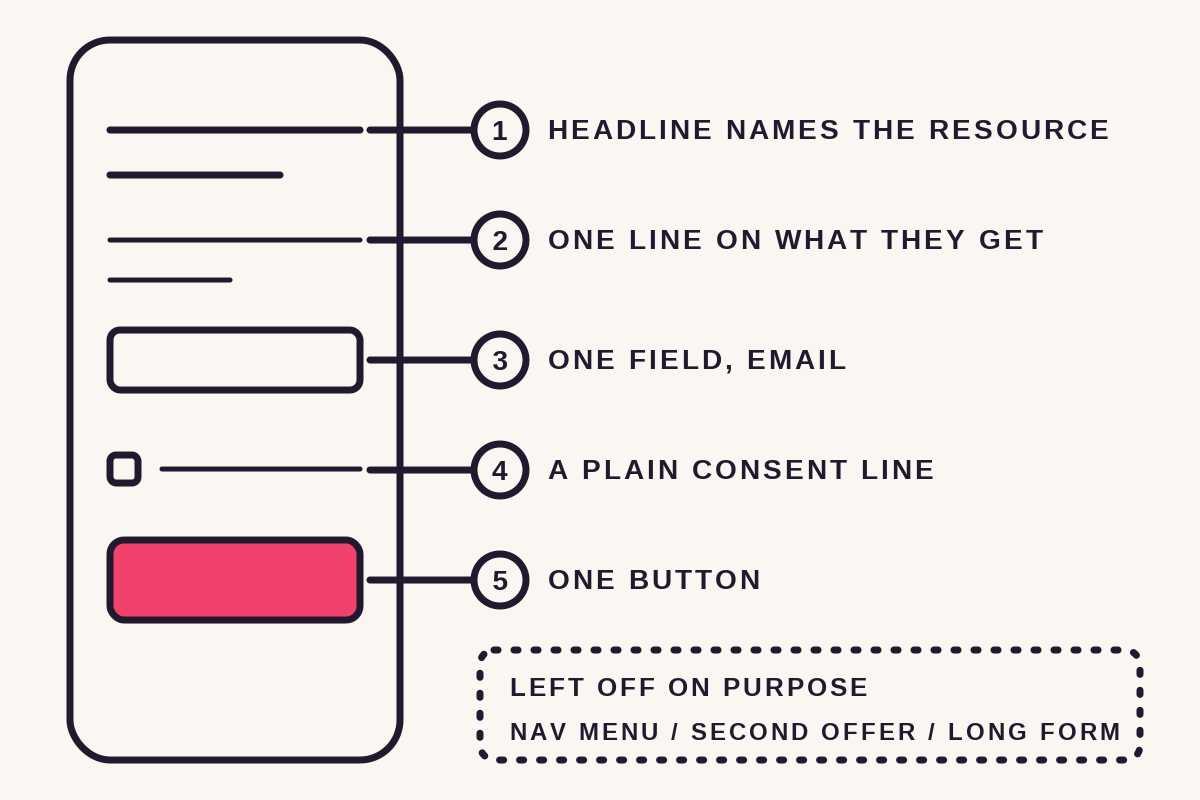
The diagram shows the whole page. In order:
- A headline that names the resource. Use the same words as the post. "The 12-point listing photo checklist" beats "Free download".
- One line on what they get. Say the format and the length: "A 2-page PDF you can print."
- One field. Email, unless a phone call is the real next step.
- A plain consent line. Say what the address will be used for, in one sentence.
- One button. Its label names the action: "Send me the checklist".
Leave off the menu, the footer links, a second offer and any field you can't name a use for. Each one is a way out of the page.
Then check the page on a phone, because that is where a DM link opens. The headline, the field and the button should all fit on the first screen without scrolling, and the button should be easy to tap with a thumb.
Lead magnet landing page examples
Good lead magnet landing page examples share one pattern: the headline repeats the promise made in the post, the form asks for one detail, and the button names the action. The 5 patterns here cover a checklist, templates, a guide, a waitlist and a price list.
Five lead capture page patterns to copy
Resource
Checklist
- Headline
- The 12-point listing photo checklist
- Field
- Button
- Send me the checklist
Resource
Templates
- Headline
- 5 caption templates for a product launch
- Field
- Button
- Get the templates
Resource
Guide
- Headline
- 9 free things to do in Dubai this winter
- Field
- Button
- Download the guide
Resource
Waitlist
- Headline
- Join the waitlist for the spring course
- Field
- Button
- Save my spot
Resource
Price list
- Headline
- 2026 price list and availability
- Field
- Phone
- Button
- Send the price list
We wrote these patterns for illustration. They are not screenshots of real pages. Adapt the wording to whatever your tool lets you edit. If you haven't chosen the resource yet, start with our lead magnet ideas, then design the lead magnet before you build the page.
How to build a lead capture page for Instagram traffic
To build a lead capture page for Instagram traffic, upload the resource, turn on the email gate, pick a comment keyword and let the tool send the page link by DM. Meta's private replies documentation allows one message per commenter, sent within 7 days of the comment.
In ReplyMagnet the page comes with the campaign, so there is nothing to design:
- Connect an Instagram Business or Creator account, or a Facebook Page.
- Upload the resource. The free plan hosts a PDF up to 25 MB.
- Create a campaign. Pick the posts and a trigger keyword such as GUIDE.
- Turn on the email gate. The DM link now opens the capture page first.
- Write the public reply and the DM. Name the resource in both.
- Test from a second account. Comments from your own account are ignored.
- Launch.
Pick a short keyword people can type without errors. AI matching, included on every plan, also catches phrases like "send it please".
The one-message rule comes from Meta's private replies documentation, checked 16 November 2026. ReplyMagnet works through that official API and passed Meta App Review in August 2026.
Every signup gets a 30-day trial of the paid features with no card. The full walkthrough is in our comment-to-DM setup guide.
How many fields should a lead capture page have?
A lead capture page should ask for one field unless a second one has a named use. Ask for an email when a newsletter or sequence follows, and a phone number when someone will call or message the lead within a day.
Which field to ask for
Field
- Ask when
- You'll send a newsletter, a sequence or the next resource
- Skip when
- You have no plan to email anyone
Field
Phone
- Ask when
- A person will call or message within a day
- Skip when
- Nobody is assigned to follow up
Field
Name
- Ask when
- Your emails use a first name
- Skip when
- Your tool already has the Instagram username
Field
Nothing
- Ask when
- The file is the whole offer, such as a recipe
- Skip when
- You want a list you own
In ReplyMagnet, email capture is on every plan. Phone capture, CSV export and Mailchimp or Kit sync start at $9 a month. Webhooks and removing the small "Delivered by ReplyMagnet" line start at $29 a month.
A worked example: one Reel, one lead capture page
In an illustrative example, a Reel draws 400 keyword comments, 260 people open the lead capture page and 156 enter an email. Those 400 replies use 400 of the 1,000 monthly engagements on ReplyMagnet's free plan.
These numbers are made up to show the arithmetic. They are not a benchmark.
- 400 comments with the keyword. Each gets a public reply and a DM with the link.
- 260 opens of the capture page. That is 65% of the DMs.
- 156 emails entered. That is 60% of visitors and 39% of commenters.
- 156 leads in your leads table, each with an Instagram username and an email.
Read the two gaps separately. A low open rate points at the DM or at message requests. A low capture rate points at the page.
Cost stays flat as the list grows. ReplyMagnet bills by monthly engagements, 100,000 for $29, and never by how many contacts you have stored.
What to measure on a lead capture page
Measure 3 numbers on a lead capture page: how many people opened the link, how many submitted the form, and how many opened the resource. The gap between each pair shows whether the DM, the page or the file needs work.
Three numbers and what a low one means
Number
Link opens
- A low figure means
- The DM went unread or sat in Requests
- First fix
- Say "check your requests" in the public reply
Number
Form submissions
- A low figure means
- The page asks too much or mismatches the post
- First fix
- Cut to one field and repeat the post's wording
Number
Resource opens
- A low figure means
- The file is slow, large or not what was promised
- First fix
- Shrink the PDF and rename it to match the headline
Our guide to measuring Instagram DM campaigns covers these numbers in depth, and the analytics documentation explains how ReplyMagnet counts each one.
Where lead capture pages go wrong
Lead capture pages fail most often for 4 reasons: the headline doesn't match the post, the form asks for too much, the file disappoints, or nobody says what the email address will be used for.
Fix them in this order:
- Mismatch. The post said "checklist" and the page says "ebook". Use one name everywhere.
- Too many fields. Every extra field loses people. Keep one.
- A weak file. A lead who feels tricked won't open your next email.
- No consent line. Tell people what you'll send and how often. Then only send that.
The page is the middle of the journey, not the end. Plan what happens after the download before you launch.
Common questions
What is the difference between a lead capture page and a landing page?
A landing page is any page a campaign sends traffic to. A lead capture page is a landing page with one goal, collecting a contact detail in exchange for a resource.
What should a lead capture page include?
A lead capture page should include a headline that names the resource, one line on what the reader gets, one field, a plain consent line and one button. A lead capture page should not carry a menu or a second offer.
Do I need a website to make a lead capture page?
No. ReplyMagnet hosts the lead capture page for each campaign on its own domain and sends the link by Instagram DM, so no website or page builder is needed.
Is a lead capture page free to set up?
ReplyMagnet's free plan includes a lead capture page with email capture and 1,000 engagements a month. Phone capture, CSV export and Mailchimp or Kit sync start at $9 a month.
Can a lead capture page ask for a phone number?
Yes. A lead capture page can ask for a phone number when a call or message is the real next step. In ReplyMagnet the phone gate starts at $9 a month and checks the number's international format.
Keep reading
- How to design an Instagram lead magnet people use
- Instagram Comment-to-DM Automation: Setup & Test Guide
- Deliver an Instagram lead magnet without losing the reader
- Get more qualified Instagram leads: a practical worksheet