Guide
Lead magnet template: 6 outlines you can copy today
A lead magnet template is a reusable outline for the free resource you hand over when someone asks for it. Here are 6 outlines to copy into any document tool, plus the caption, reply and DM wording that delivers the finished file on Instagram.
Published by ReplyMagnet · Last updated
What is a lead magnet template?
A lead magnet template is a reusable outline for a free resource such as a checklist, cheat sheet or worksheet. The template fixes the structure and the order, so you only write the content.
Most pages that rank for this term hand you a design file. Design is the easy half. The hard half is knowing what goes on the page, in what order, and how the file reaches the person who asked. This guide covers those two parts:
- 6 content outlines: checklist, cheat sheet, worksheet, mini guide, swipe file and resource list.
- 1 delivery template: the caption line, public reply and DM that send the file to people who comment.
Should you use ReplyMagnet for this? Yes, for the delivery half, if your audience is on Instagram or Facebook. You upload the finished PDF and pick a trigger keyword. Every person who comments the word gets the link by DM, sent through Meta's official API.
ReplyMagnet does not design the file. Build that in the document tool you already use. Start free: the free plan includes 1,000 engagements a month and hosts PDFs up to 25 MB.
Which lead magnet template fits your post?
Pick the lead magnet template by what the reader does next. A checklist suits a task with steps, a cheat sheet suits facts to keep nearby, a worksheet suits a decision, and a swipe file suits wording to copy.
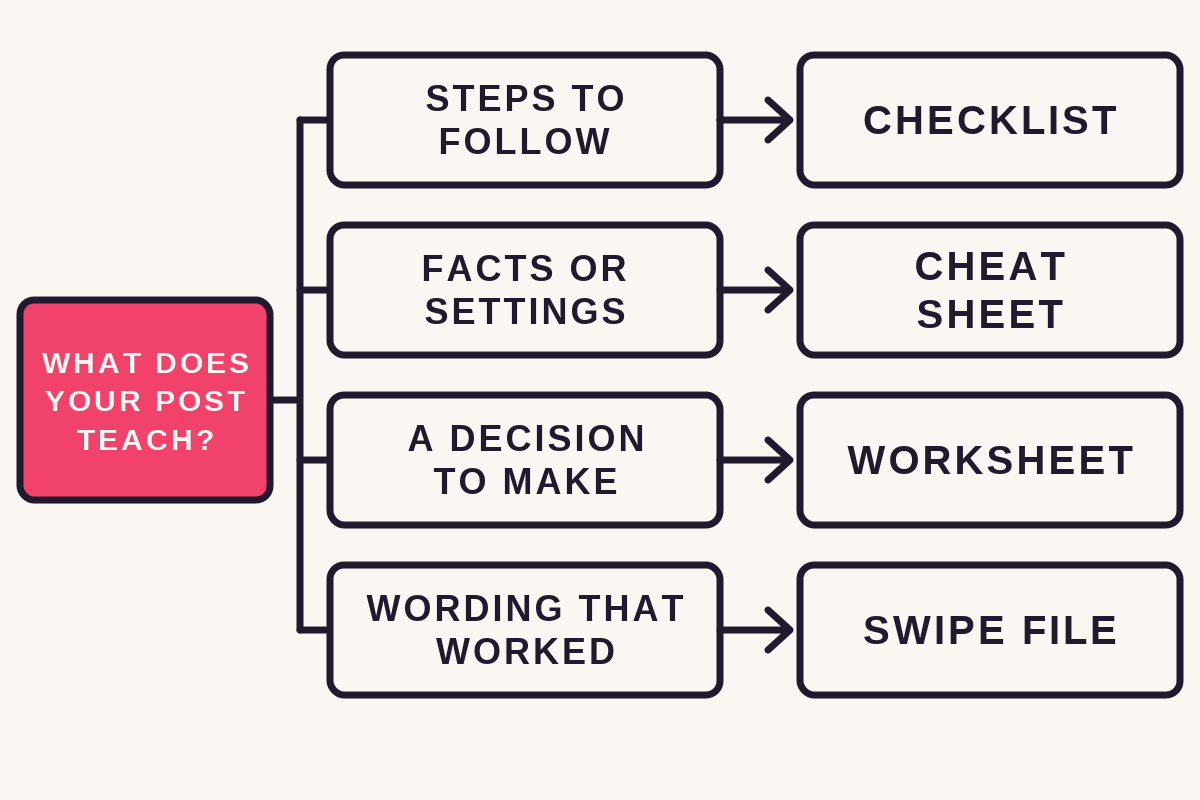
Start from the post, not from the format. The post already tells you what people want more of.
6 lead magnet templates and when each one fits
Template
Checklist
- Fits a post that
- Teaches a process with steps
- Length
- 1 page, 7 to 12 items
- Example keyword
- CHECKLIST
Template
Cheat sheet
- Fits a post that
- Shares rules, settings or numbers
- Length
- 1 page
- Example keyword
- CHEATSHEET
Template
Worksheet
- Fits a post that
- Asks the reader to decide or plan
- Length
- 1 to 2 pages
- Example keyword
- PLAN
Template
Mini guide
- Fits a post that
- Explains one problem in depth
- Length
- 5 to 8 pages
- Example keyword
- GUIDE
Template
Swipe file
- Fits a post that
- Shows wording that worked for you
- Length
- 1 to 3 pages
- Example keyword
- SCRIPTS
Template
Resource list
- Fits a post that
- Recommends tools or suppliers
- Length
- 1 page
- Example keyword
- TOOLS
If two templates fit, choose the shorter one. A first version you finish this week teaches you more than a long one you never publish. For offers sorted by business type, see our Instagram lead magnet ideas.
Checklist lead magnet template
A checklist lead magnet template has a title that names the result, 7 to 12 action items in the order people do them, and one next step at the bottom. Each item starts with a verb and fits on one line.
Copy this outline:
- Title: The [result] checklist. Example: The Reel Launch Checklist.
- One-line promise: Finish [task] without missing [common mistake].
- Before you start: 2 or 3 things to have ready.
- The steps: 7 to 12 items, each starting with a verb, each with a tick box.
- Done when: one sentence describing the finished result.
- Next step: one link or one instruction. Not three.
Three rules keep a checklist useful:
- Put the steps in the order people do them.
- Cut any item that explains instead of instructs.
- Keep to one page, so the file prints and screenshots cleanly.
Cheat sheet and worksheet templates
A cheat sheet template groups facts under 3 to 5 headings on one page. A worksheet template asks 4 to 6 questions with space to answer, then ends with one decision or plan the reader writes down.
Cheat sheet outline:
- Title: [Topic] cheat sheet. Example: Reel Export Settings Cheat Sheet.
- Who it is for: one line.
- 3 to 5 blocks: a short heading, then 3 to 6 facts, settings or numbers each.
- Common mistake box: the one error you see most.
- Date checked: facts go stale, so show when you last verified them.
Worksheet outline:
- Title: Plan your [outcome] in 15 minutes.
- What you will have at the end: one sentence.
- 4 to 6 prompts: each with a blank space and a one-line instruction beside the space.
- One filled example: labelled as an example.
- Your decision: a final box for the single choice or first action.
Our lead magnet design guide goes deeper on worksheet fields and testing.
Mini guide, swipe file and resource list templates
A mini guide template covers one problem in 5 to 8 pages. A swipe file template collects 5 to 10 examples to copy, and a resource list template names 6 to 10 tools with one line on when to use each.
Three longer lead magnet templates, section by section
Template
Mini guide
- Sections, in order
- Cover. The problem in 3 sentences. 3 to 5 steps, one per page. One worked example. Next step
- Leave out
- Your full story and any second topic
Template
Swipe file
- Sections, in order
- Title. How to use the file. 5 to 10 examples, each with a label. One blank version to fill in
- Leave out
- Examples you have not used yourself
Template
Resource list
- Sections, in order
- Title. Who the list is for. 6 to 10 items grouped by job. One line on when to use each
- Leave out
- Tools you have not tried
On a resource list, label paid and affiliate recommendations plainly. Readers forgive a commission. They do not forgive finding out later.
How to fill in a lead magnet template
To fill in a lead magnet template, write the title as a result, draft the body in plain text, cut the draft to the page limit, then export a PDF. Design comes last, after one real person has tested the plain version.
Work through these 6 steps in one sitting:
- Pick one post that drew questions. The lead magnet answers the most common one.
- Choose the template from the table above.
- Write the title as a result. "The Reel Launch Checklist" says what the reader gets. "Free PDF" does not.
- Fill the outline in plain text. No colours, no fonts yet.
- Send the plain version to one person in your audience. Ask what they did with the file, not whether they liked it.
- Fix what confused them, add your brand colours, and export a PDF under 25 MB.
Any document or slide tool handles step 6. A paid design template changes how the file looks. A paid design template does not fix an outline that promises one thing and delivers another.
The delivery template: caption, reply and DM
A lead magnet delivery template has 3 lines: a caption line that names the keyword, a public reply that says where to look, and a DM with the link. Meta's private replies documentation allows one message per comment, sent within 7 days.
Copy and adapt:
- Caption line: Comment CHECKLIST and I'll send you the one-page launch checklist.
- Public reply: Sent! Check your DMs, or your message requests if you don't follow me yet.
- DM: Here's the launch checklist you asked for: [link]. Reply here if a step is unclear.
- Capture page line (optional): Enter your email and the checklist opens straight away.
In ReplyMagnet you paste the reply and the DM into one campaign and upload the PDF. The app adds a tracked download link, so you can count opens. Turn on the email gate only if you plan to email people something useful afterwards.
A worked example: a Reel draws 250 CHECKLIST comments in a week. All 250 people get the public reply and the DM. ReplyMagnet counts one engagement per comment, so the week uses 250 of the free plan's 1,000 and costs $0.
The one-message rule is from Meta's private replies documentation, checked 14 November 2026. Our guide to Instagram message requests explains why the public reply should mention requests.
What to measure after you publish
Measure a lead magnet template by 3 numbers: how many people asked for the file, how many opened the link, and how many did the next step. A gap between two of those numbers tells you which part to rewrite.
- Requests: keyword comments on the post. Low requests mean the post or the promise needs work, not the file.
- Opens: clicks on the delivery link. A large gap after requests points at the DM wording, or at DMs sitting unread in message requests.
- Next step: replies, emails collected, or clicks on the link inside the file. A gap here points at the file itself.
Change one thing at a time. Swap the title before you redesign the pages.
Cost should not be the variable that surprises you. ReplyMagnet charges per engagement sent, not per contact stored. From $9 a month the allowance is 25,000, with Mailchimp or Kit sync for the emails you collect. Paid features come with a 30-day trial that needs no card.
Where lead magnet templates go wrong
Lead magnet templates fail in 4 common ways. The title names the format instead of the result, the file runs too long, the post promises something else, or the last page has no next step.
| Problem | What the reader sees | Fix |
|---|---|---|
| Format title | "Free PDF guide" | Name the result: "The 10-step listing photo checklist" |
| Too long | 30 pages for a 5-minute task | Cut to the template's page limit |
| Mismatch | Post promises scripts, file is a brochure | Reread the caption, then page 1 |
| Dead end | The last page just stops | Add one next step |
One more failure sits outside the file: the link never arrives. Test the whole path from a second account before you post. Our lead magnet delivery guide walks through that test.
Common questions
What is a lead magnet template?
A lead magnet template is a reusable outline for a free resource, such as a checklist or worksheet, that you give to people who ask for it. The template sets the sections and their order, and you fill in the content.
Are there free lead magnet templates?
Yes. The 6 lead magnet outlines on this page are free to copy into any document tool. Paid design templates change how a lead magnet looks, not what the file says.
Which lead magnet template is easiest to start with?
A one-page checklist is the easiest lead magnet template to start with. A checklist needs a result-led title, 7 to 12 action steps and one next step, and no design skill.
How long should a lead magnet be?
A lead magnet should be as short as the task allows. Aim for 1 page for a checklist or cheat sheet, 1 to 2 pages for a worksheet, and 5 to 8 pages for a mini guide.
How do I deliver a lead magnet on Instagram?
Ask people to comment a keyword, then send the link by DM. ReplyMagnet automates that step through Meta's official API with a public reply and one DM per comment, free for up to 1,000 engagements a month.
Keep reading
- How to design an Instagram lead magnet people use
- Instagram lead magnet ideas and examples, by audience
- Deliver an Instagram lead magnet without losing the reader
- Instagram Comment-to-DM Automation: Setup & Test Guide