Guide
Email opt-in: what it is, single vs double, and 5 opt-in email examples

An email opt-in is a person saying yes to your emails before you send any. Most guides stop at website forms. This one covers single and double opt-in, gives you 5 opt-in emails to copy, and shows how to collect opt-ins from people who comment on your Instagram posts.
Published by ReplyMagnet · Last updated
What is an email opt-in?
An email opt-in is a person's clear permission to receive your emails, given before the first one arrives. Typing an address into a form that says what you will send is the most common way people opt in.
Should you use ReplyMagnet for this? Yes, if your audience comments on your Instagram or Facebook posts and you have a resource to send them. ReplyMagnet replies to each keyword comment with a DM link. The link opens a capture page where the person types an address before the file opens. That email gate is on every plan, including the free one with 1,000 engagements a month. Start free.
Use a form or popup tool instead if your subscribers arrive on your own website. ReplyMagnet does not put forms on a site, and it does not send newsletters.
Every real opt-in has 3 parts:
- An action by the person. They type the address or tick the box themselves.
- A clear promise. What you will send, and roughly how often.
- A way out. Every email carries an unsubscribe link that works.
Single opt-in vs double opt-in
Single opt-in adds a subscriber the moment the form is sent, while double opt-in waits until the person clicks a link in a confirmation email. Single opt-in grows a list faster; double opt-in filters out typos and fake addresses.
Single opt-in compared with double opt-in
Question
When the person joins
- Single opt-in
- As soon as the form is sent
- Double opt-in
- After they click the confirmation link
Question
Steps for the subscriber
- Single opt-in
- 1
- Double opt-in
- 2, with a trip to the inbox
Question
List growth
- Single opt-in
- Faster
- Double opt-in
- Slower, because some never confirm
Question
Typos and fake addresses
- Single opt-in
- Get onto the list
- Double opt-in
- Never confirm, so they stay off
Question
Best when
- Single opt-in
- The person just asked for a file and expects it
- Double opt-in
- The form is open to anyone and bots find it
Neither method is wrong. Rules on email consent differ by country, and some places expect confirmed opt-in. This guide is not legal advice, so check the rules where you and your subscribers live.
In ReplyMagnet, ESP sync to Mailchimp adds new contacts to your audience as subscribed. Mailchimp does not send its own confirmation email to them. If you want a double opt-in step, make the first email in your platform ask the person to confirm. With Kit, sign up once with a test address and check what arrives before you launch.
5 opt-in email examples to copy
A good opt-in email confirms what the person signed up for, delivers anything you promised, and says what comes next. Keep the first email short, under 120 words, with one link.
Copy these and change the words in brackets. Each one fits a different moment.
- The delivery email. "Here is [the guide] you asked for: [link]. I send one short email a week about [topic]. If that is not for you, the unsubscribe link is at the bottom."
- The confirmation email (double opt-in). "One click to confirm: [confirm link]. Once you confirm, I will send [the guide] and a weekly note about [topic]. Did not sign up? Ignore this email and nothing happens."
- The welcome email. "Thanks for joining. Here is what to expect: [what], every [how often]. Reply to this email and tell me the one thing you want help with."
- The re-confirm email (for an old list). "You joined my list a while ago. Do you still want emails about [topic]? Click here to stay: [link]. If you do nothing, I will remove you next week."
- The newsletter invitation. "Your [file] is here: [link]. Want the weekly version too? Tick yes here: [link]. No tick, no newsletter."
Example 5 matters on Instagram. The file was what the person asked for. The newsletter is a second question, and the person answers it, not you.
How to collect email opt-ins from Instagram comments
Collecting email opt-ins from Instagram comments takes a post that offers a resource, a keyword to comment, and a DM link to a one-field form. Meta's private replies documentation allows one message per commenter, sent within 7 days of the comment.
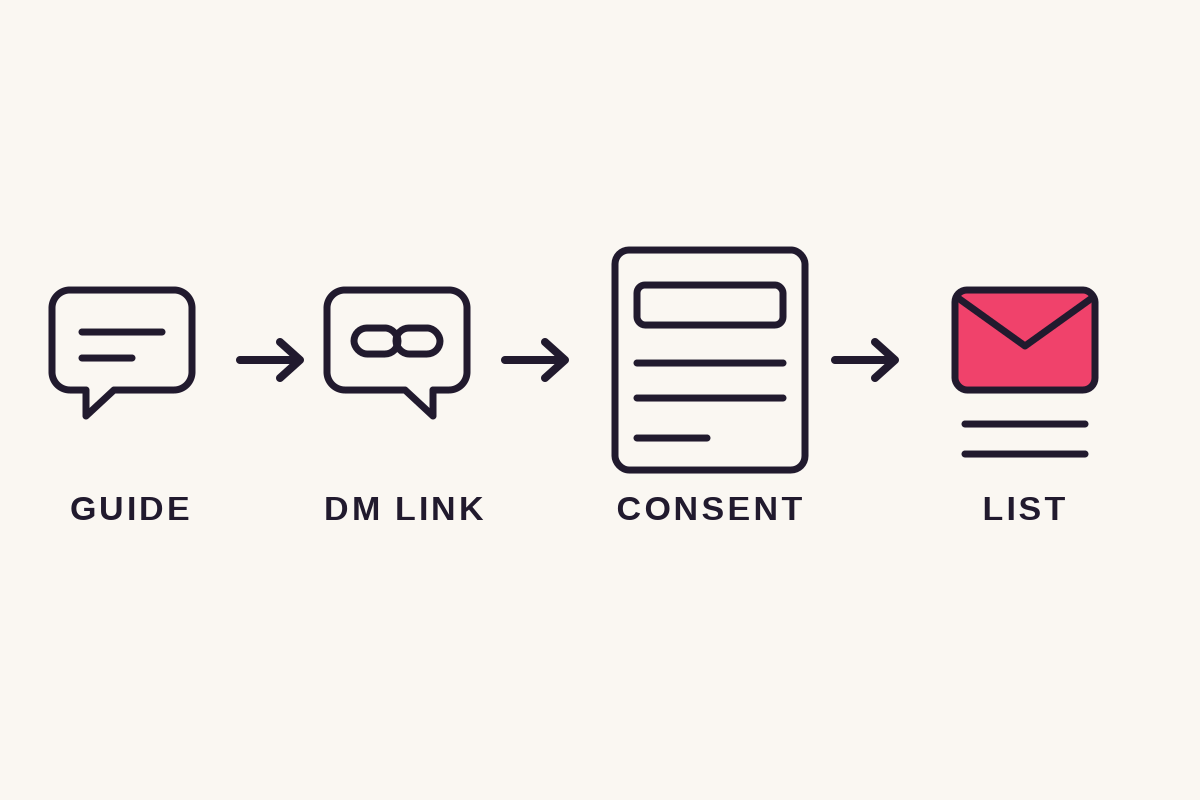
In ReplyMagnet the setup is 6 steps:
- Connect an Instagram Business or Creator account, or a Facebook Page.
- Upload the resource. The free plan hosts a PDF up to 25 MB.
- Create a campaign with a trigger keyword such as GUIDE.
- Turn on the email gate. The capture page shows a short line under the field: the person is joining your list and can leave anytime.
- Say it in the caption too. "Comment GUIDE and I will send it. You will join my weekly list."
- Test from a second account, then launch. Comments from your own account are ignored.
The one-message limit comes from Meta's private replies documentation, as read on 21 November 2026. Follow-up messages are allowed only if the person responds, within 24 hours of that response. So the first DM has to carry the link.
ReplyMagnet uses that official API and passed Meta App Review in August 2026. Mailchimp or Kit sync and CSV export start at $9 a month. The email capture guide compares this with 6 other ways to collect addresses.
The opt-in rule people trip on: a comment is not a newsletter signup
A keyword comment is an opt-in to receive the file someone asked for, and nothing more. Permission for a newsletter comes only when the person agrees to it on the form, with the promise written next to the field.
The opt-in on Instagram happens twice, and they are different:
| Moment | What the person agreed to | What you may send |
|---|---|---|
| Comments your keyword | One DM with the resource | The link they asked for |
| Types an address on a form that names your list | Emails from you | What the form promised |
Four habits keep both opt-ins honest:
- Never pre-tick a box. The person ticks it, or it stays empty.
- Never import addresses copied from profiles, bios or comments. That is scraping, not opt-in.
- Send what you promised. A weekly tips list that turns into daily sales emails breaks the deal.
- Keep the unsubscribe link working in every email.
A worked example: opt-ins from one Reel
In an illustrative example, a Reel with 600 keyword comments leads to 390 form views and 234 email opt-ins, a 60% opt-in rate on the form. All 600 engagements fit inside ReplyMagnet's free plan of 1,000 a month.
These numbers are made up to show the arithmetic. They are not a benchmark.
| Step | Count | Share of the step before |
|---|---|---|
| Keyword comments | 600 | |
| DMs sent with the link | 600 | 100% |
| Capture page views | 390 | 65% |
| Email opt-ins | 234 | 60% |
| Confirmed (if you add double opt-in at 80%) | 187 | 80% |
The last row is the cost of double opt-in: 47 fewer subscribers, but every one of the 187 has clicked a link in your email.
On the free plan the campaign costs nothing. Syncing those addresses to Mailchimp or Kit automatically starts at $9 a month, which covers 25,000 engagements. ReplyMagnet bills by monthly engagements, 100,000 for $29, never by the number of contacts stored.
What to measure after the opt-in
Measure 4 numbers after an email opt-in: the opt-in rate on the form, the confirmation rate if you use double opt-in, the first-email open rate and the unsubscribe rate in the first month.
Four email opt-in numbers and what a poor one means
Number
Opt-in rate
- How to work it out
- Opt-ins divided by form views
- A poor figure means
- The form surprised people or asked too much
Number
Confirmation rate
- How to work it out
- Confirmed divided by opt-ins
- A poor figure means
- The confirmation email is slow, unclear or in spam
Number
First-email opens
- How to work it out
- Opens divided by emails delivered
- A poor figure means
- The promise and the first email do not match
Number
Early unsubscribes
- How to work it out
- Unsubscribes in month 1 divided by subscribers
- A poor figure means
- People did not expect what you sent
ReplyMagnet counts link opens and captured emails for each campaign. Opens, confirmations and unsubscribes live in your email platform. Our guide to measuring Instagram DM campaigns explains the campaign numbers.
Where email opt-in goes wrong
Email opt-in goes wrong in 5 common ways: a vague promise, a pre-ticked box, a slow first email, a confirmation link nobody sees, and treating a download as a newsletter signup.
Check your setup against each one:
- A vague promise. "Join our newsletter" says nothing. Name the topic and how often.
- A pre-ticked box. A box the person did not tick is not their opt-in.
- A slow first email. Send it within minutes, while the person still remembers signing up.
- A hidden confirmation link. Put it at the top of a short email, with a plain subject line.
- Download equals newsletter. Ask the newsletter question separately, as in example 5 above.
The opt-in starts the relationship; the emails after it decide whether it lasts. Read what to send after the download, then see how to grow your email list once the form works.
Common questions
What does email opt-in mean?
Email opt-in means a person has agreed to receive emails from you, usually by typing an address into a form that says what you will send and how often.
What is an opt-in email?
An opt-in email is a message sent to someone who asked to receive it. The phrase also names the first email after signup, which confirms the subscription or delivers what the form promised.
What is the difference between single and double opt-in?
Single opt-in adds a subscriber as soon as the form is sent. Double opt-in adds them only after they click a link in a confirmation email, which keeps typos and fake addresses off the list.
Is commenting a keyword on Instagram an email opt-in?
No. A keyword comment asks for one DM with the resource. Permission to send emails comes only when the person types an address on a form that says they are joining your list.
Does ReplyMagnet send double opt-in emails?
No. ReplyMagnet's capture page collects the address and its Mailchimp sync adds the contact as subscribed. To confirm subscribers, send a confirmation email from your own email platform.
Can I collect email opt-ins on Instagram for free?
Yes. ReplyMagnet's free plan includes the email gate and 1,000 engagements a month. Syncing opt-ins to Mailchimp or Kit and exporting them as a CSV start at $9 a month.
Keep reading
- How to design an Instagram lead magnet people use
- Email capture: 7 ways to capture emails, with tools
- Gated content: what it is, examples and when to gate
- Instagram Comment-to-DM Automation: Setup & Test Guide