Guide
Gated content: what it is, 8 examples, and when to gate

Gated content sits behind a short form: the reader gives an email address and gets the resource. Most advice covers white papers on a company website. This guide covers the small version, a file promised in an Instagram post and delivered by DM.
Published by ReplyMagnet · Last updated
What is gated content?
Gated content is any resource a reader can open only after giving something first, usually an email address. A checklist PDF behind a one-field form is gated content, and a blog post anyone can read is ungated content.
Should you use ReplyMagnet for this? Yes, if the content is a file you promise in an Instagram or Facebook post. ReplyMagnet sends the link by DM to people who comment your keyword. Its email gate holds the file behind one field on a capture page. The email gate is on every plan, including the free one with 1,000 engagements a month. Start free.
Use a membership or paywall tool instead if you want to gate a whole website, a course library or a paid subscription. ReplyMagnet gates one resource per campaign. It does not lock pages on your site.
Gating content always has 3 parts:
- The resource. Something specific enough to name: a checklist, a template, a price list.
- The gate. A short form between the reader and the resource.
- The exchange. A plain statement of what the reader gives and what they get back.
Gated vs ungated content
Gated content asks for a contact detail before the reader can open it, and ungated content is open to everyone. Gated content builds a list you own, while ungated content reaches more people and tells you less about each one.
Gated and ungated content side by side
Who can open it
- Ungated content
- Anyone
- Gated content
- Anyone who fills in the form
Main job
- Ungated content
- Reach and trust
- Gated content
- A list of people who asked
What you learn
- Ungated content
- Views and saves
- Gated content
- A name or handle plus a contact detail
What you give up
- Ungated content
- Knowing who read it
- Gated content
- Some readers leave at the form
Typical formats
- Ungated content
- Posts, Reels, carousels, articles
- Gated content
- Checklists, templates, guides, replays
Most accounts need both, and on Instagram the split is natural. The post is the ungated part: it teaches one idea in public. The file is the gated part: the full checklist, the template or the numbers behind the post.
The order matters. Readers judge the gated resource by the free post that promised it, so the public post has to be useful without the download.
Gated content examples
Common gated content examples are checklists, template packs, short guides, webinar replays, price lists, discount codes, waitlists and email courses. Each of these 8 examples names one specific resource and asks for one contact detail in return.
Eight gated content examples and what each should ask for
Resource
Checklist
- Why a gate fits
- Short, specific and easy to name in a post
- Ask for
Resource
Template pack
- Why a gate fits
- Saves real work, so readers accept the trade
- Ask for
Resource
Short guide or ebook
- Why a gate fits
- Goes deeper than a carousel can
- Ask for
Resource
Webinar or workshop replay
- Why a gate fits
- The reader already wants the next session too
- Ask for
Resource
Price list or brochure
- Why a gate fits
- Signals a buyer, and a call is the next step
- Ask for
- Phone
Resource
Discount code
- Why a gate fits
- The reader is close to buying
- Ask for
Resource
Waitlist
- Why a gate fits
- The address is the whole point
- Ask for
Resource
Email course
- Why a gate fits
- Delivery needs the address anyway
- Ask for
We wrote these examples for illustration. They are not results from real campaigns. If you have not chosen a resource yet, our lead magnet ideas list 35 options. A gated resource given away to collect a contact detail is also called a lead magnet. Gating is one of 7 common ways to do email capture.
Should you gate content?
Gate content when 3 things are true: you will follow up by email or phone, the resource is worth an address, and the reader asked for the resource. If any one of the 3 is false, leave the content open.
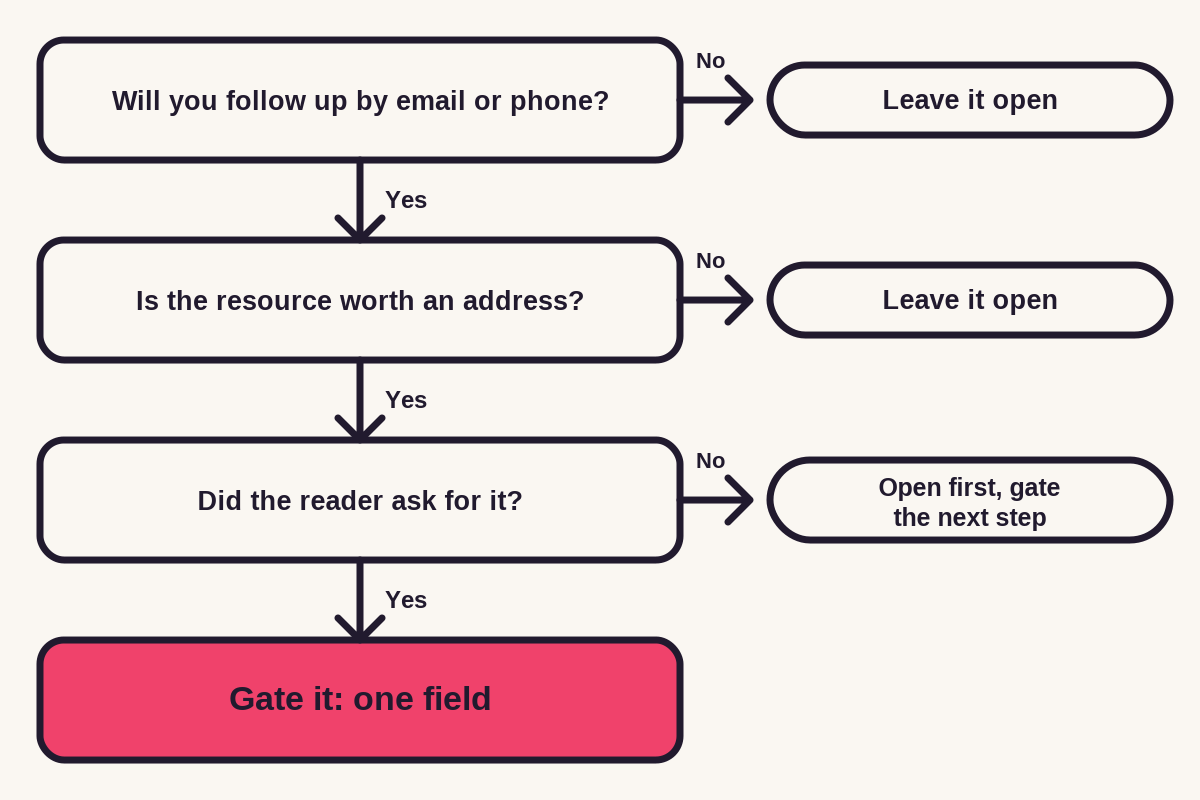
Work through the questions in order:
- Will you follow up by email or phone? An address you never use costs downloads and returns nothing. No plan, no gate.
- Is the resource worth an address? A one-line tip is not. A checklist that saves an hour is.
- Did the reader ask for it? A person who commented your keyword asked. A stranger who clicked an ad did not, and needs more persuading.
Three yes answers mean gate it, with one field. Any no means leave the content open, or open the first resource and gate the next step.
The same rule tells you when to ungate content. Remove the gate when you stop sending follow-ups, or when the resource has aged and reach matters more than the list.
How to gate content on Instagram
To gate content on Instagram, promise the resource in a post, ask for a keyword comment, and send a DM link that opens a one-field form before the file. Meta's private replies documentation allows one message per commenter, sent within 7 days of the comment.
The gate sits on the page your DM links to, not in the post itself. In ReplyMagnet the steps are:
- Connect an Instagram Business or Creator account, or a Facebook Page.
- Upload the resource. The free plan hosts a PDF up to 25 MB.
- Create a campaign. Pick the posts and a trigger keyword such as CHECKLIST.
- Turn on the email gate. The DM link now opens the capture page before the file.
- Write the public reply and the DM. Name the resource, and say an email is needed.
- Test from a second account. Comments from your own account are ignored.
- Launch.
Decide on the gate before launch. ReplyMagnet has no option to deliver the file first and ask for the address afterwards.
The message limit comes from Meta's private replies documentation, checked 17 November 2026. The same page says follow-up messages are allowed only if the person responds, within 24 hours of the response. So the first DM has to carry the link.
ReplyMagnet works through that official API and passed Meta App Review in August 2026. Every signup gets a 30-day trial of the paid features with no card. Our guide to the lead capture page covers what the form itself should say, and the comment-to-DM setup guide covers the campaign.
The rule gated content trips on: say what the email is for
Gated content should tell the reader what the address will be used for before the reader types it. A download that quietly adds people to a newsletter collects addresses from readers who never agreed to hear from you again.
Consent lines: vague and clear
Vague
Enter your email to continue
- Clear
- Enter your email and we will send the checklist plus one tip a week
Vague
Sign up for access
- Clear
- Leave your email to get the price list. We email new listings monthly
Vague
Subscribe to download
- Clear
- Your email gets you the template. No newsletter unless you tick the box
Say the same thing in the post caption, so nobody is surprised by the form. The commenter already gave one opt-in by asking for the file. The gate asks for a second one, and a second opt-in needs its own honest reason. Our guide to email opt-in explains single and double opt-in.
Ask for a phone number only when a person will call or message within a day. In ReplyMagnet, phone capture, CSV export and Mailchimp or Kit sync start at $9 a month. Webhooks start at $29 a month.
A worked example: gated and ungated on one Reel
In an illustrative example, 500 keyword comments produce 340 downloads without a gate, or 195 email addresses with one. The gate trades 145 downloads for 195 addresses, which is worth it only if you email those 195 people.
These numbers are made up to show the arithmetic. They are not a benchmark.
| Ungated | Gated | |
|---|---|---|
| Keyword comments | 500 | 500 |
| DMs sent with the link | 500 | 500 |
| Link opens | 340 | 325 |
| Emails entered | 0 | 195 |
| Downloads | 340 | 195 |
Both versions use 500 of the 1,000 monthly engagements on ReplyMagnet's free plan. Both also leave you a leads table with every commenter's Instagram username.
The difference is what you can do next. Without the gate you can't contact 340 readers again unless they message you. With it, 195 people have agreed to hear from you by email.
Cost stays flat either way. ReplyMagnet bills by monthly engagements, 100,000 for $29, and never by the number of contacts you have stored.
What to measure on gated content
Measure 3 numbers on gated content: the share of visitors who complete the form, the share who open the resource afterwards, and the share who respond to your first follow-up. A list that never responds was not worth gating for.
Three numbers for gated content and what a low one means
Number
Gate rate
- How to work it out
- Emails entered divided by page opens
- A low figure means
- The form asks too much or the post did not mention the form
Number
Resource opens
- How to work it out
- Downloads divided by emails entered
- A low figure means
- The file is slow, large or not what was promised
Number
Follow-up response
- How to work it out
- Replies or clicks on your first email
- A low figure means
- The resource attracted the wrong readers
ReplyMagnet counts link opens, captured emails and downloads for each campaign. The follow-up number lives in your email tool. Our guide to measuring Instagram DM campaigns explains how to read the first two.
Where gated content goes wrong
Gated content fails most often for 5 reasons: the resource is thin, no follow-up exists, the form surprises the reader, the form asks too much, or every resource on the account is gated.
Check your plan against each one:
- A thin resource. A reader who trades an address for a weak file won't open your next email.
- No follow-up. Plan the first email before you turn the gate on.
- A surprise form. Mention the email in the caption and the DM.
- Too many fields. Keep one field unless a second has a named use.
- Everything gated. Leave some resources open, so new readers can judge your work first.
The gate is the middle of the journey. What you send after the download decides whether the list was worth building.
Common questions
What is gated content in marketing?
Gated content in marketing is a resource, such as a checklist, template or guide, that a reader can open only after submitting a form. The form usually asks for an email address.
What is an example of gated content?
A PDF checklist that downloads only after the reader enters an email address is an example of gated content. Webinar replays, template packs, price lists and waitlists are other common examples of gated content.
What is the difference between gated and ungated content?
Gated content requires a contact detail before the reader can open it, and ungated content is open to everyone. Gated content builds a contact list, and ungated content reaches more readers.
When should you ungate content?
Ungate content when you no longer follow up with the people who fill in the form, or when the resource is old enough that reach matters more than new contacts.
Can you gate content on Instagram for free?
Yes. ReplyMagnet's free plan includes the email gate and 1,000 engagements a month, so a file sent by Instagram DM can sit behind a one-field form at no cost.
Do you need a website to gate content?
No. ReplyMagnet hosts the capture page for each campaign and sends the link by Instagram DM, so gating a file needs no website or page builder.
Keep reading
- How to design an Instagram lead magnet people use
- Lead capture page: what to put on it, with examples
- Instagram Comment-to-DM Automation: Setup & Test Guide
- Deliver an Instagram lead magnet without losing the reader