Guide
Email capture: 7 ways to capture emails, and the tools for each

Email capture is how a visitor becomes a subscriber: they type an address, and you get permission to write to them. Most guides cover popups on a website. This one compares 7 methods and adds the one for audiences who spend their time on Instagram, not on your site.
Published by ReplyMagnet · Last updated
What is email capture?
Email capture is the act of collecting a person's email address with their permission, usually in exchange for something useful. A signup form, a popup and a download page that asks for an address are all email capture.
Should you use ReplyMagnet for this? Yes, if your audience is on Instagram or Facebook and you have a resource to send them. ReplyMagnet replies to people who comment your keyword and sends the link by DM. Its email gate asks for the address on a capture page before the file opens. The email gate is on every plan, including the free one with 1,000 engagements a month. Start free.
Use a popup or form tool instead if your visitors arrive on your own website. ReplyMagnet does not put forms or popups on a site.
Every way to capture emails has the same 3 parts:
- A reason. A discount, a guide, a newsletter worth reading. Nobody types an address for nothing.
- A field. One box for the address, on a page that loads fast on a phone.
- Permission. A plain line saying what you will send and how often.
7 ways to capture emails
The 7 common ways to capture emails split into 2 groups. Signup forms, popups, landing pages and checkout tick boxes sit on your website, while gated downloads, event registrations and comment-to-DM flows work without one.
Seven ways to capture emails and when each one fits
Method
Embedded signup form
- Where the person is
- Reading your site or blog
- Works best when
- You publish often and readers come back
Method
Popup or slide-in
- Where the person is
- Browsing your site
- Works best when
- You have steady site traffic and one clear offer
Method
Landing page
- Where the person is
- Arriving from an ad or a bio link
- Works best when
- You run one campaign with one offer
Method
Checkout tick box
- Where the person is
- Buying from you
- Works best when
- You sell online and want repeat buyers
Method
Gated download
- Where the person is
- Wanting one specific file
- Works best when
- The resource is worth an address
Method
Event or webinar registration
- Where the person is
- Signing up to attend
- Works best when
- You need the address to send the joining link
Method
Comment, then DM
- Where the person is
- Commenting on your post or Reel
- Works best when
- Your audience is on Instagram or Facebook, not on your site
The first 4 methods need traffic to a website you control. The last 3 work without one, because the form can sit on a hosted page. Most small accounts start with one method and add a second later. The gated download has its own guide: gated content.
One thing is missing from the list on purpose: copying addresses from profiles, bios or comments. That is scraping, not capture. Nobody on a scraped list asked to hear from you.
Email capture tools: which type fits
Email capture tools fall into 4 types: form and popup builders, landing page builders, email platforms with built-in forms, and comment-to-DM tools with a hosted capture page. Pick the type that matches where your audience spends time, then compare products inside that type.
Email capture tool types by where the audience is
If your audience is mostly
On your website
- Tool type to look for
- Form and popup builder
- Check before paying
- How the form looks on a phone, and whether it slows the page
If your audience is mostly
Clicking ads or a bio link
- Tool type to look for
- Landing page builder
- Check before paying
- Hosting, templates and sync with your email platform
If your audience is mostly
Already on your email list
- Tool type to look for
- The forms inside your email platform
- Check before paying
- Whether your current plan includes forms
If your audience is mostly
On Instagram or Facebook
- Tool type to look for
- Comment-to-DM tool with a capture page
- Check before paying
- Official Meta API, how billing scales, and sync
ReplyMagnet is the fourth type. It is not a form builder for a website, and it does not send newsletters. It captures the address and passes it on. ESP sync to Mailchimp or Kit starts at $9 a month. Webhooks to Zapier or Make start at $29 a month.
Many accounts pair 2 tools: one email platform to send, and one capture tool for each place their audience gathers. Our comparison of Instagram DM automation and email marketing explains how the two channels divide the work.
How to collect emails from Instagram comments
Collecting emails from Instagram comments takes 3 pieces: a post that promises a resource, a keyword people comment, and a DM link that opens a one-field form. Meta's private replies documentation allows one message per commenter, sent within 7 days of the comment.
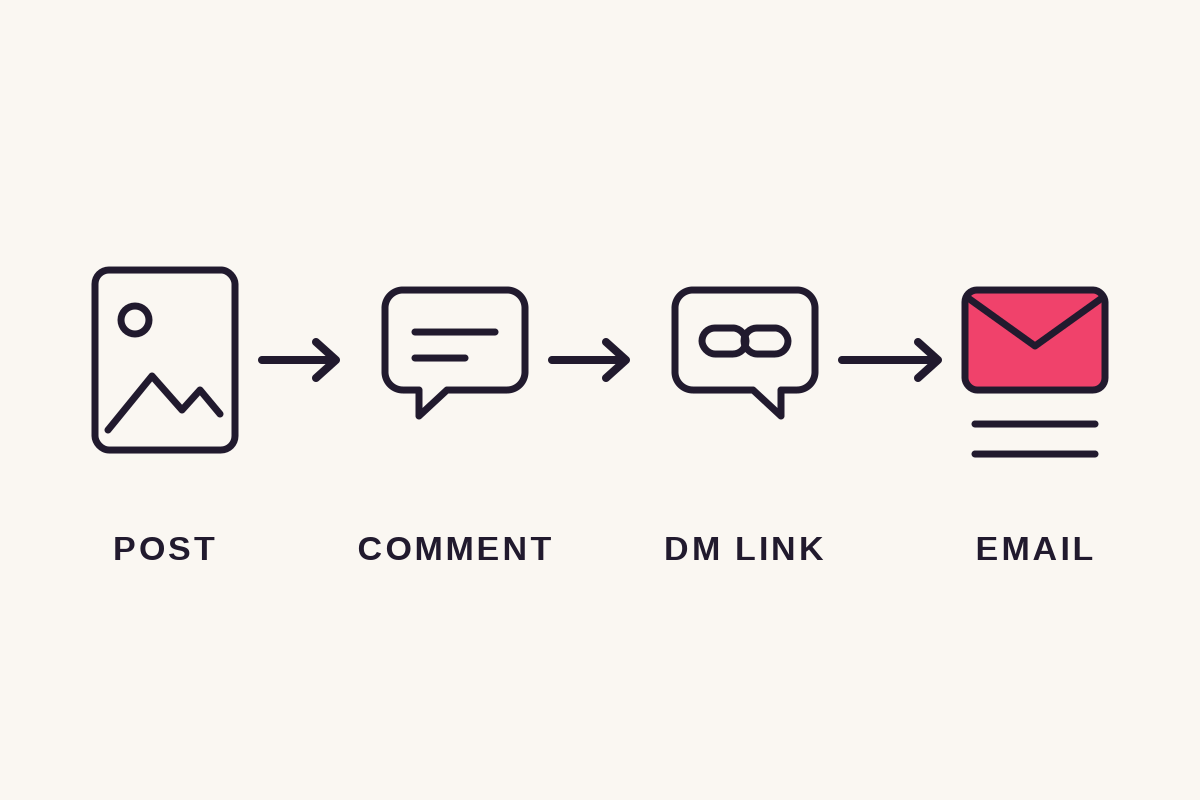
In ReplyMagnet the setup is 7 steps:
- Connect an Instagram Business or Creator account, or a Facebook Page.
- Upload the resource. The free plan hosts a PDF up to 25 MB.
- Create a campaign. Choose the posts and a trigger keyword such as GUIDE.
- Turn on the email gate. The DM link now opens the capture page before the file.
- Write the public reply and the DM. Name the resource, and say an email is needed.
- Connect Mailchimp or Kit if you use one, from $9 a month, so new addresses reach your list.
- Test from a second account, then launch. Comments from your own account are ignored.
The one-message limit comes from Meta's private replies documentation, checked 18 November 2026. The same page allows follow-up messages only if the person responds, and only within 24 hours of the response. So the first DM has to carry the link.
ReplyMagnet works through that official API and passed Meta App Review in August 2026. Every signup gets a 30-day trial of the paid features with no card. The comment-to-DM setup guide covers the campaign step by step.
Email capture forms and landing pages: what to ask for
An email capture form should ask for one thing, the email address, unless a second field has a named use. Each extra field is one more thing a visitor on a phone has to type before the form is done.
Which fields an email capture form should ask for
Field
- Ask when
- Always
- Skip when
- Never. It is the point of the form
Field
First name
- Ask when
- You will use it in the greeting
- Skip when
- Your emails are not personalised
Field
Phone
- Ask when
- A person will call or message within a day
- Skip when
- You only plan to email
Field
Company or role
- Ask when
- You sell to businesses and sort leads by it
- Skip when
- You sell to consumers
ReplyMagnet's capture page is short by design. It asks for an email, a phone number, or both, and nothing else. Phone capture starts at $9 a month. Our lead capture page guide covers the 5 parts of the page around the field.
An email capture landing page follows the same rule: one promise, one field, one button, and the same words the post or ad used.
The rule email capture trips on: permission
Email capture only counts when the person knows what the address will be used for and agrees before typing it. An address collected without that agreement belongs to someone who never asked to hear from you.
Four habits keep a list honest:
- Say what you will send and how often, right next to the field.
- Leave any newsletter tick box unticked. Let the person tick it.
- Never add addresses copied from profiles, comments or bought lists.
- Make leaving easy. Every email should carry an unsubscribe link that works.
Email and privacy laws differ by country, and this guide is not legal advice. Check the rules that apply where you and your subscribers live.
On Instagram there is one more thing to keep straight. A keyword comment is an opt-in to receive the file by DM. A keyword comment is not an opt-in to a newsletter. The line next to the field is where you ask for that. Our email opt-in guide compares single and double opt-in and gives 5 opt-in emails to copy.
A worked example: email capture from one Reel
In an illustrative example, a Reel with 800 keyword comments leads to 520 link opens and 312 captured emails, a 60% capture rate on the form. All 800 engagements fit inside ReplyMagnet's free plan of 1,000 a month.
These numbers are made up to show the arithmetic. They are not a benchmark.
| Step | Count | Share of the step before |
|---|---|---|
| Keyword comments | 800 | |
| DMs sent with the link | 800 | 100% |
| Link opens | 520 | 65% |
| Emails captured | 312 | 60% |
Two things move the last number most: whether the caption mentioned the email, and whether the form loads fast on a phone.
On the free plan this example costs nothing. To sync those 312 addresses to Mailchimp or Kit automatically, the $9 plan covers 25,000 engagements a month.
ReplyMagnet bills by monthly engagements, 100,000 for $29, and never by the number of contacts stored. A tool that bills per contact costs more each time a capture campaign works.
What to measure after you capture emails
Measure 4 numbers after you capture emails: capture rate, cost per captured email, first-email open rate and unsubscribe rate. The first 2 numbers judge the capture method, and the last 2 judge whether the right people signed up.
Four email capture numbers and what a poor one means
Number
Capture rate
- How to work it out
- Emails captured divided by form views
- A poor figure means
- The form surprised people or asks too much
Number
Cost per email
- How to work it out
- Monthly tool cost divided by emails captured
- A poor figure means
- The method is too expensive for your volume
Number
First-email opens
- How to work it out
- Opens divided by emails delivered
- A poor figure means
- The promise and the first email do not match
Number
Unsubscribe rate
- How to work it out
- Unsubscribes divided by emails delivered
- A poor figure means
- People did not expect to hear from you
ReplyMagnet counts link opens and captured emails for each campaign. Opens and unsubscribes live in your email platform. Our guide to measuring Instagram DM campaigns explains how to read the campaign numbers.
Where email capture goes wrong
Email capture goes wrong most often in 5 ways: no reason to sign up, too many fields, a form shown too early, no first email, and no permission.
Check your setup against each one:
- No reason. "Join our newsletter" is not an offer. Name what the person gets.
- Too many fields. Start with the email alone and add a field only when you will use it.
- A form that arrives too early. Let people see the post, the page or the product first.
- No first email. Write the welcome email before you switch the form on.
- No permission. Say what you will send, and never import addresses people did not type themselves.
Capturing the address is the start, not the result. What you send after the download decides whether the list was worth building. Once the form works, the next job is feeding it: our guide on how to grow your email list compares 9 sources of new subscribers.
Common questions
What does email capture mean?
Email capture means collecting a visitor's email address with permission, usually through a short form that offers something in return, such as a discount, a guide or a newsletter.
What is the best way to capture emails?
The best way to capture emails is the method that sits where your audience already is. Use a form or popup for website visitors, a landing page for ad traffic, and a comment-to-DM flow for Instagram and Facebook followers.
What is an email capture tool?
An email capture tool is software that shows a form, popup or page, stores the addresses people enter, and usually passes them to an email platform. Form builders, landing page builders and comment-to-DM tools are all email capture tools.
Can you capture emails on Instagram?
Yes. The address is collected on a page linked from a DM. ReplyMagnet sends that link to people who comment a keyword, and its email gate asks for the address before the file opens.
Is email capture free?
Email capture can be free at small volumes. ReplyMagnet's free plan includes the email gate and 1,000 engagements a month, and syncing captured emails to Mailchimp or Kit starts at $9 a month.
Is copying emails from Instagram profiles email capture?
No. Copying addresses from profiles or comments is scraping, because nobody on that list asked to hear from you. Email capture means the person typed the address themselves after seeing what you will send.
Keep reading
- How to design an Instagram lead magnet people use
- Gated content: what it is, examples and when to gate
- Lead capture page: what to put on it, with examples
- Instagram Comment-to-DM Automation: Setup & Test Guide