Guide
Comment for link on Instagram: how to send the link automatically

Comment for link is the Instagram pattern where a post says 'comment LINK' and the person gets the link by direct message. A URL pasted into a comment shows as plain text, so the link has to travel privately. This guide sets it up through Meta's official API, step by step.
Published by ReplyMagnet · Last updated
What is comment for link on Instagram?
Comment for link on Instagram is a post that asks people to comment a keyword, after which each commenter receives the link by direct message. A URL pasted into a comment shows as plain text, so the DM is where the tappable link lives.
Paste a URL into an Instagram comment and it shows as plain text. Nobody taps it. That is why creators write 'comment LINK' in the caption and send the link privately.
Should you use ReplyMagnet for this? Yes, if you want every comment answered within seconds, with a public reply under the comment and a DM carrying the link, through Meta's official API. Start free: the free plan covers 1,000 engagements a month, and the 30-day Pro trial needs no card.
Three versions of the pattern exist. Pick yours before you set anything up:
- Comment for a file. The DM carries a tracked link to a page that serves your PDF. Works on the free plan.
- Comment for your own URL. The DM sends a link to your Drive folder, Calendly page, YouTube video or shop. Link assets start at $9 a month.
- Comment for a link plus an email. The link opens a capture page that asks for an email before the resource. Email capture is on every plan.
This guide is not about messaging people who never commented, sending to lists of strangers, or tools that log in with your password. Those break Instagram's terms, and our Instagram DM automation rules guide explains why.
How comment for link works, step by step
Comment for link works in four steps: a keyword comment, a public reply under it, a private reply with the link, then the page the link opens. Meta's private replies API allows one such DM per comment, within 7 days.
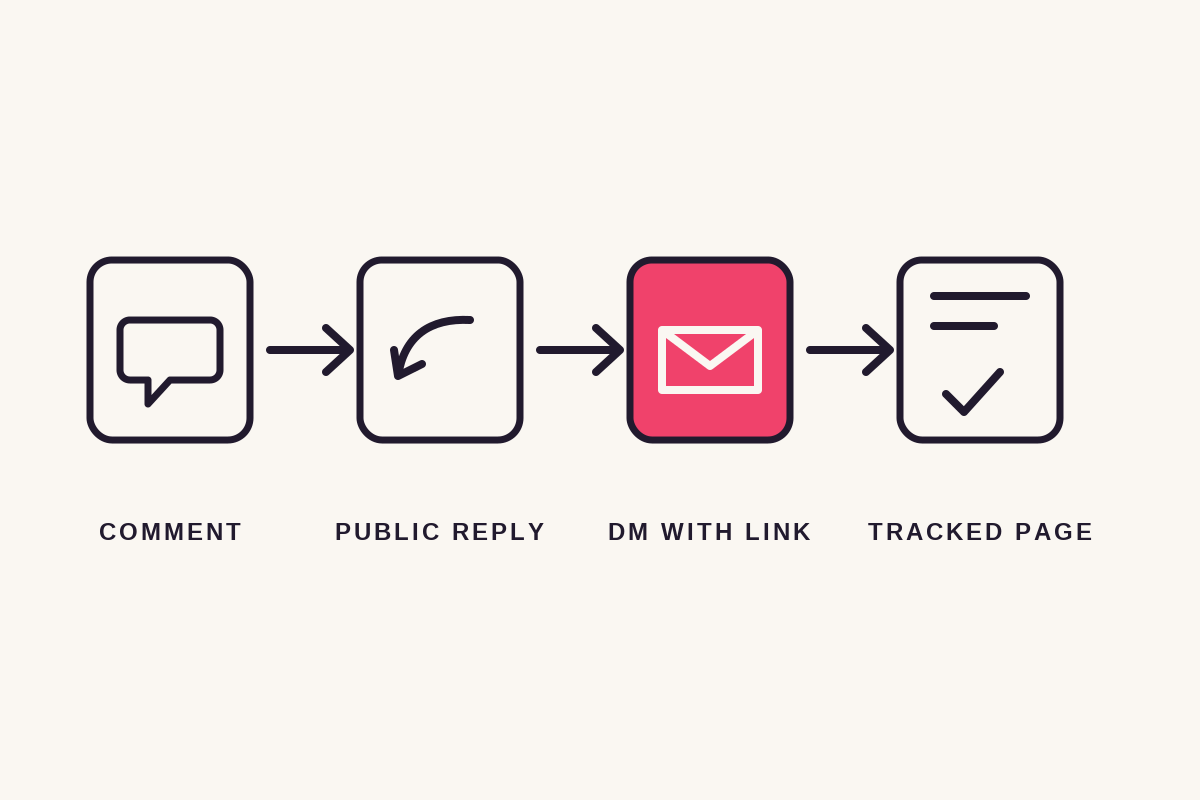
Each step is a separate event, and each can fail on its own:
- The comment. Someone types LINK, or a sentence that means it. The tool reads the comment through Meta's webhook, not by scraping the post.
- The public reply. A short public reply under the comment: 'Sent! Check your DMs.' Everyone scrolling sees it, which is what makes the next person comment.
- The DM with the link. Meta calls this a private reply: one message per comment, sent within 7 days. If the person doesn't follow you, it lands in their message requests.
- The tracked page. The link opens a delivery page that serves the file or forwards to your URL, and records the open.
ReplyMagnet runs all four from one campaign. The public reply and the DM on one comment count together as one engagement.
What you need before you set up comment for link
Comment for link on Instagram needs a Business or Creator account, a post that asks for a keyword, and the link or file to send. The tool must have passed Meta App Review for comments and messages, and a personal account cannot send automated DMs.
Have these ready before you open anything:
- A Business or Creator account. Meta's private replies work on professional accounts only.
- The destination: a PDF up to 25 MB, or your own URL as a link asset from $9 a month.
- One post, Reel or carousel with a plain call to action: 'Comment LINK and I'll DM it.'
- A trigger keyword people can thumb-type: LINK, GUIDE, PRICE.
- The public reply and the DM text, written before you launch.
- A second Instagram account for testing. Comments from the connected account are ignored by design.
Meta's own option: Meta Business Suite lists a 'Comment to message' automation among its inbox automations. It sends a DM when someone comments on a post. Use it if a plain keyword-to-DM reply is all you need. The setup below adds the public reply, link tracking, capture steps and lead records.
How to set up comment for link on Instagram
Setting up comment for link on Instagram takes about 10 minutes. Connect the account, add the link or file, create a campaign with the keyword, write the public reply and the DM, then launch and test from a second account.
- Connect the account. Sign in, choose Instagram and approve Meta's login. ReplyMagnet asks for the comment and message permissions only.
- Add what you'll send. Upload the PDF, or add a link asset with your URL.
- Create a campaign. Pick the post, or all posts. Choose a keyword, or any-comment mode for a giveaway.
- Write the public reply. One line, and tell people where to look: 'Sent! Check your message requests if you don't follow us.'
- Write the DM. Name what they asked for in the first line, then the link. That first line is the preview they see in Requests.
- Decide on a capture step. Off for a price list. On for a lesson or template, with the reason stated in the DM.
- Launch and test. Comment the keyword from a second account. Check the public reply, the DM, the link and the file on a phone.
Then post the invitation. Caption: 'Comment LINK and I'll send it to your DMs.' A pinned comment with the same words helps on older posts. The comment-to-DM pillar guide covers the campaign settings in more depth.
Meta's rules for automatically sending a link on Instagram
Meta allows an automated DM with a link as a reply to a comment on your own post: one message per comment, within 7 days, through an app that passed App Review. Follow-ups need a response from the person, within 24 hours of it.
Meta's private replies rules, from developers.facebook.com, checked 30 October 2026
Rule
One private reply per comment
- What it means for comment for link
- One DM per comment. A second DM only after the person replies.
Rule
Within 7 days of the comment
- What it means for comment for link
- Older comments can't be answered. A catch-up covers the last 7 days only.
Rule
Follow-ups within 24 hours of a response
- What it means for comment for link
- Answer questions inside the [24-hour messaging window](/glossary#24-hour-messaging-window).
Rule
Live comments only during the broadcast
- What it means for comment for link
- A link promised in a Live must go out while you're live.
Rule
750 private replies an hour per account
- What it means for comment for link
- Above that, the tool must retry later rather than drop the DM.
Rule
Non-followers get a message request
- What it means for comment for link
- Say 'check your requests' in the public reply.
Sources: Meta's private replies and rate limiting pages. ReplyMagnet passed Meta App Review in August 2026 for reading comments and sending these replies. Tools that need your Instagram password work outside these rules and put the account at risk.
Comment for link: a worked example with numbers
A worked example: a Reel that draws 600 keyword comments in a week sends 600 public replies and 600 DMs, which ReplyMagnet counts as 600 engagements. On the free plan that leaves 400 for the month; at $9 a month the allowance is 25,000.
Fictional numbers, chosen to show the arithmetic rather than report a result:
- The Reel says 'Comment LINK for the template.'
- 900 comments arrive. 600 contain LINK or a clear request; 300 are 'love this' and get no DM.
- 600 public replies and 600 DMs go out. That is 600 engagements, because the reply and the DM on one comment count once.
- 400 of the 600 commenters don't follow the account, so 400 DMs land in message requests.
- The tracked page records 350 opens in the first 48 hours.
What the numbers tell you: 600 of the free plan's 1,000 engagements are used, so a second Reel like this one would run over. Requests beyond the allowance wait in the overflow queue and send when the allowance resets or the plan changes, as long as Meta's 7-day window is still open. $9 a month raises the allowance to 25,000 engagements, and $29 a month covers 100,000, with no charge per contact.
The 350 opens against 600 DMs is the number to work on. The 400 requests are the usual cause: people who don't follow you never saw the DM. Our message requests guide explains what you can and cannot do about that.
What to measure after the link goes out
Measure comment for link at four points: matched comments, DMs delivered, link opens, and what happened on the page. A public reply count proves only that the comment was answered.
Four checkpoints and what a gap between them means
Checkpoint
Matched comments
- Where to read it
- Campaign stats
- What a gap means
- Low: the keyword is hidden in the caption, or the post scope is wrong
Checkpoint
DMs delivered
- Where to read it
- Activity feed, per comment
- What a gap means
- Below matched: the 7-day window closed, or the account disconnected
Checkpoint
Link opens
- Where to read it
- Tracked link stats
- What a gap means
- Well below delivered: DMs sit unread in message requests
Checkpoint
Email captured
- Where to read it
- Leads table
- What a gap means
- Below opens: the gate asks for too much, too early
Compare the same post against your next one, not against someone else's screenshot. Our guide to measuring DM campaigns covers cost per enquiry and what the numbers do not prove.
Where comment for link goes wrong, and the fix
Comment for link fails for five common reasons: a test from your own account, a keyword that appears in ordinary comments, a DM with no first-line context, two tools answering the same post, and a link that needs a login.
Work through the list before you blame the tool:
- You tested from the connected account. Self-comments are ignored by design. Use a second account that doesn't follow you, so you also see the Requests view.
- The keyword is a common word. 'LOVE' fires on half the comments. Pick LINK, GUIDE or a word from the post itself.
- The DM opens with a pitch. Requests show one line of preview. Open with 'Here's the template you asked for.'
- Two tools answer the same post. Meta Business Suite's comment to message and a campaign on the same post send two DMs. Turn one off.
- The link needs a login. A Drive file set to restricted, or a page behind a sign-in, stops people at the door. Our resource link sign-in guide shows the access settings to check.
If the public reply posts but no DM arrives, the comment-to-DM troubleshooting guide walks through the remaining causes.
Common questions
Can you put a link in an Instagram comment?
You can paste a URL into an Instagram comment, but it shows as plain text that nobody can tap. Comment for link sends the link by DM instead.
How do I automatically send a link on Instagram when someone comments?
Connect a Business or Creator account to a tool that passed Meta App Review, create a campaign with a keyword, and write a DM that contains the link. Each matching comment then gets a public reply and the DM within seconds.
Does comment for link work on a free plan?
Yes. ReplyMagnet's free plan sends a public reply and a DM with a tracked link to your PDF, for up to 1,000 engagements a month. Sending your own URL instead of a file starts at $9 a month.
Why didn't the person get the link?
Usually the DM is in their message requests because they don't follow you, the comment was older than 7 days, or the test came from the connected account itself.
Is comment for link allowed by Instagram?
Yes, when the DM is a reply to a comment on your own post, sent through Meta's API by an app that passed App Review. Tools that log in with your password or message people who never commented are not.
Keep reading
- Instagram Comment-to-DM Automation: Setup & Test Guide
- Instagram auto reply: how to set it up, with examples
- Instagram message requests: find, accept, fix (2026)
- Instagram DM Automation Rules: 7-Day & 24-Hour Windows