Guide
How to reply to comments on Instagram, and what to say
To reply to a comment on Instagram, open the post's comments and tap Reply under the comment. The harder part is what to say, how fast, and what to do when hundreds of people comment the same word.
Published by ReplyMagnet · Last updated
How to reply to comments on Instagram
To reply to a comment on Instagram, open the post, tap the comment icon, then tap Reply under the comment you want to answer. Instagram adds the person's @username, so type your reply and tap Post.
The steps in the Instagram app on iPhone or Android:
- Open the post, Reel or carousel.
- Tap the comment icon (the speech bubble) to open the comments.
- Tap Reply under the comment.
- Instagram starts your reply with the person's @username. Type after it.
- Tap Post. Your reply appears nested under their comment, and they get a notification.
To like a comment, tap the heart beside it. To pin, delete or report one, tap and hold the comment (or swipe left on iPhone). Menus move between app versions, so look for those words if yours differs. Instagram's own Help Center page is titled Reply to a comment on Instagram.
Should a tool do this for you? For questions, compliments and complaints, no: reply yourself. When a post asks people to comment a word to get a link or a file, yes. ReplyMagnet posts a public reply under each matching comment and sends the requested link in one DM, through Meta's official API. Start free: the free plan includes 1,000 engagements a month.
How to reply to Instagram comments on a computer
To reply to Instagram comments on a computer, open the post on instagram.com, find the comment and click Reply under it. Accounts linked to a Facebook Page can also answer comments from the Meta Business Suite inbox.
Two ways to work from a desk:
- instagram.com. Sign in, open the post from your profile, click Reply under the comment, type and press Return. It works like the app, one post at a time.
- Meta Business Suite. If your Business or Creator account is linked to a Facebook Page, the Business Suite inbox lists comments from many posts in one place. That is faster when comments are spread across a week of posts.
If you manage several accounts, check which one is active before you reply. A reply from the wrong account is public and stays there until you delete it.
What to reply to Instagram comments: examples
What to reply to an Instagram comment depends on its type. Thank compliments by name, answer questions in public, take complaints to DMs after one public line, and point keyword requests to the DM you sent.
Copy-ready replies for the 6 comments you get most
Comment type
Compliment
- Example comment
- This is so helpful!
- A reply that works
- Thank you, Priya! Which tip are you trying first?
Comment type
Question
- Example comment
- Does this work on Reels too?
- A reply that works
- Yes, the same steps work on Reels. Tap the comment icon under the Reel.
Comment type
Keyword request
- Example comment
- GUIDE
- A reply that works
- Sent! Check your DMs, and your message requests if you don't follow us.
Comment type
Complaint
- Example comment
- My order still hasn't arrived
- A reply that works
- Sorry about that. We've sent you a DM so we can sort it out today.
Comment type
Emoji only
- Example comment
- 🔥🔥
- A reply that works
- Glad you liked it! 🙌
Comment type
Tag a friend
- Example comment
- @sam you need this
- A reply that works
- Hi Sam! The full checklist is free, comment GUIDE to get it.
Three rules make any reply better. Use the person's first name when it is in their profile. Ask a short question back when you want a conversation. Keep complaint details out of the public thread, but answer in public first so others see you responded.
How to respond to Instagram comments as a business
To respond to Instagram comments as a business, reply within a day, answer every real question in public, and move order details or complaints to DMs. A keyword request needs a public reply plus the DM that delivers what was promised.
A checklist for a Business or Creator account:
- Reply within 24 hours. Old comments sink in the thread, and the person has moved on.
- Answer questions in public. One answer helps everyone who has the same question and reads the thread.
- Move private details to DMs. Order numbers, addresses and refunds belong in a message, not a comment.
- Don't paste the same line 50 times. Rotate 3 or 4 phrasings so the thread reads like a person wrote it.
- Deliver what the caption promised. If the caption says "comment GUIDE for the link", every GUIDE comment needs that link, fast.
- Hide or delete abuse, don't argue. Instagram's Hidden Words setting filters offensive words out of comments.
Point 5 is where most accounts fall behind, because the request volume arrives in the first hours after a post. That is the one job worth automating.
Reply to an Instagram comment privately
To reply to an Instagram comment privately, send the commenter a DM. Meta's developer docs allow a business one private reply per commenter within 7 days of the comment, with follow-ups only after the person responds.
In the app, open the commenter's profile and tap Message. If they don't follow you, your DM lands in their message requests, so add "check your requests" to your public reply.
Tools that reply privately for you use Meta's private replies API. Its rules, from Meta's developer docs:
- One message can be sent to the commenter from a comment.
- It must be sent within 7 days of the comment. For Live comments, only during the broadcast.
- Follow-ups only after the person responds, and within 24 hours of their response. Our glossary explains the 24-hour messaging window.
That one-message rule is why the first DM must carry the whole answer: the link, the file or the next step.
When to automate Instagram comment replies
Automate Instagram comment replies when many people comment the same word to get the same thing. Reply by hand to questions, compliments and complaints, where a person's answer matters more than speed.
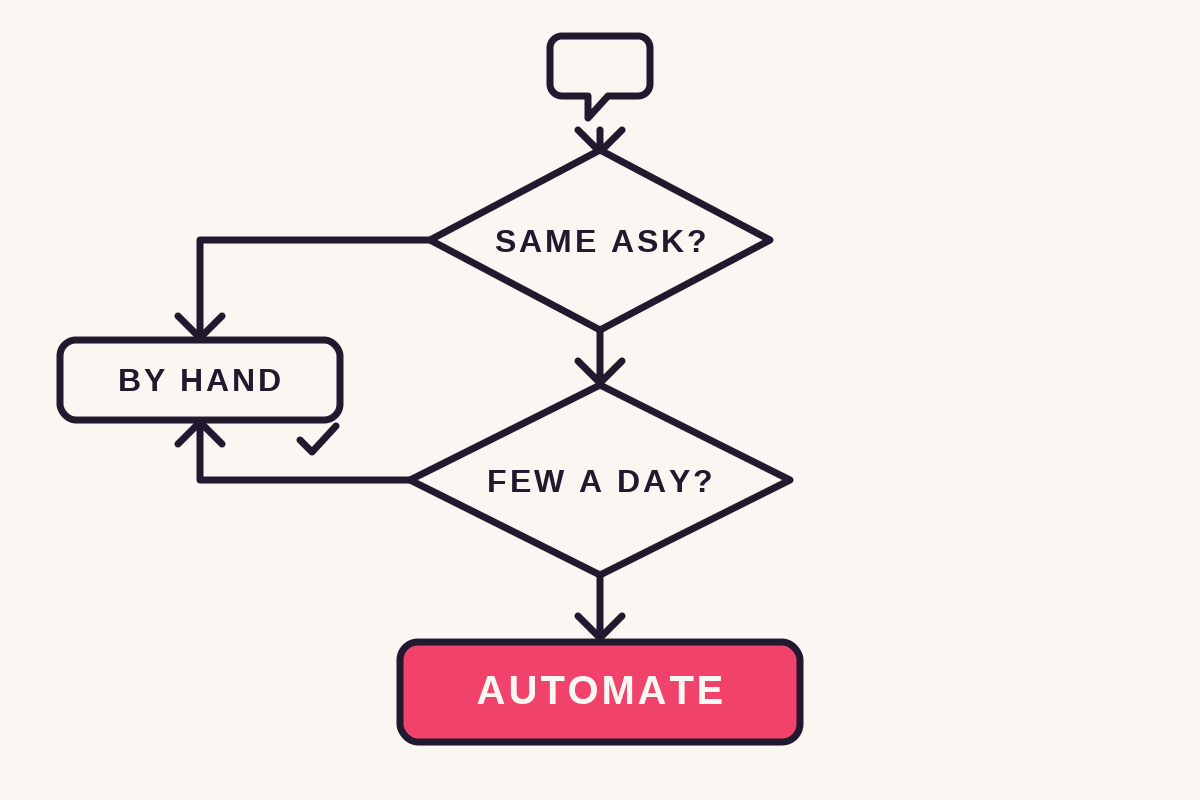
A worked example. A Reel says "comment GUIDE for my checklist" and draws 400 comments in 2 days, 250 of them GUIDE. At about 30 seconds each, a reply plus a DM by hand is roughly 2 hours of typing. Miss a weekend and Meta's 7-day window starts closing on the earliest ones.
Automated, the same 250 requests get a public reply and a DM within seconds of each comment. In ReplyMagnet that uses 250 of the free plan's 1,000 engagements a month. You keep the other 150 comments for yourself, and you answer them by hand.
What ReplyMagnet adds to a plain auto-reply:
- Reply variants you write, rotated so the thread doesn't repeat one line.
- AI matching for comments that ask without the exact keyword, like "can I get this please" (smart triggers).
- A delivery page that can ask for an email before the file, with leads you can export or sync.
- Predictable billing: 100,000 engagements a month for $29, and a 30-day Pro trial with no card required.
Meta Business Suite also has a free comment to message automation. Use one tool per post, never both, or people get two DMs. Setup steps are in our comment-to-DM automation guide.
Where Instagram comment replies go wrong
Instagram comment replies go wrong for five reasons. Replies come too late, every reply is identical, a promised DM never arrives, private details go public, or two tools answer the same comment.
The fixes, in order of how often we see them:
- Too late. Reply in the first day. For keyword requests, automate so the delay is seconds.
- Copy-paste threads. 50 identical replies look like a bot. Write 3 or 4 versions and rotate them.
- The DM never arrives. The person doesn't follow you and the DM sits in Requests, or the 7-day window passed. Our comment-to-DM troubleshooting guide walks through each cause.
- Private details in public. Never ask for an email or order number in the thread. Send a DM.
- Two tools, one comment. Business Suite's comment to message and a third-party tool on the same post send two DMs. Pick one.
Test every change from a second account that doesn't follow you. Your own account can't comment its way into the view a real stranger gets.
Common questions
How do you reply to a comment on Instagram?
Open the post, tap the comment icon, tap Reply under the comment, type your answer after the @username and tap Post. The commenter gets a notification.
Can you reply to Instagram comments on a computer?
Yes. On instagram.com, open the post and click Reply under the comment. Accounts linked to a Facebook Page can also reply from the Meta Business Suite inbox.
Can I reply to an Instagram comment privately?
Yes, by sending the commenter a DM. Meta's developer docs allow a business one private reply per commenter within 7 days of the comment.
What should I reply to Instagram comments?
Thank compliments by name, answer questions in public, move complaints to DMs after one public line, and tell keyword requesters to check their DMs and message requests.
Can Instagram comment replies be automated?
Yes, through Meta's official API. ReplyMagnet posts a public reply and sends one DM for each comment that asks for your link or file, and its free plan includes 1,000 engagements a month.
Keep reading
- Guides
- Instagram Comment-to-DM Automation: Setup & Test Guide
- Instagram auto reply: how to set it up, with examples
- Instagram message requests: find, accept, fix (2026)