Guides
Promote Etsy Listings on Instagram With a Clear DM Handoff

Use Instagram to show the product and answer an interested reader’s request with the right Etsy listing. Make personalization and fulfilment expectations clear, then keep selection, payment and the order record on Etsy.
Published by ReplyMagnet · Last updated
Choose the listing that answers the post
Send interested readers to the exact Etsy listing when the post shows a specific item. Use the shop page only when the invitation is genuinely to browse the wider range.
A video showing a handmade ceramic name dish creates a particular expectation. The reader wants to inspect that dish, see the available options and understand how to order it. A DM that opens the whole shop makes them repeat the search you could have completed for them.
Start by choosing the listing before writing the invitation. Confirm that its photographs, product name and description match the item shown in the post. If the video features an older version, a one-off piece or a custom commission, explain that difference rather than using an apparently similar listing as a silent substitute.
Etsy documents ways to share shop content to social media. That supports using social content to introduce a listing. The DM workflow described here is a separate external-link handoff, not an Etsy integration or an order-management connection.
ReplyMagnet can deliver an external URL asset on Basic or above. Its role is connecting an eligible request to the listing destination you configured. Etsy remains the place where the buyer inspects the offer and completes the transaction.
Explain handmade differences before the request
Describe the item shown, the choices a buyer can make and any important difference between an example and the finished product. Keep current processing and delivery information on the maintained listing.
Handmade products often need more explanation than a single photo provides. A glaze can vary, a personalized name can affect the layout, and a made-to-order item may not be ready to dispatch immediately. A useful Instagram post makes the relevant uncertainty understandable before inviting someone to order.
Show the details that affect the buyer’s decision. For a name dish, that might be scale, lettering style and how the dish looks in use. Avoid implying a photograph guarantees every small variation will be identical unless that is an accurate promise for the product.
Separate making time from delivery. “Ready to send” and “arrives by Friday” describe different things. Do not copy a delivery promise from an old promotion into an ongoing automated response. Let the current listing explain processing, dispatch and the destination-dependent information the buyer needs.
Write an information brief with four fields: what the example demonstrates, what can vary, what the buyer chooses and where current fulfilment information lives. This brief keeps the post, DM and listing consistent without turning the message into a full product description.
If a request needs individual confirmation, say so. A DM carrying the listing does not confirm that a special design, unusual spelling or deadline is feasible. The buyer should be able to find the appropriate Etsy communication route for those questions before placing an order.
Write a caption and reply that name Etsy
Tell readers that the requested link opens the Etsy listing. Name what they can inspect there and avoid language implying an order, reservation or payment has already occurred.
For a fictional ceramics studio, the caption might say: “This personalized name dish is made to order. Comment DISH for the Etsy listing, where you can check the size, lettering choices and current processing information.” The post is useful even before the reader requests the link because it explains the object and the decision ahead.
The corresponding DM could say: “Here is the Etsy listing for the name dish shown in the video. Check the dimensions and personalization instructions before ordering. The listing has the current options and processing details.” This closes the promise made in the caption without inventing urgency or certainty.
Set up the supported request route using the campaign guide. Sellers with their own store can follow the Shopify product link guide, and template sellers the Canva sample guide. For the first test, select the intended post and a distinct keyword. Configure the approved external listing URL through the asset guide; this asset type requires Basic or above.
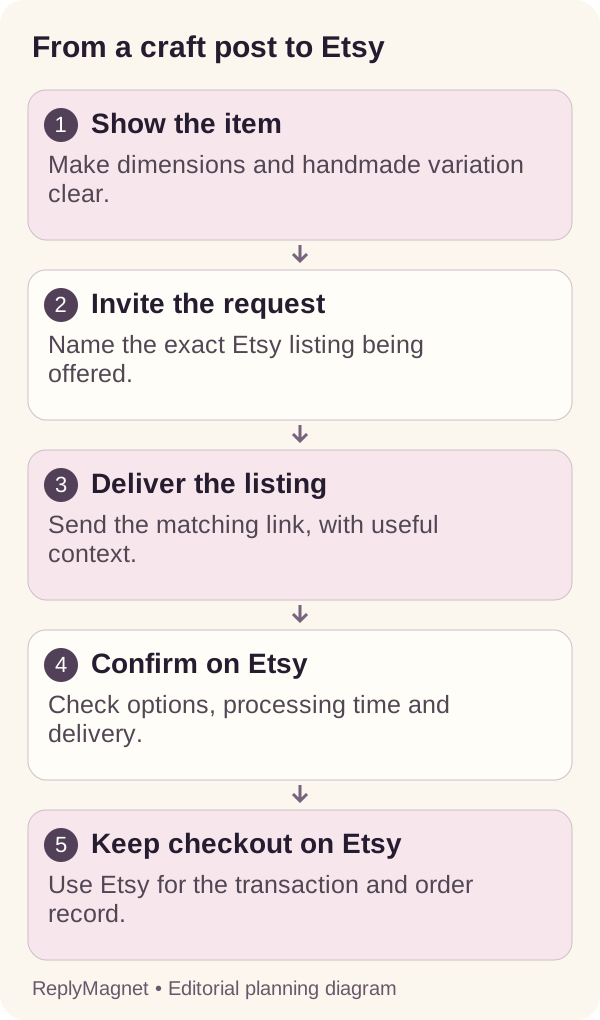
Original handoff diagram. The listing and transaction stay on Etsy; the DM supplies a requested route.
Avoid a contact-capture step that adds no value to reaching a public listing. If you are offering a separate resource or subscription, explain it as a separate choice instead of making it an unexpected condition of seeing the item.
Keep the transaction and order discussion on Etsy
Use the Instagram message to bring the interested visitor to Etsy. Do not redirect an Etsy-originated transaction to an outside payment method or another checkout.
The handoff in this article runs toward the marketplace: a person discovers the product on Instagram, requests the listing and continues on Etsy. It is not a method for moving an Etsy customer elsewhere to finish a purchase.
Etsy’s Off-Platform Transactions Policy prohibits directing members to complete transactions outside Etsy, including outside payment routes and incentives to buy elsewhere. Review the current policy when designing your seller workflow. Keep this article’s route simple: listing information, selection and checkout remain on Etsy.
For product-specific discussion, direct the buyer to the appropriate listing or Etsy conversation so the relevant context stays with the seller’s order process. Do not ask for payment-card details, private addresses or order evidence in a public Instagram comment. A message requesting the listing is not an order record.
ReplyMagnet does not verify Etsy orders or synchronize the conversation with an Etsy account. If someone says they have paid, use the marketplace’s actual order record and support workflow rather than accepting the Instagram statement as verification.
This separation also helps the operator avoid making promises from missing information. The automation can accurately say where the listing is. It cannot accurately announce that a particular person’s custom item has been accepted, produced or dispatched unless a separate authorized process has established that fact.
A personalized-gift example with a listing checklist
Before inviting requests, make sure the listing explains the item, personalization limits and current fulfilment expectations. Use a fictional buyer task to check whether the information supports a real decision.
Imagine a fictional ceramic name dish intended as a small gift. The studio offers two glaze choices and a short personalized name. The example does not represent a real shop, actual production capacity or measured customer results. Its purpose is to test whether the reader can move from watching the making process to understanding an order.
The Instagram video shows an example name and one glaze. The caption identifies both as examples. The listing needs to explain the permitted personalization, show the available choices and make the size understandable. If a buyer must enter exact spelling, that instruction belongs at the point where they choose and order.
A tester arrives wanting a dish for someone with a long name. Can they tell whether it fits the allowed customization, or where to ask? If the listing leaves that uncertain, the team should clarify the product information before creating a more persuasive caption.
A second tester wants the gift for a particular date. They need current processing and shipping information, not an old promise embedded in a DM. If the date cannot be confirmed, the message should not imply otherwise.
Use the checklist to decide whether the destination is ready. A polished making video cannot compensate for missing ordering information. The useful conversion is a buyer understanding what they are choosing, rather than simply arriving at the listing.
Fictional ceramic-gift listing readiness checklist
Reader question
What is this?
- Listing should explain
- Item identity, scale and actual included pieces
- Do not infer from the DM
- That every pictured accessory is included
Reader question
What can I personalize?
- Listing should explain
- Allowed choices and spelling instructions
- Do not infer from the DM
- That any requested design is possible
Reader question
How will it look?
- Listing should explain
- Representative photos and meaningful variation
- Do not infer from the DM
- An exact match to every handmade detail
Reader question
When can it be made?
- Listing should explain
- Current processing information
- Do not infer from the DM
- A reserved production slot
Reader question
Can it reach my destination?
- Listing should explain
- Available shipping information and conditions
- Do not infer from the DM
- A guaranteed arrival date
Reader question
Where do I order?
- Listing should explain
- The Etsy listing and checkout route
- Do not infer from the DM
- That a link request is an order
Test as a visitor rather than the shop owner
Open the actual delivered listing link without relying on your seller session. Check recognition, options, personalization and the route toward Etsy checkout on a phone.
First test the listing URL directly in a visitor context. Confirm that it is the public item page, not a seller management screen or another private editing route. Check that the item is available to inspect and that the selected photos and description match the Instagram promise.
Then test the complete path from an authorized controlled Instagram request. Open the received link on a phone and record whether it stays in a browser or opens the Etsy app. Either can be usable, but the journey should still reach the intended listing. Do not assume the route you prefer is the only one buyers will encounter.
Read the product information and attempt the relevant option selection. Can the tester find the personalization instructions? Is the item quantity clear? Can they identify the seller and current processing information? Stop before an unintended purchase, and use only an authorized process if transaction testing is necessary.
Save the observed path and any obstacle. A login prompt at checkout, a removed listing and a failed delivery redirect are different issues. Investigate the layer that actually interrupted the reader instead of repeatedly changing the campaign text.
Maintain old posts when availability or deadlines change
Review active invitations when a listing sells out, changes or becomes unsuitable for a dated promise. Correct the message and destination instead of leaving an old post to suggest availability you cannot confirm.
A making video can continue attracting interest long after the original item sells. For repeatable products, a maintained listing may still answer the request. For a one-off object, an identical replacement may not exist. Make that distinction explicit rather than presenting another item as if it were the one shown.
If the listing is unavailable, decide whether to pause the request campaign, update the invitation or provide a clearly described alternative. Do not silently redirect to a broad shop page while keeping a DM that says “Here is that exact dish.” The link must remain consistent with the sentence that introduces it.
Holiday campaigns need particular attention to wording. The studio can stop using an old seasonal delivery promise without claiming a new deadline. Current capacity and destination-dependent shipping belong in the seller’s maintained information. A scheduled campaign end does not, by itself, update every caption or previously sent message.
Keep a simple register: post, listing URL, item type, dated claims, owner and last visitor test. Review it when the seller changes the listing, production arrangement or fulfilment information. This connects maintenance to events the business already notices.
For digital products, the onboarding guide addresses the later access journey. Keep that post-purchase process separate from this listing request, and verify payment through the system that records it.
Compare request activity with Etsy evidence carefully
Use ReplyMagnet records for the request and delivery, and Etsy’s own records for visits or orders it reports. Do not infer sales, identities or purchase causes from a sent listing link.
A request shows interest in the information offered. A delivered message shows a response according to the messaging system’s definition. A link open shows a further action. None of these events, by themselves, confirms that a buyer completed an Etsy order.
Review the marketplace reporting available to your shop and keep its definitions intact. App changes, forwarded links, repeat visits and reporting limits can make the path less directly observable than a diagram suggests. Mark unavailable attribution as unavailable rather than assigning every order during the campaign to Instagram.
A practical review has three questions. Did the request route work? Did the listing answer the questions created by the post? What did Etsy actually record? The first two questions can justify useful improvements even when precise purchase attribution is missing.
If readers repeatedly ask whether personalization is included, improve the listing and caption. If visitors cannot distinguish the two sizes, improve the photographs or measurements. More messages will not repair missing product information.
Keep reading
- Sell Canva Templates on Instagram With a Free Sample
- Create a Product Comparison Guide for Instagram Shoppers
- After the lead magnet download: Instagram follow-up