Guides
How to Send Discount Codes Through Instagram DMs

Create the discount in your store, explain its real conditions, then deliver the code or merchant-created link when someone requests it. The store controls eligibility and redemption; the DM supplies the route.
Published by ReplyMagnet · Last updated
Start with the offer your checkout can enforce
Create and test the discount in the store before writing the Instagram invitation. The message should describe the checkout’s real conditions, including eligible products, minimum spend and expiry.
A coupon message is a promise about what happens later. If the DM says “Use this on anything” while checkout excludes half the range, the message is wrong even if it sends perfectly. Begin with the merchant system that owns the offer, then translate its rules into language a shopper can understand.
Record the discount type, eligible items, customer or market restrictions, minimum spend, use limits and end time. Distinguish the item subtotal from shipping or tax where that affects eligibility. Do not improvise conditions in the caption that the checkout cannot actually enforce.
Shopify’s discount management documentation describes editing, sharing and deactivating discounts and controlling eligibility. Other checkout systems have their own controls. Use the current documentation for your store rather than assuming every platform interprets a condition identically.
The purpose of the DM is to deliver a requested offer and a useful next step. It does not replace the merchant’s pricing, eligibility checks or order record. Keep those responsibilities explicit from the first draft.
Choose a shared code or a genuine unique-code system
A shared code is the same for every recipient. A unique-code workflow needs a separate issuing and tracking system; delivering a message alone does not create individual coupons.
A shared code is easy to explain and maintain. The same code appears in every relevant reply, so the team can test one configured promotion and use consistent terms. Its limitation is also straightforward: someone can copy it, forward it or publish it elsewhere.
A unique-code system assigns separate codes under defined rules. That can require code creation, allocation, use limits and records connecting an issued code to its permitted recipient. Those are merchant or integration capabilities to verify, not benefits to assume because a messaging tool can personalize text.
ReplyMagnet can include a static code in message copy or deliver a merchant-created external destination. It does not generate unique Shopify discount codes, enforce their conditions or record checkout redemptions. External URL assets require Basic or above. A unique tracked delivery link is not the same thing as a unique merchant coupon.
Decide based on the real requirement. If the promotion is public and sharing is acceptable, a shared code may be sufficient. If the business requires controlled individual eligibility, choose and test the merchant mechanism first. Do not call a publicly reusable code “your exclusive personal code.”
Treat leakage as a planning condition. Write down what you will do if a shared code circulates beyond the intended post. The answer might be to accept the reach, change future eligibility or end the offer, depending on the actual rules and customer promise.
Put the important conditions where the reader will see them
State the benefit, qualifying purchase, exclusions and end time close to the code or link. Keep the full terms accessible without making the reader discover a major restriction at checkout.
Use a short offer card before writing any promotional copy. Its fields are: benefit, eligible purchase, threshold, excluded items, permitted uses, deadline with timezone, and the page holding the complete terms. If a field is unknown, resolve it with the store owner before inviting requests.
Avoid ambiguous phrases such as “today only” in a message that may be read tomorrow. Use a specific date and timezone for a fixed deadline. If a promotion is genuinely rolling, verify how the merchant system calculates each recipient’s expiry before describing it that way.
The DM should not become a wall of conditions, but it must preserve the facts likely to change someone’s decision. A minimum spend and a major excluded category belong near the offer. A clear destination can hold detailed conditions and the current status.
For a fictional stationery promotion, a useful structure is: “Here is the notebook offer you requested. Use PAPER10 for 10% off eligible notebooks when their qualifying subtotal reaches 40 currency units. Gift cards are excluded. See the offer page for the end time and full conditions.” Replace every illustrative value with verified store facts before use.
Do not hide a required email subscription behind a simple coupon request. If another step is part of access, explain it before the person asks. Requesting a discount does not by itself establish permission for unrelated future marketing.
Connect the request to the merchant-created destination
Use a clear post-specific request, accurate reply copy and the tested store destination. A merchant-created shareable discount link can simplify the route, but its checkout behavior still needs testing.
Choose one post whose purpose includes the offer. For the first campaign, use a recognizable keyword such as NOTEBOOK and the intended post scope. A phrase that appears naturally in unrelated comments can make the request less clear. Follow the campaign setup guide for the supported configuration.
A static code can be named in the message, alongside the destination and essential conditions. Alternatively, use a link created through the merchant’s supported discount-sharing process. Shopify’s DiscountShareableUrl reference documents a shareable URL associated with a discount code. That reference describes Shopify’s object; it does not establish a native ReplyMagnet integration or prove a particular basket will qualify.
Put the merchant-created URL in the external asset configuration rather than inventing an untested link format. The asset guide explains that delivery choice. For the product link itself, see Shopify product links by DM or Etsy listings by DM. Check the full received route, including any redirect, to make sure it reaches the intended offer or product.
Original process diagram. Delivering the offer and accepting a discount at checkout are different events.
Keep the public reply modest: it can direct the person to the DM without claiming the discount has already been applied to a purchase.
Work through one promotion before publishing it
Use an illustrative basket to compare the written promise with the checkout result. Check the qualifying subtotal rather than assuming every item contributes to the minimum spend.
The following example is fictional. A stationery shop offers 10% off eligible notebooks when the eligible notebook subtotal reaches 40 currency units. Gift cards do not qualify or contribute to that threshold. Assume the merchant has configured those exact rules and the team has verified them in a safe test.
A basket with 45 units of eligible notebooks should receive a 4.50-unit reduction on those notebooks, before any separately calculated shipping or tax. A basket containing 30 units of notebooks and a 20-unit gift card should not qualify merely because its overall subtotal is 50. The distinction is the qualifying subtotal, not the total amount visible in the basket.
The invitation might say: “Choosing your next notebook? Comment NOTEBOOK for the current notebook offer and its conditions.” The DM can name the code, the eligible threshold and the exclusion, then link to the offer page. Neither message needs to claim a reserved price or guaranteed availability.
If the shop cannot configure the proposed threshold exactly, change the offer before promotion. Do not rely on customer support to explain a rule that contradicts the checkout.
This evergreen design is separate from planning a seasonal launch. For a time-bound promotional calendar and team coordination, use the Black Friday campaign guide. The coupon mechanics should be correct before that calendar goes live.
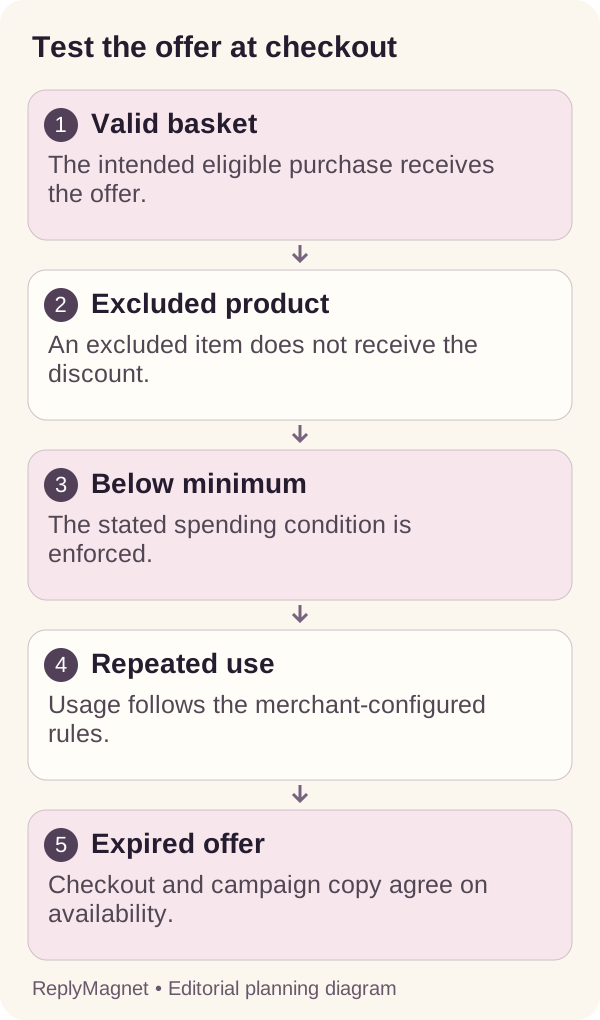
Test valid, invalid and expired baskets
Accept the offer only after the expected qualifying and rejection cases behave correctly. A successful eligible basket does not prove exclusions, limits or expiry work.
Prepare a test record with the code version, date, store configuration, basket contents and expected result. Use the merchant’s supported test method and stop before creating unintended charges or real orders. If a full test transaction is necessary, follow your store’s authorized testing process.
The matrix below uses the fictional notebook offer. Adapt it to your actual conditions. Include a mixed basket because it often exposes uncertainty over which items contribute to a threshold. Include an expiry check because editing the caption cannot deactivate a checkout discount.
When a case fails, locate the layer. If the DM contains the wrong code, fix the campaign copy. If the correct code reaches checkout but the exclusion is wrong, fix the merchant configuration. If a link opens a different product, investigate the destination and redirects.
Recheck after changing the offer. A passing result from the old configuration does not establish that a new threshold, collection or deadline behaves correctly. Save the updated test rather than quietly replacing the numbers in the caption.
Keep customer-facing error wording useful. “This code is not valid for this basket” may be accurate but insufficient if the offer omitted the reason. Improve the explanation where possible and route unusual checkout cases to the merchant’s support process.
Illustrative coupon acceptance matrix; expected results depend on the exact configured rules
Test case
45 units of eligible notebooks
- Expected result
- Qualifies for 10% on eligible items
- Check
- Correct eligible subtotal and reduction
Test case
30 units of notebooks
- Expected result
- Does not meet threshold
- Check
- No discount promised below minimum
Test case
30 notebook units plus 20 gift-card units
- Expected result
- Does not meet eligible threshold
- Check
- Excluded item does not contribute
Test case
Repeat use where a use limit applies
- Expected result
- Enforced according to configured limit
- Check
- Limit tested with the correct identity conditions
Test case
After configured end time
- Expected result
- Discount unavailable
- Check
- Store deadline and timezone verified
Test case
Code copied into another qualifying basket
- Expected result
- May work if it is a shared code
- Check
- Do not imply private allocation
Separate delivered offers from redeemed purchases
Track requests, sends, link activity and merchant-recorded redemptions as different events. A sent code is not a sale, and a shared code can be redeemed outside the original DM route.
Use each system for the event it actually observes. The automation can show request and delivery activity according to its reporting definitions. Destination analytics may show visits. The merchant’s order records establish whether a discount was accepted on a completed purchase.
Do not divide every recorded redemption by every delivered DM and call the result a person-level conversion rate without reconciling the records. Shared codes can travel, links can be forwarded, and the same person can visit several times. Refunds or canceled orders can also change the business interpretation of an initial purchase.
For your own website, a consistent campaign URL can help distinguish recorded traffic associated with the DM placement. The UTM tracking guide explains the tagging and attribution limits. A campaign tag still describes a distributed link, not a verified identity or a causal explanation for a sale.
In a review, write three separate observations: whether requested offers were delivered, whether visitors could understand and use the offer, and what the merchant recorded. Mark missing data as unavailable rather than treating it as zero.
If this promotion includes an affiliate relationship, use the affiliate-link workflow for disclosure and programme restrictions. Coupon redemption and approved affiliate commission are also separate records; neither should be inferred from a DM send.
Close the promotion at the source and in the invitation
Deactivate or end the merchant offer as intended, stop misleading invitations and explain expiry at the destination. Previously sent messages may remain visible after the campaign changes.
Give the offer an owner and a closing task before launch. That task should cover the checkout discount, current campaign, post caption, linked offer page and any other placement still advertising the same terms. A code that stops working while the post still says “available now” creates avoidable confusion.
Do not assume pausing a DM campaign invalidates a coupon already copied by a reader. Equally, deactivating the coupon does not rewrite a previously sent message. The merchant system controls redemption, while your content controls what readers are told to expect.
Where an old destination remains accessible, make its status clear. It can explain that the promotion ended and direct visitors to current product information without pretending the original discount is still available. Do not silently substitute a materially different offer behind an old promise.
Keep a short closure record: actual end time, merchant state, campaign state, corrected placements and outstanding support questions. This helps distinguish a genuinely expired promotion from a broken link or an incorrectly configured code when someone asks later.
Keep reading
- Black Friday Instagram DM Automation: 5 Templates (2026)
- Instagram affiliate links by DM: creator workflow
- Instagram DM UTM tracking: links, GA4 and limits