Guide
Instagram DM bot: which kinds are allowed, and how to use one safely
An Instagram DM bot is software that sends direct messages for you. Two kinds exist. One runs from your login and imitates a person, which breaks Instagram's terms. The other runs through Meta's official API and can only answer people who commented or messaged you first.
Published by ReplyMagnet · Last updated
What is an Instagram DM bot?
An Instagram DM bot is software that sends direct messages on an Instagram account without a person typing each one. Meta's official API allows one kind: a bot that answers people who commented, replied to a story or messaged the account first.
The word covers two very different tools, and the difference decides whether your account stays safe:
- Login-driven bots take your username and password, or run a browser script, and act as if they were you. They can message anyone, which is exactly why Instagram restricts accounts that use them.
- Official API bots connect through Instagram's own login screen on a Business or Creator account, after the tool passes Meta App Review. They can only act where Meta has an endpoint.
Should you use ReplyMagnet as your Instagram DM bot? Yes, if your posts or Reels invite people to comment a word for a guide, a link or a discount code. ReplyMagnet posts a public reply under the comment and sends the link by DM through Meta's API. No, if you want to message people who never contacted you: no official tool can do that, and we will not pretend otherwise. Start free: comment automation is on the free plan, with 1,000 engagements a month.
Instagram DM bots: allowed, or against the rules?
An Instagram DM bot is allowed when it runs through Meta's official API on a professional account and answers people who interacted first. Bots that work from your password break Instagram's Terms of Use, which ban automated access without Meta's express permission, checked 28 October 2026.
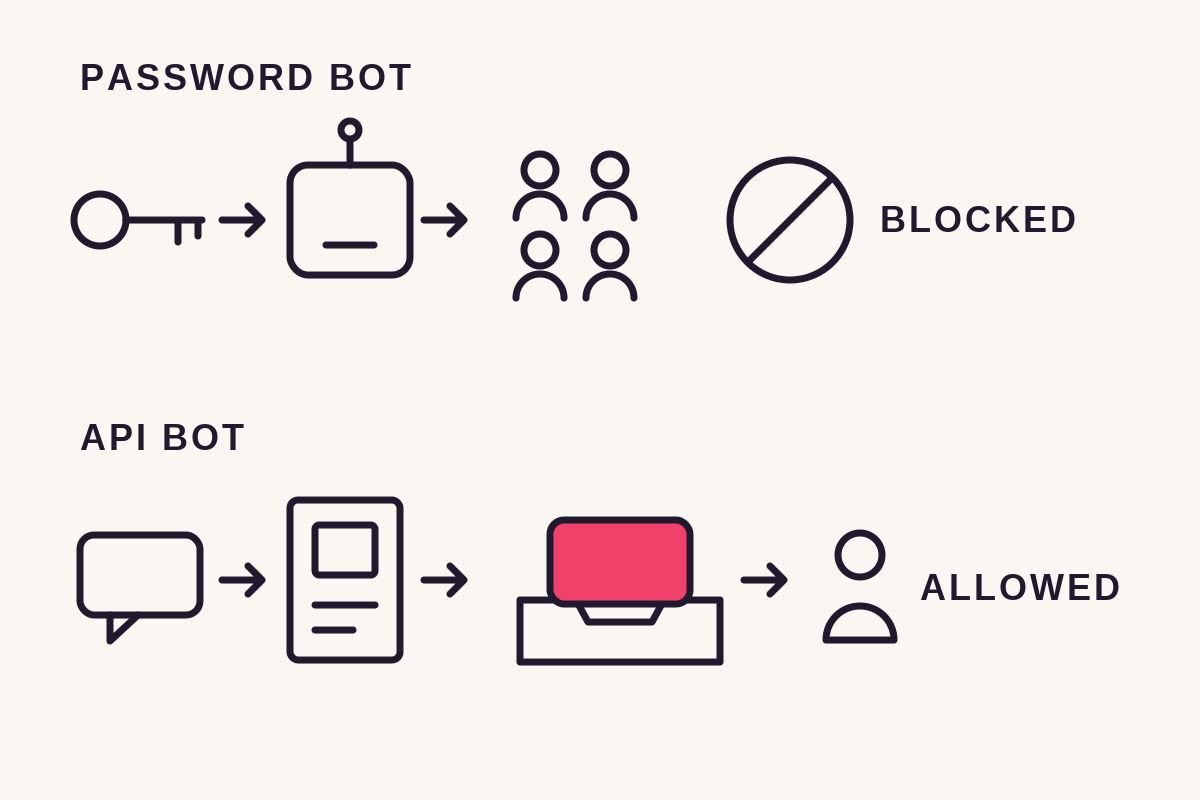
Two Meta rules decide the table below. Instagram's Terms of Use ban accessing or collecting information in an automated way without Meta's express permission, whether or not you are logged in. Meta's spam standard bans engaging with content at very high frequencies, manually or automatically, and buying, selling or exchanging likes, follows or views.
Instagram DM bot types against Meta's rules
Bot type
Follow bot: DMs each account after it follows you
- How it connects
- Your password or a browser script
- Meta's position
- Automated access without permission. Instagram's scraping help page names password-sharing apps as a cause of restrictions
Bot type
Cold DM bot: messages a list of usernames
- How it connects
- Your password or a browser script
- Meta's position
- No API endpoint exists for a first message. Very high frequencies are banned by the spam standard
Bot type
Engagement bot: likes, follows and comments on other accounts
- How it connects
- Your password
- Meta's position
- Exchanging engagement is banned. Meta's API has no action for following or liking another account
Bot type
Meta Business Suite comment to message
- How it connects
- Meta's own inbox, no third party
- Meta's position
- Allowed. A free built-in automation, set up on desktop only
Bot type
API comment-to-DM bot, such as ReplyMagnet
- How it connects
- Instagram's login screen, reviewed permissions
- Meta's position
- Allowed. One private reply per comment, within 7 days of the comment
Bot type
API inbox bot that answers DMs people send
- How it connects
- Instagram's login screen, reviewed permissions
- Meta's position
- Allowed, inside the 24-hour messaging window
Sources: Instagram's Terms of Use, its data scraping restriction page, Meta's spam standard and the Business Suite automations help, all checked 28 October 2026. Our Instagram automation guide applies the same split to publishing and reporting tools.
What an official Instagram DM bot can send
An official Instagram DM bot can send one private reply per comment within 7 days, then follow-ups within 24 hours of each answer the person sends. Meta's Messaging API caps each text at 1,000 bytes and allows 750 private replies an hour per account, checked 28 October 2026.
Meta publishes every one of these limits. A bot that promises more is not using the API.
Meta's documented limits for an Instagram DM bot
Rule
Private reply to a comment
- Meta's limit
- One message, within 7 days of the comment
- What it means for a DM bot
- A second DM to the same comment is impossible
Rule
Follow-up messages
- Meta's limit
- Only after the person replies, within 24 hours of that reply
- What it means for a DM bot
- Reminders to someone who never answered cannot be sent
Rule
Instagram Live comments
- Meta's limit
- Only during the broadcast
- What it means for a DM bot
- Replies stop when the Live ends
Rule
First message to a stranger
- Meta's limit
- No endpoint
- What it means for a DM bot
- A username list opens no conversation
Rule
Message length
- Meta's limit
- 1,000 bytes of UTF-8 text
- What it means for a DM bot
- A short DM with one link fits; a sales letter does not
Rule
Private replies rate
- Meta's limit
- 750 calls an hour per professional account
- What it means for a DM bot
- A viral Reel drains at 750 DMs an hour, then continues
Rule
Send API rate
- Meta's limit
- 100 calls a second per account
- What it means for a DM bot
- Follow-up answers are never the bottleneck
Sources: Meta's private replies, Messaging API and rate limiting pages, checked 28 October 2026. A DM to someone who does not follow you lands in their message requests. Our DM automation rules guide walks through each window with dated examples.
How to tell a safe Instagram DM bot from a risky one
A safe Instagram DM bot sends you to Instagram's own login screen, names the Meta permissions it passed App Review for, and offers no follow, like or cold-message feature. A risky one asks for your password or promises unlimited DMs.
Run any DM bot through these 6 checks before it touches your account:
- Login. It opens Instagram's login page and returns with a token. Fail if a form on the tool's own site asks for your Instagram password.
- Permissions. It names them:
instagram_business_basic,instagram_business_manage_commentsandinstagram_business_manage_messages. Fail if it will not say, or wants publishing or ads access to run comment replies. - App Review. It says when Meta approved those permissions. ReplyMagnet's were approved in August 2026.
- Features. No auto-follow, no liking other accounts' posts, no username-list messaging. None of those has an endpoint.
- Limits. It states the 7-day and 24-hour windows instead of promising unlimited DMs.
- Price. You can work out next month's bill from your comment volume. ReplyMagnet charges per engagement, not per stored contact.
Two more signs of a login-driven bot: it needs your phone switched on to keep running, or it stops after Instagram asks you to confirm a login. Our security checklist lists what to ask a vendor about access and data.
How to set up an Instagram DM bot for comments: 6 steps
To set up an Instagram DM bot for comments, switch to a Business or Creator account, upload the resource and connect through Instagram's login screen. Then create a keyword campaign with a public reply and a DM, choose whether to ask for an email, and test from a second account.
The steps below use ReplyMagnet. The comment-to-DM setup guide shows each screen.
- Switch to a professional account. A Business or Creator account is required by Meta's API. Personal profiles cannot connect.
- Prepare the resource. Upload a PDF, or save the link you want to send. Check the link opens on a phone.
- Connect through Instagram's login screen. ReplyMagnet never sees your password. It receives a token for the three permissions above.
- Create the campaign. Pick one post or all posts, set a trigger keyword such as GUIDE, then write the public reply and the DM.
- Choose the capture step. Send the link straight away, or ask for an email on the capture page before the file opens.
- Test from a second account. Comment the keyword from a profile that does not follow you, then check its Requests folder. Your own comments are ignored by design.
The free plan covers the whole setup, and the 30-day Pro trial needs no card. A DM campaign that catches comments without the exact keyword, such as "send it pls", uses smart matching on every plan.
A worked example: one Reel, 500 comments, one DM bot
A Reel that draws 500 keyword comments in a week uses 500 engagements in ReplyMagnet, one per comment, inside the free plan's 1,000 a month. At Meta's documented 750 private replies an hour, all 500 DMs go out within the hour they arrive.
Here is the week in numbers, for a creator giving away a free checklist:
- Comments with the keyword: 500, with 200 arriving in the first hour after posting.
- What each one gets: a public reply under the comment, then a DM with the checklist link.
- Send time: Meta's 750-an-hour private reply limit is never reached, so nothing waits.
- Where the DMs land: 300 commenters do not follow the account, so 300 DMs sit in Requests. The public reply says "check your message requests".
- Engagements used: 500 of 1,000 on the free plan. If the Reel keeps going past 1,000, the extra requests wait in the overflow queue instead of failing.
- Comments from last month's post: none can get a DM. Meta's 7-day window counts from each comment, not from the day you set up the bot.
Paid plans start at $9 a month for 25,000 engagements, and $29 a month covers 100,000. A tool with per-contact pricing counts those 500 people against its contact cap instead, so a good week raises next month's bill.
What to measure with an Instagram DM bot
Measure 4 numbers with an Instagram DM bot: comments matched, DMs accepted by Instagram, link clicks, and emails or phone numbers captured. Accepted only means Instagram took the message, so count clicks separately.
ReplyMagnet records each stage per comment, so the drop between two numbers tells you what to fix.
Number
Comments matched
- Where it comes from
- Comments that contained the keyword or passed smart matching
- A low number usually means
- The caption did not say which word to comment
Number
DMs accepted
- Where it comes from
- Instagram took the private reply
- A low number usually means
- Comments older than 7 days, or the account disconnected
Number
Link clicks
- Where it comes from
- The tracked link in the DM was opened
- A low number usually means
- DMs sitting unread in Requests
Number
Emails or phones captured
- Where it comes from
- The capture page was completed
- A low number usually means
- The resource was not worth an email, or the form asked too much
The measurement hub explains what each number can and cannot prove. Clicks and captures can be exported as a CSV or synced to Mailchimp or Kit.
Where Instagram DM bots go wrong
Instagram DM bots go wrong in 5 ways. A login-driven bot gets the account restricted, DMs sit unread in Requests, two automations answer one comment, a comment is older than 7 days, or the keyword is misspelled.
Fixes, in the order to try them:
- Account restricted after a login bot. Remove the app's access, change your password and turn on two-factor authentication, as Instagram's scraping restriction page advises. Then connect only through Instagram's login screen.
- DMs unread in Requests. Put "check your message requests" in the public reply and the caption. Only the recipient can move a DM out of Requests.
- Two tools, one comment. Turn off Business Suite's comment to message on any post a third-party tool covers. Our overlap audit walks through it.
- Comment older than 7 days. Nothing can send it. Launch the campaign before the post, or accept that old comments get the public reply only.
- Misspelled keyword. Pick a short plain word, or let smart matching catch close requests.
If comments arrive and nothing sends, the comment-to-DM troubleshooting guide shows which stage stopped.
Common questions
Are Instagram DM bots allowed?
Instagram DM bots that run through Meta's official API on a Business or Creator account are allowed, within Meta's 7-day and 24-hour windows. Bots that use your password or a browser script break Instagram's Terms of Use on automated access.
Can an Instagram DM bot message people who don't follow me?
An official Instagram DM bot can reply to anyone who comments on your post, follows you or not, within 7 days of the comment. The DM lands in that person's message requests if they do not follow you.
Will an Instagram DM bot get my account banned?
A bot that takes your password and messages strangers risks restriction. Instagram's help pages name password-sharing apps and automated collection as causes. A bot on the official API acts only where Meta has an endpoint and a reviewed permission.
Is there a free Instagram DM bot?
Yes. Meta Business Suite's comment to message is free, and ReplyMagnet's free plan includes 1,000 comment engagements a month with a public reply, a DM and a tracked link.
What is the best Instagram DM bot for comments?
For comments that ask for a resource, ReplyMagnet sends a public reply and a DM with the link through Meta's official API, with App Review approved in August 2026. It starts free, and paid plans begin at $9 a month.
Keep reading
- Instagram Comment-to-DM Automation: Setup & Test Guide
- Instagram DM Automation Rules: 7-Day & 24-Hour Windows
- Instagram automation: what's safe to automate (2026)
- Compare