Guide
Instagram DM templates: 20 messages for comments, requests and follow-ups
An Instagram DM template is a message you write once and reuse whenever someone asks for the same thing. The 20 below cover the moments that repeat most: a comment asking for a freebie, a DM asking for a link, and the reply after someone answers.
Published by ReplyMagnet · Last updated
What is an Instagram DM template?
An Instagram DM template is a reusable direct message for a request you get again and again, such as a comment asking for a guide. You keep the structure and swap the details, so every reply is fast, consistent and accurate.
Templates earn their keep when the same question arrives every week. Typing the same answer by hand is slow, and the tenth version is usually worse than the first.
Every template on this page is written for people who asked first: they commented, replied to a story or sent you a DM. None of them is for messaging strangers. Unsolicited messages break Meta's messaging rules and get accounts restricted.
We built ReplyMagnet to send templates like these automatically when someone comments a keyword, using Meta's official API. It is free for 1,000 engagements a month. Start free and paste any template below into your first campaign.
The rules every Instagram DM template must fit
An Instagram DM template sent through Meta's API must be 1,000 bytes or less, according to Meta's messaging API documentation. A reply to a comment is limited to one private message, sent within 7 days of the comment.
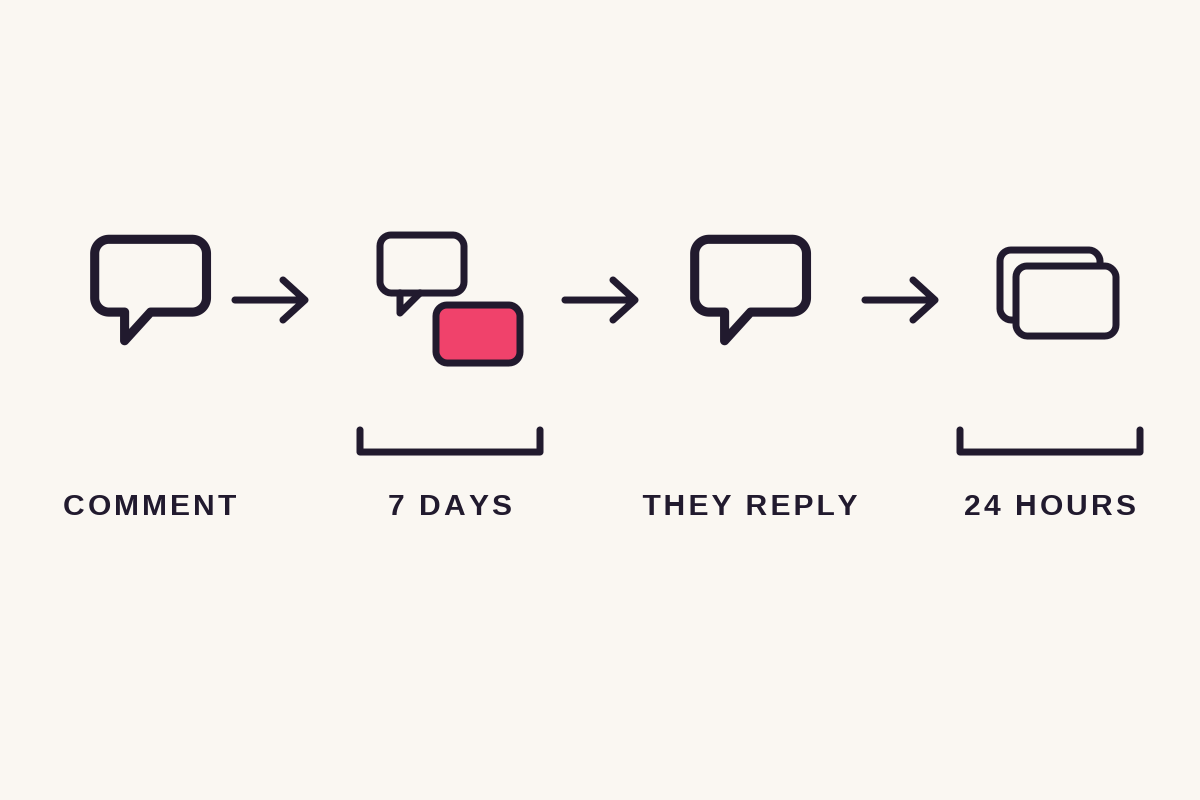
The timeline shows when each kind of template can be sent: one DM after a comment, then follow-ups only once the person replies.
These limits come from Meta's own developer pages, checked on 27 October 2026: the private replies documentation and the messaging API documentation. They shape how you write, so learn them before you copy anything.
Meta limits that affect DM templates
Rule
Text is 1,000 bytes or less (UTF-8)
- What it means for your template
- Plain English letters are 1 byte each; an emoji is usually 4. Keep templates well under 600 characters.
Rule
One private reply per comment, within 7 days
- What it means for your template
- The first DM after a comment must do the whole job: thank, deliver, set expectations.
Rule
Follow-ups only after the person responds, within 24 hours
- What it means for your template
- Write your follow-up templates for people who replied. Do not plan a second unprompted message.
Rule
Links must be valid URLs
- What it means for your template
- Test every link on a phone, signed out, before the template goes live.
6 Instagram DM templates for delivering a freebie
The best Instagram DM template for delivering a freebie thanks the person, names the resource, gives the link and says what to do next, in under 300 characters. Six versions follow for guides, checklists, templates, videos, discount codes and waitlists.
Replace the words in square brackets. Keep the resource name identical to the one in your caption so people recognise what they asked for.
- Guide or PDF: "Thanks for asking, {name}! Here's the [guide name] you asked for: [link]. Start with page [X], it's the quickest win."
- Checklist: "Here's your [topic] checklist: [link]. Print it or save it to your phone, then tick off the first 3 items today."
- Template or swipe file: "Here you go: [template name] [link]. Make a copy before editing so the original stays clean."
- Video lesson: "Your free lesson is here: [link]. It takes about [X] minutes. Watch it with [tool] open so you can follow along."
- Discount code: "As promised, here's your code: [CODE] for [X]% off [product], valid until [date and timezone]. Shop here: [link]."
- Waitlist or early access: "You're on the list for [product]. I'll message you here when it opens on [date]. In the meantime, here's [small resource]: [link]."
Each one fits a single private reply. For more ideas on what to offer, see our Instagram lead magnet ideas.
4 public comment reply templates to pair with your DM
A public comment reply template tells the commenter, and everyone reading, that a DM is on its way. Keep it short, vary it across 2 to 4 versions, and never claim the message already arrived before you have checked delivery.
The public reply is what other followers see. It shows the offer works and nudges the next person to comment.
- "Sending it to your DMs now, {name}!"
- "On its way, check your messages 📩"
- "Done! Look in your Requests folder if you don't follow us yet."
- "Great question. The full answer is in your DMs."
The third version matters more than it looks. A DM from an account the person does not follow lands in Instagram message requests, and many people never check that folder.
4 Instagram DM templates for people who message you first
When someone sends you a DM first, the reply template should answer the most common question directly and offer one next step. Four versions follow for a keyword DM, a price question, a booking request and a general hello.
These cover inbound DMs, the ones people start themselves. Our guide to the Instagram DM welcome message covers when a first reply fires and how to keep it useful.
- Keyword DM: "Hi! Here's the [resource] you asked for: [link]. Reply here if you have a question about it."
- Price question: "Thanks for asking! [Product] starts at [price]. The full price list is here: [link]. Which option are you looking at?"
- Booking request: "Happy to help. You can pick a time that suits you here: [booking link]. If none work, reply with 2 times and I'll check."
- General hello: "Hi, thanks for getting in touch! Most people ask about [A] or [B]. Tell me which, or ask anything else and I'll reply personally."
6 follow-up templates for when someone replies
A follow-up Instagram DM template is for a person who has replied to you, and Meta allows it within 24 hours of their response. Use it to fix a problem, answer a question or hand over to a human, never to restart a sales pitch.
Most replies to a delivered freebie fall into one of six cases. Write each answer once and you will not be caught out.
Six follow-up templates, by the reply you received
They said
The link doesn't open
- Your template
- "Sorry about that! Try this one: [link]. If it still fails, tell me your phone model and I'll send the file another way."
They said
Thank you
- Your template
- "You're welcome! Tell me how [the first step] goes, I read every reply."
They said
Do you have more on this?
- Your template
- "Yes: [second resource] goes deeper on [topic]: [link]."
They said
How much is [product]?
- Your template
- "[Product] is [price]. Here's what's included: [link]. Want me to help you choose?"
They said
Can I talk to someone?
- Your template
- "Of course. I'll reply personally within [time]. What's the best thing for me to look at first?"
They said
Stop / not interested
- Your template
- "No problem, I won't message again. Thanks for letting me know."
The last row is not optional. Respecting a no keeps your account in good standing and costs you nothing.
How to send Instagram DM templates automatically
To send Instagram DM templates automatically, connect a professional Instagram account to a tool that uses Meta's official API, choose a keyword, and paste your public reply and DM templates into a campaign. ReplyMagnet does this free for 1,000 engagements a month.
Here is the setup in ReplyMagnet. It takes about 10 minutes the first time.
- Connect your Instagram professional account (Business or Creator).
- Create a campaign and pick the posts it should watch.
- Choose a keyword, for example GUIDE, or let smart matching catch requests phrased differently.
- Paste 2 to 4 public reply templates. The campaign rotates through them.
- Paste your DM template, and add extra versions if you want the DM to rotate too.
- Attach the resource. ReplyMagnet adds the tracked delivery link to the DM for you.
- Comment the keyword from a second account and check the reply and the DM arrive.
Use {name} in any template. On Instagram it becomes the person's @username; when no name is available, it is removed cleanly so no braces leak into the message.
New workspaces get a 30-day trial of Pro features with no card. Mailchimp and Kit sync start from $9, and webhooks for Zapier or Make from $29. The full walkthrough is in our comment-to-DM automation guide.
Worked example: one template, 400 comments
In a worked example, a 210-character DM template with 2 emoji uses about 216 bytes, well under Meta's 1,000-byte limit. 400 matching comments use 400 engagements, since the public reply and the DM share one engagement.
Take a fitness coach posting a Reel with the caption "Comment PLAN for my free 4-week plan". The numbers below are illustrative.
Illustrative numbers for one campaign
Item
DM template length
- Value
- 210 characters, 2 emoji, about 216 bytes
Item
Public reply versions
- Value
- 3, rotating
Item
Matching comments in the first week
- Value
- 400
Item
Engagements used
- Value
- 400 of 1,000 free each month
Item
Link opens
- Value
- Tracked as link clicks in ReplyMagnet
To promote a paid programme later, the coach adds a link inside the PDF rather than sending a second unprompted DM. That keeps the one private reply rule intact.
Where Instagram DM templates go wrong
Instagram DM templates most often fail because the message promises something the caption did not, the link breaks on mobile, or the template is sent to people who never asked. Each failure is fixed before launch with one test.
Check these before a template goes live:
- Promise mismatch. The caption says "free guide" and the DM asks for an email first. Say so in the caption if you use an email gate.
- Broken or private links. A link that needs your own login fails for everyone else. Test signed out.
- Too long. If people have to scroll, the link gets missed. Put it in the first 2 lines.
- Expired offers. A discount template that outlives its date misleads people. Update or stop the campaign at closing time.
- Cold use. Pasting a template into strangers' inboxes is the fastest way to a restricted account. Only reply to people who asked.
If a DM never arrives at all, work through the checks in comment-to-DM not working.
Common questions
Are Instagram DM templates allowed?
Instagram DM templates are allowed when you send them to people who contacted you first, through Instagram or Meta's official API. Sending templates to strangers who never asked breaks Meta's messaging rules.
How long can an Instagram DM template be?
An Instagram DM sent through Meta's messaging API can be up to 1,000 bytes of UTF-8 text, per Meta's developer documentation. Most good templates are under 300 characters.
Can I put a link in an Instagram DM template?
Yes. Meta's messaging API accepts links in DM text as long as they are valid URLs. Test every link on a phone while signed out before you use the template.
How do I send an Instagram DM template automatically when someone comments?
Use a comment-to-DM tool on Meta's official API: choose a keyword, paste your DM template, and attach the link. ReplyMagnet does this free for 1,000 engagements a month.
Can I personalise an Instagram DM template?
Yes. In ReplyMagnet, {name} in a template becomes the person's @username on Instagram, and it is removed cleanly when no name is available.
Keep reading
- Instagram DM conversation design: a practical guide
- Instagram Comment-to-DM Automation: Setup & Test Guide
- Black Friday Instagram DM Automation: 5 Templates (2026)
- Instagram welcome message examples and setup (2026)