Guide
Instagram DM link: how to create one and answer every tap
An Instagram DM link is a short ig.me URL that opens a chat with your account. Making one takes a minute. What happens after the tap decides whether the link earns you anything, so this guide covers both.
Published by ReplyMagnet · Last updated
What is an Instagram DM link?
An Instagram DM link is a URL in the form ig.me/m/username that opens a chat with that account. Meta's developer documentation describes ig.me as a shortened URL service operated by Meta that redirects people to a conversation in Instagram.
Tap the link on a phone and Instagram opens a thread with the account named in the URL. According to Meta's ig.me documentation, checked 13 November 2026:
- New conversation: the person lands in a new thread and can write a message.
- Existing conversation: Instagram opens that thread.
- Nothing is sent for them. The link opens the chat. The person still types and sends.
Should you use ReplyMagnet with a DM link? Yes, if you want each person who taps and sends a keyword to get your guide, link or code in seconds. No, if you only need a contact button and you answer every chat by hand. The link itself is free and needs no tool.
Start free: the free plan includes 1,000 engagements a month.
How to create an Instagram DM link
To create an Instagram DM link, add your username to the end of https://ig.me/m/. For the account @yourbakery, the Instagram DM link is https://ig.me/m/yourbakery, the format given in Meta's ig.me documentation.
- Copy your username. Take it from your profile, without the @ sign.
- Build the URL. Write
https://ig.me/m/and add the username. - Test on a phone. Open the link while signed in to a second account. A chat with your account should open.
- Recheck after a rename. The link is built from your handle, so update it if you change your username.
The two ig.me formats in Meta's documentation
Format
Basic
- Example
- https://ig.me/m/yourbakery
- Use it for
- Bio, Stories, QR codes and email
Format
With a ref tag
- Example
- https://ig.me/m/yourbakery?ref=menu_qr
- Use it for
- Only when your messaging app reads the tag
Link generator sites produce the same URL. You do not need one, and you never need to give a generator your Instagram password.
Where to share an Instagram DM link
Share an Instagram DM link where people already hold a phone: your bio, a Story link sticker, a QR code or an email. Meta's documentation says ig.me links are currently not supported on Instagram Web, so desktop visitors need another route.
Five placements for an Instagram DM link
Placement
Profile bio
- Why it works
- Visitors are one tap from a chat
- Check first
- Say what to send: "Tap, then send GUIDE"
Placement
Story link sticker
- Why it works
- Viewers act while the Story is on screen
- Check first
- Put the keyword on the Story itself
Placement
QR code on a menu, flyer or box
- Why it works
- Turns print into a conversation
- Check first
- Print the keyword beside the code
Placement
Email or newsletter
- Why it works
- Moves subscribers into DMs
- Check first
- Many readers open email on a computer
Placement
Website button
- Why it works
- A chat instead of a contact form
- Check first
- Show it to mobile visitors only
Always put the instruction next to the link. A bare link opens an empty chat, and an empty chat gives people nothing to do. If your bio already holds a link in bio page, add the DM link as one button on it.
What an Instagram DM link cannot do
An Instagram DM link cannot send a message or start a conversation for your business. Meta's Messaging API documentation says conversations only begin when an Instagram user sends a message to the professional account.
Know the limits before you print the link on anything:
- It cannot message anyone. A business can only reply after the person writes first, per Meta's Send Messages documentation.
- It carries no ready-made text. Meta's ig.me page documents one optional parameter,
ref, and none for message text. Tell people what to type. - It does not open on Instagram Web. Meta lists that as a current limitation.
- A ref tag needs an app that reads it. Meta allows a tag of up to 2,083 characters: letters, numbers, hyphens, underscores and equals signs.
ReplyMagnet does not read ref tags today. Use a different keyword for each placement instead, such as MENU on the QR code and GUIDE in the bio. The keyword table in Analytics then shows how many requests each placement brought.
Answer every tap on your DM link automatically
ReplyMagnet answers a DM link tap once the person sends your keyword. A Direct messages campaign matches the keyword in the incoming message and replies in the same chat with your resource, through Meta's official API.
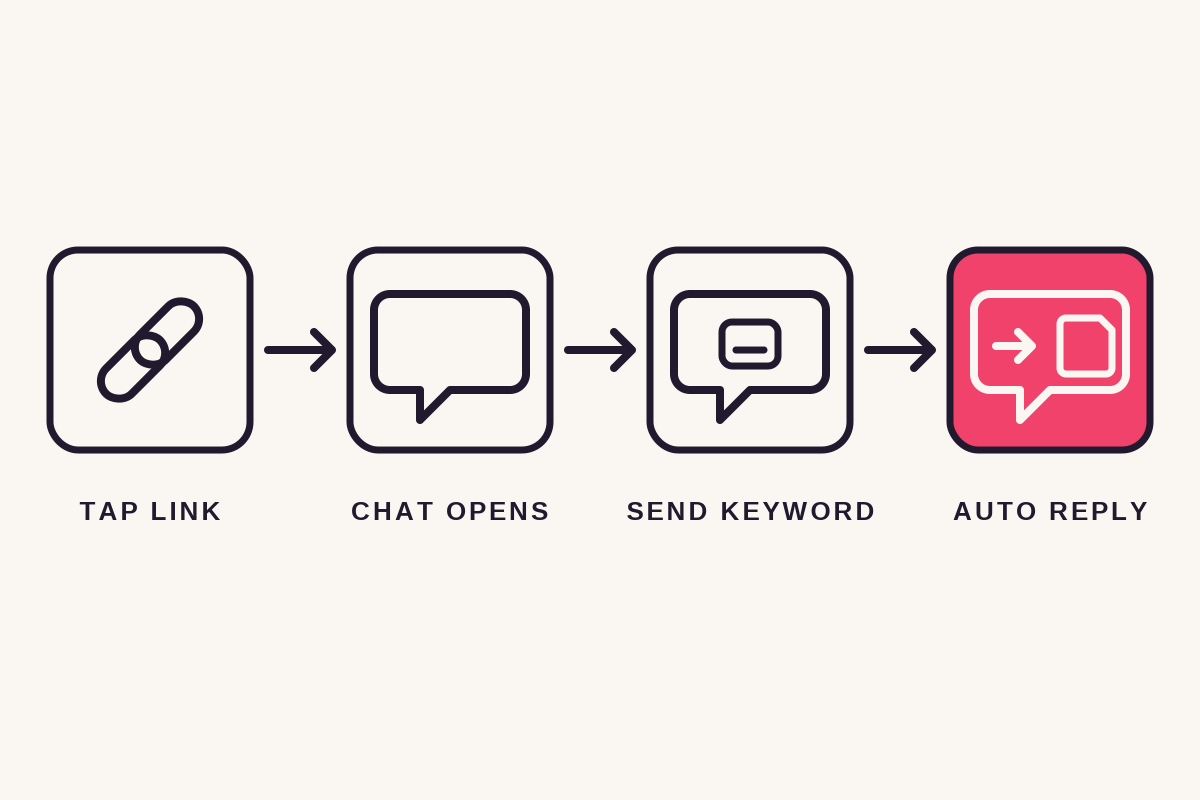
The diagram shows the four steps. Only the last one needs a tool. Set it up once:
- Connect a professional account. Use a Business or Creator account and sign in through Instagram's own screen. The connection guide covers errors.
- Create an Instagram campaign. Choose the Direct messages surface instead of Posts and Reels.
- Pick one keyword. Keep the trigger keyword short and plain, like GUIDE or MENU.
- Add the resource and write the DM. Name what the person asked for in the first line.
- Test from a second account. Open your ig.me link, send the keyword, and open the resource you receive.
- Publish the link with the instruction. "Tap, then send GUIDE."
Replies must go out inside Meta's 24-hour messaging window. An automatic reply arrives in seconds, so the window rarely matters here. ReplyMagnet's Instagram permissions passed Meta App Review in August 2026, and it never asks for your Instagram password.
For people who write something other than the keyword, add a general greeting with our Instagram welcome message guide.
Can you send links in Instagram DMs?
Yes, you can send links in Instagram DMs. Meta's Messaging API documentation says a message can contain text or a link, with message text of 1,000 bytes or less, and a business can send only after the person has messaged first.
By hand, paste the URL into the chat and send. A business sending links at volume has two official routes:
- After a DM. Someone messages you, for example through your DM link, and you reply with the link inside the 24-hour window.
- After a comment. Meta allows one private reply per comment, sent within 7 days. Comment-to-DM automation uses that route to send a link to each commenter.
ReplyMagnet sends the resource as a tracked download link on its own domain, so you can see which links were opened. The free plan hosts a PDF of up to 25 MB. Sending your own URL instead starts at $9 a month.
A DM sent after a comment can land in the Requests folder when the commenter does not follow you. See where message requests hide.
A worked example: one Instagram DM link, one month
A bakery prints its Instagram DM link as a QR code on the counter menu. In one month 400 people send the keyword MENU, each gets the menu by DM, and the month uses 400 of the 1,000 engagements on ReplyMagnet's free plan.
The numbers below are an illustration, not customer results:
- Placement: a QR code on the counter, with "Scan, then send MENU" printed beside it.
- Keyword messages received: 400.
- What each person gets: one DM with the menu link, sent in the same chat.
- Engagements used: 400 of 1,000 on the free plan.
- Live campaigns used: 1 of 1 on the free plan.
The free plan runs one live campaign. To run a comment campaign on a Reel beside the DM link, paid plans start at $9 a month for 25,000 engagements with no cap on live campaigns. At $29 a month the allowance is 100,000 engagements.
Pricing counts engagements, not stored contacts. A busy month does not raise the price of every month after it, which is the catch with per-contact pricing.
What to measure, and where DM links go wrong
Measure keyword messages received, replies sent and resources opened. Instagram DM links most often fail for 4 reasons: no instruction beside the link, a desktop visitor, a changed username, or a keyword typed differently from the one configured.
Three numbers tell you whether the link works:
- Keyword messages received: how many people followed the instruction.
- Replies sent: should match, minus any that expired.
- Resources opened: how many people used what you sent. The analytics documentation explains each count.
Fixes for the four common failures:
- No instruction. Add "Tap, then send GUIDE" beside every placement.
- Desktop visitors. Show the link on mobile only, or give desktop readers your profile URL.
- Changed username. Rebuild the link and reprint any QR code.
- Keyword variations. Choose a word people cannot misspell, or turn on Smart matching so "send me the menu" still counts.
Common questions
How do I get a link to my Instagram DMs?
Add your Instagram username to the end of https://ig.me/m/. The result, such as https://ig.me/m/yourbakery, opens a chat with your account when someone taps it on a phone.
Is ig.me an official Instagram link?
Yes. Meta's developer documentation describes ig.me as a shortened URL service operated by Meta that redirects people to a conversation in Instagram.
Can an Instagram DM link pre-fill a message?
Meta's ig.me documentation lists no parameter for message text. The only optional parameter is ref, a tag passed to a connected messaging app, so tell people which word to send.
Does an Instagram DM link work on desktop?
Meta's documentation says ig.me links are currently not supported on Instagram Web. Share an Instagram DM link where people are on a phone, and give desktop visitors your profile URL.
Can a business send a link in an Instagram DM automatically?
Yes, once the person has messaged or commented first. Meta's Messaging API allows a reply inside 24 hours of a message, and one private reply within 7 days of a comment.
Keep reading
- Instagram DM conversation design: a practical guide
- Instagram welcome message examples and setup (2026)
- Instagram Comment-to-DM Automation: Setup & Test Guide
- Instagram message requests: find, accept, fix (2026)