Guides
Get the Instagram contact into the system your team uses

A green webhook response is only half the test. The contact also needs to arrive in the right destination, with the right fields, exactly as your team expects.
Published by ReplyMagnet · Last updated
Sketch the receiving record first
Decide which destination record the integration should create or update before connecting a webhook. Name the required fields and the rule for recognising an existing contact.
For a simple CRM handoff, you might need the email, Instagram handle and campaign source. Don't require a phone number if the campaign doesn't collect one.
Write down what should happen when a person requests a second resource. Creating another record may be wrong if your CRM expects one contact with several activities.
Create a ReplyMagnet account to test the capture side. The plan guide places outbound webhooks on Pro, from $29 monthly.
Understand what a lead webhook actually sends
A webhook is a signed HTTP request ReplyMagnet sends the moment a lead event happens. Four events can trigger one: a new lead, an email, a phone number, or a confirmed follow.
The chain is short. A comment matches your keyword, ReplyMagnet captures the lead, and that moment fires a webhook: one signed POST request carrying the lead as JSON to the endpoint you set.
Zapier and Make are the two automation tools most teams already run, and both accept an inbound webhook as a trigger: Zapier calls it a Catch Hook, Make calls it a custom webhook.
Paste the URL either one gives you into ReplyMagnet as the endpoint, and the event fans out into whatever they connect to. Zapier's own directory lists more than 8,000 apps, so a lead can reach a CRM, a spreadsheet, a Slack channel, or a mailing list the same way.
You don't have to use either tool. The webhook is a plain signed POST request, so if you run your own backend you can receive it directly and skip the automation platform entirely.
Only four events send, and each is a real step a lead took, not something invented for the payload:
- Lead created: a matched comment becomes a lead, before any gate.
- Email captured: someone submits the email gate on the capture page.
- Phone captured: someone submits the phone gate.
- Follow confirmed: Instagram's own follow check verifies a follow; the payload marks it checked, not self-reported.
Every payload names the campaign the lead came from, so a Zap or a Make scenario can route a pricing-post lead differently from a giveaway lead, or watch for just one event type if that's all a particular destination needs.
Create a receiving hook, then connect it
Use a webhook receiver in Zapier or Make, copy its URL into ReplyMagnet's webhook configuration and send a test lead. Map fields from the actual received payload.
- Create the receiving hook in your chosen integration service.
- Add the receiver URL to ReplyMagnet using the webhook setup guide.
- Complete a resource request with test contact details.
- Inspect the received event before choosing destination fields.
- Run the destination action and open the resulting record.
A receiver only shows its real fields after it has seen one delivery, so send the test lead before you start mapping. Guessing at field names ahead of the first event is how a mapping goes stale the moment the real payload differs.
Use a throwaway or clearly test-labelled record when you do this, so a real teammate doesn't mistake it for a genuine inquiry later.
Follow the receiver's current documentation for its setup and account requirements: Zapier webhooks or Make webhooks. Their plans and controls are separate from ReplyMagnet.
Sign and verify every delivery
Every webhook carries an X-Magnet-Signature header, an HMAC of the timestamp and raw body, plus an X-Magnet-Timestamp. Recompute the same HMAC on your receiver and compare before trusting the request.
Three things matter when you create the endpoint:
- The endpoint URL: the catch-hook address Zapier or Make gives you, or your own backend URL.
- The events: which of the four you want that endpoint to receive.
- The secret: shown once, at creation time, so copy it then.
ReplyMagnet shows the signing secret only once. Copy it immediately and store it the way you'd store any other API key, not in a screenshot or a shared test log.
The signature proves the request came from ReplyMagnet and wasn't forged or replayed. Recompute the HMAC over the timestamp and raw body with your secret, then compare it to the header ReplyMagnet sent.
Hash the timestamp, a period, then the raw request body, using your secret as the HMAC key. Read that raw body before any JSON parsing touches it: re-serializing the payload changes the bytes and breaks the comparison.
Webhooks are a Pro-plan feature, priced flat at $29 a month with no per-lead or per-event charge, so a post that suddenly takes off doesn't cost more to deliver. The 30-day trial runs on Pro with no card, long enough to wire a real endpoint and watch a live lead arrive.
Treat a retry as the same event
An integration should avoid creating duplicate records when delivery is retried. Use the payload's identifiers and the destination's update or deduplication features where appropriate.
Don't assume every received request represents a new person. A retry may repeat an event because a service was slow or unavailable.
Test an existing email and a missing optional field. Decide whether the destination should update the contact, attach a note or reject the record for review.
If you build a custom receiver, follow ReplyMagnet's signature-verification instructions rather than trusting an unverified request. Keep secrets out of screenshots and shared test logs.
Zapier, Make, or the native sync, and where to look when something disappears
For Mailchimp or Kit, native ESP sync needs no automation tool. Reach for a Zapier or Make webhook when the destination is a CRM, a sheet, or anything the direct sync doesn't cover.
Two routes carry a lead out of ReplyMagnet, and they suit different destinations: the native ESP sync, or an automation webhook.
The native sync is the simpler path when your list already lives in Mailchimp or Kit: connect the account once and every captured email pushes in, tagged with its campaign, with nothing else to configure.
The webhook route is the general one, reaching a CRM, a sheet, a chat tool or a database that the direct sync was never built to reach.
They aren't exclusive. A common setup runs the ESP sync into your mailing list while a webhook copies the same lead into a CRM: one captured lead, two destinations, no double entry.
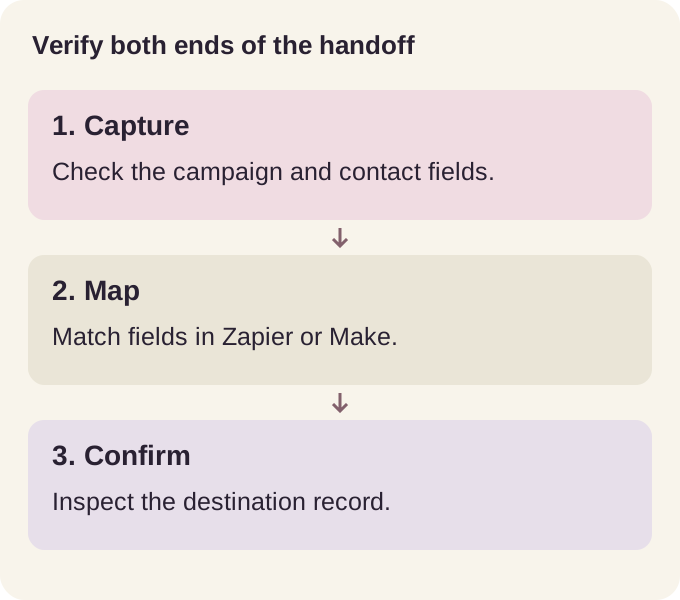
When a lead doesn't show up on the other end, check both sides separately. A practical order:
- Did the campaign capture the expected details?
- Did the webhook reach the receiver?
- Did the field mapping produce valid data?
- Did the destination accept the create or update action?
- Did the automation platform's own run history show an error?
Each layer can succeed on its own while the one right after it silently fails, which is why checking only the first is never enough.
If the only destination you need is Mailchimp or Kit, the native connection starts at $9 with no automation tool required. Fewer moving parts can make a simple subscriber handoff easier to maintain.
Destination
- Native ESP sync
- Mailchimp or Kit only
- Zapier or Make webhook
- Any app the automation tool reaches
Setup
- Native ESP sync
- Connect the account once in Settings
- Zapier or Make webhook
- Create a catch hook, paste the URL, map fields
Best for
- Native ESP sync
- One mailing list, nothing else
- Zapier or Make webhook
- A CRM, a sheet, or several destinations at once
Common questions
Do I need Zapier or Make for Mailchimp?
Not necessarily. ReplyMagnet syncs to Mailchimp and Kit natively from $9 monthly, with no automation tool required. Use an automation platform when the lead needs to reach a different destination.
Which plan includes webhooks?
Webhooks are a $29-and-up feature that also includes AI-written replies and 3 connected accounts. Lower tiers capture and store leads but don't fire outbound webhooks.
Does a successful webhook mean a CRM record exists?
No. The receiver may accept the request while a later action fails. Inspect the destination record as part of the test.
Is the webhook signed and secure?
Yes. Every delivery carries an X-Magnet-Signature header, an HMAC computed over the timestamp and raw body with a secret only you and ReplyMagnet hold, plus an X-Magnet-Timestamp. Recompute the same HMAC on your side and compare to confirm the request is genuine.
Will the integration migrate old contacts automatically?
Do not assume a new connection backfills historical records. Check the documented behavior and use a controlled import when you need existing contacts moved.