Guides
Three comment campaigns, written out from start to finish

The wording gets easier when you know what happens after the comment. These examples show the whole exchange, including where a form belongs and where it doesn't.
Published by ReplyMagnet · Last updated
Example 1: the recipe someone wants to cook tonight
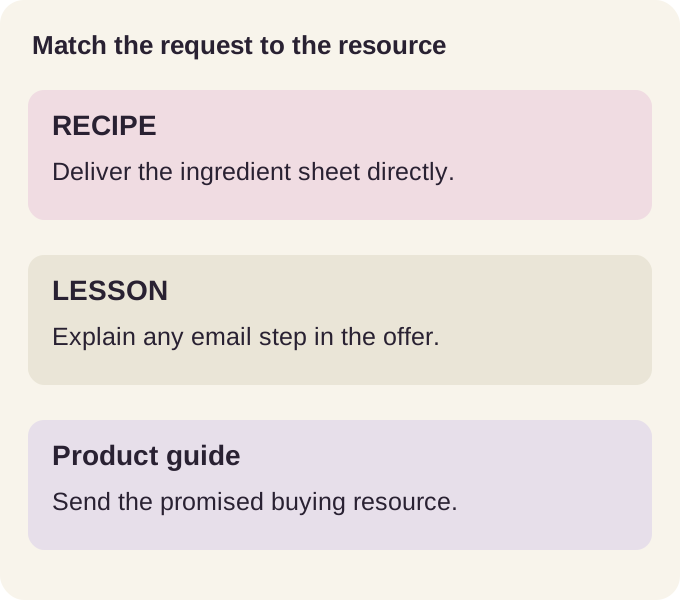
A recipe campaign can deliver the ingredient sheet directly after a RECIPE comment. Keep access quick when the reader's immediate goal is shopping or cooking.
- Keyword: RECIPE
- Public reply: ‘Sent the recipe by DM.’
- DM: ‘Here’s the tray-bake recipe from the reel. The PDF includes quantities, timings and the substitutions shown in the video.’
- Gate: none. The file is the whole offer, so a capture page adds friction without adding value here.
Attach the actual recipe, including serving size. A separate invite to future recipe emails can sit next to the file without changing the original promise.
These are illustrative scripts, not reported customer campaigns. Try one in ReplyMagnet after adapting it to your resource.
Example 2: a lesson with an explained email step
A course sample can ask for an email when the caption explains that the lesson and related teaching will arrive there. Make the subscription part of the offer, not a surprise at download.
- Keyword: LESSON
- Public reply: ‘The lesson link is in your DMs.’
- DM: ‘Open the link to get the first workbook and sign up for the three practice emails.’
- Gate: email gate on. State the subscription in the caption itself, not as a surprise at download.
The delivery page should repeat that promise. ReplyMagnet's sync to Mailchimp or Kit starts at $9 for 25,000 engagements once the address lands.
If the sample is a video, use a link asset on Basic or above, or a PDF containing the lesson link. The course creator page covers what to include in the sample.
Example 3: help a buyer choose the right size
A sizing campaign should deliver the chart for the exact product range shown in the post. A broad catalogue may leave the buyer's original question unanswered.
- Keyword: SIZE
- Public reply: ‘Sent the jacket size guide.’
- DM: ‘Here’s the measurement chart for the jacket in the reel. Compare it with a jacket you already own before choosing.’
- Gate: none. The chart answers the question directly, so nothing needs to stand between the comment and the answer.
Use the current chart and label the product clearly. Don't turn the request into a claim that the automation recommends a size from information it doesn't have.
A product-page link in the chart can lead to checkout. Your store still handles stock, payment and returns.
Example 4: a waitlist from a teaser reel
A teaser reel for an upcoming course uses the keyword WAITLIST to reply publicly, DM a signup link, and collect an email so the list is ready the moment doors open.
- Keyword: WAITLIST
- Public reply: ‘You're on it. Check your DMs for the waitlist link.’
- DM: ‘Here’s the waitlist for the course. Add your email and you'll be first to know when doors open,’ plus the tracked link.
- Gate: email gate on. The capture page collects the address before confirming the spot, so the waitlist is a list you own, not just a count.
Email capture ships on every plan, including the free Starter workspace, so this exact setup costs nothing to try.
Example 5: a pricing sheet with no gate
An offer post uses the keyword PRICE to reply publicly and DM a one-page pricing PDF with no gate, so an interested buyer gets the numbers without extra steps.
- Keyword: PRICE
- Public reply: ‘Sent you the pricing in a DM.’
- DM: ‘Here’s the full pricing sheet,’ plus the tracked link to the PDF.
- Gate: none. A gate adds more friction than an email is worth on a low-friction buying question; the comment itself is the signal.
The delivered file is a single PDF. If pricing lives in a Google Doc or a Notion page, turn it into a one-page PDF that links out to it.
Example 6: a free checklist from a carousel
An educational carousel uses the keyword CHECKLIST to reply publicly and DM a PDF checklist behind an email gate, turning a saved post into a captured lead.
- Keyword: CHECKLIST
- Public reply: ‘Check your DMs for the checklist.’
- DM: ‘Here’s the one-page checklist from the post,’ plus the tracked link.
- Gate: email gate on. A useful, finishable lead magnet is exactly the kind of thing people give an email for.
Keep the file short. A one-page checklist under a few megabytes opens more reliably on a phone than a dense guide.
Example 7: a first-order discount for a product launch
A product-launch post uses the keyword CODE to reply publicly and DM a first-order discount as a one-page PDF behind an email gate, capturing a buyer before their first purchase.
- Keyword: CODE
- Public reply: ‘Your code is in your DMs.’
- DM: ‘Here’s your first-order code,’ plus the tracked link to a one-page PDF that carries it.
- Gate: email gate on. The discount is the trade for the address, so the sale also opens a channel you can email again.
Comments beyond the monthly quota don't drop during a launch spike. They park in the overflow queue and release as headroom opens, so a post that takes off doesn't silently lose a buyer.
Example 8: a giveaway with any-comment mode
A giveaway post uses any-comment mode so every comment gets a reply and a DM with entry details, instead of relying on entrants to type an exact keyword.
- Match mode: any-comment mode, so every comment on the post triggers the reply and DM.
- Public reply: ‘You're entered. Details are in your DMs.’
- DM: ‘Thanks for entering. Here are the full giveaway terms,’ plus the tracked link.
- Gate: optional. An email gate turns entrants into a list you can reach again after the giveaway ends.
Scope any-comment mode to a post that exists only to hand something out, since it answers every comment there, not just the ones with a trigger keyword.
How to choose the right example
Match the trigger, gate and resource to the reader's immediate question. Direct delivery suits a simple answer; an email gate suits a resource with a stated follow-up; any-comment mode suits a post whose purpose is to answer every comment.
Use this quick decision table before copying a script:
| Reader need | Trigger | Gate | Best asset |
|---|---|---|---|
| Immediate answer | Exact keyword | None | Recipe, price sheet or chart |
| Lesson plus follow-up | Exact keyword | Explained email gate | Workbook or lesson link |
| Broad giveaway entry | Any-comment | Optional | Terms or entry details |
Then test one unrelated comment, one matching comment and the full link on a phone. A public reply proves only that the thread was answered; it does not prove that the DM, resource, capture step and next action work together.
Do not promise a result the asset cannot deliver. These examples show copy patterns, not guaranteed response or conversion rates.
Choose a campaign pattern by reader task
Reader task
Immediate answer
- Trigger
- Exact keyword
- Gate
- None
- Asset
- Recipe, price sheet or chart
Reader task
Lesson plus follow-up
- Trigger
- Exact keyword
- Gate
- Explained email gate
- Asset
- Workbook or lesson link
Reader task
Broad giveaway entry
- Trigger
- Any-comment
- Gate
- Optional
- Asset
- Terms or entry details
What Instagram's API actually allows
Every example above runs inside Instagram's published limits: a messaging window per surface, an account-type requirement, and Meta's own review of the app sending the DM.
- Sending needs a Business or Creator account connected through Instagram's official Graph API; personal accounts can't send the DM half of the exchange.
- The connecting app is reviewed by Meta before it can request comment and message permissions, so these DMs run through Meta App Review, not a browser script.
- A follow check can sit in front of delivery, verified through Instagram's is_user_follow_business field. It's optional, and a mandatory follow to reach content carries real policy risk.
- A request that arrives past the window below doesn't drop. It waits in the overflow queue and releases as quota opens, then expires if the window closes first.
Surface
Feed post or Reel comment
- Window to send the DM
- 7 days
Surface
Story reply or Live comment (Basic and up)
- Window to send the DM
- 24 hours
What stays consistent across every example
The offer, keyword and delivered resource must agree in every example above. The message can change by audience, but the reader should never have to guess what the link contains.
- Keep one promised resource per campaign.
- Use the resource name in the DM.
- Explain gate requirements before submission.
- Test from another account and open the destination on a phone.
Every example above reduces to four decisions: what triggers the campaign (an exact trigger keyword, smart AI matching for requests that skip the word, or any-comment mode), the public reply, the DM and its file, and whether a gate collects an email, a phone number, or nothing.
Billing runs per engagement sent, a reply or a DM, not per contact. $29 for 100,000 engagements adds outbound webhooks and AI-written replies once a campaign is live, a separate upgrade decision from picking a gate.
A good test includes an unrelated comment alongside the keyword. The setup walkthrough shows how to inspect the result. Don't copy every sentence from these examples; keep the clear promise, then use words you already use with your customers.
Common questions
What can I automate with Instagram comments?
Any comment-to-DM delivery: a keyword triggers a public reply and a DM carrying a file or link. The file can sit behind an email gate, a phone gate, a verified follow check, or no gate at all.
Can I run different keywords on different posts?
Yes. Each campaign scopes to one post, several posts, or the whole account, and carries its own keyword, so GUIDE can run on one post while PRICE runs on another.
Should every example collect an email?
No. Capture should serve an explained purpose, not apply by default.
Do examples work for Reels and Stories?
Feed posts and Reels share a 7-day window to send the DM. Story replies and live comments work too, from Basic up, inside a shorter 24-hour window set by Meta's API.
How many campaigns can I run at once?
Starter runs one live campaign at a time; paid plans run more, so a waitlist, a pricing sheet and a checklist can all stay live together. Every plan bills per engagement sent, with an overflow queue that parks comments beyond the monthly quota.