Guides
Create a fictional practice dataset for your Instagram lead magnet
Turn one spreadsheet lesson into a useful practice resource. Start with these eight invented registrations, explicit counting rules and an answer key that keeps missing information visible.
Published by ReplyMagnet · Last updated
What should a practice dataset help the reader do?
Choose one observable task. This fictional exercise asks learners to separate countable workshop registrations from exceptions, total known confirmed seats and explain what remains unresolved.

Generated editorial illustration of preparing a practice exercise, not a screenshot.
A spreadsheet educator might publish an Instagram lesson about why adding every number in a column can produce a misleading answer. The accompanying resource should let someone practice that decision. It needs records, explicit rules and an answer they can check without asking the educator to explain a hidden assumption.
The example below is invented from scratch. Its registrations, session codes and capacities describe no real workshop, customers or booking availability. The learning goal is to distinguish a confirmed seat total from an incomplete or over-capacity situation. A correct response includes both arithmetic and an explanation.
Ask the learner to produce three outputs: a decision for every source row, known confirmed seats by session, and a short note about unresolved information. That is a more useful target than “clean this spreadsheet,” which leaves the definition of clean open to interpretation.
A practice dataset supplies records to investigate. A lead-magnet worksheet usually asks readers to supply their own inputs. Choose the dataset when the lesson depends on everyone encountering the same cases; choose the worksheet when personal planning is the central task.
Which fields belong in the sample?
Use only fields needed for the exercise: registration ID, session code, seats requested and status. Define the meaning of a blank before anyone starts calculating.
The source-row number identifies a position in this teaching file. It is a reference for discussing decisions, not another registration identifier. Keep it separate from the four data fields when preparing a spreadsheet.
A registration ID identifies one fictional registration, which may request more than one seat. It does not identify a person. Session code names one of two invented sessions. Seats requested is a positive whole number when known. Status expresses the exercise’s registration state: confirmed, pending or cancelled.
Blank means unknown here. It does not mean zero, one seat, or a cancelled request. Zero is outside this exercise’s allowed seat values. If you create another exercise where zero is meaningful, change the dictionary and answer key together.
Names, email addresses, phone numbers and social handles add nothing to this lesson. Leave them out rather than constructing realistic-looking contacts. The smaller field set makes the intended reasoning easier to inspect and avoids tempting learners to treat the file as an outreach list.
Data dictionary for the fictional registration exercise
Field
Registration ID
- Meaning and allowed values
- Text identifier R01–R07; one intended registration per ID
Field
Session
- Meaning and allowed values
- A or B; fictional capacity of 4 seats each
Field
Seats requested
- Meaning and allowed values
- Positive whole number; blank means unknown
Field
Status
- Meaning and allowed values
- confirmed, pending or cancelled
Build eight rows with a reason for each one
The eight source rows below contain four countable records, one repeated row, one unknown seat count and two statuses excluded from the confirmed tally.
Copy the table into a working file and retain an untouched source version. The cell displayed as “blank” in row 4 should be empty in the learner’s spreadsheet; it is labeled here so the missing value is explicit. Keep the two R02 records identical in all four data fields.
This is the complete fictional source dataset, not an extract from a customer export. Capacities belong to the instructions: A has four seats and B has four seats. Do not add a capacity column to every record unless looking up repeated reference values is part of your lesson.
Start with the learner task and this table. Put the defect map and completed answer later in the file or on a clearly marked answer sheet. Learners should know that edge cases are intentional without having each decision supplied beside the source row.
Eight rows are enough to make each decision visible. Adding hundreds of random rows would make the file longer without necessarily adding a new reasoning task. If your next lesson teaches grouping or filtering at scale, build that as a separate version with its own checked answer.
Fictional practice data: eight source rows, seven distinct registration IDs
Source row
1
- ID
- R01
- Session
- A
- Seats
- 2
- Status
- confirmed
Source row
2
- ID
- R02
- Session
- A
- Seats
- 1
- Status
- confirmed
Source row
3
- ID
- R02
- Session
- A
- Seats
- 1
- Status
- confirmed
Source row
4
- ID
- R03
- Session
- A
- Seats
- blank
- Status
- confirmed
Source row
5
- ID
- R04
- Session
- B
- Seats
- 3
- Status
- confirmed
Source row
6
- ID
- R05
- Session
- B
- Seats
- 2
- Status
- cancelled
Source row
7
- ID
- R06
- Session
- B
- Seats
- 2
- Status
- confirmed
Source row
8
- ID
- R07
- Session
- A
- Seats
- 1
- Status
- pending
Write the rules before revealing the answer
Count each valid confirmed registration once. Set aside an exact repeated record, exclude pending and cancelled records from this tally, and hold confirmed records whose seat count is unknown.
Give learners this exercise contract before they work:
- Preserve all eight source rows. Record decisions in a separate column or sheet rather than deleting evidence.
- One registration ID represents one intended registration. When every data field matches, keep the first occurrence and set aside the later occurrence as an exact duplicate.
- If the same ID has conflicting values, hold the conflicting records for review. This sample contains no conflicting duplicates; the rule prevents arbitrary “keep first” decisions in extensions.
- Count only confirmed registrations with known positive whole-number seats. Cancelled and pending registrations are outside this confirmed-seat tally.
- Hold a confirmed registration with missing seats. Never fill the blank with a guess or silently convert it to zero.
- Compare known totals with capacity after classification. A capacity breach is a finding, not permission to remove a registration.
These rules define this exercise. They are not a universal booking policy. In particular, they do not decide which registration a real organizer should accept when requests exceed capacity.
The order matters: classify duplicate rows and statuses before adding seats. Otherwise a correct sum of the wrong selection can look convincing. Retain both the selected values and the decision trail so the answer can be checked.
Show an answer key that keeps uncertainty visible
Session A has 3 known confirmed seats and one unresolved registration. Session B has 5 known confirmed seats, exceeding its fictional capacity of 4 by 1.
For the teacher’s defect map, rows 1 and 2 establish ordinary countable registrations. Row 3 repeats row 2 exactly, so it is set aside. Row 4 supplies the missing-value case. Rows 5 and 7 establish B’s capacity breach. Row 6 tests cancellation handling; row 8 tests the distinction between pending and confirmed.
The filled row decisions are: count rows 1, 2, 5 and 7; set aside row 3 as an exact duplicate; exclude rows 6 and 8 from the confirmed tally; hold row 4 for missing seats. These categories account for every source row: 4 + 1 + 2 + 1 = 8. Seven distinct IDs remain when the repeated R02 is recognized, but that does not mean seven countable registrations.
A’s known total is R01 + R02 = 2 + 1 = 3. R03 remains unresolved. The difference between capacity and the known total is 4 − 3 = 1, but that is not a verified free seat: R03 could change the total. Do not describe A as finally within capacity or available for another booking.
B’s known total is R04 + R06 = 3 + 2 = 5. R05 contributes nothing to this tally because it is cancelled. B exceeds its invented capacity by 5 − 4 = 1. Removing R06 would hide the problem instead of answering the exercise.
Across both sessions there are eight known confirmed seats, 3 + 5. This aggregate is incomplete because R03 is unresolved, and it hides the distribution between sessions. Equal combined capacity and known seats does not establish that both sessions fit.
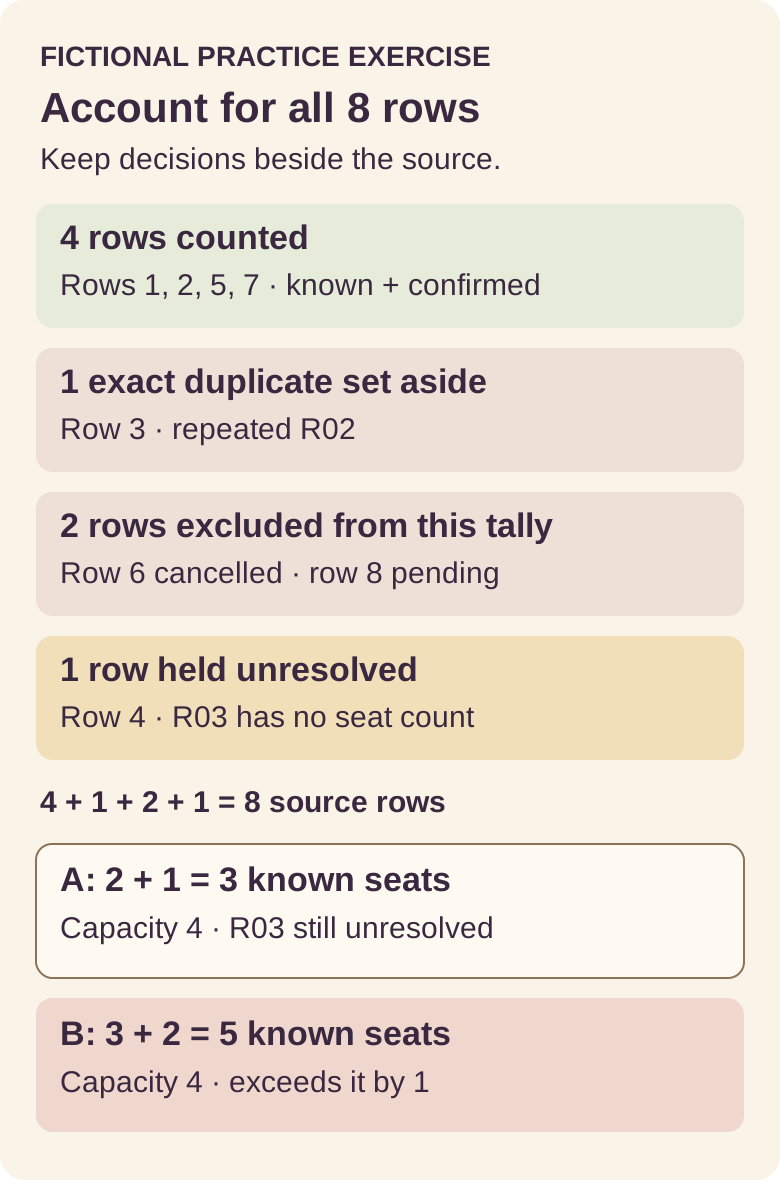
Original diagram of a fictional manual exercise. The categories account for all eight rows; this is not live booking data or an automated product workflow.
Give the learner an unfilled reconciliation record: source rows: ___; counted row numbers: ___; duplicate rows: ___; excluded rows and reasons: ___; held rows and reasons: ___; A known seats: ___; B known seats: ___; capacity finding: ___; unresolved question: ___. A complete answer explains why A is unresolved, not just why B exceeds capacity.
Package the resource so its instructions travel with it
Include the fictional label, version, learning goal, dictionary, rules and separate answer key inside the resource. A downloaded file should make sense without the Instagram caption.
A simple package can contain three sheets or clearly separated document sections: Start here, Practice data and Answer key. Put “Fictional practice data: registration cleanup, version 1” at the top. Repeat the fictional label on any answer-page screenshot that may be shared separately.
Explain that defects are intentional. Otherwise a reader may spend time reporting the duplicate as a publishing mistake or repair the blank before attempting the task. Keep the original rows visible in the answer version and annotate decisions so the path to the result survives.
Use descriptive column headers and a caption naming the table. W3C’s table guidance explains how headers and their relationships help readers understand data tables. Apply that guidance to a web version, and check the chosen document format separately; a readable web table does not certify an exported workbook or PDF as accessible.
Avoid extra contact fields or decorative URLs. If a later lesson needs a placeholder address, IANA maintains example domains for documentation. Those examples are not operational delivery destinations. They should not be presented as working mailboxes or used to test resource messaging.
For an Instagram carousel or recorded demonstration, keep the label and relevant rule within the crop. “Five confirmed seats against four places” describes this invented exercise; “our customers overbook by 25%” would turn it into unsupported customer evidence.
Test the exercise, not just whether the file opens
Work through a fresh learner copy using only its written instructions. Check row decisions, totals, missing values and mobile readability before sharing the resource.
First check the transfer. Copy or import the table and verify eight data rows, the repeated R02, all statuses and the empty R03 seat cell. Confirm that no formula or prefilled answer accidentally removes the challenge. If providing CSV, remember that instructions and additional sheets need a companion document or destination page.
Next complete the task without consulting the answer key. Record a reason for each row decision, then reconcile the categories to eight. Compare the two session totals and explain why their combined total cannot establish session availability. Check any spreadsheet formulas against those manually verified selections.
Ask someone unfamiliar with the draft to attempt the same task if practical. A question such as “Should pending count?” reveals a missing or hard-to-find rule. Revise the instructions before interpreting that confusion as a learner mistake. One successful attempt can catch defects; it is not evidence of general teaching effectiveness.
Inspect the phone route too. Can readers find the dictionary, distinguish blank from zero and open the answer key without losing the exercise? Keep the native text table and written answer alongside the diagram. The picture helps summarize the classification, but it should not be the only place containing the result.
Finally, change one value in a private test copy and check that the key would need revision. This catches a common maintenance error: updating practice rows while leaving an old answer in the distributed file. Publish the dataset, instructions and key as one version.
Connect the exercise to the Instagram lesson
Offer the exact practice task shown in the lesson, then deliver the tested resource through a supported route. The learning value comes from the exercise and its explanation.
An illustrative caption is: “Comment PRACTICE for the fictional registration-cleanup exercise and answer key.” A matching lesson might ask why one blank seat count prevents a final conclusion. Keep the answer available in the promised package rather than turning it into an undisclosed second offer.
ReplyMagnet can deliver a requested resource through its supported Instagram campaign flow. Its Assets documentation covers PDF uploads up to 25 MB on every plan and external link assets on Basic or above. For an XLSX or CSV practice file, use a tested external destination with eligible link delivery. A PDF can instead include this small copyable table and its instructions.
This workflow does not make ReplyMagnet a dataset generator, grading system or anonymization tool. Prepare and check the material yourself. Test the destination’s permissions and the promised download from the reader’s perspective before promoting it.
Use the lead-magnet delivery guide to connect the finished resource to the campaign. For course creators, a sensible next step is one lesson, one checked exercise and one clearly named delivery destination. Once those are ready, create your ReplyMagnet account and configure the supported delivery route.
Common questions
Can I just rename customer records?
That is not the method taught here. Invent every record from scratch; changing names does not establish that real records are anonymous or appropriate to share.
How many practice rows should I include?
Use enough to teach the intended decisions. These eight rows cover ordinary records, an exact duplicate, a missing value, excluded statuses and a capacity breach.
Is this a ReplyMagnet import file?
No. It is fictional teaching data, not a contact list or a ReplyMagnet import specification. Host spreadsheet files externally for the supported link delivery route.
Can the exercise demonstrate customer results?
No. Every record and capacity is invented. It demonstrates a reasoning task and its answer, not customer behavior, product performance or conversion improvement.
Keep reading
- Design a worksheet people can finish after an Instagram download
- Create an Instagram automation demo without exposing customer conversations
- Deliver an Instagram lead magnet without losing the reader
- ReplyMagnet assets: upload a PDF, add a link or replace a resource
- Instagram comment-to-DM for course creators: deliver a useful sample lesson