Guides
Make “approved” mean the whole customer journey
The caption has a thumbs-up in a chat thread. The designer is still replacing the PDF, and the client has changed the workshop date. Which version is actually approved? A small approval record can settle that question before an automation starts answering people.
Published by ReplyMagnet · Last updated
The short answer
Approve a named version of the complete journey: invitation, replies, resource, destination and important branches. Record who decided, what remains conditional, and which changes require another review.
Start freeA caption approval leaves too much undecided
Treat approval as a decision about a specific customer experience, not a reaction to one piece of copy.
An Instagram automation joins several pieces of work that may belong to different people. A social manager writes the post. A client supplies a price list. An owner connects the campaign. A booking provider maintains the destination. Each part can be correct in isolation while the overall promise is wrong.
Consider an invented workshop campaign for North Street Studio. The caption offers a beginner session guide. The first message links to that guide. A later choice lets someone ask about a private group. The client approves the caption, but the guide still contains an old cancellation instruction. Publishing that combination would make the approved caption point to an unapproved experience.
The remedy is not a long approval ceremony. It is a precise object to approve. Show the reviewer the invitation and what happens after someone accepts it. Where a branch leads to an outside website, show that destination too.
The social media manager use case covers the basic checks for operating client campaigns. This guide adds the decision record around those checks: which version was reviewed, who can accept it, and how to handle a change after someone has said yes.

Editorial illustration, not a product screenshot.
Try the resource flow for 30 days with 1,000 engagements. No card required.
Start freeBuild a review pack the client can actually follow
Put the visible journey in one short pack, with the exact copy, resource version and destination for each important path.
A reviewer should not need access to an unfamiliar builder just to understand what a customer will see. A shared document can show the caption, initial reply and each destination in reading order. Use real screenshots of an unpublished demo when they clarify a choice; label a logic preview as a preview.
For North Street, the pack contains five items: the published-post draft, the opening DM, the two possible next steps, the named PDF version, and the current private-group enquiry page. It also states the campaign's scope and the intended audience. “All campaigns” would be a poor label for a pack that covers one workshop offer.
Keep working notes separate from customer-visible text. A comment saying “check the date” should not be mistaken for an instruction already resolved. Put unresolved facts in a small decision list at the top, each with an owner.
Give the reviewer a concrete task: follow the beginner route as someone considering a first visit, then follow the private-group route as an organizer. Ask whether each route fulfills its promise. “Does this look good?” invites opinions about colors while leaving incorrect expectations untouched.
Make links accessible to the reviewer without granting unnecessary account permissions. A review copy should not contain API keys, contact exports or real customer conversations.
Name the version and the person who can decide
Use a readable version label and one accountable approver for the offer. Record specialist checks separately when needed.
A label such as “North Street beginner guide, review 03, September 29” is enough for a small team. The important part is that everyone uses the same label. Include the PDF filename or version date and the destination URL, because a document called final.pdf is not a durable description of what was reviewed.
Decide who is allowed to accept the customer promise. A social manager may be authorized to adjust punctuation but not to change a service price. A studio owner may approve the offer while a teacher checks technical instructions. Record both roles without treating every comment as a veto over the whole project.
This follows a useful project-management principle: deliverables need completion criteria. PMI's discussion of scope statements distinguishes deliverables from the criteria that show they are complete. Here the criterion might be “owner confirms session facts and both destinations match the reviewed copy,” not “client has seen the file.”
Use an external record you can maintain. ReplyMagnet's draft and publication controls do not amount to a client approval system. A message saying Draft saved tells you that work was saved, not that someone accepted it on the client's behalf.
Write decisions that survive a busy chat thread
Record accepted, changes required, or accepted with explicit conditions. Silence and an ambiguous reaction should not be treated as a complete decision.
Here is a fictional approval log for the studio:
- Review 01, owner: changes required. Replace the old arrival time in the PDF and clarify that the private-group link submits an enquiry.
- Review 02, teacher: session content checked. No decision on price or cancellation information.
- Review 02, owner: accepted only after the arrival time is corrected and the corrected page is shown again.
- Review 03, owner: accepted. Guide dated September 29, enquiry destination checked, no open conditions.
The second entry is valuable but is not overall approval. The third remains conditional. Only the fourth closes the specified conditions. This prevents a team from selecting the most convenient thumbs-up and forgetting the sentence that followed it.
A compact record needs the version, reviewer, scope checked, decision, conditions, date and evidence link. Add a publication owner so acceptance has a clear next action. Keep the original decision in place when a newer review arrives; do not silently rewrite history to make the log tidy.
If feedback conflicts, bring the specific conflict to the accountable approver. “Teacher says twenty minutes; owner says thirty” is a resolvable factual question. Averaging the two values or choosing the later message is not a sound review method.
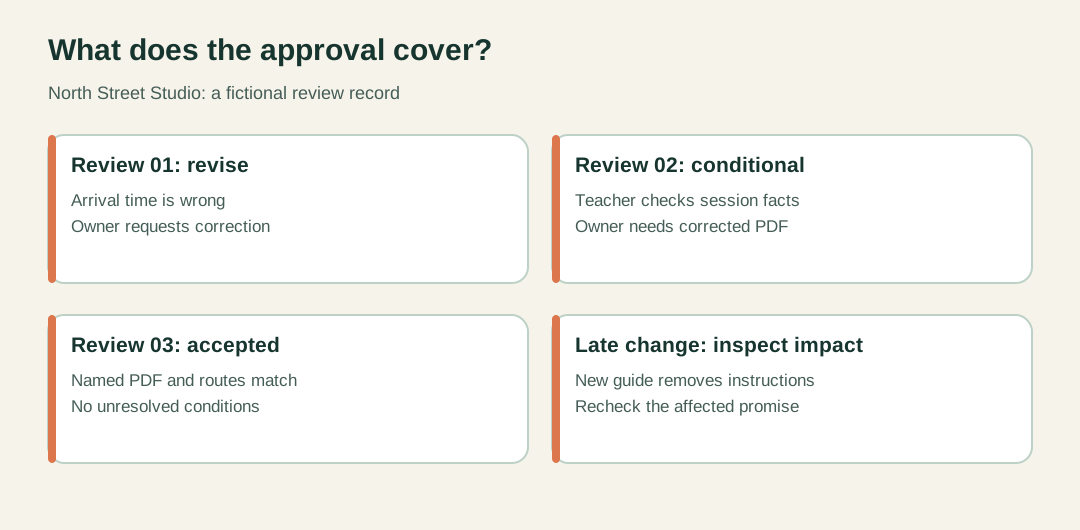
Fictional North Street review sequence, not product workflow UI.
A late change should trigger an impact check
Review what the change affects before deciding whether earlier approval still covers the experience.
On the morning of launch, North Street replaces its beginner guide with a shorter edition. The caption still says “a two-page guide,” so it is tempting to call the change harmless. But the new edition removes the collection instructions that the DM promised.
Trace the dependency: the resource changed, the message's promise now needs checking, and any branch linking to that resource needs another look. The private-group page may be unaffected. Ask the owner to accept the changed beginner route, rather than asking them to review every unrelated word again.
Different edits have different consequences. A spelling correction that leaves meaning unchanged may fit an agreed editorial permission. A new price, date, capture requirement or destination changes the customer experience. Establish those categories before the rush, and document the judgment when a borderline edit occurs.
In ReplyMagnet, replacing an asset for future requests does not rewrite every delivery link already sent. The asset guide explains the distinction. If the change corrects material information, include already-delivered copies in the business's communication decision. Do not assume an edited campaign has corrected a document in someone's downloads folder.
This is change control for the offer, not a recommendation to delay every punctuation fix until a committee meets.
Keep approval separate from technical acceptance
A client can accept the wording while the implementation still needs testing. Record both decisions before publication.
North Street's owner knows whether the session details are right. That does not prove the automation uses the intended account or that a link opens on a phone. The implementer must still check the saved configuration against the approved pack.
Use two separate status lines: content accepted and implementation checked. Under the second, note what was actually observed. A logic preview demonstrates the branch behavior you inspected. It does not establish that Instagram delivered a message or that a live booking was recorded.
The chat flow builder introduction explains the difference between Preview, saving and publishing. Customer flow access is plan-gated, and workspace owners control editing and publication. Do not give a client a promise that any reviewer can publish merely because they can read the pack.
When a controlled delivery test is appropriate, use agreed demo accounts and the established testing process. There is no reason to use an unsuspecting customer as a test participant. Keep personal details out of the public evidence pack.
A failed technical check does not erase the content approval. It changes readiness. Fix the implementation, retest the affected behavior, and reopen content review only if the fix changes what the customer sees.
Publish the accepted version, then leave a useful handover
Record what went live and who will maintain the offer. Keep the approved pack close to the campaign rather than buried in a completed project folder.
Before launch, the publication owner compares the saved campaign to the accepted pack. The check is straightforward: same account and scope, same promise, same resource version, same destinations, no unresolved conditions. If something differs, stop and resolve that difference rather than assuming the latest edit was included in approval.
After publication, add the live campaign reference, publication date and relevant verification note to the record. Keep a link to the accepted pack. A future teammate should be able to answer “why does this branch say that?” without reconstructing a month of messages.
Name the person who will react when the workshop schedule or resource changes. An approval is accurate at a moment in time; it is not a lifetime warranty on an offer. The owner can choose a sensible review trigger, such as a schedule revision, instead of inventing a daily administrative task.
For a first implementation, take one existing campaign and create this small record around it. Use the campaign setup documentation for configuration details. Keep the review process focused on a result everyone can inspect: a customer follows the invitation and receives exactly the experience the client approved.