Guides
Write a Reel that teaches something before offering a download
A resource invitation feels abrupt when the video has not earned it. The creator names a familiar problem, promises a solution and immediately asks for a comment. The viewer has learned that a download exists, but has not yet learned anything useful.
Published by ReplyMagnet · Last updated
The short answer
Give the Reel one complete takeaway, show the action that makes it understandable and offer a resource only when it helps the viewer apply the lesson. Draft spoken words and visual action separately so neither has to carry missing context.
Start freeThe lesson comes before the invitation
Choose a small action the viewer can understand and try without requesting the resource.
Consider a fictional home-cooking educator preparing a Reel about checking ingredients before writing a shopping list. The lesson is deliberately narrow: begin the list with what is already available, then identify what the planned meals still require. This is a planning example, not nutrition or food-safety advice.
The viewer should leave with a useful action even if they never comment, follow or download anything. They can look at their current ingredients before adding items to the shopping list. The optional resource can organize that check, but it should not contain a secret step that the video refuses to explain.
Write the takeaway in one sentence. Then ask what visual action would make it clear. For this example, crossing an already-available item off a draft shopping list is more informative than a creator talking beside a closed cupboard. The visual can show the relationship that a spoken explanation might make cumbersome.
Avoid promising a result the small action cannot guarantee. The method may help someone notice duplicates, but the video should not claim a fixed saving, a healthier diet or a permanently organized kitchen. Those claims require evidence beyond this demonstration.
The lead-magnet ideas guide can help choose a related artifact. Here the useful artifact is a planning sheet with space for “already have” and “need to buy.” It adds a place to do the work; it does not replace the lesson.

Editorial illustration, not a product screenshot.
Try the resource flow for 30 days with 1,000 engagements. No card required.
Start freeWrite a two-column script before recording
Pair each spoken point with a visible action that supports it, rather than filming first and adding explanatory text afterward.
The script has two columns: what the viewer hears or reads, and what they see. Keep production notes separate so the spoken language remains natural. The point is not to choreograph every movement. It is to notice when a claim has no demonstration or when the image contradicts the words.
Shot one. Spoken line: “Before I write a shopping list, I check what is already here.” Visual action: show a simple draft list beside three labeled ingredients. The opening names the task and establishes the objects needed for the explanation. It does not need a dramatic warning about doing shopping wrong.
Shot two. Spoken line: “Rice is already on hand, so it does not belong on this list again.” Visual action: point to the rice, then remove that item from the draft list. The action connects the existing ingredient with the change to the list. Labels help if the package is hard to identify.
Shot three. Spoken line: “Now I add only what these two planned meals still need.” Visual action: show two clearly labeled meal examples and add one missing ingredient. Keep this fictional demonstration simple enough to follow. The lesson is the planning relationship, not a recipe tutorial.
Shot four. Spoken line: “The check comes before the list.” Visual action: place the “already have” note before the “need to buy” note. This restates the takeaway in a compact form. It is a conclusion the viewer can use immediately.
Shot five. Spoken line: “If a sheet would help, ours has space for both lists and one completed example.” Visual action: show the real resource or a clearly labeled design preview that matches the final artifact. The invitation explains the resource's additional function instead of introducing an unrelated offer.
This is an illustrative script, not a recommended duration or a tested performance formula. Record it at a pace that makes the action understandable, then edit for clarity. A precise time target should not force you to remove the step that explains why the list changes.
Make the offer match the thing you show
Describe the resource by its contents and intended use, and verify that the final file supports the promise.
The example invitation is modest because the resource is modest. It contains two working areas and a completed example. Calling it a complete meal-planning system would create expectations that the artifact cannot meet. A specific description helps the viewer decide whether the download is worth their time.
Check the visible preview carefully. If the video shows a sample page with sections that will not exist in the final file, change the preview or finish the missing content. Do not rely on a decorative mockup to imply a larger product. A generated illustration can set a mood, but it should not masquerade as a screenshot of the resource or platform.
Name any requirement that materially affects the next step. If the reader will encounter a form, do not describe the route as opening the file immediately. If the resource is designed for printing, do not imply it is a fillable phone worksheet. The delivery guide covers how the resource reaches the reader; the script must describe that route accurately.
Keep the invitation optional in both tone and structure. The viewer has already received the main lesson. The resource is an aid for using it repeatedly or applying it to their own circumstances. This relationship is more credible than withholding the central answer until the viewer completes an engagement action.
If the offer later changes, review the video, caption and delivery message together. The public promise may outlive the campaign configuration. Updating a destination does not automatically repair spoken words that describe the wrong artifact.
Check what survives without sound
Provide accurate captions and ensure essential visual actions have enough explanation for different ways of following the video.
Watch the draft with sound off. Can a viewer understand the task and the change to the shopping list? Captions should convey the spoken explanation accurately. Review automatic captions for errors, especially ingredient names, negatives and instructions where a small mistake can reverse the meaning.
Then listen without relying on the visuals. Does the spoken line explain what “this” refers to? “Rice is already on hand, so I remove it from the shopping list” is more complete than “I take this off.” Essential meaning should not depend on pointing at an unlabeled object.
The aim is not to cram a transcript and a diagram into every frame. Use concise labels and clear spoken references. If a sequence remains hard to explain, simplify the example. Three objects and one change may teach the relationship better than a crowded counter with many packages.
W3C's writing guidance supports clear instructions and understandable language. Its image tutorial explains the importance of conveying the information an image contributes. These are general communication principles, not a claim that this review establishes full video accessibility compliance.
Ask a person unfamiliar with the script to describe the takeaway. If they say “download the sheet,” the resource invitation may have overwhelmed the lesson. If they say “check existing ingredients before writing the list,” the instructional point is clearer. This small editorial check is useful feedback, not proof of future engagement.
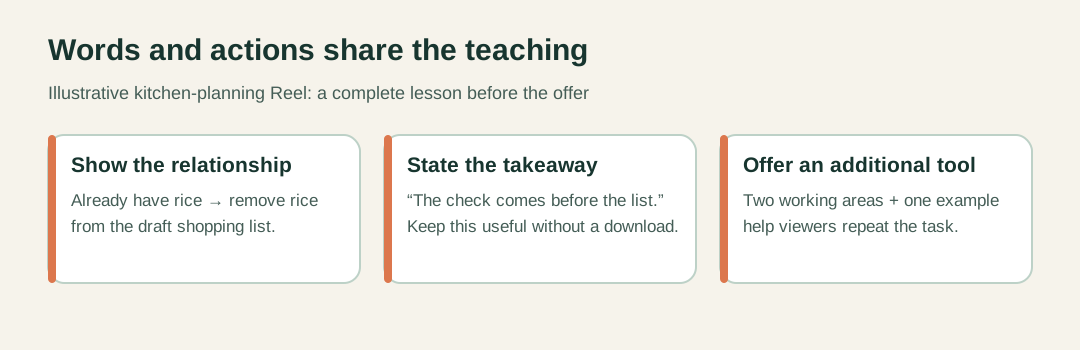
Original shot plan. It is not a duration or performance benchmark.
Cut repetition, not the reason the advice works
Remove duplicate setup and empty emphasis while preserving the example, the action and any necessary qualification.
The first edit often feels too long because the opening repeats itself. “Do you struggle with shopping? I used to struggle too. Shopping can be difficult when you do not have a plan” delays the concrete task without adding information. Start nearer the action: “Before I write the list, I check what is already here.”
A second source of length is unnecessary narration. If the image clearly shows a labeled sheet being placed on the counter, the script may not need “Now I am putting my sheet here.” Use the spoken line to explain the decision the image cannot show by itself.
Do not cut the relationship that makes the lesson useful. Removing the rice from the list is not merely a visual transition. It demonstrates the reason for checking ingredients first. A fast montage that skips that connection may look lively while becoming less instructive.
Preserve qualifications that affect the advice. If another topic depends on a specific context, state that context or narrow the claim. Short video is not a reason to turn conditional guidance into an absolute promise. The same discipline applies to captions and on-screen headings.
Review the ending for a second sales pitch. One clear resource description is enough for this example. Repeating the keyword, benefit and urgency several times can crowd out the conclusion. The campaign examples guide can help with delivery wording, but it does not replace an editorial judgment about what this particular video needs.
Review the finished sequence as a reader journey
Check the lesson, invitation and delivered artifact as connected parts, while keeping their success measures distinct.
Before publication, compare three things: the takeaway in the video, the promise in the caption and the contents of the resource. They should describe the same useful task. A video about checking ingredients should not deliver an unrelated recipe collection simply because that file already exists.
Check the visible details after editing. A crop can hide the label that makes the example understandable. Music can compete with speech. A final cut can remove the pause that gives someone time to read a crucial phrase. Review the exported version, not only the editing timeline.
If you use a comment-triggered resource, verify the campaign separately through the comment-to-DM setup guide. A clear script does not prove that delivery is configured correctly. Likewise, successful delivery does not prove that someone understood the lesson or used the worksheet.
After publication, interpret responses according to what they show. A question about the planning sequence may suggest a missing explanation. A request for the sheet shows interest in the offer. Neither alone establishes that the viewer changed their routine. Keep those observations separate when deciding what to revise.
The next script can build on a different problem rather than repeating the same invitation with new scenery. Begin with a complete useful point, choose the action that makes it visible and offer the artifact only where it helps the viewer continue. That gives the resource a clear role in the lesson.