Guides
Help a buyer choose from a small product range in DMs
A useful product finder reduces a small choice to the criteria that matter. It should explain why an option fits, make uncertain cases visible and send the buyer to a current product page before they decide.
Published by ReplyMagnet · Last updated
Start with a range you can explain accurately
Use a product finder when a few meaningful differences separate the options. If the answer depends on complex compatibility or live availability, keep a human or authoritative tool involved.

Generated editorial illustration of matching products to needs. The worked example below uses fictional desk lamps.
A small shop might sell three desk lamps that look similar in a photograph but suit different setups. One uses a base, another clamps to a compatible desk edge and a third is intended for portable use. A buyer’s question is less likely to be “Which model has the most features?” than “Which one works where I need it?”
The example in this article is fictional. The lamp types, labels and criteria are teaching material, not claims about products sold by ReplyMagnet or a customer. A real finder needs verified product specifications and current destination pages.
Choose a narrow decision. “Find a lamp for your workspace” is manageable only if the range and its constraints are clear. “Find everything you need for your home” introduces too many unknowns for a short conversation.
Write down what the finder can decide and what it cannot. It may suggest a product page based on a stated preference. It cannot confirm stock, reserve a product or guarantee suitability unless a separate verified system actually provides that information. A maintained link is not a live inventory connection.
For a broader resource strategy, the ecommerce guide covers buyer information. This article focuses on mapping a small range to explicit needs without pretending the conversation knows more than it does.
Build the matrix before you build the conversation
For each option, record the need it serves, the evidence supporting that fit and the condition that would rule it out. Empty or uncertain cells need investigation.
Start with product documentation, not the marketing names. A name like “Studio” or “Flex” may tell a buyer nothing about installation, dimensions or power requirements. Translate verified differences into questions the buyer can answer.
In the fictional range below, the first decision is the workspace arrangement. It avoids asking someone to compare technical specifications before they know why those specifications matter. The product page must still contain the exact measurements and conditions needed for a final choice.
The matrix is deliberately modest. It does not rank one lamp as universally best, assign unsupported scores or invent performance benefits. If two products fit the same need, the finder can present both with a clear difference rather than forcing a single recommendation.
Keep a source beside every real criterion in your working version. If a team member cannot point to the current specification that supports an answer, mark it unverified. Do not fill a gap with an assumption based on a photograph.
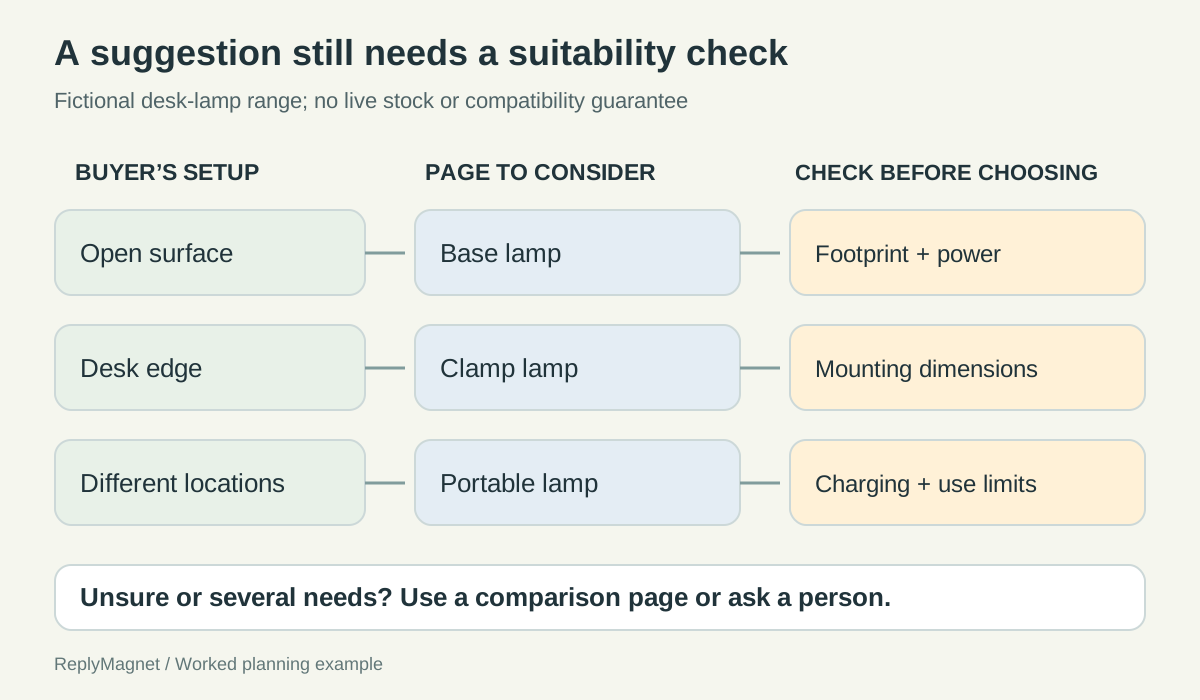
Original need-to-product matrix for the fictional lamps. A route suggests information to inspect; it does not confirm availability or suitability.
Illustrative desk-lamp matrix. These are fictional product categories, not verified specifications.
Buyer need
A lamp that sits on an open surface
- Page to consider
- Base lamp page
- Check before choosing
- Available footprint and the actual power arrangement
- Do not imply
- That it fits every desk
Buyer need
A lamp attached to a desk edge
- Page to consider
- Clamp lamp page
- Check before choosing
- Permitted edge dimensions and mounting conditions
- Do not imply
- Universal desk compatibility
Buyer need
A lamp moved between locations
- Page to consider
- Portable lamp page
- Check before choosing
- Actual charging, use and handling specifications
- Do not imply
- An invented battery duration
Buyer need
Unsure or several needs
- Page to consider
- Comparison page or human help
- Check before choosing
- Which constraint matters most
- Do not imply
- A confident recommendation from missing facts
Ask about a constraint the buyer can recognize
Use plain choices tied to observable needs. Keep technical checks on the product page when the buyer must measure or verify something before purchasing.
A first prompt could say: “Where do you want the lamp to go: on a surface, on a desk edge or between different places?” That question uses the buyer’s situation rather than an internal category label.
However, a preference for a clamp does not establish compatibility. The next response should explain that the buyer needs to check the edge measurements against the real product specification. If they cannot check, offer the comparison page or a human contact route instead of treating the preference as proof of fit.
Avoid asking three versions of the same question. “What is your goal?”, “What are you looking for?” and “What matters most?” can create a conversation that feels busy without narrowing the choice. One concrete constraint often does more work.
If you use ReplyMagnet conversation choices, the editor supports up to three replies with labels up to 20 characters. Typed labels or the numbers 1 to 3 can be recognized; unmatched or ambiguous replies take the unmatched path. Keep the visible wording and numbered prompt consistent when changing the order. The conversation choices guide explains those boundaries.
Those controls route explicit replies. They should not be presented as a general AI recommendation engine. If a buyer sends a complicated description that does not match a choice, the fallback needs to remain useful.
A practical fallback is a short comparison resource and a clear route to help. Do not repeatedly ask the same question in slightly different words when the customer has already indicated that the choices do not fit.
Walk through three example paths
Each path should connect a stated need to an explanation and a maintained destination. The destination holds the current product details needed for the buying decision.
The following paths are invented design examples. They do not represent live conversations or measured buying behavior.
Path one: an open desk surface. The buyer selects “On a surface.” The reply says: “The base-lamp page is a useful starting point for a lamp that rests on your desk. Check the footprint and power details against your setup before choosing.” The destination is the current base-lamp page.
The wording explains the match without claiming it will fit. If the base is too large, the page or human support can help the buyer consider another arrangement. The finder has reduced the search, but has not completed a compatibility check.
Path two: a crowded desk with an edge. The buyer selects “On a desk edge.” The reply says: “The clamp-lamp page explains the mounting requirements. Measure your desk edge and compare it with the specified range before deciding.” The destination shows the actual mounting information.
If the shop lacks clear mounting specifications, this path is not ready. A photograph of the clamp is not a substitute. The business should improve the product information before sending people toward a choice that depends on it.
Path three: several locations. The buyer selects “Move it around.” The reply says: “The portable-lamp page explains how this model is powered and used between locations. Check those details against where you plan to use it.” The destination provides the verified specifications.
This path deliberately avoids invented battery-life and environmental-suitability claims. If the buyer asks about a particular use that the documentation does not cover, a person should investigate or state the limit.
In all three paths, the link text should name the destination. “See the clamp-lamp requirements” tells the buyer more than “Click here.” W3C’s writing guidance supports descriptive links and clear instructions; it does not establish any of the fictional product claims.
Keep the product page authoritative
Price, availability, compatibility and purchase terms should come from the maintained destination. A DM recommendation must not quietly become a promise that those facts will remain unchanged.
A product finder can outlive the campaign that introduced it. Someone may arrive from an older post after a model changes or a product page moves. Assign responsibility for checking the destinations and the claims in the replies.
Use a small maintenance record: product, destination, criteria used in the finder, source of those criteria and change owner. When a model is replaced, review the routing logic as well as the link. A new product at the same URL may have different requirements.
Do not describe a product as available merely because its page loads. If the shop’s page displays current stock, the buyer can check there. The DM should say what the page is for without asserting a stock state that the conversation does not verify.
Likewise, do not imply that selecting an option places an order. The route ends at product information or the shop’s actual purchase process. A person may browse several pages and decide not to buy; that is a valid use of a finder.
For ReplyMagnet link assets, use the asset documentation to manage the destination. Updating a resource affects new requests; it does not rewrite links already delivered to people. Keep that distinction in mind when replacing an incorrect destination.
If the range changes so often that the matrix cannot be maintained, use a simpler entry point such as a current comparison page. A short, accurate path is better than a detailed conversation built on stale information.
Test the awkward answers as carefully as the obvious ones
Check every normal route, then test uncertainty, multiple needs and changed product information. A finder is ready only when its limits lead somewhere useful.
Have a person unfamiliar with the draft try three tasks: choose for a known setup, ask about two competing needs and explain a situation absent from the choices. Observe whether the wording helps them understand the difference between a suggestion and a confirmed fit.
Keep the tests grounded in the actual product records. Do not invent a successful recommendation because the flow reached a link. A path can operate correctly while the product explanation is misleading.
For a builder implementation, ReplyMagnet’s flow builder is available on Pro and Agency, including valid trials, and workspace owners handle editing and publishing. Preview checks the logic without sending messages or creating saved contacts. A real controlled test is still needed to inspect the delivered experience and destination.
Record the expected result for each test: correct page, useful explanation, visible compatibility check and a clear fallback. Also test what happens when someone types more than one choice or nothing that matches. The human help route should not promise an immediate response unless the business can provide one.
After launch, use observed questions to improve the matrix. Repeated uncertainty about one specification may mean the product page needs better information. It does not automatically mean you need more branches. The finder succeeds when it helps people understand a small decision accurately, including when the answer is “check this before choosing.”