Guides
Give every Instagram DM choice a clear destination
“Learn more,” “Get started,” and “Other” look like three options. To someone trying to book a pottery class, they can mean almost the same thing. A useful menu tells people where each answer will take them.
Published by ReplyMagnet · Last updated
The short answer
Build a DM menu around distinct visitor tasks, then write the answer each choice promises. Connect unexpected replies and silence to deliberate endings, and test those paths as carefully as the main options.
Start freeDecide what the visitor is choosing
A useful DM menu separates different needs. If two options would send the same person to the same answer, rewrite the choices or remove the extra step.
Consider an illustrative ceramics studio that offers public workshops, private group sessions and finished pottery. These are fictional business details for a design exercise, not a customer case study.
The studio receives an incoming DM containing the configured word STUDIO. Its first response should orient the person: “What would you like help with? Choose workshop dates, a private group session, or buying pottery.” Each phrase names a destination a visitor can recognize.
Compare that with “Learn more / Get started / Other.” Someone who wants workshop dates could reasonably choose any of the three. The automation would still record a choice, but the choice would provide little evidence of what the visitor meant.
Before opening the builder, write three actual requests in the customer's language. Then write the next useful answer for each. If your requests are “send the guide,” “download the guide” and “where is the guide,” they likely need one resource reply, not a three-way menu.
This article focuses on an eligible incoming keyword DM. The welcome message guide covers the separate first-message welcome; a follow by itself is not the entry event for this example.

Illustration of the fictional studio menu, not an Instagram conversation or customer result.
Try the resource flow for 30 days with 1,000 engagements. No card required.
Start freeWrite labels that survive outside your planning document
Use short labels that name the help available. Avoid internal sales stages, vague verbs and distinctions that require the visitor to understand your business structure.
The three labels in our example are Workshop dates, Private group and Buying pottery. Someone looking at them without the rest of the flow can make a reasonable choice. “Discovery,” “Events” and “Shop journey” would require more interpretation.
ReplyMagnet's Choice editor supports up to three replies, with a 20-character limit for each label. That is a constraint for a compact decision, not a target to fill. Two clear options can be enough. Keep the explanatory detail in the prompt instead of squeezing an entire sales proposition into a label.
The W3C's writing guidance recommends meaningful link text and clear instructions. Those principles also provide a useful check for a conversation menu: the words should explain the destination and the action required. This does not establish that a particular flow meets every accessibility requirement.
Read the labels aloud with the prompt. “What would you like help with? Workshop dates. Private group. Buying pottery.” The set sounds coherent because every option answers the same question. A mixed set such as “Prices / I am a beginner / Yes” asks the visitor to compare a topic, an identity and an unexplained confirmation.
Avoid adding an emoji as the only distinction between two otherwise identical labels. Text should carry the meaning. If you choose numbered instructions, ensure the prompt's numbers follow the actual option order whenever you rearrange the choices.
Write the answer each branch owes before connecting it
Treat each choice as a promise. Specify the information, destination and stopping point that will fulfill it, then connect the flow to those concrete next steps.
The table below is a planning tool, not a built-in ReplyMagnet report. Complete it before drawing a large map. It exposes the common problem of three attractive labels all leading to one general homepage.
For Workshop dates, the next message could say: “Here are the current public workshop dates. Open a session to see its price, format and available places.” Link to a real, current external booking page. The destination handles availability and booking; the DM has not reserved a place.
For Private group, offer the actual enquiry process: “Planning a group session? This page explains the group options and how to ask about a date.” Do not announce that a staff member has been assigned unless someone really has been assigned through your working process.
For Buying pottery, direct the visitor to the shop collection with a sentence that matches it. If the page lists ready-made pieces, do not describe it as a custom-order form. The wording should remain true after a visitor opens the link.
Give each destination an owner. Workshop details may belong to the studio manager, group enquiries to the events coordinator, and products to the shop owner. Those responsibilities are business arrangements, not a claim that the flow automatically assigns conversations.
Illustrative branch contract for the ceramics studio
Choice
Workshop dates
- Promise and answer
- Show upcoming public sessions and where to check details
- Destination / uncertainty
- Current booking page; send unusual date questions to the studio contact route
Choice
Private group
- Promise and answer
- Explain how to ask about a session for a group
- Destination / uncertainty
- Group enquiry page; do not promise capacity before confirmation
Choice
Buying pottery
- Promise and answer
- Show the collection currently offered for sale
- Destination / uncertainty
- Shop collection; route bespoke requests to the stated contact method
Choice
Unmatched reply
- Promise and answer
- Explain that the menu could not choose a path
- Destination / uncertainty
- Clear contact route and a deliberate ending
Choice
No answer
- Promise and answer
- Allow the visitor to stop
- Destination / uncertainty
- Deliberate ending; no assumed interest or booking
Build the small menu, including its exits
Use one Choice step with an explicit destination for each option. Configure Unmatched reply and No answer paths too, so the design covers uncertainty as well as successful selections.
The chat flow builder guide explains entry setup, node types and publishing. The Instagram builder is available on Pro and Agency, including valid trials, and workspace owners can edit and publish flows. Start with a supported keyword campaign for this exercise rather than the general any-mode welcome.
In your draft, add the orientation message and the Choice step. Enter the short labels, connect each reply to its matching answer, and give each route an intentional end. Use your actual HTTPS destinations. The studio wording here is a design example to adapt, not a reason to publish placeholder links.
Next, inspect the two paths that are easy to overlook. Unmatched reply handles a reply the choice cannot resolve, including ambiguity. No answer handles the configured timeout when no answer arrives. Silence and confusion are different situations; they do not need the same message.
For this small example, the unmatched path can explain the limit and provide the studio's real contact route: “I couldn't match that to one of these options. For a different question, please use the studio contact page.” The no-answer path can simply end. You do not need a reminder solely because the builder can contain another message.
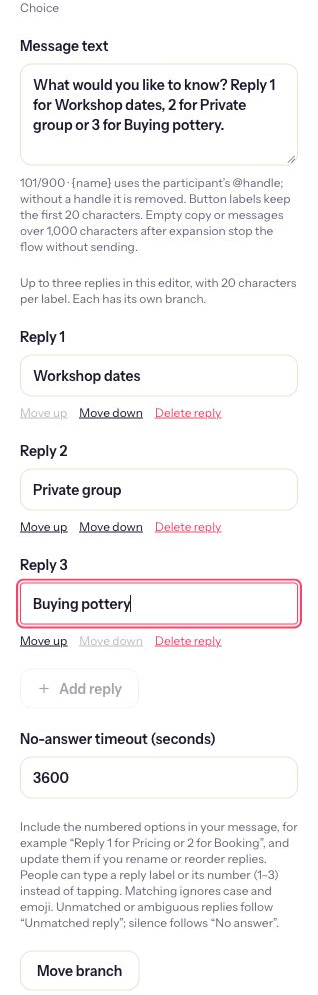
Actual Choice controls with unsaved demonstration labels. This image shows configuration, not a published or fully tested ceramics conversation.
Plan for typed replies, uncertainty and changed minds
A visitor can type a choice label or its number. Keep recovery wording helpful when the reply is ambiguous, and do not promise a universal back command unless you have built and tested one.
ReplyMagnet's Choice guidance accepts a typed reply label or a number from 1 to 3. Matching ignores case and emoji; unmatched or ambiguous answers follow the Unmatched reply path. This is still a configured choice, not open-ended understanding of every sentence a person might write.
If the prompt says “1 for workshop dates, 2 for a private group, 3 for buying pottery,” a typed 2 should lead to the group branch. After swapping the first two options, update that sentence as well as the connections. A stale numbered prompt can confidently send people to the wrong place.
Someone might type “workshops or a private session, not sure.” Your design should acknowledge uncertainty rather than treat it as a firm group enquiry. A brief comparison on the contact or information page could help: public sessions use scheduled dates, while group sessions require an enquiry. Verify those facts for your own business before using them.
Changing one's mind is another real conversation behavior. Do not write “type BACK anytime” unless every relevant stage actually supports the route you have tested. A simpler first version can give each branch a clear contact link for a different question and end cleanly. Later, you can design a deliberate return path if the extra complexity is justified.
Never use the recovery path to claim a person has joined a list, booked, or requested a sales call. The only thing you know is that the configured decision was unresolved.
Read six conversation scenarios before publishing
Test every intended destination plus typed input, ambiguity and silence. Preview checks the configured logic without sending messages or saving conversation data.
These are invented test scenarios and expected design outcomes, not records of tests performed on a live studio account. Adapt them to your draft and record what actually happens in Preview.
1. The person wants a class date. Visitor sends STUDIO, sees the menu, and chooses Workshop dates. The next message should name public sessions and point to the current booking destination. It should not say “You're booked.” Confirm the route ends after the information you intended to supply.
2. The person types a number. Visitor replies 2 to the displayed three-option prompt. Confirm the configured second option is Private group and that the group explanation follows. Read the prompt again after reordering any option. Test the visible order, not the order you remember drawing earlier.
3. The person types the label. Visitor types “buying pottery” in lower case. Inspect whether the shop branch follows and check the destination on a phone separately. A logic path reaching a URL does not tell you whether the shop page is usable or has the items the message describes.
4. The person cannot choose. Visitor types “workshop dates or private group.” The expected design is the unmatched path, not an arbitrary choice between two plausible interests. Check that the recovery message offers a useful next step and does not accuse the visitor of making an error.
5. The person asks an unrelated question. Visitor types “I left my scarf at the studio.” The unmatched path should make the actual contact route easy to find. A sales menu should not trap a lost-property request inside a booking pitch. If your real inbox receives many such requests, the menu's scope may need to be narrower.
6. The person stops. Visitor reaches the choice and sends nothing. Inspect the configured No answer path and its timing in your draft. For this example, the intended outcome is an end, not repeated prompts. A timeout does not establish that the visitor rejected the offer.
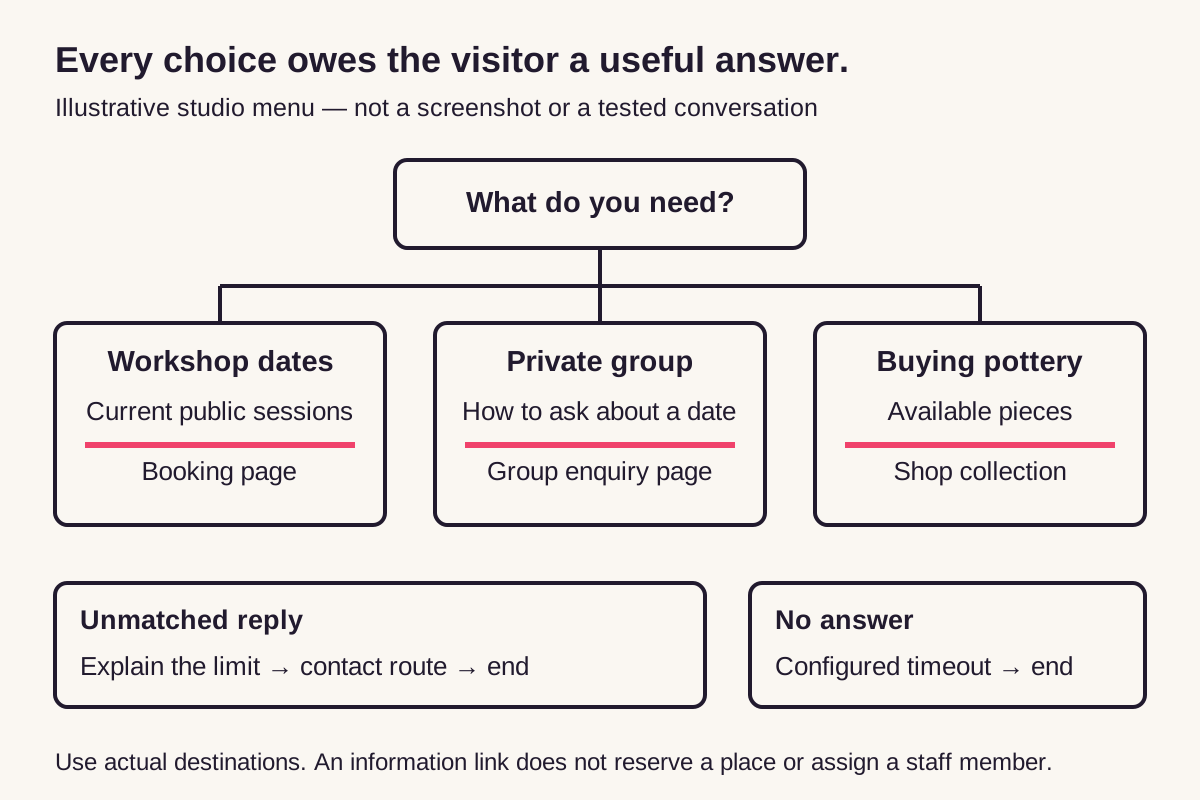
Illustrative branch map. Preview and a controlled delivery test are still needed for your actual configuration.
For each scenario, write the expected next message beside the observed one. If a mismatch appears, fix the copy or connection and rerun the affected paths. Do not turn a successful first branch into approval for the whole flow.
Know when a shorter conversation is the better design
Remove a menu when the person has already made a clear request. Keep a human contact route for exceptions that require judgment, and only promise response times your team can meet.
If someone has already asked for the Saturday dates, making them choose Workshop dates again may add little. A specific request can justify a more direct campaign. The three-way menu is useful when the entry word is intentionally broad and the visitor still needs to select a direction.
Review your first version for questions that do not change the next answer. Asking for a name before displaying public dates does not improve the dates. Asking about group size could matter for an enquiry, but only when you know how the business will use the answer and can explain why it is needed.
Keep sensitive or complicated requests out of a rigid menu. A detailed accessibility question, refund dispute or unusual booking arrangement may require a person to inspect the circumstances. Provide the business's actual contact method and explain any real operating hours there. “Our team is reviewing this now” is unsuitable if no review has begun.
After publishing, perform a controlled delivery test using an account you control or a consenting colleague. Preview simulates logic and does not prove Instagram delivery, account eligibility or a valid messaging window. Those limits still apply, as the DM automation rules guide explains.
Begin with one useful decision in your ReplyMagnet workspace. Keep the branch contract beside the draft, and check every route against the promise it makes. Expand the menu only when a real unresolved request needs a different destination.