Guides
Watch someone use your Instagram DM flow without coaching them
The flow reaches the correct ending in Preview. Then a reader chooses the wrong option because “Private sessions” sounds like individual tuition. Logic testing found no broken connection; a short usability session can reveal a different problem.
Published by ReplyMagnet · Last updated
Decide what you need to learn from a person
Usability testing observes whether someone can understand and complete a task. It complements technical checks; it does not establish delivery reliability or predict a conversion rate.
A campaign owner knows what every label means. That knowledge makes it easy to overlook wording a new reader interprets differently. A person unfamiliar with the flow can show where the explanation stops being obvious.
The GOV.UK moderated testing guidance describes observing people attempt relevant tasks using neutral instructions. For an Instagram flow, apply the approach to a narrow question such as “Can a group organizer find the appropriate enquiry route?”
Keep this separate from asking whether the campaign sends a message. The setup guide covers technical request and delivery checks. A technical failure can interrupt a study, but fixing it does not answer whether the wording makes sense.
The test plan should name the uncertainty, the people who encounter it and the part of the experience to inspect. “Improve the flow” is too broad. “Find whether organizers mistake the private-group option for one-to-one teaching” creates a specific observation task.

Editorial illustration of a research setting, not a recording of a conducted session.
Choose willing participants with a relevant task
Invite people who resemble the intended readers in their needs, not merely colleagues who already know the flow. Explain the session and obtain agreement before observing or recording.
For a private workshop enquiry, a useful participant might be someone who has organized a group activity. They need not be an existing customer, but the scenario should be understandable to them. A developer who built the flow may be excellent at spotting wiring problems and poor at representing a first-time reader.
The GOV.UK research planning guidance recommends choosing research activities around the questions and relevant user groups. This small exercise should remain qualitative. Do not attach a universal participant count to a claim that all usability problems will be found.
Tell the person what you will observe, whether you intend to record, how notes will be used and that they can stop. Use a safe demonstration that does not require purchases, real customer messages or unnecessary personal information. If recording is not needed, concise notes may be enough.
Consider practical access needs. A participant's own device or assistive setup can reveal issues you would miss on the owner's laptop, provided the test arrangement is appropriate and agreed. Do not assume everyone interacts with the same screen size, reading speed or input method.
Keep names and contact details out of the analysis notes when they are not required. A participant label can identify the session without turning your content review document into a customer database.
Write a task that does not reveal the menu answer
Describe the person’s situation and desired outcome without naming the option they should select. Otherwise you are testing whether they follow your instruction, not whether they understand the flow.
Here is an invented task for a ceramics business: “You are organizing an activity for eight colleagues. You want to find out whether the studio can accommodate your group and how to ask about a date. Use this conversation to find the next step.”
Compare that with “Choose Private group and open the enquiry link.” The second instruction gives away the solution. A participant can complete it while still believing the label means something else.
Write the expected completion in your observer notes, not in the task you read aloud. For this example, completion means finding the group enquiry destination and correctly explaining that it is an enquiry, not a confirmed reservation. Merely reaching the page is insufficient if the person thinks eight places are already booked.
Prepare a second scenario that explores a different need, such as finding public workshop dates. Do not make the second task a test of memory from the first. Reset the demonstration where necessary and record the order, because the first task can teach people how the flow works.
Try the wording with a colleague before the session. Ask whether the scenario is believable and whether any phrase exposes the intended button. That rehearsal improves the study instructions; it is not a substitute for observing an unfamiliar reader.
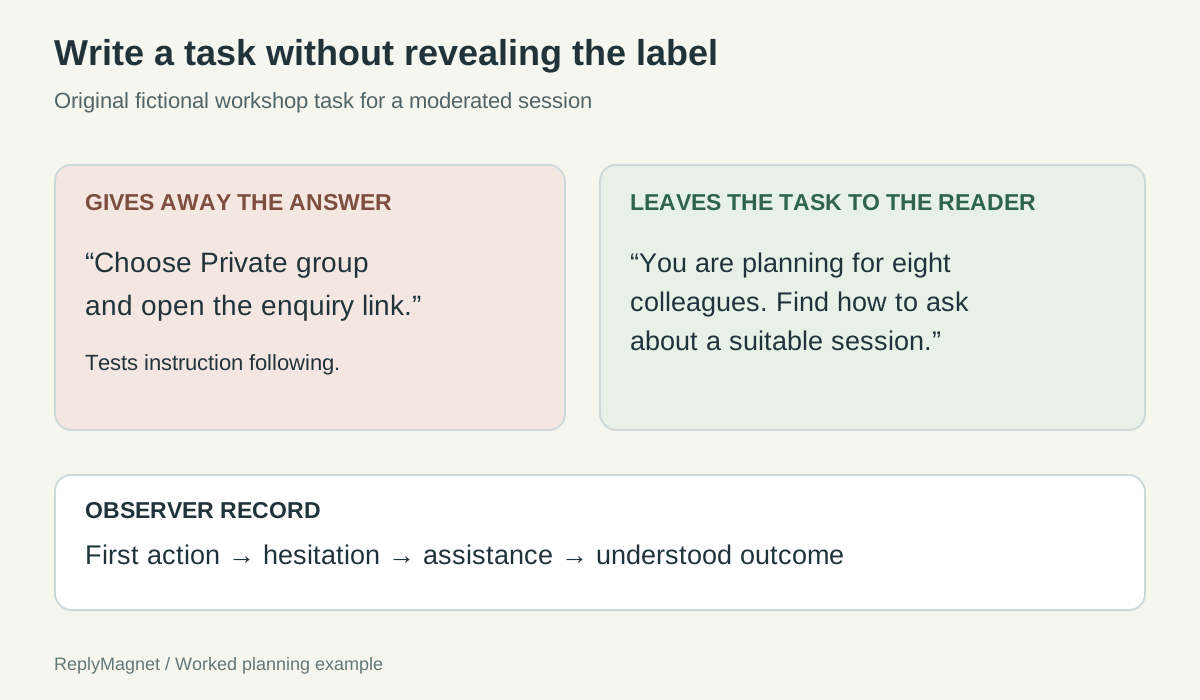
Original task-card comparison. It illustrates test design; no participant session is claimed.
Use a short facilitator script, then leave room for silence
Explain that the experience is being tested, give the task, and observe before helping. If assistance becomes necessary, record it so completion is not mistaken for independent success.
You can adapt this original script:
“Thank you for helping us review this conversation. We are checking whether the wording and next steps make sense. We are testing the experience, not your ability. Please say what you are looking for and what you expect as you go. You can stop whenever you wish. This is a demonstration, so you do not need to make a purchase or supply personal details.”
Read the task and let the person begin. Resist explaining the labels when they pause. A hesitation may reveal the exact uncertainty you wanted to investigate. If they ask “Which one should I pick?”, try “What do you think the options mean?” before supplying the answer.
Do not let a participant remain stuck indefinitely merely to preserve the test. You can give the smallest assistance needed to continue, then mark that point in the notes. The rest of the task may still teach you something, but it is no longer wholly unassisted.
At the end, ask what they expected after their key choice and whether anything surprised them. Their explanation can distinguish an accidental tap from a misunderstanding. Avoid “Was that easy?” as the only question; a polite yes gives little direction for a revision.
Close by thanking them and explaining what happens to their feedback. Do not promise to implement every suggestion. The team still needs to decide which issue the evidence supports.
Record behavior before proposing a fix
Write down the task, action, hesitation, assistance and interpretation separately. This keeps a plausible design idea from being mistaken for something the participant actually said.
An observation sheet can be simple: task; first action; exact wording or clearly marked paraphrase; point of hesitation; help provided; destination reached; explanation of what happens next; possible issue; next check.
The following notes are entirely fictional and demonstrate how to separate evidence from interpretation. They are not findings from a ReplyMagnet usability study.
A single fictional pause does not establish a broad problem, and real pauses can have several explanations. The useful habit is to preserve enough detail for another reviewer to understand why you propose a change. Record contrary evidence too: if another participant understands the label immediately, do not delete that observation because it weakens your preferred recommendation.
Invented observation notes for a private-workshop task
Observed in the example
Participant selects public dates, then says private sessions sounds like individual tuition
- Possible interpretation
- Label may hide group booking meaning
- Next check
- Try an explicit group label in a revised draft
Observed in the example
Participant reaches enquiry page and says the booking is now confirmed
- Possible interpretation
- Destination promise may be misunderstood
- Next check
- Check message and page for reservation wording
Observed in the example
Participant asks whether the link leaves Instagram
- Possible interpretation
- Destination transition may be unclear
- Next check
- Name the enquiry page in the preceding message
Observed in the example
Participant asks for a date the business does not offer
- Possible interpretation
- Offer does not meet the scenario
- Next check
- Do not solve an availability issue by changing a button label
Separate a wording problem from an offer problem
Change the interface when it obscures a real option. Change or clarify the offer when the desired option does not exist. Do not use a better label to imply a service the business cannot provide.
If the studio accommodates private groups but the label suggests one-to-one tuition, clearer language may help. If the studio does not accommodate groups at all, renaming an option Private group would create a false promise. The next step is an honest explanation of availability.
A delivery problem forms a third category. A broken destination prevents completion even when the participant understands the route. Record it, fix it, and avoid interpreting the failed task as evidence that the audience dislikes the offer.
Prioritize issues by their effect on the task and the confidence in your explanation. A person believing they have booked when they have only enquired deserves prompt attention. A minor preference for a different greeting may matter less. Keep the underlying observation beside the priority so it can be reconsidered.
Discuss the notes with the person who knows the service. They can distinguish a missing explanation from a business constraint, and they may identify a promise the draft should never have made. Preserve disagreements as questions to resolve instead of averaging them into an arbitrary score.
Do not report “half our customers failed” after observing two people. You observed two sessions in a particular setup. Describe the actual behavior and conditions, then decide what small revision is justified.
Test the revision without turning Preview into a customer study
Use Preview to inspect the changed logic, then observe comprehension again in an appropriate demonstration. Document what each check establishes and what it leaves unknown.
The ReplyMagnet builder guide explains that Preview simulates logic without sending messages or saving conversation data. That makes it useful for inspecting paths, but it is not the same as the final Instagram experience.
If a participant sees a prototype, screenshot sequence or guided preview, record that limitation. They may understand the copy while the live mobile layout still creates problems. Conversely, a prototype's awkward controls may create difficulty that does not exist in the delivered interface. Do not silently combine the two forms of evidence.
After revising the group label, have an unfamiliar willing reader attempt the relevant task without the answer in the instructions. Compare the observed misunderstanding, not just how quickly the owner can complete the flow. If the same confusion remains, revisit the explanation or destination instead of adding more decorative copy.
Keep a small change record: issue observed, revision, logic check, reader check and remaining uncertainty. The immediate deliverable is a better-understood conversation with documented limits. Its effect on enquiries or bookings needs a separate measurement plan.
Choose one question about your current flow that Preview cannot answer. Write a neutral task for it and arrange a short session. Watching where someone hesitates can give you a more precise edit than another hour of rereading your own labels.