Guides
Turn one useful lesson into several different pieces of content
Repurposing often produces four versions of the same introduction. A long article becomes a shorter caption, then a carousel with the same sentences, then a video reading them aloud. The idea appears more often, but the reader does not necessarily get more help.
Published by ReplyMagnet · Last updated
The short answer
Keep the lesson’s central argument and give each format a different job. Demonstrate one action in a video, explain the reasoning in a carousel and provide a resource that helps the reader apply it to their own situation.
Start freeThe source lesson: an entryway that keeps filling up
Extract the teachable decision and its limits before dividing an existing lesson into formats.
Take a fictional home-organizing lesson about a crowded entryway. Its useful argument is not “buy better baskets.” It is that objects need a destination based on what happens to them next. Keys need a place that supports leaving again. A borrowed book needs a visible return reminder. A parcel waiting to leave the house should not disappear into general storage.
The source lesson includes a demonstration with three ordinary objects, an explanation of why temporary items accumulate and a small worksheet for choosing destinations. It also has a limitation: the method helps organize everyday objects, but it does not create more space or resolve a household disagreement by itself.
Write down the argument in a sentence before creating new formats: “Sort entryway objects by their next action, then choose a location that supports that action.” Under it, list the evidence or demonstration that makes the statement understandable. Finally, list qualifications that would make the advice misleading if removed.
This extraction step protects the lesson from becoming a generic decluttering slogan. It also gives the editor a way to reject weak adaptations. A post that only shows attractive storage may share the visual theme while losing the actual teaching point.
Google's people-first content guidance encourages original value and useful experience for readers. It does not establish a preferred Instagram format or promise reach. Here, the practical editorial question is whether each adaptation adds something a reader can use.
Editorial illustration, not a product screenshot.
Try the resource flow for 30 days with 1,000 engagements. No card required.
Start freeGive each piece a job that the others do not perform
Assign separate learning tasks to the formats instead of distributing the same summary across them.
The educator creates a small adaptation map. The video demonstrates one decision: where a borrowed book goes when it needs to be returned. The carousel explains the three next-action categories. A question post invites readers to identify which object repeatedly gets stranded. The worksheet helps a person apply the method to their own entryway.
These pieces overlap in the central idea but differ in their work. The video makes a movement visible. The carousel gives the viewer time to compare categories. The question exposes a relevant situation. The worksheet holds decisions the reader makes about their own objects. No piece needs to reproduce the whole lesson.
Write an output sentence for each format. After the video, the reader should be able to choose a visible temporary destination for a return item. After the carousel, they should be able to distinguish an everyday item from an item waiting for an action. After the worksheet, they should have a short list of destinations to try.
If two output sentences are identical, reconsider the second piece. Repetition can be useful for emphasis, but it should be intentional. Perhaps a second example addresses a different constraint, such as a shared entryway. Otherwise, the adaptation may merely change the surface while asking for another round of attention.
Do not assign a format because a calendar has an empty slot. Manychat's marketing-calendar article provides inspiration for coordinating content, but the map here is an original editorial method. It makes no claim about an ideal posting frequency or an algorithmic reward for using several formats.
Build the three public pieces from different material
Use a demonstration, a comparison and a question to develop the same argument without repeating its introduction.
The video begins with an object. A borrowed book sits beneath a pile of mail. The educator picks it up and says, “This does not need permanent storage. It needs to leave with me tomorrow.” The next shot shows it in a clearly labeled return spot near the exit. The ending states the takeaway: choose the location by the next action. The video has taught something before any resource is mentioned.
The carousel begins with a decision. Its opening asks, “Does this belong here, or is it waiting for something?” The next panels compare three fictional objects: keys used daily, a book to return and a document that belongs elsewhere. Each panel explains the relevant destination. A later panel handles a constraint: the return spot must remain small enough that it does not become a second storage area. The closing panel asks the reader to choose one object and name its next action.
The question post begins with a recognizable situation. “Which object keeps landing by your door even though it belongs somewhere else?” This invites a specific example rather than a vague reaction. The educator can read responses to understand where the lesson needs another explanation. It is not a promise that every answer will receive personal organizing advice.
These are illustrative editorial drafts, not observed campaign results. The three pieces could be published in a different order or reduced to two if production time is limited. Their value comes from the distinct task each performs.
Notice what is absent. The video does not list every category. The carousel does not retell the complete video. The question does not hide the answer behind a demand for engagement. Each piece can stand alone while contributing to a coherent lesson.
Make the resource useful after the post ends
Give the download a place to hold the reader’s own work, not just another copy of the public explanation.
The resource is a one-page destination worksheet. Its columns ask for the object, its next action, the proposed location and the event that will clear the temporary spot. A completed row reads: “Borrowed book / return to neighbor / return tray / take it on tomorrow's walk.” Another blank row lets the reader apply the method.
The worksheet adds a function the video cannot provide. It gives the reader a place to record decisions about several objects and revisit them. It is not valuable because the same advice has been exported to a PDF with a cover. It is valuable if it supports the transition from understanding to doing.
Keep the instructions short enough that the sheet can be used without replaying the lesson. Include the key qualification about temporary locations. If a place has no clearing event, it can become another accumulation point. That condition belongs in the resource because it changes how someone should use the method.
The lead-magnet ideas guide offers other resource types, but choose one that matches this lesson's next action. A lengthy ebook would add reading work without necessarily helping the person decide where a borrowed book belongs.
If you deliver the worksheet through Instagram, describe the actual artifact: “The destination sheet has a completed example and space for your own objects.” The comment-to-DM guide covers the delivery setup. ReplyMagnet is not being presented here as a tool that writes, edits or schedules the public posts.
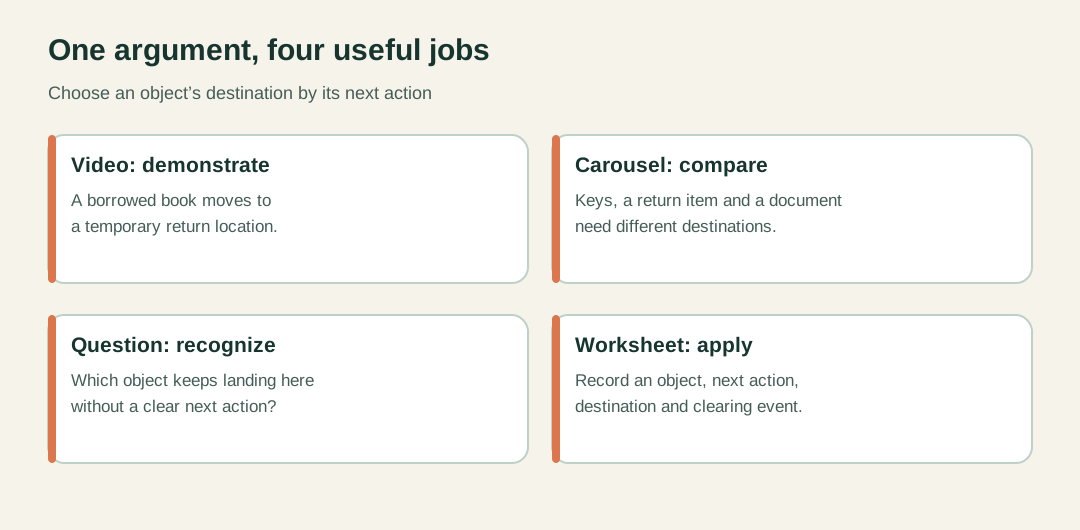
Original adaptation map. Each format has a different reader task.
Run a context check before publishing the adaptations
Compare each piece with the source lesson and restore any qualification that changes the advice.
Compression can remove the most useful part of a lesson. “Keep return items near the door” is incomplete if the original explanation says to use a small temporary location with a clearing event. Without those conditions, the adaptation can recommend the very pile the lesson was meant to address.
Use a brief context check. What claim does this piece make? What example supports it? What condition limits it? What might a reader reasonably misunderstand if they see only this piece? Answer these questions for the caption as well as the visual content, because people may encounter fragments independently.
Check the relationship between words and images. A beautiful entryway photograph should not imply that the method requires buying the furniture shown. A diagram should label the action that matters rather than relying on decorative arrows. W3C's writing guidance supports clear instructions and meaningful labels; those principles help make compressed explanations easier to follow.
Ask someone unfamiliar with the source lesson to explain the takeaway after seeing one adaptation. If they conclude “buy three baskets,” the editorial transformation has lost the argument. Revise the demonstration or wording before making additional formats.
Be especially careful with numerical, health, financial or platform claims in other lessons. A short format does not excuse removing the conditions that make a claim accurate. If the essential qualification cannot fit comfortably, narrow the claim instead of shrinking the text until nobody can read it.
Keep a source record so updates stay coherent
Link each adaptation to the argument and example it uses, then revise the affected pieces when the lesson changes.
Create an internal record with the source lesson, its central claim and the derivative pieces. Note which piece uses which example. This need not be a complex content system. A short document can prevent the team from forgetting that three captions and a worksheet depend on one explanation.
Suppose the educator later changes the method from a fixed return tray to a flexible location chosen by household routine. Review the pieces that mention the tray. The video may still work as one example if the caption makes that clear. The worksheet may need broader wording. The question post may require no change at all.
This is why adaptations should preserve a traceable argument rather than becoming disconnected snippets. It lets the team update the relevant meaning without rewriting everything simply because the source date changed.
For course creators, the same approach can extend a lesson into public teaching while keeping the deeper course work distinct. The course-creator use case discusses resource delivery in that setting. A public piece should still provide a complete useful point; it need not reveal every exercise to avoid being empty.
Start with one strong lesson and a small set of genuinely different reader tasks. Publish only the formats you can produce and maintain well. Repurposing then becomes a way to explain an idea through several useful forms, rather than a way to multiply the same paragraph.