Guides
Should your Instagram resource be a PDF or a web page?
A printable packing sheet and a changing workshop schedule can both be useful Instagram resources. Giving them the same format creates different kinds of friction: the sheet may be awkward to print, while the schedule may become outdated in someone’s downloads folder.
Published by ReplyMagnet · Last updated
The short answer
Choose the format by the reader’s task, the rate of change and your ability to maintain it. A PDF can suit a stable printable artifact. A web page can suit information that needs frequent updates. Neither format guarantees accessibility or useful analytics.
Start freeTwo resources, two different jobs
Describe what someone will do with the resource before comparing file formats or design tools.
Consider a fictional community art studio. It wants to offer a one-page packing checklist for an outdoor sketching session and a schedule of upcoming workshops. Both offers arrive through Instagram, but the similarity ends there.
The checklist helps someone prepare away from a desk. They may print it, mark items with a pen or save a copy before leaving home. Its core content changes infrequently. The schedule helps someone find a currently available date. Its usefulness depends on up-to-date information, working links and clear status.
A beautifully designed PDF schedule can still create an operational problem. The studio may change a date on its website while an earlier file remains in a customer's downloads. Conversely, a long web page with navigation, banners and unrelated material may be a poor substitute for a compact sheet intended for printing.
Write a one-sentence task for each resource. “Check what to pack before leaving” and “Find a current workshop date” are specific enough to guide a decision. “Provide value” is not. It offers no way to distinguish a useful format from an attractive one.
The lead-magnet ideas guide can help choose the resource itself. Once you know its job, format becomes a design decision rather than a habit inherited from your last campaign.

Editorial illustration, not a product screenshot.
Try the resource flow for 30 days with 1,000 engagements. No card required.
Start freeCompare the work each format asks you to do
Evaluate updates, printing, navigation and access as practical responsibilities, not as universal advantages.
A PDF gives you control over a fixed page composition. That can help a checklist designed for printing, but a fixed composition can also make phone reading difficult. A web page can adapt to a narrow screen when it is implemented well, yet an awkward page layout can waste that advantage.
A downloadable file may be available offline after it has been saved, depending on the device and viewing application. A web page may require connectivity unless it has specific offline support. Test the actual experience instead of advertising offline use based on the format name alone.
Updates are another distinction. Editing a web page at a stable URL can change what later visitors see. It does not guarantee that every reader will see the change immediately, nor does it alter copies someone saved elsewhere. Publishing a replacement PDF likewise does not recall all previously downloaded files.
Accessibility depends on authoring. A PDF needs appropriate structure and reading order; W3C's PDF guidance describes a relevant check. A web page needs meaningful structure too, as explained in W3C's page-structure tutorial. The label “web” or “PDF” is not a quality certificate.
Measurement also depends on your implementation. A host may record visits or downloads, but those events do not prove someone read, understood or used the resource. Do not choose a format solely because a tool displays a larger number. First identify the observation that would actually help you improve the reader's task.
Use a weighted matrix without pretending it is scientific
Weight the criteria according to the specific resource, and treat the totals as a discussion aid rather than measured performance.
The studio uses four criteria: suitability for printing, ease of maintaining current information, quality of the tested phone experience and ability to work after saving. It assigns weights from one to three, then scores each candidate from one to three based on its own prototype. These are illustrative judgments, not industry benchmarks.
For the packing checklist, printing receives weight three, updates one, phone use two and saved use two. Suppose the tested PDF scores three for printing, one for updates, two for phone use and three for saved use. Its weighted total is twenty. The tested web page scores one, three, three and one respectively, totaling fourteen. The studio chooses the PDF for this particular checklist.
For the changing schedule, the weights change. Printing receives one, updates three, phone use three and saved use one. Using the same illustrative scores, the PDF totals fifteen and the web page totals twenty. The web page now fits the task better. The difference comes from the reader's priorities, not a claim that one format is always superior.
Write the arithmetic beside the criteria so the decision is inspectable. Checklist PDF: 3×3 + 1×1 + 2×2 + 2×3 = 20. Schedule web page: 1×1 + 3×3 + 3×3 + 1×1 = 20. If the team disagrees, discuss the disputed criterion instead of arguing over the total.
A hard requirement can override a score. If a partner needs a printable handout, printing may be mandatory. If a resource contains changing availability, a dated snapshot may be unacceptable as the sole source. A matrix should expose these constraints, not average them away.
Budget for the second version, not just the first
Include checking, updating and retiring versions in the cost of a resource.
A format that is fast to create may be expensive to maintain. The studio can design its first schedule PDF in an afternoon, but every changed date requires a source edit, export, review and replacement. Someone must also check the captions and messages that describe it.
The web schedule needs maintenance too. Links can break, headings can become unclear and the page can accumulate old dates. A stable URL helps only if someone owns the information behind it. Record the owner and the event that triggers a review, such as a changed session date or booking policy.
Estimate the recurring steps in ordinary language. “Update one page and check its links” is different from “update the source file, export it, check reading order, replace the asset and revise three campaign descriptions.” You do not need a precise financial model to recognize that these workflows carry different responsibilities.
For a stable printable checklist, the extra export review may be worthwhile. For rapidly changing details, the same work may repeat too often. Put changing details on an authoritative page and refer to that page from the printable artifact when the combination serves a real purpose.
Avoid maintaining two complete versions without a reason. If both contain the entire schedule, they can disagree. A better pairing may be a printable preparation sheet plus a link to current dates. Each artifact then owns a distinct job, and the team has fewer repeated facts to reconcile.
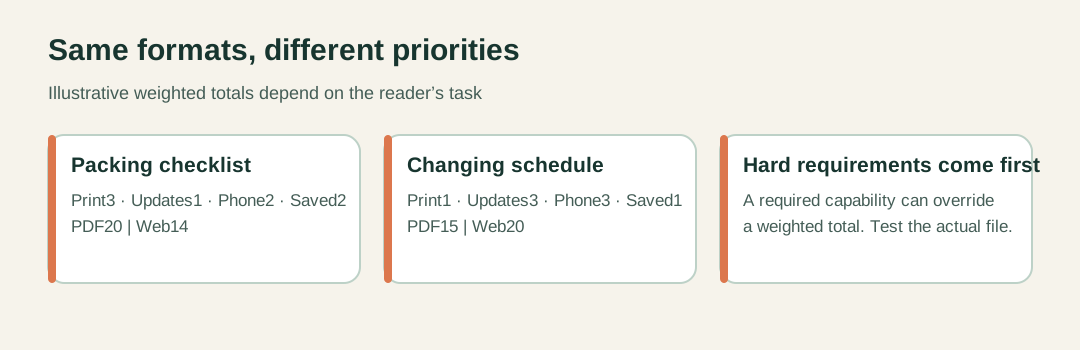
Scores are illustrative editorial judgments for two prototypes, not measured format performance.
Test the route from Instagram to the task
Try the actual destination on a phone, including access requirements and the first useful action.
Create a rough version before polishing the design. Open it from the same kind of link the reader will receive. Check whether it requires an unexpected account, asks for permission to view or lands on a folder instead of the promised resource. Those problems can defeat a sensible format choice.
For the checklist, try printing it and marking an item. Check whether instructions remain understandable in monochrome. Save it on a phone and reopen it using the intended viewing application. Do not infer that offline use works merely because you downloaded something once on a different device.
For the schedule, find a specific date and follow the relevant next link. Check the mobile layout, heading labels and any information that determines whether the session is suitable. Ask a reader unfamiliar with the resource to complete the task without coaching. Observe where they pause rather than explaining the interface immediately.
The access route must also match the offer. If the caption promises a printable checklist, make the printable artifact easy to identify. If it promises current dates, do not send an undated file whose currency the reader cannot judge. The first screen should confirm that the resource is the one they requested.
ReplyMagnet supports assets and eligible external-link delivery as described in its current Assets documentation. Check plan eligibility before building an offer around a linked resource. The delivery guide covers the campaign route; neither page guarantees the behavior of an arbitrary external host.
Change formats without creating conflicting authorities
Name the current source, date snapshots where needed and update future delivery without assuming old copies disappear.
Suppose the studio has already distributed its schedule as a PDF and now chooses a web page. Begin by deciding which source owns current dates. Make that ownership explicit on the new page and in future campaign copy. If an old file can be edited at its existing location, a clear notice can point readers to current information, but do not assume every saved copy will change.
In ReplyMagnet, replacing an asset for future deliveries does not retroactively change previously delivered links to the original asset. Plan around that distinction. Verify the new destination, update the relevant campaign and check the customer-facing description. A resource migration is complete only when the active promise and active destination agree.
Keep an internal record of the previous version and why the format changed. This is useful when a customer asks about an older file or a teammate finds an old caption. It also prevents a future redesign from accidentally restoring obsolete information.
For a paired resource, state each role plainly: “Print the packing checklist; check the workshop page for current dates.” The reader should not need to decide which version is authoritative by comparing timestamps or guessing which design looks newer.
The strongest format decision is often modest. Give stable, printable instructions a file that works for that purpose. Put changing information somewhere the responsible team can maintain it. Test both against the actual task, and keep the delivery promise as clear as the resource itself.