Guides
Test the calendar handoff before inviting Instagram bookings
A booking page can load correctly and still send someone toward the wrong appointment type or an unclear time. Test the details that determine which appointment is recorded, then check how the person can change it.
Published by ReplyMagnet · Last updated
The short answer
Explain what the appointment is for, send the correct destination and let the booking system establish confirmation. Test the boundary between systems, including timezones, unavailable slots and changes. A delivered DM is not a booking record.
Start freeFour states that should not share one message
Distinguish receiving a link, selecting a time, completing the booking and changing an existing appointment.
Imagine a fictional design consultant offering introductory calls. An Instagram conversation helps the person decide whether the call is relevant, then provides a link to an external calendar. The consultant wants a smooth experience, but smooth wording must not erase the steps that still need to happen.
State one is “link provided.” The person has a route to the calendar. State two is “time selected.” The person may have chosen an available option but still need to submit details or complete another required step. State three is “booking confirmed.” The destination system has recorded the appointment according to its own process. State four is “booking changed or canceled,” which needs to be handled through the actual booking workflow.
These are conceptual states for the handoff, not claims about a native ReplyMagnet calendar integration. The exact steps vary with the scheduler you use. Inspect your configured destination rather than assuming every calendar behaves identically.
The DM at state one can say, “Choose an available introductory-call time on the booking page.” It should not say, “Your call is reserved.” The first sentence describes the action now available. The second asserts an outcome that has not yet occurred.
The coaches and consultants page discusses using resource and booking links in a service business. This guide focuses on the boundary that matters afterward: where the conversation's information ends and the booking system's record begins.

Generated editorial illustration of a booking handoff. It is not a real scheduler or confirmed appointment.
Try the resource flow for 30 days with 1,000 engagements. No card required.
Start freeMake the appointment understandable before the click
Name the purpose, expected preparation and any material conditions that are already verified.
A calendar link is not an explanation of the service. Before sending someone away from the conversation, state what the appointment is for. In the fictional consultant's case, the introductory call explores whether a proposed project fits the consultant's services. It does not promise a finished design, a detailed proposal or immediate project acceptance.
Include preparation only when it changes the usefulness of the appointment. “Bring a short description of the project” is a reasonable instruction for this illustrative offer. Requesting a long document before someone even sees available times may add unnecessary work. Choose requirements according to the actual service, not a generic lead-qualification script.
Verify practical details such as duration, cost and format against the live booking page before including them in the DM. If those details vary across appointment types, link to the specific type instead of a general calendar that forces the reader to choose again. Avoid repeating changeable facts in many messages unless the team can maintain them.
Use a descriptive link label. “Choose an introductory-call time” communicates more than “Click here.” W3C's writing guidance recommends meaningful links and clear instructions. Here, that helps establish what the next page is supposed to do.
If the person is not ready to book, give them a useful stopping point. A clear explanation or service page may be enough. The goal is not to push every conversation into a calendar, but to make the transition accurate for people who want it.
Test the calendar in the conditions your reader will face
Check the actual destination on a phone, including timezone display, unavailable dates and any required fields.
Open the link from a test conversation using an appropriate demo account or other controlled route. Confirm that it lands on the intended appointment type. A correct domain with the wrong event page can still produce a confusing or unsuitable booking.
Inspect the timezone shown by the scheduler and how a reader can understand or change it. Do not assume the displayed time is the business's local time or the reader's local time without checking. In the acceptance record, note the device timezone, the scheduler's visible timezone and the resulting appointment time. Use the scheduler's current documentation for its exact behavior.
Try a date with no available times. The page should make the state understandable and provide whatever legitimate next option your business supports. Do not write a DM that promises a particular slot unless that slot is actually held by the booking system.
Check required fields and confirmation steps. A reader may choose a time and then discover an unexpected form, payment step or account requirement. If a condition materially changes the offer, communicate it before the click. Do not hide it in the name of a shorter message.
Test links and controls at ordinary phone viewing size. GOV.UK's usability-testing guidance supports observing relevant tasks with participants. For this handoff, a useful task is “Find an appropriate time and explain what tells you the appointment is confirmed.” The test should reveal whether the person understands the state, not just whether a button can be pressed.
Test two time contexts when your audience spans locations. Record the calendar date, displayed time and named time zone for the same selected appointment in each context. Compare the final confirmation with the organizer’s actual record. A local clock time without a zone is not enough evidence that both people expect the same moment.
Include a date near a time-zone offset change if that is relevant to the locations you serve. Use the configured scheduler’s current documentation and observed display rather than calculating assumptions into your DM copy. The test is about the actual appointment, not whether two screenshots happen to show the same hour.
A worked acceptance record for the handoff
Record the expected result, the observed result and the system that can establish each state.
The fictional consultant uses a small acceptance sheet before promoting the route. It begins with the appointment's purpose and the exact destination under review. The sheet records a test version and date so an old result is not mistaken for evidence about a changed calendar.
Check one: destination. Expected: the link opens the introductory-call page. Evidence to record: visible appointment name and URL. If it opens a general booking menu, decide whether that extra choice is intentional. A successful page load alone does not establish that the right destination was reached.
Check two: timezone. Expected: the reader can identify the timezone used for the displayed time and confirmation. Evidence to record: the labels shown at selection and confirmation, checked against the intended appointment. Any ambiguity becomes a revision task before publication.
Check three: incomplete booking. Expected: selecting a time without completing the required process is not described as a confirmed appointment. Evidence to record: the actual state shown by the destination. The DM copy remains “choose a time,” not “your booking is complete.”
Check four: confirmation. Expected: after completing an authorized test booking, the scheduler contains the corresponding record and presents its confirmation. Evidence to record: the test appointment in that system, using non-sensitive demo details. Remove or cancel the test afterward through the proper process so it does not consume real availability.
Check five: change route. Expected: the confirmation explains the supported way to reschedule or cancel. Evidence to record: the destination's actual instructions. Do not invent a change capability in the DM if your configured scheduler does not provide it.
This is an original acceptance framework, not a report that these tests have been performed on your business. The point is to assign each claim to evidence from the system capable of supporting it.
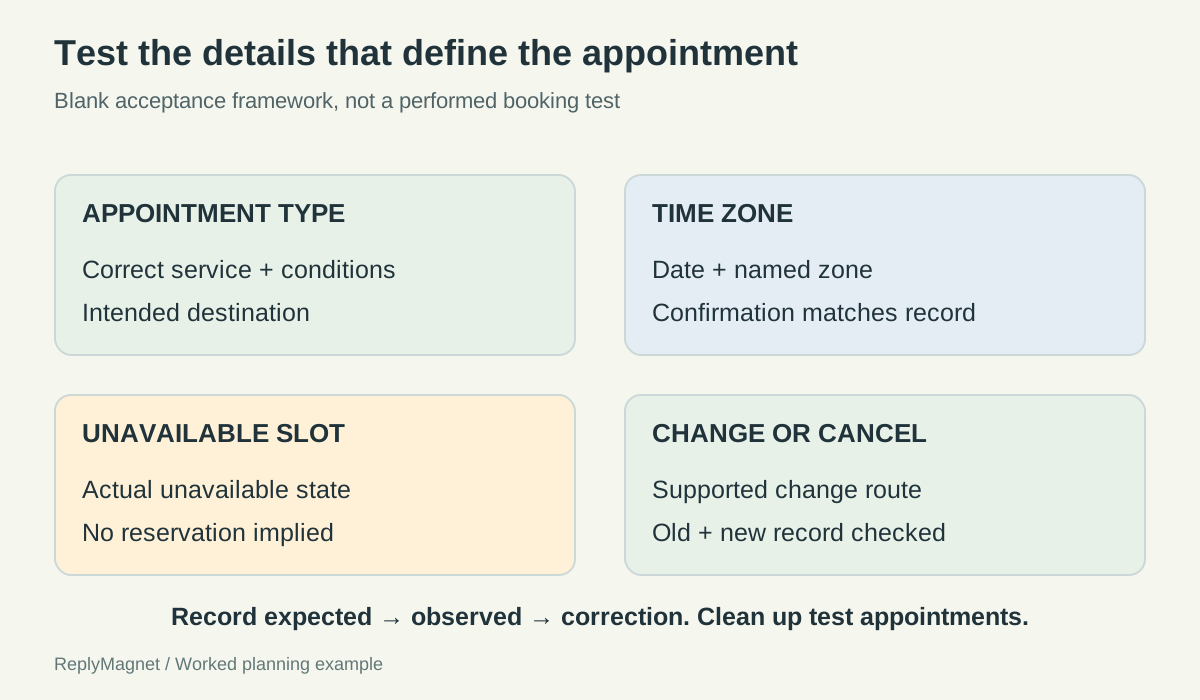
Original calendar acceptance map. The external scheduler defines availability and confirmation; no native calendar integration is shown.
Blank appointment acceptance record. Complete from an authorized test; no test results are claimed.
Check
Appointment type
- Record from the actual scheduler
- Name, duration and relevant conditions
- Failure to resolve
- General link opens the wrong service
Check
Time zone
- Record from the actual scheduler
- Date, displayed zone and confirmed appointment time
- Failure to resolve
- Reader and organizer expect different moments
Check
Unavailable slot
- Record from the actual scheduler
- Visible state and legitimate next option
- Failure to resolve
- DM implies a slot is held
Check
Incomplete booking
- Record from the actual scheduler
- State before all required steps finish
- Failure to resolve
- Selection is mistaken for confirmation
Check
Reschedule or cancel
- Record from the actual scheduler
- Actual supported route and updated record
- Failure to resolve
- Old and changed appointment are both treated as current
Give changes and questions a clear destination
Keep calendar changes in the booking workflow and route unclear service questions to the appropriate person.
A person who needs a different time should not have to infer whether replying “Tuesday?” in Instagram changes the appointment. State the actual supported route. If the scheduler provides a rescheduling link, use its verified instructions. If your business handles changes manually, explain how to contact the responsible team and avoid promising an unverified response time.
Separate a booking change from a service question. “Can I bring another person?” may need a human answer about the appointment's purpose. “I selected the wrong day” concerns the booking record. The same inbox may receive both, but the operational action is different.
Do not ask people to publish booking references, contact details or private project information in public comments. Give them an appropriate private support route when account-specific information is necessary. Collect only what the team needs to locate and resolve the issue.
In ReplyMagnet, a flow can explain options and provide a destination within verified capabilities described in the chat-flow guide. That does not mean it reads calendar availability, reserves slots or knows whether an external booking succeeded. Keep those claims out of automated wording unless a separately verified integration truly supports them.
Review messages after changing the scheduler or appointment type. Old copy can continue describing a preparation step, duration or change route that no longer exists. The handoff remains accurate only while both sides of it agree.
During the authorized test, follow the actual change route rather than only checking that its link opens. Confirm how the destination represents the old appointment and the replacement, or the canceled state. Record the visible result and any confirmation sent by that system. If the business handles changes manually, test the request reaching the responsible person and the eventual record correction instead. Clean up the test appointment so the exercise does not leave real availability blocked.
Measure the boundary without inventing attribution
Use booking-system records for appointments and keep message delivery, link use and confirmed bookings separate.
A delivered message establishes that a message reached the relevant delivery state in the available system. It does not prove the person opened the calendar or completed a booking. A visit to a booking page, where it is measured, still does not establish an appointment.
Use the scheduler's records to count confirmed appointments according to a clear definition. Decide how canceled and rescheduled records are treated so one person moving a meeting does not become two new outcomes. The exact reporting method depends on the destination system, so document it alongside the count.
Attribution may remain incomplete. Someone can see an Instagram post, return later through a saved link and book from another device. Do not force every appointment into a campaign source merely because the business wants a complete report. Mark unknowns and explain what the available evidence actually supports.
For the conversation side, use the automation rules guide and current product documentation when deciding what messages are permitted. A booking link does not create unrestricted permission to follow up in DMs. This article proposes no reminder sequence or window extension.
The best handoff makes its limits easy to understand. The conversation helps the person decide whether to proceed. The calendar provides current options and records the booking. The confirmation tells the person what happened and how to change it. Keeping those responsibilities visible prevents a friendly message from becoming an accidental reservation promise.